

Spades Plus - Card Game
- Reviews
- 4.6
- Version
- 6.52.1878
- Installs
- 10,000,000+

Screenshots







 Analysis by Frivlyz
When I want a quick card game that still rewards attention, I like having a digital Spades table available without needing to organize a group in person. Spades Plus - Card Game gives that familiar trick-taking game a place to play against other people, so it can suit a short break as well as a longer session with friends. Its appeal is straightforward: the cards and the decisions stay at the center.
That focus matters because Spades is not just a matter of playing the highest card. You have to judge how many tricks your hand can take, remember what has already been played, and coordinate your expectations with a partner. I find that combination more satisfying than a card game decided mainly by speed or luck. Still, this is an online game, so it works best when you are comfortable playing with whoever is available rather than expecting every table to feel like a private game night.
The Digital Card Table
Upon launching Spades Plus - Card Game, you're greeted by a sleek and intuitive interface. The app layout is designed to make navigation easy, even for those who might be new to digital card games. The main screen offers a variety of game modes, from classic Spades to tournaments and even 'Whiz' and 'Mirror' variations. It's like having a deck of cards and a table full of friends in your pocket, ready to go wherever you are.
For a new player, the useful first step is not to chase the most competitive table straight away. I would begin with the familiar version of Spades, take time to understand how bidding and trick-taking feel on a screen, and only then try a variation. That gives you a fair way to tell whether a different mode changes the decisions you enjoy or simply makes the game less familiar. If you already know the rules, the alternate formats can be a welcome change of pace when standard hands begin to feel repetitive.
The usual alternative is a physical deck with people you know, or another mobile card game that offers a different style of play. A real table is better for conversation, reading your friends, and agreeing on house rules; this app is better when you want opponents without arranging a meetup. Compared with a solo card game, its multiplayer focus adds the uncertainty of other people’s choices, but also means your experience depends partly on the table you join. I see it as a convenient supplement to playing in person, not a replacement for the warmth of a familiar group.
Gameplay and Features
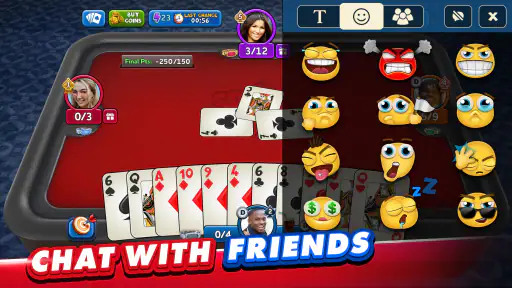
One of the standout features is the multiplayer option. You can either play with your Facebook friends or challenge random players around the globe. The matchmaking system is pretty swift, ensuring you spend more time playing and less time waiting. Plus, there's a chat feature that lets you interact with players, adding a social element to the game. Just remember, good sportsmanship goes a long way!
That mix of familiar contacts and unknown opponents gives the game two different uses. If I want a more personal session, inviting friends makes the table feel closer to a regular card night; when nobody is available, random opponents make it possible to play anyway. The trade-off is that a stranger’s bidding habits and pace may not match yours. I would treat chat as an optional social extra rather than a necessary part of the game: the cards and partnership decisions should remain enjoyable even when I do not feel like talking.
Gaming Stories You May Enjoy

Dancing Road Turns Short Breaks Into a Test of Rhythm and Timing

Super Stylist Makes Every Outfit a Test of Taste and Patience

Dominoes on Your Terms: Who Should Play and Who Should Pass

Pokémon GO Makes the Familiar World Feel New

Chess.com Turns Rematches Into Rivalries, but Community Has Its Costs

Archery Battle 3D Review: Sharp Aiming, Unclear Feedback
Spades also rewards small habits that are easy to overlook when playing quickly. Before bidding, I try to consider the whole hand rather than counting only high cards, and during play I keep track of which suits have already been led and whether the trump suit has appeared. With a partner, a conservative bid can be more useful than an ambitious one if the hand offers little certainty. These are general Spades skills, but a digital table gives you repeated practice without needing to gather three other people first.
For everyday use, it fits neatly into a waiting period or a quiet stretch at home: I can open a table when I have enough time to focus on a hand, rather than trying to squeeze a decision-heavy game into a moment when I might need to leave immediately. A round asks for attention to bids, cards and the partner’s play. If interruptions are common, it is sensible to wait until you can give the table a little continuity instead of starting while distracted.
If you are wondering whether this is suitable for someone who has never played Spades, the answer depends on patience. The familiar card format makes it approachable, but learning to bid accurately takes practice, and playing with experienced strangers can feel less forgiving than learning at home with friends. A beginner who enjoys learning through repeated hands may find that worthwhile; someone looking for a guided, solitary introduction may prefer a dedicated tutorial or a casual game with people willing to explain their choices.
If your main concern is whether you can play with friends, the app supports playing with Facebook friends as well as joining random players. That gives you a way to bring known people into the experience and a fallback when they are not around. If you prefer a completely private, offline game, however, a physical deck or a single-player alternative is a better match than relying on a multiplayer table.
If you're someone who enjoys a bit of competition, the league and tournament mode will be right up your alley. Participating in these can earn you rewards, which can be used to spruce up your profile or gain entry into higher-stakes games. It adds an extra layer of excitement and keeps you coming back for more.
Competition is also where I would be most deliberate about my expectations. Tournaments and higher-stakes games can make each bid feel more consequential, which is exciting if you like measuring your decisions against other players. They may be less relaxing if you only want a low-pressure hand or are still learning the basics. I would build confidence in standard play before treating competitive modes as the main attraction, and avoid letting the promise of rewards push me into a faster or riskier style than I actually enjoy.
The word “rewards” should not be mistaken for a reason to spend. Spades Plus is free to download, while in-app purchases are available, with listed item prices ranging from $0.49 to $219.99. That broad range is a reason to check the price of a specific item before buying, not to assume every purchase is necessary or that a particular payment improves your skill. I would first see whether the free experience gives me enough enjoyable play; paid value is personal and depends on whether an optional item is genuinely worth its displayed cost to me.
Graphics and Sound
The graphics are crisp and vibrant, making the card game visually appealing. The animations are smooth, which keeps the gameplay fluid and enjoyable. Sound effects are subtle yet effective, complementing the overall experience without being distracting. It's clear the developers paid attention to detail, ensuring every game feels immersive.
Presentation matters more in a card game than it might seem: cards need to be easy to follow, and visual motion should not pull attention away from the choice of what to play. The clean look helps keep the table readable, while restrained sound avoids turning a thoughtful hand into a noisy distraction. If you tend to play in a quiet place, the subtle audio is a plus; if you prefer complete silence, sound is not the feature that makes this game worth choosing. The real test is whether you enjoy returning to the card decisions, not whether the effects feel elaborate.
There are trade-offs that come with any online version of a partner-based card game. You do not control how other players bid, communicate or approach risk, and a quick matchmaking experience cannot guarantee that every table will suit your mood. The social layer can make a game feel lively, but it can also be less appealing when you want a calm solo pastime. Players who dislike competition, online interaction or learning through repeated hands may be happier with a simple offline card game.
There is also a practical difference between wanting a brief distraction and wanting to improve. For a casual player, a few hands can be enough to enjoy familiar rules and company. For someone trying to get better, it helps to pay attention to patterns across hands instead of judging a partner’s play from one surprising decision. Remembering which cards have gone and comparing your bid with the tricks you actually take gives each session a learning point, even when you do not win.
Zynga develops the game, which is listed as a free card title for players aged Teen. It first released on July 24, 2014, and its current version is 6.52.1878, with Android 7.0 as the minimum operating-system requirement. Those details make it easier to check basic compatibility before installing; the game is also widely played, with over 10 million installs and an average rating of 4.6 from around 395,000 ratings. Its large audience can help make multiplayer feel like the central point of the experience, though popularity alone cannot promise that every match will be a good fit.
What I would not do is treat the rating or player count as a guarantee that the app suits every card fan. Someone who wants a calm puzzle against the computer, a strictly offline game, or a table where all players know one another may find a different option more comfortable. Likewise, if you dislike optional purchases appearing in a free game, take a moment to distinguish the no-cost download from paid items and decide your own spending limit before browsing them.
Final Thoughts
In a world filled with countless gaming apps, Spades Plus - Card Game stands out for its simplicity and engaging gameplay. Whether you're a seasoned pro or just someone looking to kill some time, this app offers something for everyone. It's a digital twist on a classic, and it's worth a try if you're a fan of card games. So, shuffle those cards and jump into a game of Spades anytime, anywhere!
My recommendation is to try it if you already enjoy Spades, want opponents when your usual group is unavailable, or like the extra pressure of bidding alongside a partner. Start with the standard game, learn the rhythm of the table, and move into tournaments or variations only if they add fun rather than pressure. If what you really want is a quiet solo diversion or a fully offline card night, choose another format. For everyone else, the free entry point makes it reasonable to see whether its online tables suit the way you like to play, while keeping purchases optional and considered.
Spades Plus - Card Game Pros and Cons
Pros
- Smooth and user-friendly interface.
- Variety of game modes available.
- Active online community.
- Regular updates with new features.
- Cross-platform compatibility.
Cons
- Contains in-app purchases.
- Requires internet connection.
- Ads can be intrusive.
- Limited offline features.
- Occasional connectivity issues.
Frequently Asked Questions
What is Spades Plus and how does it work?
Spades Plus is an online multiplayer card game available on Android and iOS platforms. It allows players to enjoy the classic game of Spades with friends or against random opponents from around the world. The game includes various modes, such as Solo, Partnership, and Mirror, offering different strategies and challenges to keep you engaged. Players can participate in tournaments, earn rewards, and climb the leaderboard to showcase their skills.
Is Spades Plus free to download and play?
Yes, Spades Plus is free to download and play on both Android and iOS devices. However, it offers in-app purchases for virtual items, such as coins and premium memberships, which can enhance the gaming experience. These purchases are optional, and players can enjoy the game without spending any money, although some features may be limited or unlocked more slowly without purchases.
What are the system requirements to run Spades Plus on my device?
To run Spades Plus smoothly on your device, you need a smartphone or tablet with Android 4.4 or later, or iOS 9.0 or later. It requires a stable internet connection to play online matches. A device with at least 1GB of RAM is recommended to ensure optimal performance without lag or crashes. Make sure to keep your app updated to the latest version for the best experience.
Can I play Spades Plus with my friends?
Absolutely! Spades Plus allows you to invite friends to join you in a game. You can connect with friends through Facebook, which makes it easy to find and play with them. Additionally, you can create private tables to play exclusively with friends, ensuring a personalized and enjoyable gaming experience. This feature enhances the social aspect of the game and keeps the fun going.
What should I do if I encounter issues or bugs in Spades Plus?
If you encounter any issues or bugs while playing Spades Plus, you can reach out to the customer support team through the app. They are available to assist you with any technical difficulties or questions you may have. Additionally, checking for updates and ensuring your app is up-to-date can help resolve some common problems. The community forums and FAQs on the official website are also excellent resources for troubleshooting.


