

Spades Masters - Card Game
- Reviews
- 4.6
- Version
- 2.50.3
- Installs
- 1,000,000+

Screenshots
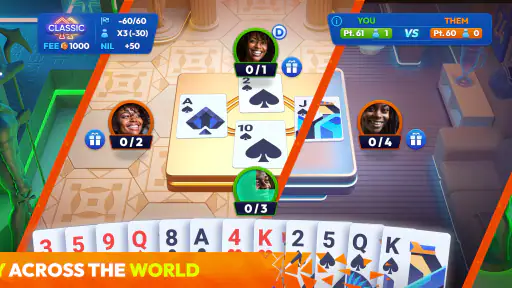
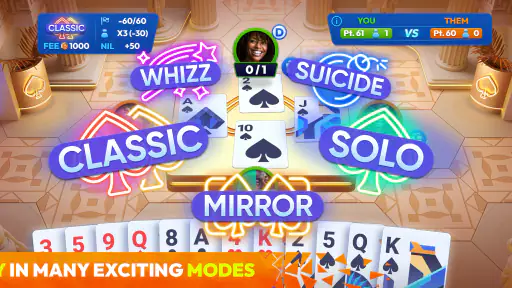
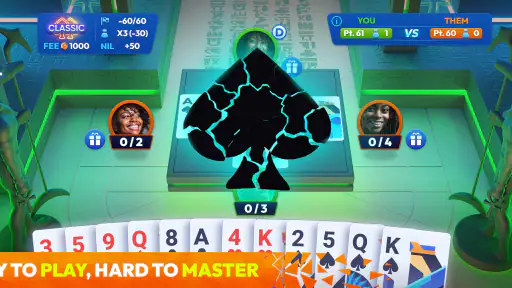

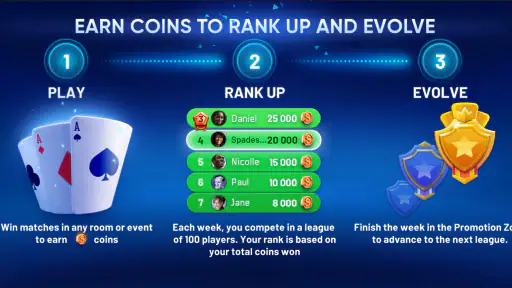

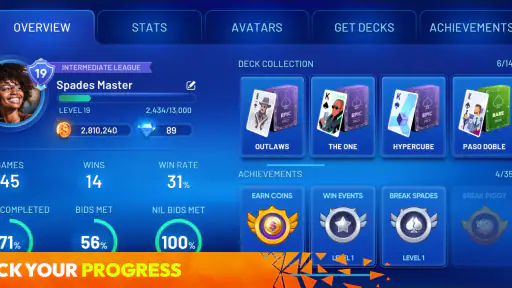

 Analysis by Frivlyz
I usually judge an online card game by what happens after the first few rounds: is it easy to bring people together, does the table stay understandable, and does the game remain enjoyable when everyone is using the same phone or playing from separate devices? Spades Masters makes a good case for the classic trick-taking format, especially when the goal is a quick match with friends rather than a long campaign or a complicated collection system.
This is a free card game from YallaPlay, built around online multiplayer Spades. It has reached over a million installs, carries an average rating of 4.6 from around 88 thousand ratings, and is marked for Everyone. Those figures suggest a broad audience, but they do not remove the need to think about how the game fits your household. A shared tablet, a child borrowing a parent’s phone, or several people coordinating a private game can all create a different experience from playing alone.
How Spades Masters fits into shared play
The most natural use case is a small break when two or more people want something competitive without learning a new ruleset. Spades is familiar to many card players, yet it still gives every hand enough decisions to feel meaningful. You estimate how many tricks your side can take, manage the cards you hold, and watch what opponents reveal through their plays. That makes a short session feel more involved than a simple matching game.
I can imagine using it in a household where one person has a few minutes before dinner and another is relaxing nearby. One player can start a game, while others join when they are ready. The important practical point is that online multiplayer works best when everyone agrees beforehand on who is playing, which device belongs to whom, and whether the session is meant to be casual or competitive. The game itself cannot solve household confusion; a little coordination makes the experience much smoother.
On a shared device, I would avoid handing the phone from person to person without first checking whose account or game session is active. A card game may seem harmless, but an accidental tap can affect the wrong player’s turn or progress. If several people in the home use the same tablet, it is sensible to establish a simple rule: one person starts the table, and the device is returned only after the hand is complete. That small boundary prevents arguments that have nothing to do with the cards.
The format also works well for friends who do not live together. A planned match can replace a conversation that keeps getting postponed, because the activity gives everyone a reason to show up at the same time. I prefer this kind of social play to a game that fills the screen with constant effects. Spades Masters puts the attention on the hand, the bids, and the decisions around each trick.
What the first session feels like
The basic idea is easy to understand if you already know Spades: players bid on tricks, then try to meet those bids while the suit of Spades acts as the trump suit. New players may need a few hands before they stop treating every high card as an automatic winner. The real skill is timing. Sometimes keeping a strong card for later matters more than taking the first available trick.
Gaming Stories You May Enjoy

Dancing Road Turns Short Breaks Into a Test of Rhythm and Timing

Super Stylist Makes Every Outfit a Test of Taste and Patience

Dominoes on Your Terms: Who Should Play and Who Should Pass

Pokémon GO Makes the Familiar World Feel New

Chess.com Turns Rematches Into Rivalries, but Community Has Its Costs

Archery Battle 3D Review: Sharp Aiming, Unclear Feedback
That learning curve is useful for mixed groups. An experienced player can explain why a bid was too ambitious or why a low card was played at the right moment. A complete beginner may still feel behind during the first match, so I would not make the opening game the basis for judging someone’s ability. The game becomes more satisfying once players start reading the table rather than only their own hand.
One practical tip is to agree on a relaxed first round before anyone starts worrying about results. In a household, this is especially helpful when an adult and a younger player are sharing the experience. The stronger player can talk through decisions without turning the hand into a lecture. That approach makes the game feel like a shared activity instead of a test.
Keeping account boundaries clear
Because this is an online multiplayer title, account boundaries deserve attention even when the game is used casually. I would not assume that one device should automatically represent everyone in the home. If a phone is shared, decide whose session is open before joining a table. If separate devices are available, each player should use the identity they intend to keep using, rather than switching between people during a match.
This is not just about convenience. Clear boundaries make it easier to remember who agreed to a game, who is waiting for a turn, and who is responsible for any purchase prompt. The game is free to download, but it includes in-app purchases ranging from $0.49 to $359.99 per item. That is a wide range, so I would treat purchase approval as an adult responsibility on any shared device. A child should not be left to interpret a payment screen simply because the game has an Everyone age rating.
I also recommend checking the active account before starting a social session. A quick pause can prevent the wrong person from joining friends, using another player’s profile, or continuing a match that someone else wanted to leave. This is a general household habit, but it matters more in a multiplayer game because one mistaken action can affect several people at the table.
Another useful boundary is time. Spades is easy to continue hand after hand, especially when a close result makes everyone want a rematch. In a shared home, agreeing on a stopping point avoids the familiar problem of one person expecting the device back while another says, “just one more.” I find that a fixed number of hands or a simple end time works better than trying to stop in the middle of a tense match.
Coordinating a better multiplayer table
Good coordination matters more here than flashy presentation. Before inviting friends, decide whether the match is intended to be a quick social game or a serious contest. The distinction changes how people react to mistakes. A relaxed table can tolerate experimental bids and teaching moments; a competitive table needs players who understand the rules and are ready to focus.
For a family or group of friends, I would begin with one person acting as the organizer. That player can decide when the session begins and remind everyone whose turn it is if someone gets distracted. This is particularly useful when the game is running in the background while people are talking. A missed turn can make the whole table wait, so multiplayer Spades rewards players who are willing to stay engaged.
A less obvious strategy is to use the first few matches to learn each player’s style rather than immediately chasing the highest score. Some people bid cautiously and wait for opponents to make mistakes. Others take calculated risks when they see a chance to control the hand. Recognizing those habits helps partners coordinate better and makes later matches more interesting. It also gives beginners a way to improve without needing a formal tutorial.
Partnership play creates its own household tension. When a teammate makes a bid that fails, the natural reaction is to explain what they should have done. That can quickly become unpleasant, particularly when an adult is playing with a child or a less experienced relative. I get more enjoyment from discussing the hand afterward than criticizing the decision while the next trick is already underway. The game is at its best when the table stays competitive without becoming personal.
There is also a practical trade-off between online play and a physical deck. A real deck is faster to set up when everyone is sitting at the same table, and it does not depend on a device being available. Spades Masters is more convenient when players are apart, and it handles the card dealing digitally, but it introduces the usual concerns of battery, connectivity, notifications, and account mix-ups. I would choose the app for remote coordination and the physical deck for an uninterrupted living-room session.
Age, trust, and the Everyone rating
The Everyone rating makes the game approachable for a broad age range, and the rules themselves are suitable for a mixed-age card group. Still, an age label should not be confused with a complete household plan. Online multiplayer means parents or guardians should decide whether a younger player is ready to interact with other players and whether the child understands not to share personal details.
I would explain three simple rules before handing over a device: use only the intended game identity, do not disclose private information, and ask before accepting any purchase. These rules are more useful than assuming that a friendly card table is automatically risk-free. They also help children understand that online play involves real people, even when the game looks light and casual.
Trust works both ways. An adult sharing a device should avoid opening another person’s session without permission, while younger players should know that purchases are not part of normal play unless an adult approves them. Since the game is free but offers paid items, the safest approach is to make the payment boundary explicit before the first match. That keeps the focus on cards instead of an unexpected expense.
For older relatives, the main challenge may be familiarity rather than age. Someone who knows traditional Spades can usually understand the objective, but digital controls and online timing may take adjustment. I would sit beside a new player for the first hand, explain the meaning of a bid, and let them make the decisions themselves. That is more encouraging than taking over the device whenever they hesitate.
The game is less suitable for a household that wants completely private, offline entertainment. If the priority is a quiet card game with no online element, a standard deck or an offline card app is a better match. Spades Masters is designed around connected multiplayer enjoyment, so its strongest feature is also the reason some users may prefer an alternative.
Where it stands beside other card-game choices
Compared with solitaire, this game offers much more social interaction but less freedom to play at any pace. Solitaire is ideal when you have only a minute and do not want to wait for anyone. Spades Masters asks you to remain available through a hand, which makes it better for planned sessions and worse for fragmented moments.
Compared with a physical deck, the app removes dealing mistakes and makes remote games practical. It also gives players a consistent digital table without needing cards on the kitchen table. The cost is dependence on the phone or tablet and the need to manage online identity and purchase expectations. Neither option is universally superior; the right choice depends on whether convenience or independence from a device matters more.
Compared with other online card games, Spades Masters has a narrower focus. That is a strength if you specifically want Spades and do not want to sort through several unrelated modes. It can be a limitation if your group prefers switching between poker, rummy, blackjack, or puzzle-style card games. I would recommend it to someone who wants to improve at one recognizable game, not to someone looking for a large variety of card formats.
The current version is 2.50.3, and the listed minimum operating system is Android 7.0. That makes the app accessible to many older Android devices, although actual comfort will still depend on the screen, battery condition, and how well the device handles online games. Before planning a household tournament, I would update the app and test the device privately rather than discovering a problem when everyone is waiting.
Small habits that make the game more enjoyable
My first recommendation is to treat bidding as a promise, not a guess. A player who bids aggressively every hand may occasionally win big, but the whole table becomes harder to manage when the bids do not reflect the cards. Beginners should start conservatively, observe how many tricks they actually take, and adjust gradually. This turns each match into practice instead of a string of random outcomes.
Second, pay attention to what has already been played. The useful information is not only which high cards are gone, but also which suits opponents appear to be avoiding. If a player cannot follow a suit, Spades may become especially important later. Remembering those details helps partners make better decisions without needing complicated strategy guides.
Third, do not let the app replace communication between people who are physically together. If two household members are playing side by side, talk before the match about whether advice is welcome. Some players enjoy discussing every trick; others want to make independent choices. Agreeing on that point protects the mood, especially when skill levels differ.
Fourth, separate learning games from score-focused games. A new player may need permission to try an unusual bid or play a card that an experienced partner would not choose. Once the group has learned the rhythm, start a more serious session. This two-stage approach is one of the easiest ways to keep a family game welcoming without making experienced players pretend that strategy does not matter.
Finally, use the free entry point as a trial rather than assuming every optional purchase is necessary. The game can be evaluated through ordinary play before anyone spends money. On a shared device, I would make that decision collectively and keep the payment responsibility with the account holder. That is a sensible habit for any game with in-app items, but the broad price range makes it especially important here.
My household verdict
After looking at the game as both a card player and a shared-device user, I see Spades Masters as a focused choice for people who genuinely enjoy Spades. Its biggest success is the way it turns a familiar trick-taking game into an online meeting point for friends and relatives. The rules have enough depth to reward attention, while the basic objective remains approachable for a new player who is willing to learn through a few hands.
I would recommend it to a household that can set clear boundaries around accounts, turns, and purchases. It is a good fit for a parent and older child who want a structured activity, for friends arranging a remote match, or for card players who want digital convenience without abandoning traditional Spades strategy. The Everyone rating helps with broad access, but responsible supervision still matters when younger users share a connected device.
I would skip it if you want offline play, instant one-minute sessions, or a large collection of unrelated card games. I would also avoid making it the centerpiece of a household gathering if several people are competing for one phone and nobody has agreed on turn-taking. In those situations, a physical deck or a simpler solo game may create less friction.
For everyone else, the free download makes trying it straightforward, while the established player base gives the game a convincing sense of reach. My final view is positive but practical: Spades Masters is strongest when the social plan is clear and the table stays respectful. Set the account and payment boundaries first, give beginners room to learn, and it becomes an enjoyable digital version of a game that already works well around a real table.
Spades Masters - Card Game Pros and Cons
Pros
- Smooth controls make bidding and card play easy on mobile screens.
- Quick-match options suit both short sessions and longer games.
- Clear card animations help follow tricks without visual clutter.
- Competitive modes add variety beyond standard casual matches.
- Runs well on many mid-range devices with modest storage needs.
Cons
- Online matchmaking may feel uneven when player skill levels differ.
- Some features may require watching ads or making in-app purchases.
- A stable internet connection is needed for most multiplayer modes.
- The interface can feel busy for players new to Spades rules.
- Progression may become repetitive after extended daily play.
Frequently Asked Questions
What is Spades Masters - Card Game?
Spades Masters - Card Game is a digital version of the classic Spades trick-taking game for Android and iOS devices. It generally combines traditional bidding and card-play rules with modern features such as solo matches, computer opponents, online competition, progression systems, and customizable settings. It is designed for both casual players learning the basics and experienced Spades fans looking for quick matches on a mobile device.
How do you play Spades Masters - Card Game?
In Spades, players usually compete in teams and bid on how many tricks they expect to win during each round. Spades are always the trump suit, meaning they can beat cards from other suits once the suit has been broken. Players must follow the suit led whenever possible, and the team’s score depends on meeting its bid. New players should take time to review the in-game tutorial and scoring rules.
Can I play Spades Masters offline?
The availability of offline play can depend on the particular game mode and the version installed on your device. Matches against computer-controlled opponents are commonly the best option when you do not have an internet connection, while online multiplayer, advertisements, leaderboards, and cloud-related features normally require connectivity. Before traveling or playing offline, open the app once and test the desired mode to confirm what remains accessible.
Does Spades Masters include online multiplayer or competitive features?
Spades Masters may offer competitive elements such as online matches, rankings, tournaments, leagues, or progression rewards, depending on the current release and region. Online play can be more unpredictable than matches against artificial intelligence because opponents have different skill levels and playing styles. A stable connection is recommended, and users should also review the game’s privacy, chat, and account settings before joining multiplayer contests.
Is Spades Masters free to download, and does it contain purchases or ads?
The game may be available as a free download, but free access does not always mean that every feature is completely unrestricted. Mobile card games commonly support themselves through advertising, optional purchases, premium currencies, extra content, or subscriptions. Check the Google Play Store or Apple App Store listing for the latest pricing and in-app purchase information, and use parental controls if the game will be played by children.


