

Spades: Classic Card Game
- Reviews
- 4.8
- Version
- 2.3.0
- Installs
- 1,000,000+

Screenshots
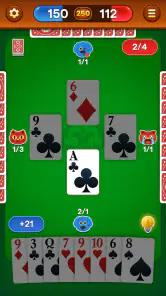
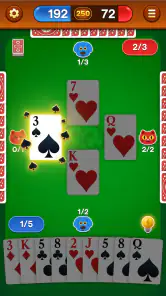
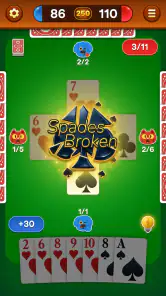
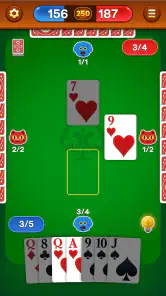

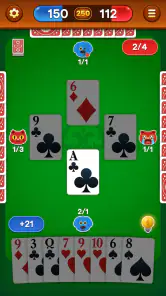
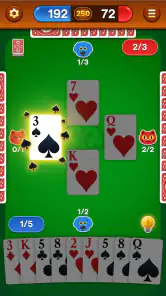
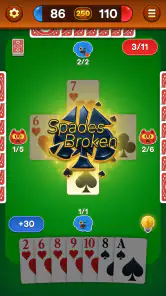
 Analysis by Frivlyz
What I value most in a mobile card game is how quickly it lets me settle into a hand, without turning a short break into a setup chore. Spades: Classic Card Game is built around a familiar trick-taking game, and its offline focus makes it an easy option when I want to play without depending on Wi-Fi. That makes it especially appealing for a quiet moment at home, a wait between appointments, or a journey where a connection is unreliable.
Quick starts, with a deliberate pace
Spades is a game of choices rather than rapid tapping: I need to think about how many tricks to bid, which card to lead, and when to play a high card. So I judge speed less by flashy animation and more by whether I can get into a hand and follow the play without fuss. The offline format gives the game a practical advantage over many online card tables: there is no need to wait for other people to join or keep a connection active before I can enjoy a session.
That convenience suits short sessions, but the game still rewards attention. If I have only a minute, I may prefer to finish a hand rather than start one and leave midway. For a longer break, I can treat the game as a small mental exercise: make a bid, track the cards that have appeared, and adjust my expectations as the hand develops. Spades is most satisfying when I give those decisions a little thought instead of tapping through each trick.
Making a session work in everyday life
A realistic use for this kind of game is a delayed train or a lunch break when I do not want to browse social feeds. I can use an offline card game to occupy the gap without needing to coordinate with friends or find a signal. It also works for someone who already knows the basic rules and wants a familiar solo pastime. The store describes the game as playable offline, which is the detail that most clearly shapes where I would choose it over a multiplayer-first alternative.
There is a useful trade-off here: solo play is dependable in the sense that it does not rely on finding human opponents, but it cannot recreate the unpredictability and conversation of a table with friends. People who mainly play Spades for partnership chemistry, playful arguments over bids, or the social ritual of a group game may find an offline session too self-contained. I would pick this for a flexible solo break, not as a replacement for a planned card night.
Thinking through each hand
For a more deliberate game, I find it helpful to treat bidding as a small estimate rather than a promise I can ignore once the cards are dealt. Before committing, I can consider how many strong cards I hold and how much support my hand might offer. During play, keeping a rough mental note of which high spades have already appeared helps me make more informed choices about whether to draw trump or save a card for later. These are general Spades habits, but they are especially useful in a mobile session, where it is easy to play too quickly while distracted.
I would also use short breaks to practise one decision at a time. On one hand, I might focus on avoiding an overambitious bid; on another, I might pay closer attention to leading a suit and seeing how opponents respond. That turns a casual game into a low-pressure way to sharpen judgment. If the rules or table behavior do not match the version I learned, I would first check the available rule options rather than assume every Spades table follows the same conventions.
Gaming Stories You May Enjoy

Dancing Road Turns Short Breaks Into a Test of Rhythm and Timing

Super Stylist Makes Every Outfit a Test of Taste and Patience

Dominoes on Your Terms: Who Should Play and Who Should Pass

Pokémon GO Makes the Familiar World Feel New

Chess.com Turns Rematches Into Rivalries, but Community Has Its Costs

Archery Battle 3D Review: Sharp Aiming, Unclear Feedback
The game is free to download, with optional in-app purchases priced from $0.99 to $9.99 per item. I would treat those purchases as optional extras rather than a reason to start playing: the basic appeal is the card game itself, and I would decide whether any paid item is worthwhile only after trying the experience. The Everyone age rating also makes it broadly suitable for casual household play, though younger players may still need help learning bids, tricks, and the partnership logic behind them.
Who will enjoy it, and who may prefer another table
I would recommend this to people who want a classic card game close at hand, especially if they like practising at their own pace and value being able to play offline. It is also a sensible choice for someone returning to Spades after a long break: a solo game gives room to remember the flow without asking friends to wait through a learning session. The game’s store summary emphasizes classic Spades play without Wi-Fi, and that is a clear, practical reason to consider it.
On the other hand, if my main priority were live competition, a social community, or a way to meet regular opponents, I would look for a multiplayer-focused card game instead. The appeal of this release is its offline convenience, not a promise of a busy online scene. Likewise, someone who dislikes trick-taking strategy and would rather play a quick matching or collecting game may find the bidding and card-counting more demanding than relaxing.
What to expect from performance
Because the core activity is a turn-based card game, I do not expect the same performance demands as I would from a visually intensive action game. It is the kind of title I would try on an older or modest device if it meets the stated minimum operating-system requirement, while keeping expectations grounded: compatibility does not guarantee that every device will feel identical. The game requires Android 7.0 or later, a useful point to check before installing if I am using an older phone or tablet.
In ordinary play, a card game should be a good fit for brief, repeated visits rather than a long session that depends on continuous connectivity. The offline design also avoids one common source of interruption: a weak Wi-Fi connection. Still, I would not assume that offline play protects every part of a session from interruption. If I need to switch apps, take a call, or conserve battery, I would make a habit of finishing the current hand first when possible, then return to the game afterward.
For reliable everyday use, I would keep the app updated and leave enough free space for normal app updates and other phone needs. The current version is 2.3.0, and NewPubCo is the developer. Those details make it easier to identify the right release, but they are not a substitute for how an individual device behaves. If the game feels sluggish, I would first close other demanding apps and restart it before deciding that the card game itself is unsuitable for my phone.
Getting to Know Spades
So, what’s the deal with the Spades: Classic Card Game? Well, first off, it's a digital version of the traditional card game that has been keeping people entertained for generations. The app developers have done a stellar job in preserving the essence of the game while adding some cool features that make it even more engaging. You can play solo against AI opponents or dive into the multiplayer mode to challenge friends or players from around the world. The interface is sleek, intuitive, and really easy to navigate, which I absolutely love.
Gameplay Experience
Jumping into a game of Spades has never been easier. With just a few taps, you’re plunged into a game that feels as familiar as it does fresh. The app offers a variety of difficulty levels, so whether you're a seasoned pro or a complete newbie, there’s something for everyone. The AI is surprisingly smart, providing a real challenge without feeling unfair. And when you’re playing with friends, the chat feature adds a nice social element that’s perfect for some friendly banter.
Features that Stand Out
One of the standout features of the app is its customization options. You can choose from a variety of card designs and backgrounds, making the game feel uniquely yours. Plus, the app supports different rule sets, so you can play the version of Spades you grew up with. I also appreciate the detailed statistics that keep track of your wins, losses, and overall progress. It’s a great way to see how you’re improving over time.
The Verdict
In conclusion, the Spades: Classic Card Game app is a fantastic way to enjoy a beloved classic anytime, anywhere. Whether you’re killing time on your commute or just looking to unwind, this app has got you covered. It’s well-designed, packed with features, and most importantly, it’s a lot of fun. So, if you’re a fan of card games, do yourself a favor and give this app a try. You won’t be disappointed!
Spades: Classic Card Game Pros and Cons
Pros
- Addictive and engaging gameplay.
- Smooth and intuitive interface.
- Multiplayer mode available.
- Customizable game settings.
- Low battery consumption.
Cons
- Contains in-app purchases.
- Requires internet connection.
- Occasional ads disrupt play.
- Limited tutorial for beginners.
- No offline play mode.
Frequently Asked Questions
What is Spades: Classic Card Game?
Spades: Classic Card Game is a digital adaptation of the traditional card game Spades, which is a trick-taking game that can be played individually or with partners. The app offers various modes and difficulty levels, allowing players to enjoy the classic experience on their Android or iOS devices. It also includes features like online multiplayer, customizable avatars, and leaderboards to enhance the gaming experience.
Is Spades: Classic Card Game free to play?
Yes, Spades: Classic Card Game is free to download and play on both Android and iOS platforms. However, the app may offer in-app purchases for additional features, such as ad-free gameplay, exclusive avatars, or other premium content. Users can enjoy the basic features without spending any money, but these optional purchases can enhance the overall gaming experience.
Can I play Spades: Classic Card Game offline?
Yes, Spades: Classic Card Game offers an offline mode where players can enjoy the game against AI opponents without needing an internet connection. This feature is particularly useful for users who want to play on the go or in areas with limited connectivity. The offline mode ensures continuous gameplay, allowing players to improve their skills without the need for a network.
How does the online multiplayer feature work in Spades: Classic Card Game?
The online multiplayer feature in Spades: Classic Card Game allows players to connect with friends or random opponents from around the world. Players can create private rooms to play with friends or join public matches to compete with others. The app includes leaderboards and rankings, providing a competitive aspect where players can track their progress and strive to improve their standings.
Are there any tutorials or guides available in Spades: Classic Card Game?
Yes, Spades: Classic Card Game includes comprehensive tutorials and guides for beginners and those needing a refresher on the rules. The app provides step-by-step instructions and interactive tutorials to help users understand the game's mechanics, strategies, and rules. These guides are designed to enhance the player's experience and ensure that everyone, regardless of skill level, can enjoy the game.


