

Solo Cat : CatPOP music game
- Reviews
- 4.6
- Version
- 1.6.7
- Installs
- 500,000+

Screenshots





 Analysis by Frivlyz
When I decide whether to keep a mobile music game, I look beyond the cute cover appeal: I want to know if the timing feels satisfying, whether a short session works, and if the presentation helps me enjoy the music rather than distracts me from it. Solo Cat: CatPOP music game makes a clear first impression with its cat-centered rhythm play, and that gives it a warmer, more playful mood than a serious score-chasing game. I’d consider it first as a light way to tap along, not as a replacement for a full music library or a deep rhythm-game challenge.
It is a free music game from FunGo Studio, rated for Everyone, and it runs on Android 6.0 or later. Its current version is 1.6.7; the game was released on July 12, 2024, and has passed 500,000 installs. The average rating is 4.6 from around 1,600 ratings, with 21 written reviews. Those figures suggest that plenty of players have tried it, but they don’t tell me whether its particular style will suit you. I’d use the first few sessions to judge the feel of the taps and the music, rather than treating popularity as a guarantee.
The kind of rhythm game this is
The central appeal is the pairing of music-led tapping with a playful feline performer. You follow notes as they approach markers, aiming to stay in time and build a better run. That makes the basic activity easy to understand: I don’t need to learn a complicated control scheme before I can start. The challenge comes from keeping my timing steady as the pace and patterns become less forgiving.
That format suits quick, focused play. I can imagine opening it while waiting for a ride or taking a short break, choosing a track, and giving it my attention for a few minutes. The useful habit is to play with the sound on when possible, since rhythm cues are part of the appeal; if I’m somewhere quiet, I’d keep the volume low and focus on the visual timing instead. It’s a simple adjustment, but it helps avoid turning a music game into a distracting noise source.
Why the cat presentation works
The feline theme gives the game an identity beyond tapping notes. The dancing cat and bright, cute presentation make mistakes feel less severe than they might in a stark score-attack game, which is welcome when I’m still learning a song’s rhythm. I’d be more likely to hand it to a younger player or play it casually with family than I would a visually intense title built around competition.
That friendliness is also a matter of taste. If you want a serious practice tool, a detailed performance interface, or a game that puts technical mastery ahead of character and charm, this may feel too light. The cat is not just decoration; it sets expectations for a relaxed, approachable experience. I’d choose it for a cheerful change of pace, not because I expect it to offer the depth of a specialist rhythm game.
Music, attention, and the best way to try it
The soundtrack is a key part of the draw, and the available tracks give each run a different feel. I’d try more than one before deciding whether the game’s music matches my taste: liking the character alone may not carry repeated sessions if the tunes don’t work for me. Conversely, a track that clicks can make replaying a level feel like a small personal challenge rather than simple repetition.
Gaming Stories You May Enjoy

Dancing Road Turns Short Breaks Into a Test of Rhythm and Timing

Super Stylist Makes Every Outfit a Test of Taste and Patience

Dominoes on Your Terms: Who Should Play and Who Should Pass

Pokémon GO Makes the Familiar World Feel New

Chess.com Turns Rematches Into Rivalries, but Community Has Its Costs

Archery Battle 3D Review: Sharp Aiming, Unclear Feedback
For a fair first test, I’d play somewhere with a stable grip on the phone and give the timing a few attempts before judging it. A missed note can come from unfamiliarity as much as from the game’s difficulty, so I’d notice whether my accuracy improves after I learn the pattern. If it still feels uncomfortable, I would not force long sessions. Short rounds make more sense for a casual game, especially when I’m using it as a quick reset between other tasks.
Getting to Know the Furry Star
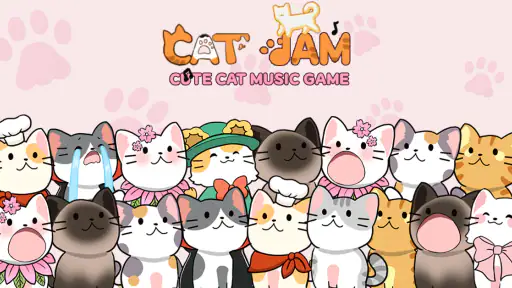
At its core, Solo Cat: CatPOP music game is all about combining the adorable charm of cats with the pulsating beats of catchy tunes. The game revolves around a solo feline star who dances and pops to the music. Your mission? Help this charming kitty score high by tapping along to the rhythm. It’s simple, addictive, and oh-so-fun!
Gameplay Mechanics That Keep You Hooked
What really got me hooked was the intuitive gameplay. The controls are straightforward: tap on the screen as the notes reach the markers. Sounds easy, right? But here’s the twist – the beats get faster, and the patterns become more complex as you progress. It’s a test of your reflexes and rhythm sense, and trust me, it’s incredibly satisfying to nail those combos!
One of the things I love about this game is how it caters to both beginners and seasoned players. It starts off easy, allowing newbies to get the hang of it, but quickly ramps up the challenge for those looking to push their limits. Plus, the variety of music tracks keeps things fresh and exciting.
Visuals and Soundtrack: A Feast for the Senses
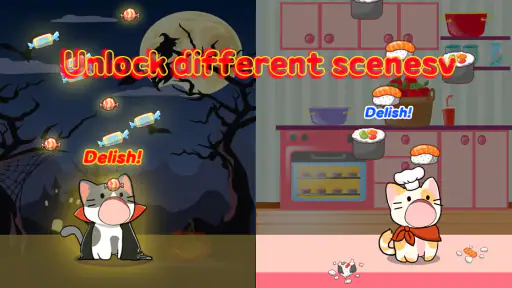
Let’s talk about the visuals, shall we? The game boasts vibrant graphics that are pleasing to the eye. The animations are smooth, and the overall design is cute without being overly saccharine. It’s a perfect balance that appeals to all age groups.
Now, on to the soundtrack – the heart and soul of any music game. The developers have done a fantastic job curating a selection of tunes that range from pop hits to indie gems. Each track is a joy to play along with, and the sound quality is top-notch. It’s like having a mini concert in your pocket!
Where other music games may fit better
Compared with music games built around dense note charts, competitive rankings, or specialist rhythm practice, this one leans on an approachable cat character and direct tapping. That distinction matters more than the broad label of “music game.” If your main goal is to test precision and chase demanding patterns, I’d look for a title whose challenge is clearly centered on that. If you want a friendly presentation that makes picking up a phone and playing feel low-pressure, this is the more natural direction.
It also differs from simply playing songs in a streaming app: here, listening is tied to responding at the right moment. That interaction is the point, but it means this is not the best choice when I want uninterrupted background music, control over a personal playlist, or a passive listening session. I’d keep it for moments when I can look at the screen and participate, and choose an ordinary music player when I just want sound while doing something else.
There is a useful trade-off between easy entry and long-term variety. Straightforward tapping lets a new player understand the basic task quickly, while rising speed and more involved patterns give practice a purpose. Still, anyone who needs a large, explicitly described progression system before committing should try it first rather than assume that a cute rhythm game will provide the structure they prefer. Its strongest case is immediate, song-by-song enjoyment.
Making a short session count
A practical way to fit the game into a normal day is to use one track as a brief break, rather than opening it with the expectation of a long session. For instance, after finishing a work task, I might play once, notice where I lose the beat, then try again with that section in mind. This turns a replay into a small, concrete goal instead of tapping repeatedly without paying attention. It also gives me a natural point to stop when I have only a little time.
I’d treat the first attempt as a baseline, not a verdict. On the next try, I’d focus on one thing only: arriving on the marker consistently, rather than trying to rush every note or chase a perfect result immediately. When the pattern speeds up, relaxed hands and an even rhythm are more useful than frantic tapping. That approach is a general playing tip, not a hidden mode or special feature, and it makes the basic mechanics easier to evaluate fairly.
Another sensible use is sharing the screen with a child or a casual player who likes cats, while keeping expectations modest. The Everyone age rating makes the game broadly suitable, but I would still be the one to check the device and any purchase prompts before handing it over. The game includes optional in-app purchases priced from $0.99 to $9.99 per item, so “free” describes the starting cost, not necessarily every possible purchase. If I’m setting it up for someone else, I’d make clear that paying is optional and decide in advance whether purchases should be restricted through the device’s settings.
What to consider before settling in
One question I’d ask before making it a regular habit is whether the music itself keeps me interested. A rhythm game can have a charming character and still lose its appeal if I don’t enjoy the tracks enough to replay them. I’d sample the selection over a few short visits before deciding; that is more useful than judging from the cat artwork or a single first impression. The game is at its best when the song and the tapping both feel enjoyable.
Another is whether I want to play with sound. Because this is built around music, playing silently may make the experience less engaging, even if the visual markers still guide the taps. On a bus, in a waiting room, or near someone resting, I’d keep the volume considerate and avoid assuming that headphones are always convenient. If I often need a completely silent game, a puzzle or turn-based option may fit my routine better.
I’d also think about attention and comfort. The notes require looking at the screen, so this is not something I’d play while walking, crossing a street, or trying to listen to someone. At home, on a break, or seated while waiting, the same short bursts can be a pleasant distraction. If tapping quickly makes my hands tense, I’d stop rather than turn a casual game into a chore; a slower or less timing-dependent game would be a better match on those days.
Free to start, with a sensible spending check
Since the game costs nothing to download, trying it is an easy decision for someone curious about cat-themed rhythm play. I would still separate “free to start” from “no possible spending”: in-app purchases are available, so I’d check what is being offered before confirming anything. I don’t see a reason to buy something simply because I enjoy the first session. I’d first establish that I return to the game and understand what an optional purchase would add to my own experience.
The listed purchase range is useful for setting expectations, but it does not make spending necessary. For a casual player, the best test is whether the basic play is enjoyable without paying. If you are choosing a game for a child, a shared family device, or someone who may tap through prompts quickly, reviewing purchase controls beforehand is a practical safeguard. That advice applies especially here because the cheerful presentation can make the game feel like a harmless toy, while purchases still involve a real spending decision.
Who I’d recommend it to—and who should pass
I’d recommend Solo Cat: CatPOP music game to someone who likes cute characters, wants a music game that is easy to understand, and enjoys improving through short retries. It also makes sense for a casual player who wants an active alternative to scrolling during a small gap in the day. FunGo Studio has built the experience around a clear premise, and the version available now is 1.6.7. I’d use that version detail mainly to identify the edition, not as a reason to expect a particular feature or change.
I’d skip it if I’m looking for a broad music catalogue, hands-free listening, a highly technical rhythm trainer, or a game whose appeal depends on elaborate systems rather than direct tapping. Someone who dislikes cute visuals may also find the central presentation less compelling, even if the basic timing challenge is appealing. In those cases, choosing a different kind of music game—or simply using a music app—would be more satisfying than trying to make this one serve a purpose it was not built for.
Why You Should Join the CatPOP Craze
If you’re still on the fence about downloading this gem, let me give you that final nudge. Solo Cat: CatPOP music game is more than just a game; it’s an experience. It’s perfect for unwinding after a long day or when you need a quick entertainment fix. Plus, who can resist the charm of a dancing cat?
In conclusion, whether you’re a fan of rhythm games or just love cats, this app is a purr-fect addition to your mobile game collection. Give it a try, and I guarantee you’ll be tapping and bopping along in no time. Happy gaming!
Solo Cat : CatPOP music game Pros and Cons
Pros
- Engaging rhythm gameplay.
- Colorful and lively graphics.
- Wide variety of music tracks.
- Easy to learn controls.
- Great for quick fun sessions.
Cons
- Ads can be intrusive.
- Limited offline play.
- In-app purchases required for extras.
- Repetitive levels over time.
- Occasional lag on older devices.
Frequently Asked Questions
What is Solo Cat: CatPOP music game?
Solo Cat: CatPOP is a rhythm-based music game where players guide a cute cat through various levels, popping bubbles in time with the music. The game offers an engaging blend of adorable graphics and catchy tunes, making it a fun and addictive experience for music and cat lovers alike.
How do I play Solo Cat: CatPOP music game?
To play Solo Cat: CatPOP, you need to tap on the screen in time with the music to pop bubbles. The game is designed to test your rhythm and timing skills. As the levels progress, the difficulty increases, and players must stay focused to achieve higher scores and unlock new songs and challenges.
Is Solo Cat: CatPOP music game free to play?
Solo Cat: CatPOP is free to download and play. However, it may offer in-app purchases that allow players to unlock additional content, such as new songs or customization options for the cat. While these purchases are optional, they can enhance the overall gameplay experience for those interested in additional features.
Can I play Solo Cat: CatPOP music game offline?
Yes, Solo Cat: CatPOP can be played offline. This makes it convenient for users who want to enjoy the game without needing a constant internet connection. However, some features, such as downloading new songs or accessing certain content, may require an internet connection.
What devices are compatible with Solo Cat: CatPOP music game?
Solo Cat: CatPOP is available for both Android and iOS devices. It is designed to run smoothly on a wide range of smartphones and tablets. To ensure the best performance, it's recommended to have the latest version of the operating system installed on your device.


