

Solitaire:Classic Deluxe Cards
- Reviews
- 4.5
- Version
- 1.2.4
- Installs
- 1,000,000+

Screenshots
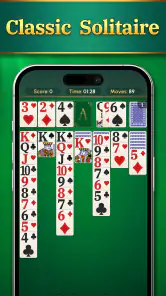
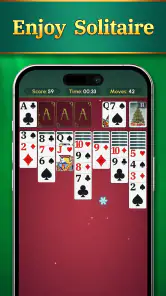
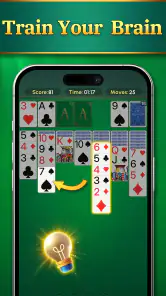
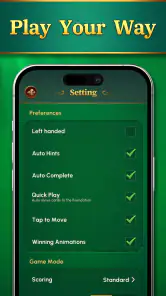
 Analysis by Frivlyz
I tend to judge a solitaire game less by how many extras it promises and more by what happens after the first few hands: is it easy to settle into, does each move stay readable, and is there a reason to play another round without turning the hobby into a chore? Solitaire: Classic Deluxe Cards makes its case through familiar card play, clear presentation, hints, and themes rather than a complicated progression system. That makes it a natural fit for short breaks, though it may not satisfy someone who wants a steady stream of missions or competitive goals.
A simple start, with room to find your rhythm
The early appeal is that I can get straight to the card puzzle. This is a free solitaire card game from Chillapex Studio, rated for Everyone, and its current version is 1.2.4. Its broad approach suits someone who already knows the basic routine as well as a newcomer who wants a familiar game to learn at an unhurried pace. The store release date is Dec 20, 2024, and it runs on Android 5.0 or later.
For a first session, I’d treat the hints as a learning aid rather than an automatic answer button. Before using one, I try to scan the tableau for moves that uncover a face-down card or open a useful space. Then, if I’m stuck, a hint can help me see a possibility I missed. That small habit keeps the game from becoming a sequence of taps made without understanding why a move matters.
There is a useful trade-off here: a familiar ruleset gets you playing quickly, but it also means the early hands may not feel like a campaign with an obvious next milestone. The immediate goal is the puzzle in front of you. If that is enough motivation, the low-friction start is a strength; if you need a checklist of objectives to stay interested, the experience may feel spare.
What counts as progress in a game built around hands
Solitaire’s progress is mostly visible in the decisions you make within a deal: uncovering cards, managing open columns, and moving cards toward their suits in order. The hints can be especially useful when a board looks blocked, but I wouldn’t treat every suggested move as proof that it is the best long-term choice. A move can be legal and still leave you with fewer useful options, so I prefer to consider what it reveals before following it.
The game’s average rating is 4.5 from around 14,000 ratings, and it has more than a million installs. Those figures suggest that a large audience is comfortable with its straightforward take on solitaire, but they don’t tell me whether a particular hand will be satisfying. The more meaningful signal during play is whether I can trace a move to a purpose: turning over a hidden card, freeing a column, or making a needed rank available.
Themes provide a different kind of progress signal: they let me adjust the look of a game to suit the moment rather than changing the card puzzle itself. I might choose a calm table appearance for a quiet break and a brighter one when I want the cards to stand out. I see that as personalization, not a reward track. It helps the app feel more comfortable to return to, but it doesn’t replace new goals for players who want unlocks to drive their sessions.
Gaming Stories You May Enjoy

Dancing Road Turns Short Breaks Into a Test of Rhythm and Timing

Super Stylist Makes Every Outfit a Test of Taste and Patience

Dominoes on Your Terms: Who Should Play and Who Should Pass

Pokémon GO Makes the Familiar World Feel New

Chess.com Turns Rematches Into Rivalries, but Community Has Its Costs

Archery Battle 3D Review: Sharp Aiming, Unclear Feedback
Difficulty, pacing, and the value of a quick hand
The challenge comes from reading the layout and choosing an order for moves, not from a complicated control scheme. Smooth touch handling matters because a misread card or awkward drag can interrupt the thought process. Here, the large, clear cards and responsive-feeling movement support a pace where I can focus on the board. The understated sound also makes it easy to play without demanding the room’s attention.
A practical approach is to slow down when two moves seem equally attractive. I look first for the move that exposes hidden information, then consider whether moving a card would block a useful sequence or occupy a column I may need. That is a more reliable way to work through a difficult position than repeatedly asking for hints. When I’m only filling a short gap in the day, though, I may prefer a quicker, less analytical round; the game can accommodate both moods because its basic interaction is easy to pick up.
The pacing is naturally uneven from hand to hand. Some layouts offer a clear route for a while; others make me reconsider the same few cards. That variation is part of solitaire’s appeal, but it also means a run of awkward deals can feel less rewarding than a designed level with a carefully tuned difficulty curve. I would choose this for a compact puzzle, not for a guaranteed climb from easy stages to a dramatic final challenge.
When it fits—and when I’d choose something else
I can picture opening it while waiting for a train, taking a quiet break between tasks, or winding down at home with the sound kept low. In those moments, a game that presents large cards and gets out of the way is more useful to me than one that surrounds each hand with prompts. The themes help make repeat visits feel less visually monotonous, while hints give a newcomer a way to recover without having to abandon a puzzling deal immediately.
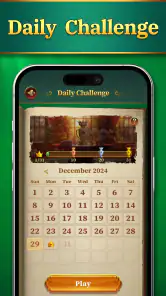
By contrast, someone who wants head-to-head play, a story, frequent events, or a strong sequence of unlocks should look for a different kind of card game. This app’s appeal is the solitaire board itself. Compared with more feature-heavy alternatives, that restraint can be refreshing: there is less to learn before the first move. The downside is that players who depend on daily challenges, score chasing, or elaborate collections may find fewer reasons here to build a routine around it.
It is also worth choosing the display thoughtfully. Large cards are helpful on a smaller phone because ranks and suits are easier to distinguish, but a clear layout does not remove the need to pause and check a sequence before dragging. If I play while distracted, I’m more likely to make a move that closes off options and then reach for undo. For a relaxed session, that is a minor inconvenience; for someone seeking a highly competitive test of planning, the forgiving aids may make the experience feel less demanding.
Playing well without turning it into a chore
My most useful routine is simple: scan the columns before moving anything, prioritize opportunities to uncover hidden cards, and save hints for moments when I’ve genuinely run out of ideas. I use undo to correct a clumsy touch or reconsider a move, not to erase every decision until the hand is perfect. That keeps the controls helpful without letting them take over the puzzle. If a deal stops being enjoyable, I’m happy to move on rather than treat completion as an obligation.
The app has 826 reviews, and its straightforward identity is easy to understand: it is designed for playing solitaire, not for managing a larger collection of modes. I wouldn’t assume that a high rating or a large audience means it will suit every card player. Its best audience is someone who wants a recognizable solo puzzle with readable cards and a few comfort features. It is less compelling for a player whose main motivation is a visible ladder of achievements or social competition.
One practical question is whether a newcomer needs to know the rules before installing. I don’t think so: the basic objective is familiar enough to pick up, and hints can offer support when a position becomes confusing. Another is whether the game can fill a very short break. Yes, its simple touch interaction makes it easy to start a hand without a lengthy setup, although a puzzle can naturally take longer if I stop to plan carefully. If I want a more structured challenge, I would choose a game built around explicit levels rather than expect this one to supply that framework.
For me, the strongest case for returning is not a promise of constant rewards but the small satisfaction of spotting a useful sequence. The most important limitation follows from that same design: if the card layout itself does not hold your attention, themes and hints are unlikely to create a deeper progression loop. I’d recommend it to casual players, solitaire regulars who value a clean presentation, and anyone who wants a low-pressure way to occupy a few minutes. Players who need fresh objectives every session should choose a more goal-driven alternative.
When it comes to passing the time, there's nothing quite like a classic game of solitaire. Enter Solitaire: Classic Deluxe Cards, a delightful rendition of the traditional card game that has captivated millions over the years. Available on both Android and iOS, this app promises to bring the classic card game experience straight to your fingertips. But does it deliver? Let's dive into the details and find out.
Getting Started with Solitaire: Classic Deluxe Cards
Right off the bat, downloading and installing Solitaire: Classic Deluxe Cards is a breeze. It’s lightweight, so it won't hog your device's resources, making it perfect for quick installs and hassle-free gaming. Once you launch the app, you’re greeted with a clean and inviting interface. It’s straightforward and well-designed, which means you won’t have to fumble around to start playing.
The Gameplay Experience
As you'd expect from a solitaire game, the objective here is simple: arrange all the cards in the deck into their respective suits in ascending order. But while the rules are classic, the experience is anything but ordinary. The app offers a variety of themes and card backs, allowing you to customize the game to suit your mood or style. Whether you’re a fan of traditional green felt or something a bit more whimsical, there’s a theme for you.
Another standout feature is the intuitive touch controls. Dragging and dropping cards feels smooth and responsive, which is crucial for a game that relies heavily on precise movements. Plus, the app includes handy features like undo and hints, so if you make a mistake or get stuck, you can easily backtrack or get a nudge in the right direction.
Graphics and Sound
Visually, the app is a treat. The graphics are crisp and clear, making it easy to distinguish between cards, even on smaller screens. The animations are subtle but add a nice touch to the overall experience. And let's not forget about the sound effects. They're minimalistic, which is perfect for a game you might play while unwinding after a long day. There’s a certain satisfaction to hearing the gentle shuffle of cards or the soft click of a successful move.
Why You Should Download It
Solitaire: Classic Deluxe Cards is more than just a nostalgic trip down memory lane. It’s a meticulously crafted app that respects the traditional game while enhancing it with modern features. Whether you’re a solitaire aficionado or a casual player looking for a fun way to pass the time, this app has something to offer.
In conclusion, if you're on the lookout for a solid solitaire game, this one is definitely worth checking out. It's free to download, so you’ve got nothing to lose. Give it a try, and you might just find yourself hooked on this digital deck of cards.
Solitaire:Classic Deluxe Cards Pros and Cons
Pros
- Simple and intuitive interface
- Smooth and responsive gameplay
- Offline play available
- Minimalistic design
- Customizable card backs
Cons
- Limited game modes
- No multiplayer options
- Ads can be intrusive
- No landscape mode
- Limited customization options
This Game in Other Languages
Frequently Asked Questions
What is Solitaire: Classic Deluxe Cards?
Solitaire: Classic Deluxe Cards is a digital version of the classic card game, Solitaire, designed for mobile devices. It offers a premium experience with enhanced graphics, smooth animations, and a variety of customizable features. Users can enjoy the traditional gameplay they love, with added modern twists to keep the experience fresh and engaging.
Is Solitaire: Classic Deluxe Cards available for both Android and iOS?
Yes, Solitaire: Classic Deluxe Cards is available for download on both Android and iOS platforms. Users can find it on the Google Play Store for Android devices and the Apple App Store for iOS devices. This ensures that players on different devices can enjoy the game seamlessly, regardless of their operating system.
Does Solitaire: Classic Deluxe Cards require an internet connection to play?
No, Solitaire: Classic Deluxe Cards does not require an internet connection to play. This makes it an excellent option for users who want to enjoy the game on the go, without worrying about data usage or needing a stable internet connection. However, some features, such as leaderboards or updates, may require internet access.
Are there any in-app purchases in Solitaire: Classic Deluxe Cards?
Yes, Solitaire: Classic Deluxe Cards offers optional in-app purchases. These purchases may include features like themes, card backs, or ad removal options. While the game can be fully enjoyed for free, these purchases provide users with customization options and an ad-free experience, enhancing overall enjoyment.
What features make Solitaire: Classic Deluxe Cards stand out from other Solitaire games?
Solitaire: Classic Deluxe Cards stands out with its high-quality graphics, smooth user interface, and customizable options. It offers different game modes, daily challenges, and a variety of themes to enhance user experience. Additionally, the game provides statistics tracking and leaderboards, allowing players to compete with friends and track their progress over time.


