

Solitaire Story
- Reviews
- 4.9
- Version
- 3.34.2
- Installs
- 1,000,000+

Screenshots


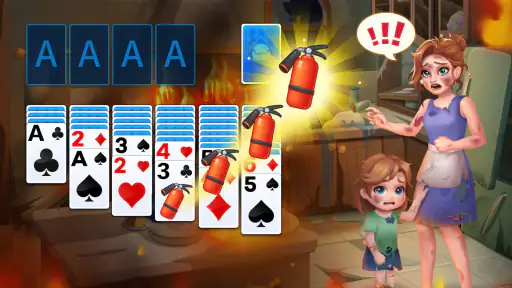
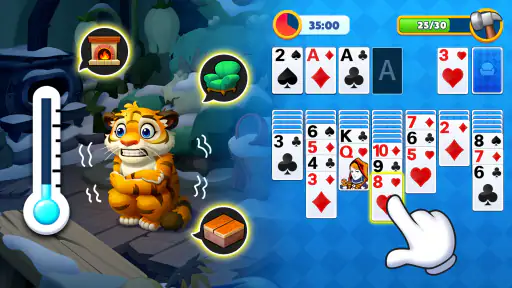

 Analysis by Frivlyz
I spent time with Solitaire Story as a simple card game for short breaks, and its appeal became clear quickly: it keeps the familiar solitaire routine intact while giving each hand a little more purpose through a charitable theme. It is a free game from Solitaire Card Games Classic, aimed at Everyone, and it feels designed for players who want something calm, recognizable, and easy to pick up without learning a complicated ruleset first.
The basic idea is straightforward. You play solitaire, make the best decisions you can with the cards available, and return whenever you have a few spare minutes. That simplicity is its greatest strength, but it also sets a boundary around the experience. This is not the right choice if you want a large collection of competitive card modes, a deep strategy campaign, or a social game built around live opponents. I see it more as a dependable solo companion than as an ambitious card-game platform.
How I settled into a reliable daily workflow
My normal session starts with one hand rather than a promise to play for a long time. That matters because solitaire is easy to underestimate: a quick round can become a much longer session when I keep chasing a better result. The game works well in the gaps between other tasks, such as waiting for an appointment, winding down before bed, or taking a break from work. The cards provide enough concentration to occupy my mind without demanding the constant attention of a multiplayer match.
The first useful habit is to slow down at the opening of each hand. I do not immediately move every available card just because a move is possible. Instead, I look for actions that reveal a hidden card or create a useful empty space. That small pause makes the game feel less like tapping through obvious choices and more like managing a sequence of opportunities. It is also a good way to avoid reaching a position where the visible cards look active but the important cards remain trapped.
For a new player, the familiar structure makes the learning curve gentle. Anyone who already knows classic solitaire can begin without a tutorial-heavy introduction, while someone returning to the game after years can rediscover the rhythm through trial and error. I appreciate that the charitable theme does not replace the card play. The central activity remains recognizable, so the app does not feel as though it is using a message or story to distract from weak gameplay.
A realistic everyday use case is a short evening session when I want something quieter than a puzzle game with timers and louder than reading. I can play one hand, stop when I feel finished, and come back later without needing teammates or a scheduled event. That makes it especially suitable for people who prefer low-pressure entertainment. It is less suitable for someone who needs a clear stopping point after every few moves, because the temptation to restart a disappointing hand can make the experience feel repetitive.
The charitable purpose is an important part of the identity, but I would still judge the game first by whether the card play suits you. The store summary connects solitaire with helping people in need and spreading compassion. That gives the routine a warmer tone than a purely decorative card app, yet players should not expect the theme alone to create a deeper strategy system. In my experience, the motivation remains personal: the game is enjoyable when the familiar mechanics already appeal to you.
Gaming Stories You May Enjoy

Dancing Road Turns Short Breaks Into a Test of Rhythm and Timing

Super Stylist Makes Every Outfit a Test of Taste and Patience

Dominoes on Your Terms: Who Should Play and Who Should Pass

Pokémon GO Makes the Familiar World Feel New

Chess.com Turns Rematches Into Rivalries, but Community Has Its Costs

Archery Battle 3D Review: Sharp Aiming, Unclear Feedback
Settings that deserve an early check
Before settling into regular play, I recommend opening the available settings and checking how the game behaves on your device. I would pay attention to sound, music, notifications, and any visual or interaction options that are offered. These details can change the feel of a solitaire session more than people expect. A quiet player may want a clean, distraction-free board, while another person may find light sound feedback useful for confirming taps.
I also prefer to check settings before judging the game’s speed. A card game can feel sluggish when the issue is really an animation preference, screen response, or an interaction style that does not match the way I tap. If the game offers more than one way to confirm moves, I would test each one during a low-stakes hand instead of changing options in the middle of a promising run. That creates a fairer impression of the controls.
Notifications are worth considering as well. Solitaire is naturally an on-demand activity, so I do not think it needs to interrupt the day unless reminders are genuinely useful to you. I would keep only the alerts that support a deliberate routine and turn off anything that makes the app feel more demanding than a casual card game should be. This is a small adjustment, but it helps preserve the calm quality that makes the game attractive in the first place.
Device compatibility is broad enough for older phones and tablets, since it requires Android 6.0 or later. That makes it a practical option for someone who does not upgrade hardware frequently. Still, an older device may make animations, touch response, or battery behavior feel different from a newer one. I would judge the experience on the phone you actually plan to use, especially if solitaire is going to become part of a daily routine.
The current version is 3.34.2, and I would keep the installation updated through the normal store process. Updates can matter for stability and compatibility even when the card rules remain familiar. I would not treat a version number as a reason to expect a radically different game, though. The core appeal here is consistency, and players who want constant mechanical reinvention may find that steadiness too conservative.
Faster patterns that improve decisions without rushing
Experienced solitaire play is not mainly about tapping quickly. It is about choosing which move preserves the most future options. My preferred pattern is to prioritize moves that expose a concealed card, followed by moves that improve the arrangement of cards in a meaningful way. Moving a card simply because it can move may look productive, but it can also consume a useful space or block a better sequence.
I try to keep empty columns available until I have a clear reason to use them. An open space can be valuable because it gives a long descending sequence somewhere to go, but filling it too early may remove flexibility. When I have a choice between two legal moves, I ask which one leaves more possible follow-up actions. That question is more useful than asking which move looks neatest on the screen.
Another repeatable habit is to inspect the stock and tableau before committing to a foundation move. Sending a card upward can be correct, but doing it automatically may remove a card that is still needed to build a sequence. I prefer to consider whether the move improves access to blocked cards or merely makes the foundation look more complete. This is one of the easiest ways for a familiar hand to turn into a difficult one.
When I reach a position with several possible moves, I mentally mark the one that reveals new information. A move that uncovers a hidden card can change the entire hand, while a move between already visible cards may only rearrange the same problem. This approach is especially helpful on a small phone screen, where repeated dragging can make the board harder to read. Fewer, more deliberate actions usually produce a clearer position.
I also recommend resisting the urge to restart immediately after an awkward opening. Some hands look poor because the first sequence is not obvious, not because they are already lost. Taking a moment to scan the full tableau often reveals a move that was hidden by focusing on the most convenient column. On the other hand, I do not keep replaying indefinitely just to force a perfect outcome. Part of a healthy routine is knowing when a hand has stopped being enjoyable.
For touch control, I use shorter gestures and pause briefly after a move that changes several cards. That gives the board time to settle and reduces accidental taps. If the app supports automatic placement or a convenient tap-to-move behavior in its current interface, I would use it selectively rather than blindly. Automation is helpful for obvious endgame moves, but manual review is still valuable when several destinations are possible.
These habits create a useful distinction between speed and efficiency. Speed is finishing actions quickly; efficiency is avoiding actions that do not improve the position. Solitaire Story suits the second approach better than frantic play. Its strongest moments come when a careful choice opens the board, not when I simply move cards as fast as my fingers allow.
Where the simple design reaches its limits
The biggest limitation is also the most obvious: this remains a solitaire game. If you have played many versions of classic solitaire, the basic loop may feel familiar rather than fresh. The charitable framing adds a different emotional context, but it does not automatically solve the repetition that can appear during long sessions. I would recommend it to someone who enjoys the genre, not to someone hoping the app will convert them into a card-game fan.
The free price makes trying it easy, but in-app purchases range from $0.99 to $69.99 per item. That is the point where I would be more deliberate. A free download is convenient for sampling the game, yet the presence of optional purchases means I would review the purchase flow carefully before handing the device to a child or letting someone play without supervision. The Everyone content rating describes the intended audience, but it does not remove the need for sensible spending controls.
I would also avoid assuming that a high store rating guarantees a perfect personal fit. The game holds an average rating of 4.9 from around 17 thousand ratings, with 525 reviews, and it has passed one million installs. Those figures suggest strong broad appeal, but solitaire preferences are unusually personal. Some players care about visual themes, others about statistics, hints, undo behavior, or a particular scoring style. A popular app can still lack the exact feature that matters most to you.
Compared with a very bare classic-solitaire app, this game has a more distinctive purpose and may feel more inviting to players who want their routine connected to compassion. Compared with a large card-game collection, it is narrower and easier to understand. A collection is the better choice if you want to switch between solitaire variants, freecell-style play, spider layouts, or other card puzzles in one place. Solitaire Story is the better fit when you prefer one recognizable activity without a crowded menu.
It is also not my first recommendation for competitive players. There is no reason to approach this experience as though it were a head-to-head card battler. Its value comes from private concentration and repeatable solo play. Someone seeking leaderboards, direct opponents, or a strong community layer should look toward a purpose-built competitive alternative instead of expecting this game to provide that atmosphere.
Players who are sensitive to monetization should make a simple plan before playing: decide whether the free experience is enough, avoid impulse purchases, and use the device’s purchase protections. I find that approach more comfortable than treating every optional item as part of the expected cost. The game can be enjoyed as a free casual title, but the purchase range is significant enough that families should pay attention.
Who gets the most from this card game?
I think it is a strong match for three kinds of players. First, it suits people who already enjoy classic solitaire and want a familiar game with a kinder, more purposeful presentation. Second, it works for casual players who need a quiet activity that can be started and stopped easily. Third, it is useful for someone with an older Android device who wants a card game compatible with Android 6.0 or later rather than a demanding modern title.
It may also fit a person trying to replace less focused phone habits with a small, contained activity. The best way to use it for that purpose is to set a personal boundary before opening a hand: one round during a break, or a short session after finishing a task. Because solitaire has an obvious repeat loop, the boundary has to come from the player rather than from the game’s basic concept.
I would steer away from it if your priority is variety, competition, or a heavy narrative. The store short description calls it “Solitaire Story,” but I would not approach it expecting a story-driven adventure with character development or branching choices. The meaningful story element is the charitable intention surrounding the solitaire routine. That can be enough for a thoughtful casual game, but it is not a substitute for a campaign if narrative depth is what keeps you playing.
My final view after building a repeatable routine
Solitaire Story works because it does not overcomplicate a game people already understand. I like the combination of familiar card decisions, short-session convenience, and a charitable identity that gives the activity a warmer reason to exist. The developer, Solitaire Card Games Classic, has positioned it as a free card game for a broad audience, and the strong rating and install history show that the format has connected with many players.
My recommendation comes with a clear condition: enjoy solitaire itself. If you do, the best experience comes from checking the settings once, keeping notifications under control, learning to favor revealing and flexible moves, and treating purchases as optional rather than automatic. Those habits make the game calmer and more rewarding than random tapping, while also preventing a short break from turning into an unplanned marathon.
My verdict is positive for relaxed solo players, but selective for everyone else. I would install it for a dependable classic-card routine, especially on a compatible older Android device, and I would recommend it to a friend who likes quiet games with a compassionate theme. I would choose another option for multiplayer competition, extensive card variety, or a substantial narrative. Within its focused lane, though, it is an easy game to return to and a pleasant way to give familiar solitaire a little more meaning.
Solitaire Story Pros and Cons
Pros
- Relaxing solitaire gameplay suitable for short or extended sessions.
- Story progression gives regular goals beyond simply winning card games.
- Simple controls make it accessible for beginners and casual players.
- Bright visuals and character moments add personality to classic solitaire.
- Playable at your own pace without requiring fast reactions.
Cons
- Some levels may feel repetitive after extended play.
- Progress can become slower as challenges and objectives increase.
- Hints or extra moves may be limited during difficult hands.
- Frequent events and rewards can make the interface feel busy.
- Performance may vary on older phones or tablets.
Frequently Asked Questions
What is Solitaire Story, and how do you play it?
Solitaire Story is a casual card game built around the classic Klondike Solitaire format, combined with a light adventure and progression system. You complete card layouts, earn rewards, and move through different stages or story locations. The core rules are familiar, but the game adds objectives, boosters, and visual themes to make individual rounds feel more varied than traditional offline solitaire.
Is Solitaire Story free to download and play?
Solitaire Story can generally be downloaded and played for free, allowing you to begin progressing without an upfront purchase. However, the game may include optional in-app purchases for coins, boosters, extra lives, or other convenience items. Advertising may also appear during play. You can usually enjoy the main experience without spending money, although patience may be needed when resources or attempts are limited.
Does Solitaire Story require an internet connection?
An internet connection may be needed for certain features in Solitaire Story, including advertisements, cloud synchronization, special events, updates, and in-app purchases. Some basic solitaire levels may remain playable offline, but availability can depend on the version and device. If you plan to play while traveling, it is best to test the game without Wi-Fi or mobile data before relying on offline access.
Are there ads or in-app purchases in Solitaire Story?
Solitaire Story may use advertising and optional in-app purchases as part of its free-to-play model. Ads can appear between levels or may be offered in exchange for extra rewards, while purchases can provide coins, boosters, additional moves, or other helpful items. Before downloading, review the store listing and your device’s purchase settings, especially if children may use the application.
Is Solitaire Story suitable for beginners and children?
Solitaire Story is generally accessible to beginners because it uses familiar solitaire rules and introduces its progression features gradually. The game does not require fast reflexes, making it suitable for relaxed play. Nevertheless, parents should check the current content rating, advertising behavior, and purchase options before allowing children to play, since availability and monetization features can vary between regions and updates.


