

Solitaire Relax® Big Card Game
- Reviews
- 4.6
- Version
- 1.8.16
- Installs
- 1,000,000+

Screenshots
 Analysis by Frivlyz
I usually reach for solitaire when I want something familiar that doesn’t demand a long session or a lot of concentration. Solitaire Relax® Big Card Game is aimed squarely at that kind of play: it puts a recognizable card puzzle on a phone screen and makes the cards large enough to read comfortably. My impression is that its appeal depends less on a complicated progression system and more on whether a simple round fits the moment you have.
What a first session asks of you
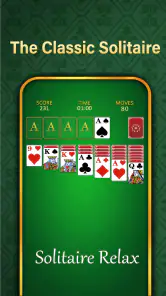
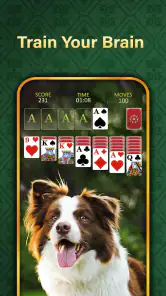
The opening attraction is the straightforward Klondike format. You can begin with the familiar job of arranging cards by suit and rank, making moves as the tableau opens up and deciding when to draw from the stock. That gives a new player an immediate goal without requiring a tutorial-heavy introduction. If you already know solitaire, the rules are the reason you can settle in quickly; if you are learning, the board’s visible card layout makes it easier to follow the state of a game than a small, crowded interface would.
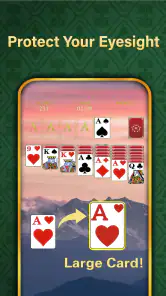
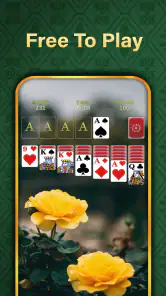
The large-card presentation is practical, not just decorative. On a phone, card ranks and suits can become tiring to distinguish when a game uses a dense layout or when you are playing one-handed in a spare moment. Here, the bigger cards make checking possible moves less of an eyestrain exercise. I would still suggest turning the screen toward a comfortable position and taking a moment to scan the columns before moving: a readable board helps, but it does not choose a sensible move for you.
This is a useful game for the small gaps in an ordinary day. I can imagine opening it while waiting for a kettle to boil, taking a short break between tasks, or sitting down after dinner for one or two rounds. Klondike is particularly suited to these moments because its objective is clear and each move gives you a small decision to make. It is less suitable when you need an activity that can be abandoned without thought at any instant; as with any card puzzle, you may prefer to finish a hand before switching away.
How the goals and progress feel
The central goal is easy to understand: work toward a completed layout by building sequences and moving cards into the foundations. That immediate objective supplies enough direction for a casual session, while the uncertainty of which cards will become available keeps each deal from feeling like a rote exercise. I find that this balance is the strongest source of momentum here. You do not need a long-term plan to enjoy a round, but you can still think through the consequences of moving one card rather than another.
There is also a sense of progress in seeing how a deal develops. A newly exposed card can open a column, create room for a useful sequence, or leave you reconsidering a choice you made a moment earlier. That change in the board is a more meaningful signal during play than a flashy reward would be for someone who came looking for classic solitaire. The app’s customization and stat-tracking options can give returning players another reason to notice their habits, though personal records matter most if you enjoy comparing your own sessions rather than chasing an external competition.
For a more deliberate approach, I recommend pausing before filling an empty column. An open space is valuable, but using it immediately on the first available king may not be the best move if another king could reveal a more useful sequence. Similarly, when you have a choice between moving a card from the tableau and drawing, look at whether that move exposes a hidden card or simply rearranges what is already visible. These small checks make the game feel more thoughtful without turning a relaxing round into homework.
Gaming Stories You May Enjoy

Dancing Road Turns Short Breaks Into a Test of Rhythm and Timing

Super Stylist Makes Every Outfit a Test of Taste and Patience

Dominoes on Your Terms: Who Should Play and Who Should Pass

Pokémon GO Makes the Familiar World Feel New

Chess.com Turns Rematches Into Rivalries, but Community Has Its Costs

Archery Battle 3D Review: Sharp Aiming, Unclear Feedback
Difficulty without a demanding climb
Klondike’s difficulty comes from the cards you are dealt and the choices available, rather than from a complicated set of controls. Some hands open up quickly; others leave you waiting for a particular rank or suit before you can make meaningful progress. That natural variation is part of the genre’s appeal, but it also means a player should not treat every unsuccessful deal as evidence of poor play. Sometimes the useful choice is to review the board and try a different line; sometimes the layout simply gives you fewer opportunities.
The relaxed presentation makes that uncertainty easier to accept. It does not remove the puzzle or make every hand straightforward, and that is a good thing: if each deal resolved itself, the familiar decision-making would lose its point. At the same time, anyone seeking a steep skill curve, complex tactical systems, or a strong sense of competition may find this style too gentle. The game is best approached as a repeatable card pastime, not as a demanding strategy challenge.
Compared with a paper deck, the app saves the setup and cleanup and keeps the play area readable on a small device. Compared with a more elaborate digital card game, it is easier to understand and less dependent on learning extra rules or managing a busy screen. That simplicity is a strength when I want to start playing immediately. It is also the main trade-off: people who want a deep collection of distinct challenges or a highly competitive experience may be happier with a different kind of card game.
How much the presentation adds
The soothing atmosphere is useful when I want a quiet pause, but it is not a substitute for interesting decisions. The large cards do more practical work than the background music because they directly improve how comfortably I can inspect the board. Music is a matter of taste and situation: a gentle soundtrack may suit an evening session, while someone playing in a shared space or listening to something else may prefer a quieter setup. I would judge the game primarily by how the cards feel to read and move, not by expecting the sound to transform every round.
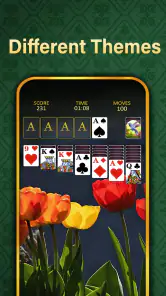
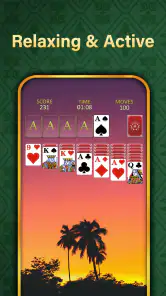
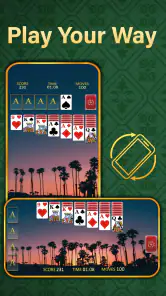
Customization can help make repeat visits feel more personal. Changing card designs or backgrounds is worth trying if the default look does not suit your eyes or if you simply want a different visual mood. My practical tip is to prioritize legibility over novelty: a striking design is not an improvement if it makes suit symbols harder to distinguish. The same principle applies to playing on a smaller phone. A clean, high-contrast view matters more to a long session than a decorative choice that looks attractive in a screenshot.
There is a reasonable distinction between playing for relaxation and playing for a record. The app tracks stats, which can help you notice whether your own outcomes are changing over time, but I would use that information as a personal reference rather than a verdict on skill. A short session after a busy day is not a fair test of how well you play, and a run of awkward deals can skew the impression. If numbers make you feel pressured, the better approach is to ignore them and focus on the next decision.
Who will enjoy it—and who may want something else
I would recommend it to people who already like Klondike, anyone who wants cards that are easier to see on a phone, and casual players who prefer an uncomplicated game they can return to in short bursts. It is also a sensible choice for someone who wants a calm alternative to fast action games. The broad Everyone age rating reflects its accessible card-game framing, and the free price makes it easy to try without first committing to a purchase.
I would steer away from it if your main reason for downloading a card game is multiplayer rivalry, a campaign with a narrative, or a constant stream of escalating objectives. Those are different expectations from a relaxed solitaire experience. Likewise, if you already have a Klondike app whose controls and visual style you love, there may be little reason to switch unless the larger cards or the quieter presentation solve a problem for you. The useful question is not whether this is the most feature-packed option, but whether its particular emphasis fits the way you actually play.
For a realistic routine, I might open a hand during a commute while seated, play until I reach a natural stopping point, and return later rather than forcing a long session. If I am interrupted, I would first make sure I am comfortable leaving the current game, since a half-finished puzzle can be harder to pick up than a fresh one. When I have more time, I can use the stats as a casual way to notice patterns, such as whether I tend to reveal hidden cards early or make moves that do not open new possibilities. That turns an ordinary round into a small exercise in patience without requiring a formal challenge mode.
Practical details and staying power
The game is a free card title from Solitaire Relax® - Solitaire Card Games. It has an average rating of 4.6 from around 6,800 ratings, with over a million installs and 906 written reviews. Those figures suggest it has found a substantial audience, but they do not tell me whether its particular pace will suit you; the best test is whether the readable board and classic format make you want to play another hand. It was released on February 7, 2024, and version 1.8.16 requires Android 5.0 or later.
One likely question is whether this is still a good fit for someone who only knows the basic rules. I think so: the familiar Klondike objective gives you a clear place to start, and the clean presentation avoids making the first session feel like a tour of complicated systems. A returning player may instead wonder whether there is enough to keep playing. In my view, the answer depends on whether you enjoy the changing decisions within a deal and the personal satisfaction of improving your own approach. If you need frequent unlocks or new mechanics to stay engaged, the steady rhythm may feel limited.
Another practical consideration is how to use it without letting a quick break stretch longer than intended. Solitaire rounds can invite “one more deal,” especially when the last hand nearly worked out. I find it helps to decide before opening the app whether I have time for one game or a longer pause. That is not a special feature; it is simply a good way to make a low-pressure pastime stay low-pressure. The game’s relaxed feel is most valuable when it fits around your day rather than displacing something you meant to do.
The Gameplay Experience
First off, let me tell you that the Solitaire Relax® Big Card Game is not your average solitaire game. The developers have taken the traditional game and added a touch of elegance and charm to it. The cards are larger than usual, making it easier for those of us with less-than-perfect eyesight to enjoy the game without squinting at the screen. And let’s not forget the soothing background music that’s designed to help you unwind after a long day. It’s like having a mini spa right in your pocket!
Intuitive and User-Friendly
One thing that stands out about Solitaire Relax® Big Card Game is its intuitive design. From the moment you launch the app, it’s clear that the developers have put a lot of thought into making the game accessible to everyone. The interface is clean and straightforward, with large buttons and easy-to-read text. Even if you’re new to solitaire, you’ll find it easy to navigate through the different game modes and settings.
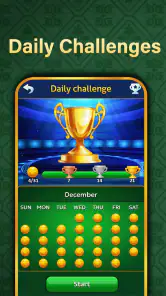
The game offers several modes to keep things interesting. You can stick with the classic Klondike version or try your hand at one of the many other variations available. Each mode comes with its own set of challenges and rewards, so there’s always something new to explore.
Customization Galore
If you’re like me and love personalizing your gaming experience, you’ll appreciate the customization options available in Solitaire Relax® Big Card Game. You can choose from a variety of card designs and backgrounds to suit your mood and style. Plus, the game keeps track of your stats, so you can see how you’re improving over time. It’s a great way to challenge yourself and strive for that perfect game.
Why You Should Download It
Now, I know there are plenty of solitaire apps out there, but what sets this one apart is its attention to detail and focus on relaxation. The big cards and serene music truly make a difference, transforming a simple card game into a calming retreat. Plus, the app is free to download, so you have nothing to lose by giving it a try.
In conclusion, if you’re looking for a solitaire game that offers more than just the basics, Solitaire Relax® Big Card Game is definitely worth checking out. Its beautiful design, user-friendly interface, and relaxing atmosphere make it a standout choice in the crowded world of mobile card games. So go ahead, download it, and enjoy some well-deserved relaxation time.
Solitaire Relax® Big Card Game Pros and Cons
Pros
- User-friendly interface enhances gameplay
- Large cards improve visibility
- Relaxing background music
- Multiple game modes available
- Offline play supported
Cons
- Ads can be intrusive
- Limited customization options
- No multiplayer mode
- Occasional in-app purchase prompts
- Some levels feel repetitive
Frequently Asked Questions
What is Solitaire Relax® Big Card Game and how does it differ from other solitaire games?
Solitaire Relax® Big Card Game is a relaxing and visually appealing version of the classic solitaire card game, designed with larger cards for easier handling and better visibility. Unlike many other solitaire apps, this version focuses on providing a stress-free gaming experience with calming background music, intuitive controls, and customizable themes to enhance relaxation.
Is Solitaire Relax® Big Card Game free to download and play?
Yes, Solitaire Relax® Big Card Game is free to download and play. However, like many free apps, it may contain in-app purchases and ads. These purchases are optional and can enhance your gaming experience by providing additional features, themes, or ad-free gameplay. Ensure to check the app settings if you want to manage or disable in-app purchases.
What devices are compatible with Solitaire Relax® Big Card Game?
Solitaire Relax® Big Card Game is compatible with both Android and iOS devices. It is optimized for smartphones and tablets, ensuring smooth gameplay across a range of screen sizes and resolutions. Before downloading, check the app store for the minimum operating system requirements to ensure compatibility with your device.
Does Solitaire Relax® Big Card Game require an internet connection to play?
No, Solitaire Relax® Big Card Game does not require an internet connection to play. This makes it an excellent choice for users who want to enjoy a relaxing game on the go, without worrying about connectivity issues. However, certain features like in-app purchases and ads may require internet access.
Are there any customization options available in Solitaire Relax® Big Card Game?
Yes, Solitaire Relax® Big Card Game offers various customization options to enhance your playing experience. Users can choose from a selection of card designs, backgrounds, and themes to personalize their game. These options allow players to tailor the visual and auditory environment to their preferences, making each session uniquely relaxing.


