

Solitaire Pro
- Reviews
- 4.7
- Version
- 1.51
- Installs
- 10,000+

Screenshots


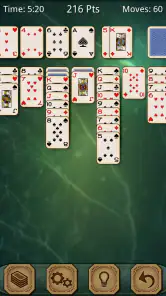


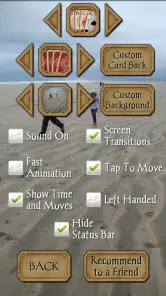


 Analysis by Frivlyz
Ever found yourself with a few minutes to spare, and you're just itching to do something fun with your phone? Well, let me introduce you to Solitaire Pro. This app is like having a deck of cards in your pocket without the hassle of shuffling! I’ve spent quite a bit of time playing around with this app and here’s what I think about it.
Getting Started with Solitaire Pro
Downloading Solitaire Pro was a breeze. It’s available on both Android and iOS, so no matter what device you're rocking, you’re covered. Once installed, you’re greeted with a clean and user-friendly interface. Seriously, it’s so intuitive that even if you’ve never played Solitaire before, you’d figure it out in no time. You can choose from different game modes like Klondike, Spider, and FreeCell. I started with Klondike because it’s like the classic version everyone knows and loves.
The Gameplay Experience
The gameplay is as smooth as butter. The cards move seamlessly with a tap or drag, and the animations are just the right amount of flashy—not too much to distract but enough to keep things interesting. Plus, there’s this nifty hint feature that I found super helpful when I got stuck. It’s like having a little helper tapping you on the shoulder, saying, “Hey, try this move!”
One thing that really stood out for me is the customization options. You can change the card faces and backs, and even the background. I spent a good chunk of time just playing around with these settings to make the game feel a bit more personal. And let’s not forget about the scoring options—you can choose between standard or Vegas scoring. Personally, I found the Vegas scoring to add a little extra challenge which I quite enjoyed.
Why You Might Love It
If you’re someone who enjoys a bit of competition, Solitaire Pro has you covered with its daily challenges and leaderboards. I found myself getting a bit competitive, trying to beat my previous scores and climb up the leaderboard. It’s a great way to keep the game feeling fresh and exciting. Plus, the daily challenges are a fun twist, offering new puzzles to solve every day.
Another thing I loved is how lightweight the app is. It doesn’t drain your battery like some other games do, and it runs smoothly without any lag, which is super important when you’re getting into a game groove.
Gaming Stories You May Enjoy

Dancing Road Turns Short Breaks Into a Test of Rhythm and Timing

Super Stylist Makes Every Outfit a Test of Taste and Patience

Dominoes on Your Terms: Who Should Play and Who Should Pass

Pokémon GO Makes the Familiar World Feel New

Chess.com Turns Rematches Into Rivalries, but Community Has Its Costs

Archery Battle 3D Review: Sharp Aiming, Unclear Feedback
Final Thoughts
All in all, Solitaire Pro is a fantastic app for both Solitaire enthusiasts and newbies alike. It’s got all the classic charm of the traditional game but with modern features that make it even more enjoyable. Whether you’re killing time or looking for a mental challenge, this app has got you covered. So, if you haven’t already, give it a download and happy playing!
Solitaire Pro Pros and Cons
Pros
- Intuitive user interface
- Multiple game modes
- Customizable themes
- Offline play available
- Daily challenges
Cons
- Contains ads
- In-app purchases required
- Occasional glitches
- Battery consumption high
- Limited free features
Frequently Asked Questions
What is Solitaire Pro and how does it differ from other solitaire apps?
Solitaire Pro is a premium version of the classic card game designed for both Android and iOS users. Unlike other free versions, Solitaire Pro offers an ad-free experience, customizable themes, and advanced game statistics. It provides smooth gameplay and an intuitive interface, which makes it suitable for both beginners and seasoned players. The app also includes challenging levels and daily challenges to keep players engaged.
Is Solitaire Pro available for both Android and iOS devices?
Yes, Solitaire Pro is available for download on both Android and iOS platforms. You can find it in the Google Play Store for Android devices and the Apple App Store for iOS devices. The app is designed to be compatible with a wide range of devices, ensuring that users have a seamless experience no matter which platform they are using.
Does Solitaire Pro require an internet connection to play?
No, Solitaire Pro does not require an internet connection to play. The game can be enjoyed offline, making it a perfect companion for situations where you do not have access to Wi-Fi or cellular data. However, some features like leaderboards and daily challenges may require an internet connection to update and sync your progress.
What are the main features of Solitaire Pro?
Solitaire Pro comes packed with a variety of features that enhance the gaming experience. These include an ad-free interface, customizable card backs and backgrounds, detailed game statistics, and unlimited undo options. The app also offers daily challenges, multiple card games such as Klondike, Spider, and FreeCell, and sync capabilities across devices. This makes it a comprehensive app for solitaire enthusiasts.
Does Solitaire Pro offer any in-app purchases or subscriptions?
Yes, Solitaire Pro offers in-app purchases and subscriptions that allow users to access premium features. These may include additional themes, exclusive card designs, and advanced statistics tracking. While the basic app provides a full gaming experience, these extras can enhance the game for those who wish to personalize their experience further. It's important to review these options before downloading to ensure they fit your preferences and budget.


