

Solitaire - Passion Card Game
- Reviews
- 4.5
- Version
- 1.0.33
- Installs
- 100,000+

Screenshots
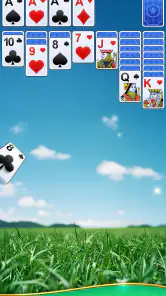

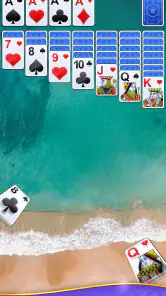
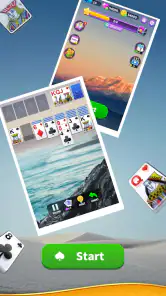

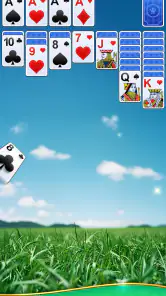

 Analysis by Frivlyz
I judge a solitaire app by how easily it fits into the small gaps in a day: can I open it, understand the board, and get back to what I was doing without turning a quick game into a project? Solitaire - Passion Card Game is aimed squarely at that kind of casual play. It is a free card game from Fancy Game, and its familiar format makes it approachable if you already know solitaire or simply want a quiet way to pass a few minutes.
There are a few practical details worth knowing before you install it. The game is rated Teen, supports Android 5.1 and later, and its current version is 1.0.33. It has an average rating of 4.5 from around 21,000 ratings, with more than 100,000 installs. Optional in-app purchases range from $0.99 to $9.99 per item, so the game is free to start, but purchases may be part of the experience for players who choose them.
Getting comfortable with a familiar card game
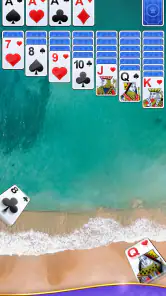
When I first stumbled upon Solitaire - Passion Card Game, I was hit with a wave of nostalgia. This app takes the classic solitaire we all know and love and gives it a fresh twist. The interface is clean and modern, making it easy to navigate, even if you're new to the game. It's like meeting an old friend who's had a bit of a makeover.
What feels easy, and where players may get stuck
The basic appeal is that the rules are familiar and the game does not ask you to learn a complicated system before starting. If you have played solitaire with a physical deck or another phone app, you can focus on the cards rather than figuring out an unfamiliar genre. If you are new, take a moment to check what each available action does before moving quickly; even a familiar-looking layout can make it easy to tap the wrong card when you are playing in a hurry.
A common source of frustration in solitaire is not knowing whether a move was a mistake, a missed opportunity, or simply a dead end in the deal. The undo button is useful for checking that distinction: I can reverse a move, compare the board, and make a more deliberate choice instead of restarting at the first sign of trouble. That is more helpful as a learning tool than as a way to guarantee a win. Undoing a move cannot make an unavailable card appear, so I treat it as a way to review decisions rather than a promise that every deal can be solved.
One of my favorite features is the variety of card designs available. You can personalize your deck to suit your mood, whether you're feeling a bit whimsical or prefer something more traditional. Plus, the app offers different backgrounds, adding a nice touch to the overall experience.
Those visual choices are practical as well as decorative. When I am playing for only a few minutes, a design that makes the suits and ranks easy for me to distinguish matters more than picking the most elaborate look. If a custom deck makes similar cards harder to read on your screen, switching back to a plainer design is a sensible trade-off. A background that looks attractive in a bright room may also feel too busy when you are playing late or on a smaller display, so it is worth choosing for legibility, not just appearance.
Gaming Stories You May Enjoy

Dancing Road Turns Short Breaks Into a Test of Rhythm and Timing

Super Stylist Makes Every Outfit a Test of Taste and Patience

Dominoes on Your Terms: Who Should Play and Who Should Pass

Pokémon GO Makes the Familiar World Feel New

Chess.com Turns Rematches Into Rivalries, but Community Has Its Costs

Archery Battle 3D Review: Sharp Aiming, Unclear Feedback
Small setup checks that can save a frustrating session
Before blaming the game for a problem, I would start with a few basic checks. Confirm that the device is running Android 5.1 or later, make sure the app has finished installing, and reopen it if the screen has become unresponsive. If card taps seem unreliable, try a slower, more deliberate touch and check whether your finger is covering a neighboring card. Solitaire boards can be crowded, and a mis-tap can look like a control issue when it is really a matter of precision.
It also helps to choose a comfortable way to play before beginning a longer session. If you are holding the phone in one hand while walking or carrying something, you are more likely to tap the wrong card than when the device is resting securely. For a quick game on a break, I would settle the phone in one hand or set it down, then make moves at a pace that lets me read the board. This is a small habit, but it reduces the chance of using undo repeatedly just to correct accidental touches.
The game itself runs smoothly, and the touch controls are incredibly responsive. I didn't experience any lag, which is a huge plus because there's nothing more frustrating than a game that stutters just as you're about to make your move. The app also includes a handy undo button, which, let's face it, we all need from time to time.
A calmer workflow for short and interrupted sessions
Solitaire is especially well suited to moments when I want a little focus without committing to a long activity: waiting for a ride, taking a short break between tasks, or winding down at home. One realistic approach is to start a single game while waiting for an appointment, play only while there is enough time to pay attention, and stop when the wait is over. The undo button is helpful if I lose track of a move after an interruption, but I would not rely on it to preserve a session or assume that an unfinished deal will resume exactly as I left it.
For a more thoughtful game, I find it useful to pause before moving a card that opens a new space or reveals something underneath. That quick check can prevent the common habit of making the first legal move and then discovering that another move would have left more options open. The point is not to turn a relaxing pastime into homework. It is simply a way to make each move feel intentional, especially when a deal becomes tight.
If the board appears stuck, I would first review the available cards and undo the most recent move if I am unsure whether it closed off a useful option. If the app itself stops responding, returning to the app or reopening it is a reasonable first step. I would avoid making repeated rapid taps while it is unresponsive; that can make it harder to tell whether a move registered. These are ordinary troubleshooting steps, not a guarantee that every interruption or device issue has the same cause.
Challenges, rewards, and the competitive side
One thing that sets this app apart is its challenge mode. If you’re competitive like me, you’ll love trying to outdo yourself. Completing daily challenges rewards you with points, and there’s nothing like that satisfying feeling when you finally crack a tough one. It keeps things interesting and gives you a reason to come back every day.
That daily structure suits players who like a small, repeatable goal, but it may not suit everyone. If you prefer to play only when you happen to have spare time, a daily prompt can feel like an obligation rather than a bonus. I would treat challenges as an optional change of pace: try one when the regular game feels repetitive, and leave it alone when you want a low-pressure round. Points can make progress feel more tangible, but the enjoyment should still come from solving the card layout rather than from feeling compelled to check in.
And let's not forget about the leaderboard. Seeing how you stack up against other players worldwide is both exciting and humbling. It’s a great way to test your skills and see how you rank in the solitaire world.
Competition is a bonus, not the reason I would recommend this game to everyone. A leaderboard can give confident players a reason to improve, while someone who prefers a private, unhurried game may get little from comparing results. I would not let rank determine whether a session was worthwhile: a careful game that helped me relax can be a good one even if I am not chasing a place among other players.
How it compares with other ways to play solitaire
Compared with a plain solitaire app, this one adds visual customization and a more goal-oriented layer through challenges, points, and a leaderboard. Those additions make it more appealing to someone who likes both the card puzzle and a sense of progress. A stripped-down alternative may be a better fit if you want nothing beyond a basic deal, dislike competitive elements, or want an interface with as few distractions as possible.
A physical deck is still a good choice when you want to be away from a screen or enjoy handling real cards, though it takes more space and setup than opening a game on a phone. This app is more convenient for a short solo break, while a physical deck can be more satisfying when you want a tactile activity. For players deciding between digital solitaire games, the most useful question is whether the personalized look and challenge features add enjoyment. If they do, they give this version a distinct reason to stay installed; if not, a simpler alternative may suit your habits better.
The free-to-start model is another point to weigh. There are in-app purchases priced from $0.99 to $9.99 per item, so I would check any purchase prompt carefully and make sure I am comfortable with the cost before proceeding. Players who only want to try a few games can begin without paying, while anyone who dislikes optional purchases appearing in a game may prefer a version with a different payment approach. The Teen age rating is also worth considering if you are choosing games for a younger player or managing what appears on a shared device.
When a problem may be outside the game
Not every interruption points to a fault in the card game. A device that is low on available resources, a temporary system slowdown, or an accidental touch can affect how any app responds. If the same issue appears in other apps too, I would look at the phone or its settings rather than assuming this game is the cause. If the problem happens only here, closing and reopening the game is a reasonable first check before deciding whether it is a persistent app issue.
For unreliable taps, clean and dry fingers and a stable grip can make a difference, particularly when cards sit close together. For a screen that seems frozen, give it a moment before tapping again, then try reopening the app if needed. If a game does not behave as expected after a restart, I would avoid guessing that a particular feature or setting is responsible; first check that the app is installed and that the device meets its Android requirement. These steps are intentionally simple, but they help separate a temporary phone hiccup from a problem that repeats during normal play.
Who will enjoy it most
I would recommend this version to people who already enjoy solitaire and want a convenient phone game with a little more personality than a bare-bones card table. The deck and background choices suit players who like to make an app feel their own, while the challenges and leaderboard offer extra motivation for those who enjoy measurable goals. It is also a sensible pick for someone learning at their own pace: familiar rules lower the barrier, and undo gives room to reconsider a move.
I would steer away from it if you are looking for a multiplayer card game, a deep strategy game with lots of different systems, or a completely screen-free pastime. It is still solitaire at heart, so players who do not enjoy arranging cards and thinking through moves are unlikely to be converted by visual options or points. Likewise, if you want a minimal experience without challenges or rankings, a simpler solitaire app may feel more peaceful.
A practical verdict for everyday play
In conclusion, Solitaire - Passion Card Game is a fantastic way to enjoy a classic card game with some modern flair. It's perfect for both seasoned players and newcomers alike. Whether you’re killing time on your commute or just unwinding at home, this app provides endless entertainment. So, if you haven't already, give it a try and see if it reignites your passion for solitaire. Trust me, you won't regret it!
My more measured take is that its strengths are easiest to appreciate when you want a familiar solo puzzle, room to personalize the table, and optional goals to keep the routine fresh. I would start with the standard look, learn how the controls feel, and then try the challenges if I want a more structured session. If a tap goes wrong, undo is a useful recovery tool; if the app stops responding, basic device checks are a better first move than repeated tapping. That combination makes it a good fit for casual card players, though not a replacement for a multiplayer game or a very minimal alternative.
Solitaire - Passion Card Game Pros and Cons
Pros
- Intuitive design for easy navigation.
- Variety of solitaire game modes.
- Daily challenges keep it engaging.
- Offline play available.
- Customizable card themes.
Cons
- Contains in-app purchases.
- Ads can be intrusive.
- Limited social features.
- No multiplayer mode.
- Requires regular updates.
Frequently Asked Questions
What features does Solitaire - Passion Card Game offer?
Solitaire - Passion Card Game offers a classic solitaire experience with several modern twists. It includes various game modes, daily challenges, and customizable card designs and backgrounds. The app also provides hints and undo options to help players improve their game. Its intuitive interface ensures a seamless user experience, making it suitable for both beginners and seasoned players.
Is Solitaire - Passion Card Game free to download and play?
Yes, Solitaire - Passion Card Game is free to download and play. While the core game is available at no cost, it does offer in-app purchases for additional features and customization options. These optional purchases can enhance the gameplay experience, but they are not necessary to enjoy the full game. Users can opt to play completely for free with ads.
Can I play Solitaire - Passion Card Game offline?
Yes, you can enjoy Solitaire - Passion Card Game offline without an internet connection. This feature allows you to play whenever and wherever you want, making it a perfect option for travel or areas with limited connectivity. However, some features like daily challenges may require an internet connection to update scores and access new content.
What platforms is Solitaire - Passion Card Game available on?
Solitaire - Passion Card Game is available for both Android and iOS devices. You can download it from the Google Play Store for Android devices and the Apple App Store for iOS devices. It is designed to run smoothly on most modern smartphones and tablets, offering a consistent gaming experience across platforms.
Does Solitaire - Passion Card Game include ads?
Yes, Solitaire - Passion Card Game includes ads, which help keep the app free for users. While ads may appear during gameplay, they are generally not intrusive and do not disrupt the gaming experience. For those who prefer an ad-free experience, the app offers a paid option to remove ads through an in-app purchase.


