

Solitaire for Seniors Game
- Reviews
- 4.9
- Version
- 4.4.0-25041679
- Installs
- 1,000,000+

Screenshots



 Analysis by Frivlyz
Solitaire for Seniors is a delightful twist on the classic card game, designed specifically with a senior-friendly interface in mind. Sometimes, finding a game that’s both enjoyable and easy to use can be a bit of a challenge for our older generation. But this app hits the nail on the head by combining simplicity with a dash of nostalgia.
A gentler pace for quick sessions
What I value most in a solitaire game is how little preparation it asks of me: I can open it when I have a quiet moment, make a few considered moves, and stop when I need to. That makes this a natural fit for a coffee break, a wait in a reception area, or an unhurried evening at home. It is a card game rather than a collection of competing modes, so the appeal is the familiar rhythm of looking over the layout and deciding what to move next.
The word “seniors” in the title is useful guidance, but I would not treat it as a strict age boundary. A player who prefers prominent controls and a less fussy presentation may appreciate the same qualities at any age. Conversely, a senior player who wants intricate rules, a steep learning curve, or a competitive environment may find the straightforward approach too limited. It is best suited to someone seeking a calm solo pastime, not a substitute for a more demanding strategy game.
How it fits into an everyday routine
Picture a rainy afternoon when you want something to do without setting up a physical deck or committing to a long session. I would reach for this sort of solitaire, play at a comfortable pace, and use a hint if I had overlooked an available move. That is a practical advantage over cards on a table: the app keeps the activity contained on the device and makes the next move easier to inspect. The trade-off is that a screen is still a screen; if you are tired of looking at one, a real deck or a short walk is the better choice.
For a relative helping someone choose a first card game on a phone, I would suggest sitting together for the first session. Let the player adjust their grip and viewing distance, then see whether tapping cards feels natural. A large-looking card face does not guarantee comfort for every pair of eyes or every device, and people differ in how accurately they can tap. A short trial is more useful than assuming that a senior-oriented design will suit everyone.
Easy on the Eyes
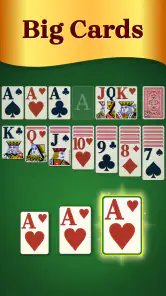
One of the first things you'll notice when you fire up Solitaire for Seniors is the large, easy-to-read cards and buttons. I mean, who wants to squint or fumble around with tiny icons, right? The game’s interface is thoughtfully designed to reduce eye strain, making it a perfect companion for those lazy Sunday afternoons.
Intuitive Gameplay
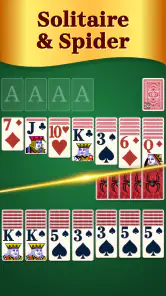
Now, let’s talk about gameplay. If you’ve ever played Solitaire before, you’ll feel right at home. The developers have kept the controls intuitive and straightforward. You simply tap on a card and it moves to the appropriate spot. No unnecessary complications. Just plain old Solitaire goodness!
Gaming Stories You May Enjoy

Dancing Road Turns Short Breaks Into a Test of Rhythm and Timing

Super Stylist Makes Every Outfit a Test of Taste and Patience

Dominoes on Your Terms: Who Should Play and Who Should Pass

Pokémon GO Makes the Familiar World Feel New

Chess.com Turns Rematches Into Rivalries, but Community Has Its Costs

Archery Battle 3D Review: Sharp Aiming, Unclear Feedback
Plus, there’s a handy hint system. So, if you ever find yourself stuck and staring at the screen, a gentle nudge in the right direction is just a tap away. This feature is a game changer for those moments when you’re scratching your head and wondering where to move next.
Small adjustments that matter
I would use a hint as a learning aid, not as an instruction to follow automatically. Before tapping it, I’d scan the visible cards and check whether a move might uncover another card or free a useful space. Then I’d compare the suggestion with my own idea. That little pause keeps the game engaging and helps a newer player understand why a move may be useful, rather than turning each round into a sequence of taps.
One practical trade-off with any card game on a phone is that a move can be easy to make quickly but harder to judge on a small display. I find it sensible to slow down around a crowded layout and tap deliberately, especially if I’m playing one-handed. If a card does not go where I expect, I would first check whether I selected the intended card and destination before assuming the game has failed. A familiar tap-based control scheme is approachable, though it still rewards a steady touch.
The game is made by Guru Puzzle Game and is free to install, with optional in-app purchases priced at $6.99 per item. That makes it easy to try without paying upfront, but I would still check purchase prompts carefully, particularly if the device is shared with a family member. The game is rated for Everyone, and its broad audience makes it suitable to consider for a household device, while ordinary supervision around purchases remains sensible.
Customizable Settings
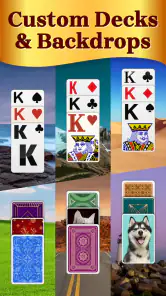
Another cool feature is the customization options. You can change the background and card designs to suit your mood. Feeling a bit jazzy? Go for the vibrant themes. Want something calming? The pastel hues have got you covered. It’s these small touches that make the game feel personal and engaging.
Rather than changing the look every time, I’d choose a background and card design that make the faces easy to distinguish, then keep them for a while. The best-looking theme is not necessarily the most comfortable one: contrast and legibility matter more than novelty when you are scanning a layout. If you share the device, a brief check of the chosen settings before handing it over can also prevent someone else from having to adapt to an unfamiliar appearance.
Let’s not forget the adjustable difficulty levels. Whether you're a seasoned Solitaire pro or a newbie, you can tweak the difficulty to match your skill level. This makes the game accessible to everyone, regardless of how sharp their card-playing skills are.
What kind of solitaire player will enjoy it?
As a card game, it sits on the relaxed end of the mobile solitaire range. Compared with a physical deck, it removes the need to shuffle, arrange cards, or clear a table, which is convenient when space is limited or you want to play while travelling. Compared with a more elaborate digital card collection, its appeal is the familiar solitaire routine rather than a broad menu of different games. If your main goal is variety, tournaments, or deep strategic challenge, I would look for another option; if your goal is a readable, low-pressure solo game, this is a more sensible match.
It is also worth being realistic about what a solo card game offers. It can fill a quiet gap and give you a small decision to focus on, but it does not create the conversation and shared fun of playing cards with someone else. I would recommend it to someone who already enjoys solitaire or wants a gentle way to learn, while suggesting a multiplayer game or an actual deck for a player who values social play more than convenience.
Reliability, speed, and device fit
I would expect a familiar solitaire game to feel responsive during ordinary play because its basic interaction is simple: inspect the cards, choose one, and make a move. Still, perceived speed depends on the phone or tablet as well as the game, so I would not promise the same feel on every device. If it seems slow, closing other active apps and reopening the game is a reasonable first check before deciding that the game itself is the problem.
For reliability, I judge a casual card game by whether I can return to it without fuss and continue playing comfortably. I would avoid making a long session depend on an assumption that progress will always be preserved after closing the app or losing power. If I need to put the device away, I would finish a move and leave the game in a stable state first. That is a simple habit, not a claim about a particular save or recovery feature.
The current release is version 4.4.0-25041679, and the game requires Android 6.0 or later. It has a 4.9 average from around 54,000 ratings, with over one million installs and around 1,600 written reviews. Those figures suggest that many players have tried it, but they cannot tell me whether it will feel comfortable on your particular screen. I would check the card visibility and tapping accuracy during a short first session, especially on an older device or one with a compact display.
Because this is a card game with a straightforward visual layout, I would not choose it expecting demanding action or elaborate effects. That makes it a reasonable candidate for a modest device, but actual smoothness and battery use still depend on the device and how long you play. If you mainly want a game to occupy a few spare minutes, short sessions are a natural fit; if you are comparing apps for extended play, try it on your own device before making it your regular choice.
Why Give It a Try?
So, why should you or your loved ones give this app a whirl? Besides being a fantastic way to pass the time, Solitaire is known to boost cognitive function and help with mental agility. It's a fun way to keep the brain engaged without feeling like you’re working out.
My more modest reason to recommend it is that it offers a familiar, manageable activity when I want a little focus without a complicated setup. I would not treat solitaire as a proven mental-health or cognitive-training program; I see it as light entertainment that asks me to pay attention to cards and choices. That distinction matters if you are choosing a game for someone primarily to address a health concern rather than to enjoy some downtime.
My take after weighing the trade-offs
Solitaire for Seniors is a card game from Guru Puzzle Game, released on January 13, 2023. Its appeal is clear: readable cards, straightforward tapping, hints for moments of uncertainty, and visual choices that let the screen feel more personal. The free entry point lowers the commitment, while optional purchases mean I would pay attention to any prompts rather than assume every extra is included.
Its strongest fit is someone who wants a familiar solo card game that is easy to approach and does not demand a long stretch of attention. Its weaker fit is someone looking for social competition, a wide catalogue of card games, or a technical showcase. I would also be cautious about recommending it sight unseen to a player who struggles with touchscreens; trying a few moves first is the fairest test.
In conclusion, Solitaire for Seniors offers a wonderful blend of entertainment and simplicity. With its large print, easy controls, and customizable features, it’s a fantastic choice for seniors looking to enjoy a classic game with a modern twist. So, grab your device, pour yourself a cup of tea, and get ready for some card-flipping fun!
Solitaire for Seniors Game Pros and Cons
Pros
- User-friendly interface for seniors.
- Large
- easy-to-read card designs.
- Simple one-touch controls.
- No ads in premium version.
- Offline play available.
Cons
- Limited customization options.
- Ads in free version.
- No multiplayer mode.
- Music can be repetitive.
- Requires in-app purchases for extra features.
Frequently Asked Questions
What makes Solitaire for Seniors different from other solitaire games?
Solitaire for Seniors is designed with an easy-to-read interface, featuring larger cards and buttons to accommodate users with visual impairments. The game includes adjustable difficulty levels and tutorials to help seniors who might be new to digital gaming. Its intuitive design ensures that players of all ages can enjoy a seamless gaming experience.
Is Solitaire for Seniors available for both Android and iOS devices?
Yes, Solitaire for Seniors is available for download on both Android and iOS devices. You can easily find it in the Google Play Store for Android users and the App Store for iOS users. Make sure your device meets the minimum system requirements to enjoy a smooth gameplay experience.
Does Solitaire for Seniors offer any in-app purchases?
Solitaire for Seniors is free to download and play, but it does offer optional in-app purchases. These may include additional card designs, themes, or ad-free experiences. While the core game is fully accessible without spending money, these purchases can enhance the game and offer a more personalized experience.
Can Solitaire for Seniors be played offline?
Yes, Solitaire for Seniors can be played offline, making it a perfect companion for travel or areas with limited internet access. Once downloaded, you can enjoy the game without needing an internet connection, allowing for uninterrupted play anytime and anywhere.
What kind of support is available if I encounter issues with the game?
If you encounter any issues while playing Solitaire for Seniors, there is customer support available through the app. You can access the help section, which provides FAQs and troubleshooting tips. Additionally, you can reach out to the support team via email for more personalized assistance. They are committed to ensuring a smooth and enjoyable gaming experience.


