

Solitaire Cruise: Card Games
- Reviews
- 4.5
- Version
- 4.13.2
- Installs
- 10,000,000+

Screenshots



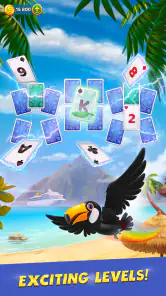
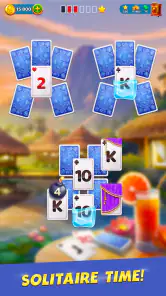



 Analysis by Frivlyz
I went into Solitaire Cruise: Card Games expecting a familiar patience game with a light travel theme, and that is exactly where it works best: as an easy-to-start card game for short breaks. It is a free mobile game in the card category from BELKA GAMES, built around Tri Peaks Solitaire rather than a collection of unrelated modes. The basic appeal is simple: clear the cards, make a few decisions, and continue whenever I have a spare moment.
That simplicity is useful, but it can also make small setup or progress problems feel confusing. A solitaire game should be almost frictionless, so when a screen takes longer to load, progress does not appear as expected, or a purchase prompt interrupts the flow, the experience can feel more complicated than the cards themselves. My review focuses on how I would use it in everyday life, where I would expect trouble, and what I would check before blaming the game.
What the Tri Peaks format feels like in practice
Tri Peaks is easy to understand once the first layout is visible. I look for a card that sits one rank above or below the card currently available, remove it, and hope the next exposed card keeps the chain alive. The pleasure comes from balancing an obvious move against the possibility of preserving a better card for later. It is more active than simply dealing standard Klondike and less demanding than a strategy game that requires long planning.
That makes this a good fit for a bus ride, a waiting room, or a short pause between tasks. I do not need a large block of concentration to enjoy a round. At the same time, the format is not completely mindless. When several cards are available, choosing the order can matter, and a careless tap may close off a useful sequence. I found that the best sessions were the ones where I slowed down for a second instead of treating every move as automatic.
The sea-tour presentation gives the card tables a sense of progression, which is more inviting than opening a plain digital deck every time. Still, the core remains solitaire. Anyone looking for a deep story, competitive multiplayer, or a very broad card collection should adjust expectations. The travel framing supports the game; it does not replace the traditional puzzle at its center.
Where new players are most likely to get stuck
The first point of friction is understanding what counts as a useful move. New players may expect to remove any visible card, while Tri Peaks limits the choice to a neighboring rank. I recommend checking the current card before tapping quickly. If a move seems unavailable, that is usually a rule question rather than a broken screen.
Another common stumbling block is the difference between a completed round and overall progression. Finishing one layout may not feel like reaching a major milestone, especially if the game presents a larger journey around the individual hands. I found it helpful to treat each deal as a self-contained puzzle and the wider cruise as a reason to keep playing, rather than expecting every round to produce a dramatic change.
Gaming Stories You May Enjoy

Dancing Road Turns Short Breaks Into a Test of Rhythm and Timing

Super Stylist Makes Every Outfit a Test of Taste and Patience

Dominoes on Your Terms: Who Should Play and Who Should Pass

Pokémon GO Makes the Familiar World Feel New

Chess.com Turns Rematches Into Rivalries, but Community Has Its Costs

Archery Battle 3D Review: Sharp Aiming, Unclear Feedback
Players can also misread an unsuccessful deal as a technical failure. Tri Peaks depends partly on the order of the cards, and some layouts become difficult because the available sequence runs out. Before restarting the app, I would first check whether the current card has any neighboring rank left on the board. A dead end can be part of the puzzle rather than evidence that the touch controls have stopped responding.
On a small phone screen, the exposed cards and the next-card area may also demand more attention than expected. I prefer using a clean, deliberate tap rather than pressing repeatedly when a card does not disappear immediately. Rapid taps can make it unclear whether the first input registered, particularly when the device is busy changing screens.
Setup checks that prevent avoidable frustration
Because this is a free game, I would install it only from the official store on the device I plan to use. The listed minimum operating system is Android 5.0, so older phones may meet the basic requirement while still feeling less comfortable during loading or transitions. Compatibility is not the same as a smooth experience, especially on hardware with limited free space or many background apps.
After installation, I would open the game with a stable connection and allow the initial screens to finish before switching to another app. This is a practical habit for any title that may need to prepare content or account-related progress. If the first launch appears slow, I would avoid repeatedly closing and reopening it, since that can interrupt the same startup process I am waiting for.
It is also worth checking available storage before installing an update. The current version is 4.13.2, and keeping the operating system and store application in a healthy state can prevent update loops that look like game errors. I would restart the phone if an update remains stuck, then try again rather than immediately deleting the game.
Notifications and purchase prompts are another part of setup that deserves attention. The game is free to download, but it includes in-app purchases ranging from $0.29 to $199.99 per item. I would use the device’s purchase controls and authentication settings before handing the phone to a child or family member. The age classification is Everyone, but an all-ages label does not remove the need for sensible spending safeguards.
A safer workflow for playing without losing momentum
My preferred routine is to begin a round when I have enough time to finish a few moves without rushing, then pause naturally when the layout reaches a clear decision point. That is better than tapping through a sequence while distracted. In Tri Peaks, a moment of attention can preserve a longer run, so the game rewards small pauses more than constant speed.
I also try to identify the purpose of each exposed card. If a move reveals another card that can continue the chain, it may be more valuable than taking a different available card immediately. This is one of the less obvious strengths of the format: the best move is not always the first legal move. When several choices are open, I look for the one that reveals the most useful information while keeping alternatives available.
When I lose a deal, I avoid treating the result as a reason to spend money straight away. I replay the situation mentally, especially the point where I chose between two neighboring cards. That review is more useful than simply repeating the same taps. If the game offers a recovery option during play, I would read the wording and cost carefully before accepting it, because convenience purchases can change a casual session into an expensive habit.
If progress appears to have disappeared, I would first return to the main screen and give the game a moment to refresh. I would then confirm that I am using the same device profile and store account as before. I would not uninstall immediately: removing an app can complicate recovery if progress was stored locally or if the game has not finished synchronizing. A restart of the device and a stable connection are safer first steps.
For a frozen card, I would tap once, wait briefly, and then try a different screen control if one is visible. If the whole interface is unresponsive, I would close the app through the normal system controls, reopen it, and check whether the round resumes. Repeatedly tapping the same card is rarely helpful and may make it harder to tell whether the problem is input delay or an invalid move.
When the app is not the cause of the problem
Not every loading issue comes from the game. A weak mobile signal, an overloaded home network, low device storage, or an operating system process running in the background can produce the same symptoms. I would test another ordinary app or website before deciding that Solitaire Cruise is responsible. If everything is slow, the phone or connection deserves attention first.
Battery-saving modes can also change how quickly an app resumes after being left in the background. If the game reloads after I switch away for a while, I would check whether the phone is aggressively restricting background activity. I would not disable important security settings casually, but I would recognize that the operating system may be managing the app rather than the app failing on its own.
Store updates can create a separate problem from gameplay. If the download will not complete, I would check the store’s pending updates, available storage, and connection, then restart the device. If the game opens normally but a store page behaves oddly, that points more toward the store service or account than the card table.
Purchase trouble deserves the same distinction. A declined transaction may result from the payment method, account settings, or store authentication rather than BELKA GAMES. I would check the purchase confirmation carefully and avoid repeating the transaction several times. The sensible approach is to verify whether a charge was actually made before trying again.
Finally, I would keep the game’s age rating and payment model in mind when sharing a phone. Everyone can enjoy the card play, but the presence of optional items means the device owner should remain in control of purchases. This is especially important when a child can access the screen without understanding that a tap may begin a paid transaction.
Who will enjoy it, and who should choose another solitaire game
I would recommend this game to someone who wants a recognizable solitaire rule set with a more decorative journey around it. It is especially suitable for players who enjoy short sessions, gradual completion, and the small satisfaction of improving their decisions from one deal to the next. The 4.5 average from around 200 thousand ratings and more than 10 million installs suggest that its straightforward format has reached a broad audience, although popularity alone does not guarantee that its style will suit everyone.
The main alternative is a traditional Klondike app. Klondike is usually the better choice for a player who wants the classic layout, a slower planning rhythm, or a more familiar form of solitaire without a travel wrapper. Tri Peaks feels quicker and more chain-based. I prefer it when I have only a few minutes, while Klondike is more satisfying when I want to settle into one longer puzzle.
Dedicated offline solitaire apps may also be preferable for someone who cares most about minimal interruptions and a plain card-table experience. Solitaire Cruise is a weaker match if the player dislikes progression framing, wants complete control over every rule variant, or does not want to encounter optional purchases. In those cases, a simpler paid or ad-focused alternative may feel cleaner, even if it looks less lively.
I would also skip it if my priority were social competition or a large multiplayer community. Nothing about the central Tri Peaks experience makes it a substitute for a competitive card platform. Its strength is personal, low-pressure play, not proving that I can outscore another person in real time.
My practical verdict after using it as a daily card break
Solitaire Cruise: Card Games succeeds because it does not overcomplicate Tri Peaks. I can open it, understand the next move, and play for a short while without learning a large system. The sea-tour setting gives repeated deals a little more purpose than a bare deck, while the card decisions provide enough thought to keep the experience from becoming a pure tapping exercise.
The trade-off is that a simple game leaves little room for technical friction. Slow startup, unclear progress, accidental rapid taps, or an unexpected purchase prompt can dominate the experience because the underlying activity is meant to be so effortless. My advice is to install it on a supported, reasonably maintained phone, start with a stable connection, and use deliberate moves instead of rushing through the layout.
For me, the strongest use case is a quiet five-minute break when I want a familiar puzzle rather than a demanding game. I would keep purchase controls protected, avoid reinstalling during a progress problem, and check the phone or connection before assuming the app is at fault. With those habits, this free card game from BELKA GAMES is an enjoyable choice for casual Tri Peaks fans, but a traditional solitaire app remains the better option for players seeking maximum simplicity, broader rule control, or a completely different style of card play.
My bottom line: choose it for quick, approachable Tri Peaks sessions with a light travel theme; skip it if you want deep card variety, competitive play, or a strictly no-purchase environment. Its best quality is its accessibility, and its main weakness is that the surrounding mobile-game friction can sometimes distract from the very simple pleasure that brought me to the table.
Solitaire Cruise: Card Games Pros and Cons
Pros
- Relaxing solitaire gameplay suitable for short or extended sessions.
- Cruise-themed visuals and destinations add variety to classic card play.
- Large selection of levels provides plenty of content to explore.
- Simple controls make the game accessible for new solitaire players.
- Playable on mobile devices with convenient portrait-oriented sessions.
Cons
- Frequent events and rewards may encourage repetitive daily play.
- Some levels can feel difficult without boosters or extra resources.
- Progression may depend heavily on coins
- lives
- or other limited items.
- Ads can interrupt gameplay
- especially for players using the free version.
- The cruise story may feel secondary to the card-game mechanics.
This Game in Other Languages
Frequently Asked Questions
What is Solitaire Cruise: Card Games?
Solitaire Cruise: Card Games is a casual mobile game built around classic solitaire-style card puzzles, presented through a travel-themed adventure. As you complete levels, you can visit different destinations, earn rewards, and unlock additional content. The game is designed for short sessions, making it suitable for playing during breaks, while still offering progression goals for players who enjoy completing stages and collecting bonuses.
How do you play Solitaire Cruise: Card Games?
The main gameplay follows familiar solitaire rules: arrange cards in the correct order, reveal hidden cards, and clear the tableau before the available moves or cards run out. Each level may introduce different layouts, objectives, or helpful boosters. The controls are simple and touch-friendly, so new players can start quickly, while later stages require more planning and careful use of power-ups.
Is Solitaire Cruise: Card Games free to download?
Solitaire Cruise: Card Games can generally be downloaded and played without an upfront purchase, but it may include optional in-app purchases. These purchases can provide extra coins, boosters, lives, or other advantages and are not normally required to experience the basic game. Players should review the store listing and configure purchase restrictions, especially if children may use the device.
Can Solitaire Cruise: Card Games be played offline?
Some solitaire levels may remain available without a constant internet connection, which is convenient for travel or areas with unreliable service. However, online access may still be required for features such as advertisements, cloud synchronization, events, updated content, rewards, or in-app purchases. Offline availability can also vary by version and device, so it is worth testing the game before relying on it during a trip.
Does Solitaire Cruise: Card Games contain ads or require many permissions?
The game may display advertisements, particularly when players choose to receive optional rewards or continue after certain setbacks. The exact frequency can depend on the version, region, and device. Before installing, check the official Google Play or App Store listing for current privacy information and requested permissions. As with any free game, reviewing these details helps you understand how advertising and personal data may be handled.


