

Solitaire Classic
- Reviews
- 4.7
- Version
- 1.7.2
- Installs
- 5,000,000+

Screenshots
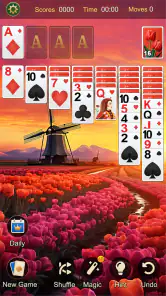
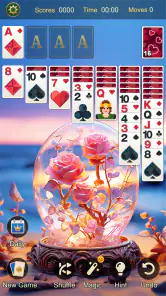
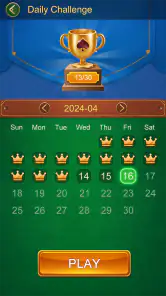


 Analysis by Frivlyz
I find Solitaire Classic works best when I treat it as a small, repeatable break rather than a game I need to rush through. A round gives me a simple task to focus on, while the familiar cards make it easy to pick up without learning a complicated ruleset. Mint Games has made a straightforward card game for Android, and its appeal is less about novelty than having a dependable way to play a few hands whenever I have a spare moment.
A steady routine for a quick game
My usual approach is to scan the tableau before moving anything, checking which face-down cards might be uncovered and whether an available card can help build a foundation. That brief pause matters: making the first legal move is not always the move that gives me the most options. In a short session, I try to preserve flexibility rather than chase immediate progress, especially when several cards seem equally playable.
The choice between drawing one card at a time and drawing three changes the feel of a hand. I use the single-card option when I want a more forgiving, relaxed round, or when I am still getting comfortable with the layout. The three-card draw asks me to plan further ahead because the useful card may not be immediately accessible. Switching between them is a practical way to adjust the challenge to my attention and mood, rather than assuming one mode is right for every session.
Hints are useful as a nudge when I have overlooked a move, but I would not follow them automatically. Before tapping for help, I take another look at the columns and the order of cards in the waste pile. That habit turns a hint into a check on my own reasoning instead of a substitute for it. It is particularly helpful for newer players learning to notice how a move can open a face-down card or make space for a king.
Settings and choices that shape the experience
One decision worth making early is which draw style suits the way you actually play. A one-card draw is a sensible default for casual sessions and for anyone who wants fewer frustrating dead ends. Three-card draw is better when you already know the basic priorities and want a tighter puzzle. I would change modes depending on whether I am playing to unwind or to concentrate, rather than treating difficulty as a measure of skill.
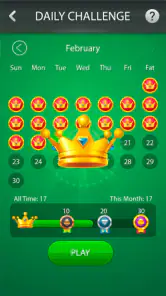
The app also presents daily challenges and a leaderboard, which add goals beyond simply finishing a hand. I see the challenge as a reason to return when I want a defined task; it gives a session a clearer endpoint than starting another ordinary deal. The leaderboard is more appealing if comparing progress motivates you, but it is entirely possible to enjoy the card play without treating other players’ results as a target.
Before settling into a longer session, I would check the game’s available settings and controls on the device, then keep the choices that make cards easiest to read and select. A card game depends on clear visual distinctions, especially when I am playing on a smaller screen or in a bright waiting room. I also prefer to make deliberate taps instead of rushing through a sequence: in solitaire, one misread card can send me searching for the move I meant to make.
Gaming Stories You May Enjoy

Dancing Road Turns Short Breaks Into a Test of Rhythm and Timing

Super Stylist Makes Every Outfit a Test of Taste and Patience

Dominoes on Your Terms: Who Should Play and Who Should Pass

Pokémon GO Makes the Familiar World Feel New

Chess.com Turns Rematches Into Rivalries, but Community Has Its Costs

Archery Battle 3D Review: Sharp Aiming, Unclear Feedback
A classic format with a few modern touches
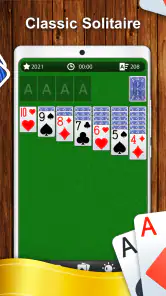
One of the first things you'll notice when you fire up Solitaire Classic is its intuitive and user-friendly interface. It’s like meeting an old friend who’s had a bit of a makeover. The graphics are clean and crisp, making it a joy to play. You still get that familiar setup with the cards laid out in front of you, but the added touch of smooth animations and seamless transitions gives it a fresh feel. Trust me, the developers did a great job at keeping it simple yet visually appealing.
Game mechanics and practical patterns
For those who might be unfamiliar, the objective is simple: move all the cards to the four foundation piles, sorted by suit and in ascending order. But don't let the simplicity fool you—it's all about strategy and a bit of luck! The app offers a hint feature if you’re ever stuck, which is a nice touch for both newbies and seasoned players. Plus, you can choose between drawing one card at a time or three, depending on how challenging you want your game to be.
As I get more comfortable with a hand, I try to use a few repeatable habits instead of tapping as soon as a move appears. I look for chances to reveal face-down cards, because information about the hidden columns often matters more than a quick foundation move. I also avoid emptying a column without a plan for filling it: a vacant space is valuable, but it only becomes useful when I can place a king there. These small checks help me make fewer impulsive moves without turning a casual game into homework.
When several legal moves are available, I consider what each one exposes. Moving a card to a foundation can feel like progress, but keeping it in the tableau may be more useful if it supports a sequence or helps uncover another card. The right choice depends on the layout, so I do not treat any one rule as absolute. That is part of what keeps familiar solitaire engaging: the basic objective stays constant, while the order of decisions changes from hand to hand.
Another cool feature is the daily challenges. These aren't just your average solitaire games; they come with specific goals and can really get you hooked. If you're a competitive soul, the game’s leaderboard will surely pique your interest, letting you see where you stand among other players worldwide. Now, who doesn’t love a little friendly competition?
Where it fits—and where it does not
A realistic use for this game is a few hands during a lunch break or while waiting for an appointment. I can start with a clear goal, play until the next interruption, and return to the same simple kind of puzzle when I have another quiet moment. That makes it a better fit for short, self-contained pauses than for someone looking for a story, a campaign, or a game that depends on a group being available at the same time.
Compared with other familiar solitaire apps, the main draw here is the combination of an uncomplicated card layout with daily challenges and a leaderboard. If you only want the bare card game, those extra goals may not matter much; a very minimal alternative could feel less busy. If you enjoy having a reason to return or a way to compare results, those additions give this version more structure than a plain deck. I would choose based on whether those features encourage you to play, not on the assumption that more features automatically make a better solitaire game.
The game is free to download, with in-app purchases listed at $2.99 to $9.99 per item. I would approach those purchases as optional rather than necessary to understand the basic card game. If your priority is simply to play ordinary hands, you can decide whether the free experience suits you before spending anything. Anyone who dislikes in-app purchase prompts or prefers a completely purchase-free setup should take that into account before settling on a game.
There is also a practical limit to the format: solitaire can only offer so much variety when the central rules remain familiar. Daily goals and the choice of draw style change the context, but they do not turn it into a deep strategy game with a changing campaign. I would skip it if I wanted constant new mechanics, elaborate multiplayer, or a strong narrative. It is at its best when the appeal is the card puzzle itself, not when I expect it to replace a broader game.
Small decisions that make sessions smoother
If I have only a minute, I choose a relaxed hand and focus on clearing one useful face-down card rather than trying to optimize every move. If I have more time, I use the three-card draw and pause to track which cards are visible in the waste pile. Keeping that distinction in mind makes it easier to enjoy both modes: one suits a low-pressure break, while the other rewards closer attention.
I also try not to judge a session only by whether I win. A hand can still be satisfying when it reveals a good sequence of moves, and a loss can show me where I committed too early. The most useful lesson is often specific: perhaps I should have opened a column sooner, or held back a card that could have helped organize the tableau. This kind of self-review is optional, but it gives experienced players something to work on without needing extra systems or invented features.
For a new player wondering whether the rules are approachable, I think they are: the objective is familiar and the hint option can help when the layout feels confusing. For someone who already knows classic solitaire, the choice of draw style and daily challenges are the clearest reasons to keep this particular version in rotation. If you are deciding whether it works for a short commute or waiting room, it is a natural fit as long as you are comfortable playing on your phone and can give the cards enough attention to make deliberate moves.
Who will enjoy it most
What I personally love about this app is how it fits perfectly into those tiny pockets of free time throughout the day. Whether you’re commuting, waiting for an appointment, or just chilling at home, Solitaire Classic is the perfect companion to keep your mind engaged. The satisfaction of completing a game is something I can't quite put into words—it’s just one of those things you need to experience yourself.
It is especially suited to players who already like solitaire, people who want a low-pressure solo activity, and newcomers who would rather learn through a familiar layout than tackle a complicated card game. The Everyone content rating also makes it broadly approachable for different ages, although younger players may still benefit from someone explaining the card order and foundations at first. On Android, the game requires version 5.0 or later, and its current release is version 1.7.2.
Mint Games’ card game has an average rating of 4.7 from around 39,000 ratings, with roughly 5,600 written reviews and over 5 million installs. Those numbers suggest that many players have found a reason to try it, but they do not tell me whether its particular mix of classic play and extra goals matches your taste. I would put more weight on whether you prefer a calm solo puzzle, whether daily challenges appeal to you, and whether you want a familiar card game rather than a more involved mobile experience.
It's also worth noting that the app doesn't bombard you with annoying ads every few seconds, which is a huge plus in my book. You get to enjoy your game without constant interruptions, and that's something that's become quite rare in free apps these days.
In conclusion, if you’re looking for a casual yet engrossing game to add to your collection, Solitaire Classic should definitely be on your radar. It’s a delightful blend of nostalgia and modern gaming, perfect for players of all ages. So go ahead, give it a try, and let those cards shuffle their way into your heart!
Solitaire Classic Pros and Cons
Pros
- Intuitive and easy-to-use interface.
- Minimal ads for a seamless experience.
- Customizable card decks and backgrounds.
- Smooth gameplay with no noticeable lag.
- Offline play mode available.
Cons
- Limited game modes available.
- No multiplayer or competitive features.
- Graphics are basic and not modern.
- In-app purchases can be pricey.
- No daily challenges or rewards.
Frequently Asked Questions
What is Solitaire Classic and how does it differ from other Solitaire games?
Solitaire Classic is a digital version of the traditional card game known for its simple and engaging gameplay. Unlike some modern variations, Solitaire Classic sticks to the original rules and layout, providing a nostalgic experience for those who enjoy the classic solitaire. It is perfect for players seeking a pure, uncomplicated card game without extra features that could distract from the traditional experience.
Is Solitaire Classic available for both Android and iOS devices?
Yes, Solitaire Classic is available for download on both Android and iOS platforms. Users can easily find the app in the Google Play Store for Android devices and the Apple App Store for iOS devices. It ensures that players across different mobile operating systems can enjoy the classic card game on the go, regardless of their device preference.
Does Solitaire Classic require an internet connection to play?
No, Solitaire Classic does not require an internet connection for gameplay. This makes it an excellent choice for users who want to enjoy the game offline, such as during travel or in areas with limited internet access. Players can enjoy uninterrupted gaming sessions without worrying about connectivity issues, making it a reliable choice for solitaire enthusiasts.
Are there any in-app purchases or ads in Solitaire Classic?
Solitaire Classic is typically free to download and play, but it may contain ads to support the developers. Some versions might offer in-app purchases to remove ads or access additional features, such as custom card designs or backgrounds. Users should check the app details in their respective app stores to understand the pricing model and decide if they want to make any purchases.
What features does Solitaire Classic offer to enhance gameplay?
Solitaire Classic offers several features to enhance the gaming experience, such as customizable card decks and backgrounds, an undo button for correcting mistakes, and hints to assist beginners. The game often includes daily challenges and statistics tracking to keep players engaged and motivated. These features ensure that both new and experienced players can enjoy a tailored and satisfying solitaire experience.


