

Soccer Superstar
- Reviews
- 4.6
- Version
- 0.3.10
- Installs
- 100,000,000+

Screenshots

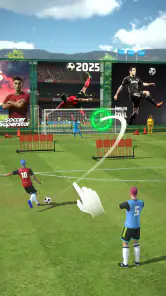


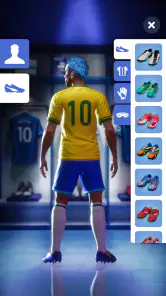

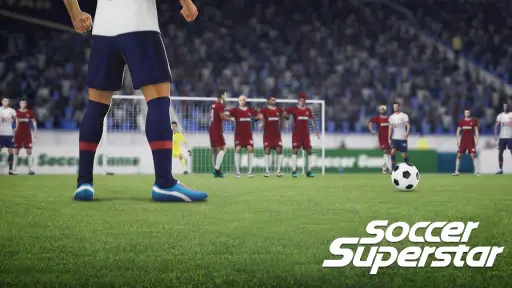
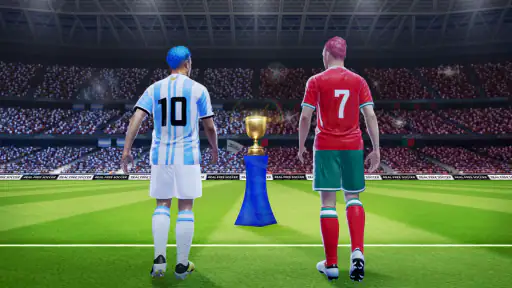
 Analysis by Frivlyz
I usually reach for a phone soccer game when I have a few spare minutes, not when I want to manage a full club or learn a complicated control scheme. Soccer Superstar is aimed at that quick, direct kind of play: you take a shot, try to make it count, and work through a sequence of challenges. Its premise is easy to grasp, but the climb through more than a hundred levels gives those short sessions a sense of direction. I find that combination more appealing than a game that asks me to commit to a lengthy match every time I open it.
Who will enjoy this style of soccer?
This is a sports game for people who want to make the decisive play themselves. The focus is on scoring, rather than building a detailed football club, following a long season, or controlling every player in a full simulation. That distinction matters when you are choosing between soccer games: if you want tactics boards, transfers, or a realistic match that unfolds over time, a management game or a conventional football simulator will suit you better. If you would rather pick up your phone and concentrate on turning an attacking chance into a goal, this one is a more natural fit.
I can picture playing a level while waiting for a friend or taking a short break between errands. The level-based structure gives me a clear stopping point, which is useful when I do not want to lose track of time in an open-ended match. I would treat it as a series of quick soccer puzzles rather than a substitute for playing or watching a full game. Its appeal depends on enjoying the small decisions involved in each attempt, not on expecting the depth of a console simulation.
Our Stories on Soccer Superstar
Why Football Strike: Online Soccer is the Mobile Game Everyone's Talking About
NewsDancing Road Turns Short Breaks Into a Test of Rhythm and Timing
NewsSuper Stylist Makes Every Outfit a Test of Taste and Patience
NewsDominoes on Your Terms: Who Should Play and Who Should Pass
NewsPokémon GO Makes the Familiar World Feel New
NewsChess.com Turns Rematches Into Rivalries, but Community Has Its Costs
NewsMaking short sessions work for you
One practical way to approach the levels is to slow down before each kick. A swipe is simple to understand, but a simple control does not mean every shot is equally easy: the direction and strength you choose can determine whether the ball reaches the target. When an attempt goes wrong, I would change one part of the swipe at a time rather than immediately repeating the same motion. That makes each restart more informative and can help keep a tricky stage from feeling like pure guesswork.
The level format also changes how I would use the game compared with a standard match-based alternative. A full match gives you a broad contest with stretches of build-up; here, the attraction is a more concentrated goal-scoring task. That is convenient when I have only a little time, but it can feel narrow if what I want is a complete match with more roles and decisions. I would choose based on mood: this for a quick attempt at a specific scoring challenge, a fuller football game when I want the whole contest.
Progress without turning every session into a marathon
Working through over a hundred levels gives the game a natural progression path, but I would not treat clearing them quickly as the main measure of enjoyment. A better habit is to stop after a satisfying stage or when I notice I am repeating attempts without thinking. That small pause helps preserve the casual feel and gives me a chance to return with a fresh eye. It is especially useful for a game whose central action is easy to repeat: the control may stay familiar, while the challenge of choosing a successful shot keeps asking for attention.
If you are introducing the game to someone who does not play many sports titles, the direct swipe control makes it approachable. I would still set expectations clearly: it is about scoring through levels, not learning the rules and responsibilities of every position on a football pitch. That focus is a strength for newcomers who want an immediate goal, and a limitation for experienced fans seeking tactical control. The right question is not whether it contains every part of soccer, but whether this particular slice of it is the one you enjoy.
Gaming Stories You May Enjoy

Archery Battle 3D Review: Sharp Aiming, Unclear Feedback

Should You Switch to Geometry Dash Meltdown? A Test of Timing and Patience

Fidget Toys Trading・Pop It 3D: What Happens When the Game Stumbles

NBA LIVE Mobile Makes the Season the Main Event

Sonic Forces: PvP Battle Race - Speed and Strategy Combined

Unlocking the Secrets of Piano Game: Classic Music Song
Gameplay that Packs a Punch
From the moment I started playing, Soccer Superstar had me hooked. The app is designed to give you the thrills of a real-life soccer match. You start off as a rookie player and work your way up to stardom. The controls are super intuitive, which means you won’t spend hours trying to figure out how to score a goal. Just swipe to kick and score!
Graphics and Sound
Now, let’s talk about the graphics. The developers have done an incredible job at making the visuals pop. Each stadium is beautifully designed, and the player animations are pretty fluid. It’s almost like watching a live match! The sound effects are equally impressive. The roar of the crowd as you score a goal? Absolutely exhilarating!
Features that Keep You Engaged
This app isn’t just about playing matches. It’s got a whole bunch of features that keep you coming back for more. You can customize your player, upgrade your skills, and even participate in global tournaments. Plus, there’s a leaderboard to see how you stack up against other players worldwide. Talk about keeping the competitive spirit alive!
Paying, progress, and fair expectations
The game is free to download, with optional in-app purchases priced from $0.99 to $5.99 per item. That gives a useful starting point for deciding whether it fits your budget, but it does not by itself tell me what each purchase contains or whether spending changes progression. I would begin without paying and see whether the core level-to-level play is enjoyable on its own. If a purchase prompt appears, I would check exactly what it offers and whether I actually want it before confirming; there is no need to spend simply because a game has optional items.
That distinction is important when thinking about fairness. A large player community and a leaderboard can make competition sound appealing, but the existence of those features does not establish how rankings work or whether purchases affect them. I would enjoy any competitive element for what it shows me in the game, without assuming that every player is competing under identical conditions. If your main reason for downloading is a rigorously balanced online contest, look for details about the specific competitive rules before making that the deciding factor.
The developer is Real Freestyle Soccer, and the game has an average rating of 4.6 from around 2.6 million ratings, with roughly 25,000 written reviews and over 100 million installs. That level of adoption suggests many people have tried it, but popularity is not a promise that its play style will fit everyone. Its age rating is Everyone, and it is free to start, so it is easy to consider as a casual option; I would still keep purchase decisions separate from the fact that the initial download costs nothing.
What to check before you settle in
For a practical first session, I would try several levels before deciding whether to spend money or make the game part of my routine. That gives you a fair chance to judge the swipe-based scoring, the pace of progression, and whether the presentation holds your attention. It also answers a common question: can you simply try it without committing to a purchase? Yes, the game is free to download, while optional in-app items have listed prices. What those items do is something to inspect in context rather than guess at in advance.
Another useful question is whether it suits a short break. The level structure makes it easier to fit in a brief attempt than a full-length football match, although a difficult challenge may tempt you to keep trying. I would decide on a stopping point before opening it if I have somewhere to be. And if you prefer a game where progress comes from squad planning, detailed tactics, or controlling a complete team, I would skip this in favor of a title built around those activities; the straightforward goal-scoring focus is not a weakness for the right player, but it is a clear boundary.
A few details that shape the recommendation
The game is listed as version 0.3.10 and requires Android 5.0 or later on Android. Those details are handy if you are checking an older device before downloading; they do not tell me how the game will perform on every phone, so I would leave room for differences between devices. The game was released on September 28, 2020, and its current version is the one to check when deciding whether your device can run it.
One trade-off I would keep in mind is that a simple control scheme can be both the easiest route in and the main thing you spend time mastering. You do not have to learn a complicated control layout before attempting a shot, but players who need broad tactical choices may find the central action too focused. Likewise, a level-based challenge can make progress feel clear without offering the same kind of variety as a season or a management campaign. I see that as a question of preference, not a reason to expect one style to replace the other.
Final Thoughts
In conclusion, Soccer Superstar is a fantastic app for anyone who loves soccer. It’s got the perfect blend of fun, competition, and strategy. Whether you’re a die-hard fan or just looking for a fun game to pass the time, this app is definitely worth a download. Just a heads up though, it’s pretty addictive, so make sure you’ve got some free time on your hands!
So, if you’re ready to kick off your soccer journey, why not give Soccer Superstar a try? It’s available for both Android and iOS, and I promise you won’t regret it. Happy gaming!
Soccer Superstar Pros and Cons
Pros
- User-friendly controls for easy gameplay.
- Realistic graphics enhance gaming experience.
- Offline mode available for on-the-go play.
- Regular updates with new features.
- Engaging challenges keep players hooked.
Cons
- In-app purchases can be expensive.
- Limited customization options.
- Ads can interrupt gameplay.
- Requires frequent updates.
- Some levels can be too challenging.
This Game in Other Languages
Frequently Asked Questions
What is Soccer Superstar, and how does it stand out from other soccer games?
Soccer Superstar is a dynamic and engaging soccer game available on both Android and iOS platforms. It distinguishes itself from other soccer games with its intuitive swipe-based mechanics, allowing players to control shots with precision. The game combines realistic graphics with an arcade-style experience, making it accessible to casual players while still challenging for soccer enthusiasts. With its offline play capability, Soccer Superstar offers a smooth gaming experience without needing a constant internet connection.
Is Soccer Superstar free to play, and are there in-app purchases?
Yes, Soccer Superstar is free to download and play, but it does include in-app purchases. These purchases are optional and are mainly used to enhance the gaming experience by unlocking new levels, customizing characters, or acquiring special abilities. While the game can be fully enjoyed without spending money, some players may opt for these purchases to speed up progression or to personalize their gameplay experience.
What are the system requirements to play Soccer Superstar on Android and iOS devices?
To enjoy Soccer Superstar on an Android device, you'll need a version of Android 5.0 or higher and at least 100 MB of free storage space. For iOS users, the game requires iOS 10.0 or later and similar storage space. While these are the minimum requirements, having a device with better specifications will enhance the game's performance and graphics, providing a smoother and more immersive experience.
Can I play Soccer Superstar offline, or do I need an internet connection?
One of the appealing features of Soccer Superstar is its offline play capability. Players can enjoy the game without an active internet connection, making it an excellent choice for those who travel frequently or have limited access to Wi-Fi. This offline functionality ensures that you can continue to enjoy the game anytime and anywhere, without the need for constant connectivity.
How does the progression system work in Soccer Superstar, and is it beginner-friendly?
Soccer Superstar features a straightforward progression system that is beginner-friendly. Players advance through various levels by completing challenges and winning matches. The game's mechanics are easy to learn, with a gradual increase in difficulty to keep players engaged. Tutorials and guides are available to help new players understand the gameplay, making it accessible for those who may not be familiar with soccer games. This balance of simplicity and challenge ensures that both new and experienced players can enjoy the game.


