

Skyline Bowling
- Reviews
- 4.3
- Version
- 3.12.5
- Installs
- 1,000,000+

Screenshots




 Analysis by Frivlyz
What makes a mobile bowling game worth keeping is not a long list of modes; it is whether each throw gives you a reason to try again. That is the angle I would use to approach Skyline Bowling: as a quick sports game built around the feel of aiming, releasing, and seeing what happens, with unusual settings and special abilities adding a twist to familiar lane play. I like that premise for short breaks, though it also means the game is best judged as a playful alternative to bowling, not a full substitute for time at a real alley.
A familiar sport with a less familiar setting
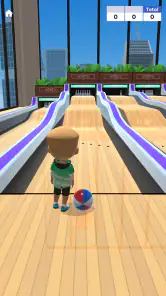
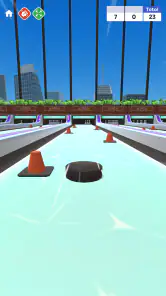
The central appeal is the contrast between bowling’s simple objective and the game’s more playful presentation. You still want to send the ball toward the pins, but the distinctive maps and special abilities make the experience feel less like a straight recreation of a neighborhood lane. That change matters: it gives a round its own visual context and can make a familiar sport more inviting when I only have a few minutes to play.
VOODOO is the developer behind this free sports game, which is aimed at Teen players. Its average rating is 4.3 from around 7,900 ratings, and it has been installed over a million times. Those figures suggest that plenty of people have tried it, but they don’t guarantee that its style will suit everyone. I’d treat the game as a low-commitment way to see whether this particular take on bowling clicks with you.
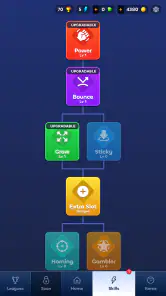
What the ability-and-map angle changes
In ordinary bowling, the lane is part of the challenge but generally not the attraction; the interest comes from your aim, delivery, and score. Here, the unusual maps and abilities are the more important distinction. They give the game room to feel lively without asking a new player to learn a complicated sport simulation first. If you enjoy arcade versions of real activities, that balance is likely to be the draw.
There is a trade-off, though. Special abilities can make a bowling game feel less like a test of consistent technique and more like a game of adapting to its own rules. That can be a welcome change when I want something light, but it may frustrate a player who expects a close digital copy of alley bowling. If realism, detailed lane practice, or the social atmosphere of playing in person is the priority, a conventional bowling simulator or an actual local game is a better fit.
A good fit for short, casual sessions
I can see this working best in the small gaps of a normal day: a few minutes while waiting for a friend, taking a break between tasks, or passing a quiet stretch of a commute as a passenger. The central idea is easy to understand, so it suits someone who wants to get into a sports game without first committing to a long learning session. It can also be a cheerful pick for a casual hand-off between friends who want to compare how they handle the same kind of challenge.
For a more useful first session, I’d pay attention to how each ability changes the way I approach a shot rather than rushing through rounds. Trying to understand the effect of a game’s special mechanics is more rewarding than treating every turn as an identical attempt to knock down pins. The maps are also part of the experience, so I’d let their differences shape my expectations instead of assuming that one approach will feel right in every setting. That small shift helps make the game’s unusual presentation feel like a reason to play, not just decoration.
Gaming Stories You May Enjoy

Dancing Road Turns Short Breaks Into a Test of Rhythm and Timing

Super Stylist Makes Every Outfit a Test of Taste and Patience

Dominoes on Your Terms: Who Should Play and Who Should Pass

Pokémon GO Makes the Familiar World Feel New

Chess.com Turns Rematches Into Rivalries, but Community Has Its Costs

Archery Battle 3D Review: Sharp Aiming, Unclear Feedback
Where it may not fit
The light, arcade-style direction is also its main limitation for some players. Anyone looking for measured practice, dependable real-world bowling technique, or a calm simulation may prefer a more realistic alternative. And although the game is free to download, it includes in-app purchases ranging from $0.49 to $99.99 per item. I’d decide in advance whether I’m happy simply trying the game as it comes, and avoid treating optional spending as a requirement for enjoying a quick session.
The game’s current version is 3.12.5, and it has received around 1,200 reviews alongside its ratings. For a practical decision, I would focus less on the version number and more on what I want from a mobile bowling game: a playful setting and quick entertainment, or a detailed practice tool. Skyline Bowling is more naturally suited to the first. Its Teen content rating is another useful point for households considering whether it suits a younger player.
First Impressions
So, I downloaded Skyline Bowling after hearing quite a bit of buzz about it. To be honest, I wasn’t expecting much more than your typical bowling app, but boy, was I wrong! From the moment I launched the app, I was greeted with eye-catching graphics that made me feel like I was stepping into a real, albeit digital, bowling alley. The interface is slick and user-friendly, ensuring that even the most tech-averse among us can navigate with ease.
Gameplay and Features
Let’s dive into the gameplay. The mechanics are straightforward, yet surprisingly realistic. You swipe your finger to roll the ball, and the physics engine does a fantastic job of simulating the nuances of a real-life throw. It’s all about timing and precision, which makes hitting that perfect strike all the more satisfying.
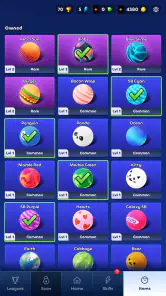
What really sets this app apart, though, are the features. You can choose from a variety of ball designs, each with different weights and spins. Plus, the game offers multiple lanes with unique challenges, keeping the experience fresh and engaging. And if you’re a competitive soul, the multiplayer mode lets you challenge friends or random players from around the globe. Nothing beats the thrill of outscoring a stranger from the other side of the world, right?
Customization and Rewards
Another thing I love about Skyline Bowling is the customization. You can personalize your avatar, which adds a nice touch of individuality. As you play, you earn coins and can unlock new outfits or gear. It’s a great way to keep players motivated and coming back for more. Plus, who doesn’t like showing off a cool new look when playing against friends?
The Final Frame
In conclusion, Skyline Bowling is more than just a game; it’s a full-fledged bowling experience that fits right in your pocket. Whether you’re a seasoned pro or just looking for some casual fun, Skyline Bowling has something for everyone. The combination of realistic gameplay, stunning graphics, and engaging features makes this app a must-try for any bowling aficionado.
So, what are you waiting for? Lace up your virtual bowling shoes and give Skyline Bowling a spin. Trust me, you won’t be disappointed!
Making a few minutes count
One practical way I’d use it is as a small shared challenge rather than a game I expect to occupy an entire evening. If a friend is nearby, passing the phone back and forth can turn a short wait into a light competition without needing to arrange a trip to a bowling center. When playing alone, I’d keep a simple goal for the session—such as paying attention to how a map or ability changes my choices—so a handful of turns feels intentional rather than repetitive.
That approach also helps answer a common question: is it approachable if I’m not already good at bowling? The basic idea is recognizable, and the arcade framing should be easier to pick up than a detailed simulation. I would still give myself time to adjust to the way a particular round behaves instead of expecting real-world technique to transfer perfectly. The useful skill here is learning the game’s own rhythm, not assuming that a real bowling stance or release can be reproduced on a touchscreen.
Choosing it over other bowling games
Compared with the usual mobile bowling alternative—a lane-focused simulator that tries to reproduce a straightforward match—this game’s stronger identity is its unusual maps and abilities. I would choose that approach when I want variety and a more playful mood. A conventional simulator is the better choice when I care most about practicing familiar shots or keeping the rules and presentation close to a real alley. Neither approach is automatically better; the right one depends on whether I want a quick arcade diversion or a more literal sports imitation.
It is also worth separating social play from the promise of a full bowling night. The original appeal of an in-person game includes conversation, movement, and the shared setting, none of which a phone can replace. A mobile match is convenient precisely because it asks less of you, but that convenience makes it a different kind of entertainment. I’d use it to fill a spare moment or spark a little friendly rivalry, not as a reason to skip an outing that I actually want.
Small habits that improve the experience
For a first try, I’d avoid making purchases until I know whether I enjoy the core loop. The game is free to start, while optional in-app items span a broad price range; that makes it sensible to treat spending as a separate choice rather than part of learning the game. I’d also take a moment to notice what an ability seems to change before using it casually. That is a simple way to get more out of the central hook without assuming there is a hidden strategy or a guaranteed shortcut.
If I were introducing it to someone else, I’d explain the appeal as “bowling with a playful twist,” then let them decide after a short session. That is more useful than promising a realistic training tool or an endlessly deep competitive game. The Teen rating is worth considering for families, while the free entry point makes it easy for an interested player to sample the style before deciding whether it belongs on their phone.
Who should give it a try
I’d recommend it to people who enjoy quick sports games, like seeing familiar activities presented in a less serious way, or want an easy option to share casually with friends. It may also suit bowling fans who are open to an arcade interpretation rather than expecting the exact feel of polished lanes and a real ball. The strongest reason to try it is not that it replaces bowling; it is that it offers a compact, game-like version of the idea when a real outing is inconvenient.
I’d steer away from it if I wanted a dependable way to improve my real-world score, a highly realistic simulation, or a game whose appeal depends entirely on sustained strategic depth. Those expectations would make the maps and special abilities feel like distractions instead of the point. Players who dislike optional purchases should also be comfortable ignoring them, since the free download does not mean every item is free.
My overall view is that Skyline Bowling makes the most sense when I meet it on its own terms. It is a casual sports game with a distinct arcade angle, suited to short sessions and informal competition. I’d try it for a few rounds, notice whether its settings and abilities keep each attempt interesting, and then decide whether that style is enough to bring me back. If what I really want is the measured feel of an actual bowling lane, I’d choose a more realistic alternative; if I want an easy, playful diversion, this is the kind of game I’d happily keep in mind.
Skyline Bowling Pros and Cons
Pros
- Smooth and intuitive user interface
- Realistic physics for a true bowling experience
- Wide variety of bowling balls to choose from
- Multiplayer mode to challenge friends
- Engaging sound effects enhance gameplay
Cons
- Occasional lag in multiplayer mode
- In-app purchases can be pricey
- Limited customization for avatars
- Ads can be intrusive at times
- Requires constant internet connection
Frequently Asked Questions
What is Skyline Bowling?
Skyline Bowling is a mobile gaming app designed for both Android and iOS platforms. It offers an immersive and realistic bowling experience with various game modes and challenges. Users can play solo or compete with friends online, making it a versatile choice for both casual and competitive players. The game features stunning graphics and realistic physics to enhance the user experience.
How can I download Skyline Bowling?
Skyline Bowling is available for download on both the Google Play Store for Android devices and the Apple App Store for iOS devices. Simply search for 'Skyline Bowling' in your respective app store, and click on the download button to install it on your device. Ensure you have a stable internet connection for a smooth download process.
Is Skyline Bowling free to play?
Skyline Bowling is free to download and play; however, it offers in-app purchases. While you can enjoy the core features without spending money, certain premium features, cosmetic items, or additional game modes may require payment. This allows users to enhance their gaming experience based on their preferences.
What are the system requirements for Skyline Bowling?
To ensure optimal performance, Skyline Bowling requires Android devices to run on version 5.0 (Lollipop) or later, and iOS devices to be on iOS 11.0 or later. Additionally, a device with at least 2GB of RAM and a stable internet connection is recommended to enjoy smooth gameplay and access online features without interruptions.
Can I play Skyline Bowling offline?
Skyline Bowling offers an offline mode, allowing users to enjoy the game without an internet connection. However, some features, such as online multiplayer and leaderboard updates, require an active internet connection. This offline capability makes it convenient for users to play anytime, anywhere, even when they are not connected to the internet.


