

Sesame Street Alphabet Kitchen
- Reviews
- 3.8
- Version
- 2.6.2
- Installs
- 10,000,000+

Screenshots
 Analysis by Frivlyz
I’d treat Sesame Street Alphabet Kitchen as a short, shared activity rather than a complete literacy program. Its kitchen theme gives young children a playful reason to handle letters and words, while Cookie Monster and Elmo make the experience feel familiar. I find that combination most useful when a child is curious about letters but not yet ready to sit with a workbook. The game is free to start, though optional purchases mean it is worth checking what is available before handing over a device.
Who will enjoy this kind of learning
This educational game is aimed at early learners, and its strongest audience is children who respond to characters, colorful play, and simple hands-on tasks. A caregiver can sit nearby and turn a session into a conversation: ask what letter the child is choosing, invite them to say its sound, then think of another word that begins with it. That small bit of adult involvement can make the activity more meaningful than simply watching the screen.
It can also suit a child who is willing to explore but loses interest when practice feels like a test. The pretend cooking gives letter work a clear theme, and making a word can become a little shared accomplishment. I would not expect it to replace reading together, talking about words, or a teacher’s guidance. Instead, I see it as one modest activity in a broader routine of stories, conversation, and play.
A practical way to fit it into the day
Imagine a child waiting while dinner is being prepared. A short turn with the game could occupy that pause, followed by a real-world prompt: notice a letter on a food package, or think of a word connected to what is being cooked. The useful trick is to let the screen session lead into a spoken exchange rather than stretching it simply because the child is entertained. If attention starts to drift, stopping on a positive moment is better than turning practice into a chore.
For an adult, it helps to keep the goal small. Instead of expecting a child to master several letters in one sitting, focus on noticing one sound or talking through one word. Children vary in how quickly they recognize letters and how much repetition they enjoy, so I would follow the child’s interest rather than assume a fixed pace. That makes the game easier to use as a flexible prompt, not a lesson plan that must be completed.
How it differs from other early literacy choices
Compared with alphabet videos, this game invites children to interact with the letters rather than only watch and listen. Compared with paper cards or a book, it adds animated Sesame Street characters and a playful kitchen setting, but it also puts the activity on a screen. Each option has a place: a book is better for sharing a longer story, cards work well for quick offline practice, and this game may appeal when a child wants to tap and make something.
That trade-off matters in a household trying to balance screen time. I would choose it when the child is engaged by Elmo and Cookie Monster or needs a change from passive viewing, and choose a book or hands-on letter play when the aim is more conversation away from a device. It is also not the right fit for a child who finds character animations distracting or wants open-ended play beyond the game’s word-building premise.
Gaming Stories You May Enjoy

Dancing Road Turns Short Breaks Into a Test of Rhythm and Timing

Super Stylist Makes Every Outfit a Test of Taste and Patience

Dominoes on Your Terms: Who Should Play and Who Should Pass

Pokémon GO Makes the Familiar World Feel New

Chess.com Turns Rematches Into Rivalries, but Community Has Its Costs

Archery Battle 3D Review: Sharp Aiming, Unclear Feedback
Purchases, expectations, and a fair trial
The game is free, with in-app purchases listed at $2.99 per item. That gives families a way to try it before deciding whether any paid content is worthwhile, but the presence of purchases means I would explore the free portion first and make purchase decisions with an adult present. I would not assume every activity is available without paying, or that buying something is necessary for a child to enjoy the basic idea.
For context, Sesame Workshop develops the game, its age rating is Everyone, and it has a 3.8 average from about 15,000 ratings, with more than 10 million installs. Those figures suggest it has reached many families, but popularity alone cannot tell me whether a particular child will connect with its pace or style. I would use the free experience as the real test: does the child try the letters, talk about the words, and want to return without needing constant prompting?
What I would check before settling in
The game was released in 2016, and version 2.6.2 requires Android 5.1 or later. If you are installing it on an older device, checking that requirement first can save time. I would also spend a moment beside the child at the start, both to see how the activities work for them and to keep any purchase choices in an adult’s hands. That is a practical safeguard for a game meant for young players, not a reason to make the experience feel supervised every second.
One point I would keep in mind is that a child’s enjoyment and learning are not identical. A child may delight in the baking theme without retaining every letter sound, so I would occasionally pause and ask them to name or describe what they made. If they cannot yet do that, there is no need to turn the moment into a quiz; a gentle model and another chance later are more suitable. The game works best as an invitation to practice, not proof that a skill has been learned.
I’d treat Sesame Street Alphabet Kitchen as a short, shared activity rather than a complete literacy program. Its kitchen theme gives young children a playful reason to handle letters and words, while Cookie Monster and Elmo make the experience feel familiar. I find that combination most useful when a child is curious about letters but not yet ready to sit with a workbook. The game is free to start, though optional purchases mean it is worth checking what is available before handing over a device.
Whipping Up Fun with Letters
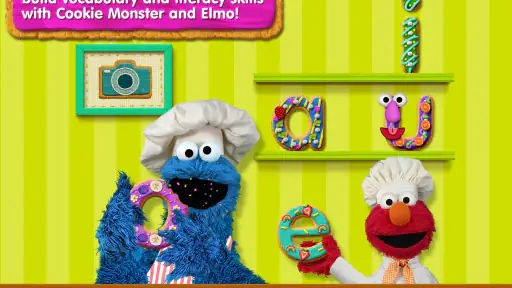
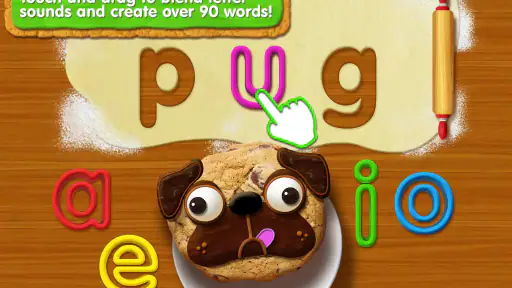
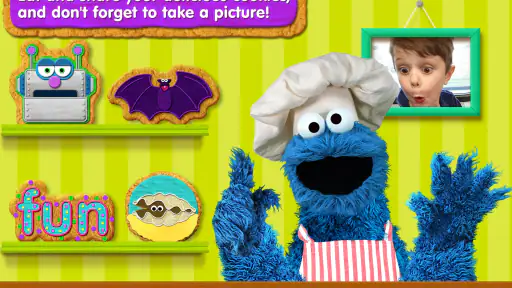
As soon as you launch Sesame Street Alphabet Kitchen, you’re greeted by the friendly faces of Cookie Monster and Elmo. These beloved characters are here to make learning the alphabet a playful and engaging experience. The app is designed to spark creativity through word-building activities. Imagine your little chef creating words with dough and baking them into word cookies. It’s not just an app; it’s a kitchen of imagination!
Interactive and Entertaining
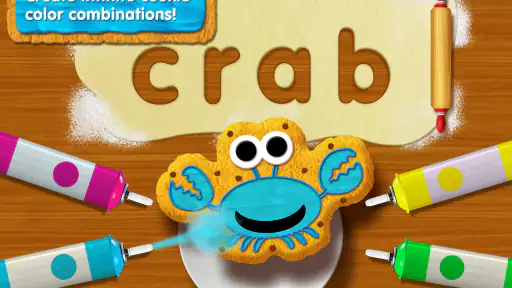
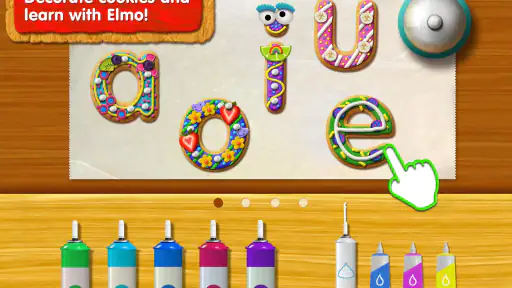
One of the first things that struck me was how interactive the app is. Kids are encouraged to tap, swipe, and drag ingredients to form letters and words. Watching Cookie Monster munch on the cookies they create is pure joy! It’s a clever way to keep children engaged while they learn. Plus, the animations are vibrant and colorful, which keeps the young ones glued to the screen without even realizing they’re learning. Genius, right?
Learning Through Play
This isn’t just an app for playtime; it’s a learning tool disguised as fun. The app focuses on improving vocabulary and phonics, helping kids understand the sounds that different letters make. It’s like having a mini classroom right in your pocket. The best part? The app adjusts its difficulty based on the child’s progress, ensuring they’re always challenged but never frustrated. Talk about a smart cookie!
Parents will appreciate the educational value, as it aligns with many early learning curriculums. And let’s be real, anything that can keep the kids entertained while I sip my coffee is a win in my book!
A Few Crumbs of Feedback
While the app is a treasure trove of learning, I noticed that some of the features require in-app purchases to unlock. It’s a bit of a bummer if you’re not looking to spend extra, but the free content is still quite substantial. Also, a little more variety in the games could keep things fresh for kids who are quick learners.
Overall, Sesame Street Alphabet Kitchen is a delightful blend of entertainment and education. It’s a wonderful way to introduce young children to the alphabet and basic vocabulary. Whether you’re a parent, teacher, or just a Sesame Street fan, this app is sure to bake up some smiles and learning!
Sesame Street Alphabet Kitchen Pros and Cons
Pros
- Engaging educational content
- Interactive and fun gameplay
- Colorful graphics
- Fosters creativity
- Suitable for young children
Cons
- In-app purchases needed
- Limited free content
- Requires internet connection
- Can be repetitive
- High battery usage
Frequently Asked Questions
What is Sesame Street Alphabet Kitchen?
Sesame Street Alphabet Kitchen is an educational app designed for young children to learn about letters and words through fun and interactive activities. It is developed by the trusted Sesame Workshop team, known for creating engaging and educational content for kids. The app features beloved characters like Cookie Monster to guide children in creating new words, enhancing their vocabulary and phonics skills in an entertaining way.
What age group is Sesame Street Alphabet Kitchen suitable for?
This app is specifically designed for preschool-aged children, typically between the ages of 3 to 5 years. It aims to help young learners develop foundational literacy skills in a playful environment. Parents and educators appreciate its age-appropriate content that aligns with early childhood education standards, making it a valuable tool for early language development.
Is Sesame Street Alphabet Kitchen available on both Android and iOS devices?
Yes, Sesame Street Alphabet Kitchen is available for download on both Android and iOS platforms. This allows users with different types of devices to access the educational content. You can find it on the Google Play Store for Android devices and the Apple App Store for iOS devices, ensuring wide accessibility for families and educators.
Does Sesame Street Alphabet Kitchen require an internet connection to play?
One of the convenient features of Sesame Street Alphabet Kitchen is that it does not require an internet connection to play. This means children can enjoy learning and playing with the app anytime and anywhere, making it a perfect companion for travel or places where internet connectivity might be limited.
Are there any in-app purchases or advertisements in Sesame Street Alphabet Kitchen?
Sesame Street Alphabet Kitchen offers a safe and ad-free environment for children to learn. The app does not contain any third-party advertisements, ensuring a distraction-free experience. While the basic version is free, there might be optional in-app purchases for additional content or features, allowing parents to enhance the app's educational potential at their discretion.


