

Sago Mini School (Kids 2-5)
- Reviews
- 3.4
- Version
- 4.5
- Installs
- 1,000,000+

Screenshots

 Analysis by Frivlyz
My first impression of Sago Mini School is of a bright, friendly play space that invites a young child to explore rather than sit through a lesson. That distinction matters: for ages two to five, an educational game works best when the child can try things at their own pace, and the grown-up can join without turning the moment into a test. I see this as a playful option for short stretches of shared screen time, not a substitute for books, conversation, or hands-on play.
A gentle first impression for small learners
The game is made by Play Piknik and sits in the educational category, with a focus on early learning. It is free to download, though in-app purchases range from $7.99 to $99.99 per item, so I would check the purchase options before handing a device to a child. Its Everyone age rating is reassuring as a broad content label, but it does not tell you whether the activities suit your particular child’s attention span or stage of development.
I would be most likely to bring it out when a child wants to tap around while I prepare a meal, or when we have a few calm minutes before leaving the house. In that setting, the useful question is not whether the game can keep a child busy indefinitely; it is whether it offers something worth talking about afterward. A puzzle, a color choice, or a curious character can give a parent an easy opening: “What did you notice?” That small conversation is where screen play can become more social and memorable.
A colorful world with a clear purpose
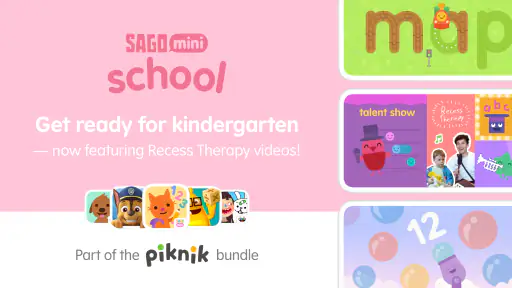
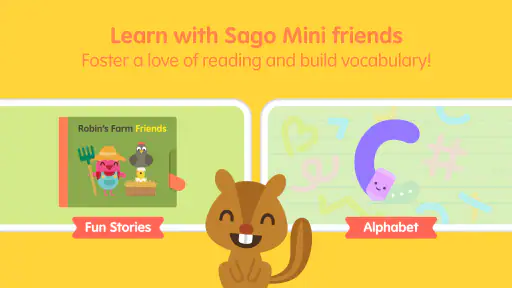
The first thing that caught my eye about Sago Mini School is its vibrant and colorful interface. It's like stepping into a cartoon world where everything is interactive and learning is seamlessly blended with play. If your kid is anything like mine, who loves to explore and discover, they’ll feel right at home here.
The art direction is doing practical work, not just decorating the screen. Strong colors and approachable characters help make the activities feel welcoming to children who are still learning how to navigate an app. The overall mood is more like a cheerful playroom than a formal classroom, which suits the age range. I also like that the setting gives adults a natural way to connect an on-screen moment with something nearby: a shape on the screen can prompt a search for the same shape in a room, while a color choice can lead into a simple sorting game with toys.
How the activities invite discovery
Forget the old-school rote learning methods! This app introduces various themes like space, underwater exploration, and even basic science, all crafted with the little ones in mind. I loved how each module is designed to spark curiosity and creativity. For instance, in the space module, kids can learn about planets by piecing together puzzles or hearing fun facts from animated characters.
For a child who is not yet reading, the value of this kind of activity is that an idea can be explored through pictures, interaction, and a grown-up’s voice together. I would sit alongside a toddler the first few times, narrating what is happening and letting them choose what to try, rather than expecting them to follow a fixed sequence independently. That also helps me judge whether the activity is a good fit: some children enjoy experimenting with a puzzle, while others may prefer to watch first and copy later.
Gaming Stories You May Enjoy

Dancing Road Turns Short Breaks Into a Test of Rhythm and Timing

Super Stylist Makes Every Outfit a Test of Taste and Patience

Dominoes on Your Terms: Who Should Play and Who Should Pass

Pokémon GO Makes the Familiar World Feel New

Chess.com Turns Rematches Into Rivalries, but Community Has Its Costs

Archery Battle 3D Review: Sharp Aiming, Unclear Feedback
The range of themes can also help parents make a small routine feel fresh. If a child is fascinated by the sky one day, a space-themed activity may hold their attention; another day, an underwater setting can offer a different visual starting point. I would treat these themes as invitations to explore, not as a structured course that guarantees a particular learning outcome. The best follow-up is often simple: draw a planet together, talk about an animal, or ask the child to explain what they just tried in their own words.
Choice, customization, and useful limits
One of the coolest features is the ability to customize the learning experience. Parents can choose specific themes and activities that align with their child’s interests or educational needs. I found this particularly helpful when trying to build on topics my kid showed more interest in, like colors and shapes. It’s a great way to tailor learning without making it feel like a chore.
Choice can help prevent a young child from feeling pushed through material they are not ready to enjoy. I would use it in a modest way: pick a theme the child already likes, then let them explore rather than switching rapidly between activities to chase every possible skill. If a child is tired or easily frustrated, a familiar topic may be a better choice than introducing something new. Conversely, if they lose interest, changing the activity can be more sensible than insisting they finish.
There is a trade-off, though. An app with several choices can be less calming if a child spends the whole session browsing instead of playing. I would offer two options aloud, or choose the activity together, then keep the device within reach so the child can ask for help. This gives a little structure without taking away the sense of agency that makes exploratory play appealing.
Characters, sound, and the pace of play
The characters are downright adorable and do an excellent job of holding a child’s attention. They guide the kids through different activities, making the learning journey engaging and sometimes downright hilarious. Trust me, you’ll hear giggles and see smiles as your child interacts with these lovable guides.
The friendly character-led presentation helps the game feel less like a worksheet, and that is a real strength for children who resist anything that looks like formal practice. Sound and animation can make a small action feel rewarding, but young players vary: a child who enjoys lively feedback may respond warmly, while one who is sensitive to busy screens may need a quieter setting or a shorter session. I would watch the child rather than assume that more stimulation always means more engagement.
For a practical routine, I would keep play brief and give it a clear endpoint: one activity before lunch, or a short turn while waiting for an appointment. That makes it easier to move on without a sudden battle over the device. A parent can also use the end of a session to bridge back to offline play, asking the child to act out a character, draw something from the activity, or find a related object in the room.
How it compares with familiar learning options
Compared with alphabet or number drill apps, this game appears more exploratory and character-led, which may suit a preschooler who learns best by trying things rather than repeating answers. Compared with watching a children’s video, it gives the child a more active role: they can make choices and interact instead of only following what is on screen. Neither comparison makes it the right choice for every family. If your main goal is focused letter tracing or a very specific school-readiness skill, a dedicated practice app or an adult-led activity may be a closer match.
It is also different from a physical puzzle or a stack of picture books. The app is convenient when you need a portable activity, but it cannot replace the tactile experience of turning pages, moving real objects, or sharing a toy with another child. I would treat it as one tool in a mixed routine: a little digital exploration alongside drawing, pretend play, reading aloud, and everyday conversation.
What parents should weigh before installing
The game is free to start, but the in-app purchase range is broad enough that I would review the available options before a child plays alone. A useful habit is to set expectations before opening the app: explain that the child can choose among the activities available, while purchases are an adult decision. That simple boundary prevents a playful session from turning into a negotiation over locked or paid content.
It has over a million installs, an average rating of 3.4 from around 6,500 ratings, and 538 written reviews. I would take that reception as a reason to try it thoughtfully rather than as a promise that every family will love it. The current version is 4.5, it was released on February 10, 2021, and it requires Android 5.1 or later. Those details may help with basic device compatibility, but the more important test is whether the interface and activity style suit the child using it.
For a first try, I would sit with the child, let them choose one activity, and notice whether they understand what to do without repeated adult instructions. If they enjoy exploring but need occasional guidance, that can make for a pleasant shared session. If they become frustrated, keep tapping without engaging, or are more unsettled by the animation and sound, I would stop and try a quieter activity away from the screen instead. That is a more useful measure of fit than trying to make every child enjoy the same game.
A playful option, not a complete learning plan
Parents may wonder whether a preschooler can use it independently. I would not count on that for every child in this age range: a confident older preschooler may manage some exploration, while a younger toddler is more likely to benefit from an adult nearby. The first few sessions are a good chance to see whether the child can make sense of the choices and recover when an activity does not go as expected.
Another practical question is whether it works well for a child who already has plenty of screen time. In that case, I would use it selectively rather than adding it automatically to the daily routine. Its educational theme does not make unlimited play necessary; a short shared turn followed by a book, a drawing, or an outdoor activity is a more balanced way to use it. Families seeking a strict curriculum, measurable lessons, or a screen-free experience should choose another option.
Sago Mini School has a playful identity that makes early-learning activities feel approachable, and its themes and characters give parents several easy ways to join in. I would recommend giving it a try if your child enjoys colorful, exploratory play and you are comfortable supervising a free game with in-app purchases. I would skip it if you need a tightly structured teaching tool or want to avoid screen-based activities altogether. For the right household, its best quality is not that it replaces ordinary play, but that it can give a curious child and a nearby adult one more thing to explore together.
What’s the Buzz About?
The first thing that caught my eye about Sago Mini School is its vibrant and colorful interface. It's like stepping into a cartoon world where everything is interactive and learning is seamlessly blended with play. If your kid is anything like mine, who loves to explore and discover, they’ll feel right at home here.
Interactive Learning Modules
Forget the old-school rote learning methods! This app introduces various themes like space, underwater exploration, and even basic science, all crafted with the little ones in mind. I loved how each module is designed to spark curiosity and creativity. For instance, in the space module, kids can learn about planets by piecing together puzzles or hearing fun facts from animated characters.
Creative Customization
One of the coolest features is the ability to customize the learning experience. Parents can choose specific themes and activities that align with their child’s interests or educational needs. I found this particularly helpful when trying to build on topics my kid showed more interest in, like colors and shapes. It’s a great way to tailor learning without making it feel like a chore.
Adorable Characters
The characters are downright adorable and do an excellent job of holding a child’s attention. They guide the kids through different activities, making the learning journey engaging and sometimes downright hilarious. Trust me, you’ll hear giggles and see smiles as your child interacts with these lovable guides.
Parental Insights
Let's not forget about the parents! The app comes with a feature that provides insights into your child’s learning progress. It’s like getting a sneak peek into what they’re enjoying the most and where they might need a little extra help. This feature really stood out to me as a way to stay connected with my child's educational journey in a meaningful way.
In conclusion, Sago Mini School is a delightful fusion of fun and learning, making it a must-have app for any parent looking to enrich their child’s early education. It’s packed with engaging activities that not only entertain but also educate. So, if you’re on the lookout for an app that offers both learning and smiles, this might just be the perfect choice!
Sago Mini School (Kids 2-5) Pros and Cons
Pros
- Engaging educational games
- Child-friendly interface
- No ads or in-app purchases
- Encourages creativity
- Offline access available
Cons
- Limited content for older kids
- Requires subscription
- High battery consumption
- Occasional glitches
- Content updates are infrequent
Frequently Asked Questions
What is Sago Mini School and who is it designed for?
Sago Mini School is an educational app specifically designed for children aged 2 to 5. It features a range of activities and games that focus on early learning skills such as literacy, numeracy, and problem-solving. The app provides a safe and interactive environment for young kids to explore, learn, and develop foundational skills through play.
Is Sago Mini School safe for children to use?
Yes, Sago Mini School is designed with child safety in mind. The app is ad-free and does not include in-app purchases, ensuring that children can explore and learn without encountering inappropriate content or unexpected charges. Additionally, the app complies with COPPA (Children's Online Privacy Protection Act) regulations to protect your child's privacy.
What types of activities does Sago Mini School offer?
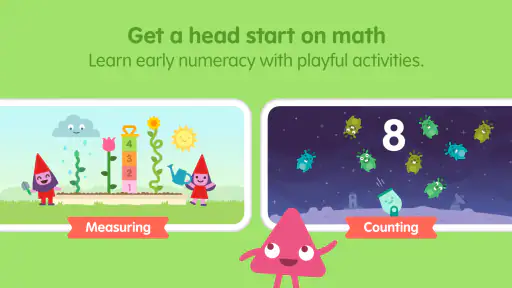
Sago Mini School offers a variety of activities that cover different learning areas such as math, science, literacy, and creativity. The app includes interactive games, puzzles, and storytelling exercises that are tailored to engage young children and support their educational development. Each activity is designed to be fun and age-appropriate, encouraging children to learn through play.
Can Sago Mini School be used offline?
Yes, Sago Mini School can be used offline, making it convenient for travel or situations where internet access is limited. Once the app is downloaded and the necessary activities are installed, children can enjoy the educational content without needing an active internet connection. This feature allows for uninterrupted learning anytime, anywhere.
Does Sago Mini School require a subscription?
Sago Mini School operates on a subscription model, offering monthly or annual plans. Subscriptions provide access to the full range of educational content and activities within the app. While there may be a free trial available, continued access to all features and updates requires an active subscription, ensuring ongoing educational benefits for your child.


