

Rummy - Classic Card Game
- Reviews
- 4.7
- Version
- 1.0.0.1193
- Installs
- 10,000+

Screenshots







 Analysis by Frivlyz
I’m drawn to mobile card games when they make it easy to settle into a familiar game without turning a quiet break into a complicated project. Rummy - Classic Card Game is built around that simple appeal: a digital take on Rummy for people who enjoy arranging cards, spotting possible combinations, and deciding when to play a hand out. It is free to install, so trying it does not require an upfront purchase. That makes it an easy option to sample, though “free” alone does not tell me everything about the longer-term experience.
What the free access means for a player
I look at the price first because it changes how I recommend a game. Here, the confirmed cost is free, which means there is no purchase price to weigh against the basic chance to play. I would treat that as low-risk entry rather than proof that every part of the experience is free: the distinction matters when deciding whether to install, but I would not assume anything about optional purchases or other costs without checking the current app screens.
The game is made by MobilityWare, a developer associated here with a straightforward card-game format. Its store page places it in the card category, and the listed release date is Nov 4, 2024. It has a 4.7 average from around 730 ratings, with 10K+ installs. Those figures suggest that it has attracted a modest but positive audience, though they cannot tell me whether its particular rules or pace will suit you.
A Classic Reimagined
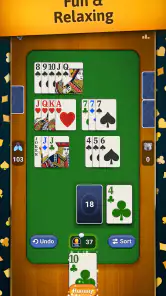
When I first launched the Rummy - Classic Card Game app, I was immediately struck by how well it captures the essence of traditional Rummy. The interface is clean and intuitive, making it easy to jump right into a game without any hassle. The developers have done a stellar job of balancing the authentic feel of Rummy while adding some digital enhancements that make the game even more engaging.
Gameplay and Features
One thing that stands out about this app is its smooth gameplay. It doesn’t matter if you’re playing against the AI or battling it out with friends online, the experience is seamless. The app offers several modes, ensuring you never get bored. Whether you’re a seasoned player or a newcomer, there’s something for everyone.
For me, the useful part of a Rummy session is not only making combinations; it is watching how each decision changes the next turn. A card that looks tempting can also reveal what I am collecting, while holding too many possibilities can leave a hand cluttered. I try to keep a clear plan for what I want to build and reconsider it as new cards arrive. That habit makes the game more thoughtful without requiring a long session or a complicated strategy guide.
A practical way to use a digital Rummy game is to play one short hand while waiting for a ride or taking a lunch break, then stop rather than letting a quick distraction stretch into the rest of the afternoon. I also find this format useful for refreshing the basic rhythm of the game before playing with relatives or friends in person. Digital play can help me think through card choices at my own pace, but it cannot replace the conversation and shared table atmosphere of a physical deck.
Gaming Stories You May Enjoy

Dancing Road Turns Short Breaks Into a Test of Rhythm and Timing

Super Stylist Makes Every Outfit a Test of Taste and Patience

Dominoes on Your Terms: Who Should Play and Who Should Pass

Pokémon GO Makes the Familiar World Feel New

Chess.com Turns Rematches Into Rivalries, but Community Has Its Costs

Archery Battle 3D Review: Sharp Aiming, Unclear Feedback
The title’s key appeal is its familiar objective: manage the cards in your hand and work toward going out, with Jokers included in the game’s premise. That gives returning players an immediate point of recognition. If you already know Rummy, you can focus on your choices rather than learning an entirely new kind of card game; if you are new, the central idea is approachable, although the finer details of play may take practice.
One small strategic tip is to avoid treating every possible combination as equally valuable. I find it more useful to decide which cards are worth holding for a realistic plan and which are becoming dead weight. That trade-off is central to the appeal: keeping options open can pay off, but carrying too many may make it harder to adapt. The game’s value is strongest when you enjoy making those judgments, not when you only want a fast, automatic win.
Learning the pace and making better decisions
The app is better suited to players who like to pause briefly and think than to anyone expecting a reflex-driven card battler. Rummy’s tension comes from uncertainty and hand management. I would not rush every turn simply because the game is on a phone; taking a moment to scan your hand can prevent a hopeful but poorly considered play. At the same time, if you prefer games with constant action, dramatic effects, or a story to follow, this kind of turn-by-turn decision-making may feel quiet.
The app’s store summary specifically calls out Jokers, which are worth treating as flexible resources rather than cards to spend automatically. In a hand, I would consider whether a Joker completes a useful group now or could rescue a more difficult combination later. That is a small but meaningful decision: using it early can simplify the hand, while saving it can preserve options. The right choice depends on the cards you have, so there is no single rule that guarantees a better result.
Another useful habit is to check the whole hand before committing to a direction. If I start building around one idea too early, later cards may make it clear that another route is more sensible. I try to reassess after each change instead of clinging to the first plan. That approach is helpful in Rummy generally and keeps a mobile session engaging even when the hand is not going my way.
The game is rated Everyone, and the current version is 1.0.0.1193. It requires Android 5.1 or later. Those details help with basic suitability and compatibility, especially if you are installing on an older device, but they do not guarantee that every phone will feel equally comfortable for extended play. Card games are easier to enjoy when the hand is legible, so I would check that the cards are clear on your screen before settling into longer sessions.
How it fits beside other card games
Compared with solitaire, Rummy asks me to manage a hand in relation to changing opportunities rather than simply work through a fixed layout. That makes it a better fit when I want decisions about which cards to keep and which to let go. Compared with trick-taking games, its appeal is less about following a suit or reading a sequence of played cards and more about shaping combinations. These are broad differences between familiar card-game styles, not a claim that this app offers every variant or mode those alternatives might have.
If your usual choice is a fast competitive card game, this one may feel slower and more deliberate. If you want a solo puzzle with a predictable layout, solitaire may be the more relaxing pick. I would choose this Rummy game when the pleasure is in adapting a hand over several turns and accepting that a promising plan can change. That distinction is more useful than calling one type of card game better than another; it comes down to the kind of attention I want to give a short break.
It also works differently from sitting down with a physical deck. The phone makes it easier to start without finding other players or setting up cards, while in-person Rummy offers conversation and the satisfaction of handling a real deck. For a casual solo moment, digital play is more convenient. For a family evening where the social part matters as much as the rules, I would reach for physical cards instead.
What to expect before settling in
The game’s compact premise is a strength, but it also sets limits on what it can offer. Rummy is still Rummy: the core pleasure comes from card decisions, not a changing story or a deep collection of unrelated activities. If the basic loop is already familiar and enjoyable to you, that focus can be a benefit. If you need a steady stream of new mechanics to stay interested, a more varied game may be a better use of your time.
For a first session, I would keep the goal modest: learn how the hand develops, notice when a plan is no longer working, and get comfortable with the timing of going out. That is more useful than trying to play perfectly right away. A new player may need several hands to understand which decisions are worth reconsidering, while an experienced player can use the first session to see whether this particular mobile presentation feels comfortable.
One question many players have is whether they need to be an expert before starting. I don’t think so: the familiar card-game premise gives beginners a place to begin, and learning through a few hands is a reasonable approach. Still, someone who strongly dislikes uncertainty may not enjoy it. You can make sensible choices and still draw cards that do not support your plan; accepting that luck is part of the experience helps keep a loss from feeling like a personal failure.
Another practical question is whether it is suitable for a brief break or only a longer sit-down. I see it as a natural fit for a spare moment because the play is built around turns rather than rapid reactions. But whether one hand fits your break depends on how quickly you play and how long you want to stay focused. I would start when I have enough time to finish comfortably, rather than opening it just before I need to leave.
Who is likely to get the most from it
I would recommend giving it a try if you already enjoy Rummy, want a familiar card game on your phone, or are looking for a low-commitment way to pass a quiet interval. It is also a sensible choice for someone who wants to practise thinking through a hand before playing with other people offline. The free entry makes that first test easy, while the Everyone rating makes the age classification straightforward for families considering a card game together.
I would be more cautious if you are looking specifically for a rich online community, regular social interaction, or a competitive scene. The published description establishes the Rummy concept, but those broader expectations should not be the reason to install it unless you have checked the current app experience yourself. If you mainly want to chat with friends or compete in organized events, a game built around those features would be a more dependable choice.
It may also be the wrong pick for someone who wants a fully predictable puzzle. Rummy involves adapting as the hand changes, and the balance between planning and chance is part of the game. Players who prefer complete control may be happier with a fixed solitaire challenge, while those who enjoy a little uncertainty will have more reason to return to Rummy.
Design and User Experience
Visually, the app is a treat. The graphics are sharp, and the card designs are reminiscent of real-life decks, which adds to the authenticity. The color scheme is easy on the eyes, perfect for those long gaming sessions. The navigation is straightforward, with all options clearly laid out, so you won’t find yourself fumbling around trying to find your way.
Another aspect worth mentioning is the customization options. You can tweak the settings to suit your playing style, from changing the card deck designs to adjusting the background music. It’s these little touches that make the app feel personal and tailored to your preferences.
Social Features and Community
What’s a card game without a bit of competition? The social features in this app are top-notch. You can connect with friends, join tournaments, and even chat with other players. It’s a fantastic way to meet fellow Rummy enthusiasts from around the world and engage in friendly competition. The leaderboard feature adds an extra layer of excitement, pushing you to refine your skills and climb the ranks.
My recommendation after weighing the trade-offs
My recommendation is to try it if the specific appeal of Rummy is enough for you: forming combinations, adjusting your plan, and deciding when to play out a hand. Its free price makes trying it a reasonable choice, and its card-focused design gives fans of the game a familiar place to spend a few minutes. I would not choose it expecting a broader adventure, a guaranteed social experience, or a substitute for every kind of card game.
If you are deciding whether it is worth keeping, judge it by how the turns feel after a few hands. Do you enjoy reconsidering your plan, or does the uncertainty become frustrating? Does the card presentation remain comfortable on your screen? Those are better personal tests than its average rating, because enjoyment depends heavily on whether this particular style of play suits you.
In conclusion, Rummy - Classic Card Game is more than just a digital version of a beloved card game. It’s a community, a learning platform, and a great way to unwind. Whether you’re playing solo or with friends, it offers hours of entertainment. If you haven’t already, give it a try – you might just find yourself hooked!
Rummy - Classic Card Game Pros and Cons
Pros
- Engaging gameplay keeps players entertained.
- Smooth user interface enhances experience.
- Multiplayer mode allows playing with friends.
- Regular updates with new features.
- Easy to learn for new players.
Cons
- Contains in-app purchases.
- Requires internet connection.
- Advertisements can be intrusive.
- Lacks offline mode.
- Limited customization options.
Frequently Asked Questions
What is Rummy and how do you play it?
Rummy is a classic card game that involves forming sets or sequences of cards. Typically played with two to six players, the goal is to arrange cards into valid sets or runs, such as three of a kind or a sequence of the same suit. The player who manages to organize all their cards into valid sets first wins the game. Rummy is a game of skill, strategy, and a bit of luck.
Is Rummy - Classic Card Game free to download and play?
Yes, Rummy - Classic Card Game is free to download and play. However, it may offer in-app purchases for additional features, enhancements, or to remove ads. While you can enjoy the core game without spending money, purchasing these extras can enhance your gaming experience by providing a more streamlined and ad-free environment.
Can I play Rummy - Classic Card Game offline?
Rummy - Classic Card Game typically offers an offline mode, allowing you to play against computer opponents without an internet connection. This is perfect for practicing your skills or enjoying the game when you don't have access to Wi-Fi or mobile data. However, some features, like multiplayer mode, may require an internet connection.
What are the age requirements for playing Rummy - Classic Card Game?
Rummy - Classic Card Game is generally suitable for players aged 12 and up. This age rating ensures that the content is appropriate for teenagers and older. It provides a balanced mix of fun and challenge, making it an excellent choice for family game nights, but parents should ensure the app's content aligns with their values.
How can I improve my skills in Rummy - Classic Card Game?
Improving your skills in Rummy involves practice and strategy. Start by understanding the rules thoroughly and practicing regularly against AI opponents or online players. Focus on observing your opponents' moves and planning your strategy accordingly. You can also find online tutorials and guides that offer advanced tips and tricks to help you become a more proficient player.


