

Rhythm Rush - Piano Music Game
- Reviews
- 4.3
- Version
- 1.9.10
- Installs
- 10,000,000+

Screenshots
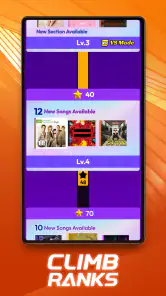

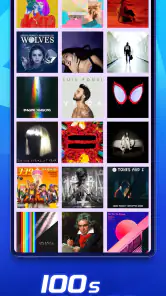
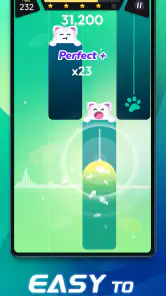
 Analysis by Frivlyz
I approached Rhythm Rush - Piano Music Game as a quick music game rather than a substitute for learning piano, and that distinction makes a big difference. Its appeal is the immediate little challenge: follow the notes, keep time, and see whether I can make it through a song cleanly. That makes it easy to pick up when I have a spare moment, though it won’t suit someone looking for proper instrument practice or a detailed music course.
What the first tap asks of you
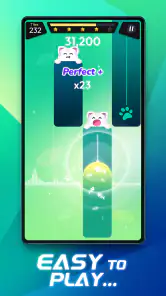
The basic action is easy to understand: watch the notes, tap in time, and let the song guide your fingers. I like that there is no need to know music theory before starting. The game gives beginners a way into rhythm through listening and reacting, rather than asking them to read notation or master piano technique first. That low barrier is useful when I want to play immediately instead of spending time setting up a lesson.
The trade-off is that quick access is not the same as musical instruction. Tapping along can sharpen attention to timing, but it does not teach the hand position, fingering, or expressive control I would need at a real keyboard. I treat a good run as a satisfying game result, not evidence that I can now play the song on a piano. If learning an instrument is the main goal, a structured lesson app or actual keyboard is a better fit.
How the rhythm loop keeps moving
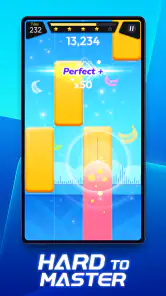
What gives the game its pull is the close link between action and feedback. I listen, watch for the next cue, tap, and immediately find out whether my timing held up. When the sequence gets demanding, I have to focus on the beat rather than simply press at random. That makes a short attempt feel active, and a mistake gives me a clear reason to try again: I want to handle that passage better next time.
For a more comfortable first session, I would start with a song or difficulty that leaves room to notice the rhythm instead of chasing every cue in a panic. Once the pattern feels familiar, I can pay more attention to consistency. This is a useful little self-imposed progression even if I am only playing casually: first understand the flow, then work on cleaner timing. It also helps separate a song that is enjoyable from one that is currently frustrating.
That feedback loop is the strongest reason to return, but it has a limit. A rhythm game rewards quick reactions and repeated attempts; it does not necessarily offer the same satisfaction as building a piece slowly on an instrument. If I am tired, distracted, or playing in a noisy place, reacting accurately can feel more like a test than a break. I would choose a calmer music app in that moment rather than expect every session here to be relaxing.
Where it fits in an ordinary day
I can see this working well in a short wait, during a quiet break, or as a small reset between tasks. For example, if I have a few minutes before leaving home, I can play one song, notice where my timing slipped, and stop without turning the moment into a long commitment. It is also a light option for someone who enjoys music games but does not want to compete with friends or study an instrument. The best use case is a focused burst of play, not background entertainment while doing something else.
Gaming Stories You May Enjoy

Dancing Road Turns Short Breaks Into a Test of Rhythm and Timing

Super Stylist Makes Every Outfit a Test of Taste and Patience

Dominoes on Your Terms: Who Should Play and Who Should Pass

Pokémon GO Makes the Familiar World Feel New

Chess.com Turns Rematches Into Rivalries, but Community Has Its Costs

Archery Battle 3D Review: Sharp Aiming, Unclear Feedback
Compared with a conventional piano-learning app, Rhythm Rush puts the immediate game challenge first and the musical curriculum second. Compared with a playlist or streaming app, it asks for active attention instead of letting music run in the background. That middle ground is appealing if I want to interact with a song but do not need a full lesson. Someone who mainly wants to discover albums, listen with the screen off, or build practical keyboard skills will probably be happier with a different kind of app.
One practical habit makes the experience easier: give the screen and the audio your attention for the duration of a song. Trying to play while answering messages breaks the connection between what I hear and when I tap, so it can turn a simple challenge into avoidable frustration. I also like to stop after a satisfying attempt rather than repeat a difficult passage indefinitely. That keeps the game feeling like a pleasant break instead of a chore I have assigned myself.
Engaging Gameplay That Hits the Right Notes
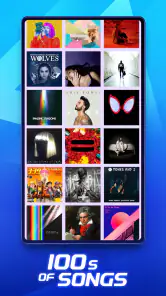
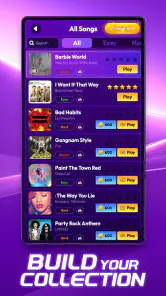
From the moment I opened Rhythm Rush - Piano Music Game, I was hooked. The interface is sleek and user-friendly, making it easy for anyone to start playing. The app offers a variety of songs across different genres, so whether you're into pop, classical, or jazz, there's something for you. The game challenges you to tap the right keys in time with the music, and trust me, it’s as addictive as it sounds.
A Musical Journey for All Skill Levels
One of the standout features of this app is its accessibility. Whether you're a complete novice or a seasoned pianist, there's a difficulty level to suit your skills. I started on the beginner level, and it was the perfect balance of fun and challenge. As I improved, I moved up to more difficult levels, which kept the game exciting and rewarding. This progression system ensures that you’re always motivated to improve your skills.
I would be careful not to assume that higher difficulty automatically means better musical practice. In a game like this, the increased challenge is useful when I want to test concentration and timing, but it does not replace learning how a pianist shapes a phrase. A practical way to use the levels is to pick one that lets me enjoy the song first, then raise the challenge only when the basic flow feels manageable. If I jump straight to a punishing setting, I risk spending the session reacting to pressure rather than enjoying the music.
Visuals and Sound: A Symphony for the Senses
Visually, the app is a treat. The graphics are vibrant and dynamic, which adds to the overall excitement of the game. But what really sets this app apart is the sound quality. The piano notes are clear and crisp, making it feel like you're playing a real instrument. The combination of stunning visuals and high-quality audio creates an immersive experience that’s hard to put down.
For me, sound matters because the timing challenge depends on following the musical cues, not only watching the screen. If I am playing somewhere loud, using the visuals alone may make the experience harder to follow, so I would save a focused run for a quieter moment. Conversely, if I am listening around other people, I would keep the sound at a considerate level and accept that the session may feel less immersive. It is a small choice, but it changes whether the game feels like a musical break or a visual reaction test.
Customization and Personalization
Another feature I absolutely loved is the ability to customize the app. You can choose different themes and even customize the sound of your piano keys. This level of personalization adds a unique touch to your gameplay experience. Plus, the app regularly updates with new songs and features, ensuring that there’s always something new to explore.
Those choices are most useful when they make a session comfortable, not when I treat customization as a goal in itself. I would settle on a theme and key sound that are easy to read and pleasant to hear, then focus on playing rather than changing settings between every attempt. A clear visual style can matter more than a flashy one when I am trying to catch incoming cues. Personal touches help the game feel like mine, but they do not change the basic loop or turn it into a piano tutor.
That distinction also helps set expectations around variety. A selection of songs and ways to adjust the presentation can keep casual sessions fresh, but I would not choose the game as my main source for exploring music in depth. Its purpose is to make songs playable challenges. If my priority is a particular artist, a broad catalogue, or a carefully sequenced learning plan, I would look elsewhere and use this as a separate, lighter activity.
Who is likely to enjoy the challenge
I would recommend it most to people who already enjoy tapping games, like having music guide a small task, and want an activity that does not demand a long commitment. It can also suit someone who is curious about piano sounds but feels intimidated by lessons, as long as they understand that the game is about rhythm and timing rather than teaching piano from the ground up. The fact that it is free to download makes it easy to try, while optional in-app purchases mean it is sensible to check purchase prompts before spending. Individual items range from $0.49 to $75.88, so I would treat any purchase as a deliberate choice rather than part of the basic appeal.
It is available for Android devices running version 6.0 or later. Boom Studio Limited develops the game, which is rated for Everyone; that broad age label does not guarantee that every child will enjoy the pace or find the purchase choices suitable without an adult’s guidance. Its current version is 1.9.10. The game has a 4.3 average from around 22,000 ratings and more than 10 million installs, which suggests that many players have tried it, but those figures do not tell me whether its particular rhythm style will click for you.
I would skip it if I want a quiet, passive listening experience, a realistic piano simulator, or a structured course that tracks technique. I would also think twice if repeated timing challenges tend to make me impatient; the retry appeal can become pressure rather than fun. For those needs, a music player, a keyboard-learning tool, or a slower creative app makes more sense. Rhythm Rush is at its best when I choose it knowingly for a compact, hands-on game.
When a run ends, what brings me back
The reward here is modest but effective: I get a quick sense of whether I kept up, and I can decide whether I want another attempt. That clear reset is valuable on a busy day because I do not have to remember a complicated plan or commit to a lengthy session. I can stop after one song, or return because a tricky stretch has made me curious to see whether I can time it more cleanly. For me, that is a better reason to replay than chasing a perfect score at any cost.
Free access lowers the barrier to finding out whether the songs, visuals, and tap timing suit my taste. I would still keep purchases in mind, especially if a younger player is using the device, and avoid treating optional spending as necessary to enjoy the basic idea. If I am evaluating the game for a child, I would try a session together first: it gives me a feel for the pace, while offering a natural moment to talk about purchases and screen-time boundaries.
There is also a useful stopping point built into the way I approach it. If I am missing cues because I am distracted, I pause rather than keep tapping in frustration; if I am focused and having fun, I allow myself another run. That small check keeps retries intentional. It is a simple distinction, but it helps the game remain a brief reward instead of turning every imperfect attempt into a reason to keep going.
To wrap it up, Rhythm Rush - Piano Music Game is more than just a game; it's a gateway to the world of music. Whether you want to unwind after a long day or challenge yourself to master a new song, this app has it all. Give it a try, and you might just find yourself tapping to the rhythm of your new favorite hobby!
My verdict on the repeat-play loop
I find the loop most satisfying when I treat each song as a self-contained challenge: start, listen, tap, notice the result, and either stop or try again with a little more focus. That makes it easy to fit into a pause in the day, and the adjustable presentation gives me some room to make the experience feel comfortable. The appeal is not that it teaches me piano or guarantees a relaxing mood every time; it is that a short attempt can be playful and absorbing.
Rhythm Rush - Piano Music Game Pros and Cons
Pros
- Engaging and addictive gameplay
- Wide variety of music tracks
- Smooth and responsive controls
- Visually appealing graphics
- Regular updates with new content
Cons
- In-app purchases can be expensive
- Ads can be intrusive
- Requires internet connection
- Limited offline play options
- High difficulty for beginners
This Game in Other Languages
Frequently Asked Questions
What is Rhythm Rush - Piano Music Game all about?
Rhythm Rush - Piano Music Game is a dynamic and engaging rhythm-based music game where players tap on the screen in time with the music to score points. The game features a wide selection of popular and classic songs, challenging levels, and stunning visuals. It's designed for music lovers who enjoy testing their rhythm skills across various genres and difficulty levels.
Is Rhythm Rush - Piano Music Game free to play?
Yes, Rhythm Rush - Piano Music Game is free to download and play. However, it offers in-app purchases that allow players to unlock additional features, songs, and customization options. While the core game can be enjoyed without spending money, these purchases enhance the gaming experience by providing more content and personalization options.
What devices are compatible with Rhythm Rush - Piano Music Game?
Rhythm Rush - Piano Music Game is available for both Android and iOS devices. It requires a minimum of iOS 10.0 or Android 5.0 to run smoothly. The game is optimized for smartphones and tablets, providing a seamless experience across different screen sizes and resolutions, ensuring that all players can enjoy the vibrant graphics and engaging gameplay.
Does Rhythm Rush - Piano Music Game require an internet connection?
Rhythm Rush - Piano Music Game can be played offline, allowing users to enjoy the game without an internet connection. However, some features, such as downloading new songs and participating in online leaderboards, require an internet connection. Players can still enjoy the core gameplay and previously downloaded content while offline.
How can I improve my skills in Rhythm Rush - Piano Music Game?
Improving skills in Rhythm Rush - Piano Music Game involves regular practice and familiarizing oneself with the rhythm patterns of various songs. Players can start with easier levels and gradually increase the difficulty as they become more adept. Utilizing practice modes and replaying challenging songs can also help players enhance their accuracy and timing.


