

RFS - Real Flight Simulator
- Reviews
- 4.3
- Version
- 2.5.7
- Installs
- 5,000,000+

Screenshots


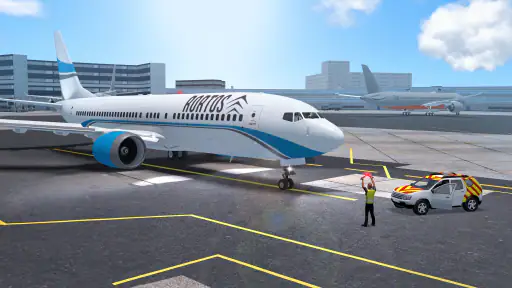


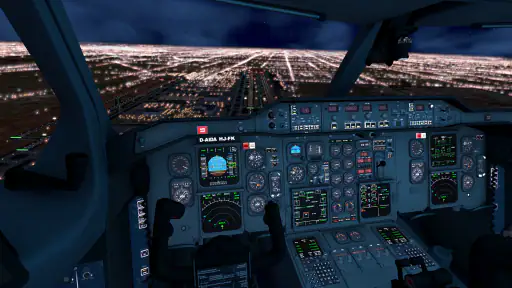


 Analysis by Frivlyz
Flight simulators can be hard to judge from a quick look: some feel like simple steering games, while others ask you to learn a cockpit before you can enjoy a short flight. RFS - Real Flight Simulator sits closer to the detailed end of that spectrum, but its appeal is not limited to people who already know aviation terms. I find it most rewarding when I treat each flight as a small task to understand, rather than expecting an instant, arcade-style thrill.
Finding your way around and reading the experience
The first impression is approachable: menus and flight choices are presented in a way that makes it possible to get moving without studying a manual first. That matters in a simulator, where a busy cockpit can make the whole experience feel inaccessible before a new player has even taken off. The interface gives newcomers a reasonable starting point, while the amount of detail in the aircraft and flying itself leaves room to explore at a slower pace.
There is still a difference between finding a button and understanding what it does. When I am learning an unfamiliar control, I prefer to change one thing at a time and take a short flight rather than adjust several settings at once. That simple habit makes it easier to see how a choice affects the flight and to recover if I have made a poor one. It also turns the learning process into manageable steps instead of a wall of cockpit detail.
For someone who mainly wants to look around, the appeal is the sense of place: airports, aircraft and changing skies give a flight a destination and a mood. For someone who wants to practice the flow of flying, the controls and aircraft details offer more to investigate. The trade-off is that the second kind of play takes attention. I would not pick it when I want a game that explains every decision immediately and keeps me moving with minimal reading or experimentation.
Flying at your own pace
Ever dreamt of soaring through the skies like a pro? Well, I’ve got just the app for you! Let’s dive into the world of RFS - Real Flight Simulator, where your aviation dreams are just a touch away from becoming a reality.
Ready for Takeoff
First things first, RFS is not your average flight sim. From the moment you launch the app, you’re greeted with a beautifully designed interface that makes navigation a breeze. It’s like they knew exactly what we aviation enthusiasts needed. The realism is off the charts, and that’s something I noticed right off the bat. Whether you’re a seasoned pilot or a rookie, there’s something here for everyone.
Experience the Skies Like Never Before
Now, let me tell you about the in-flight experience. The graphics are stunning, and the attention to detail is impeccable. You’ll find yourself lost in the intricacies of cockpit controls, realistic weather conditions, and lifelike airports. It’s as if you’re really there, prepping for takeoff and cruising among the clouds. The app offers a range of different aircraft, so whether you fancy a commercial jet or a sleek private plane, you’re covered.
Gaming Stories You May Enjoy

Dancing Road Turns Short Breaks Into a Test of Rhythm and Timing

Super Stylist Makes Every Outfit a Test of Taste and Patience

Dominoes on Your Terms: Who Should Play and Who Should Pass

Pokémon GO Makes the Familiar World Feel New

Chess.com Turns Rematches Into Rivalries, but Community Has Its Costs

Archery Battle 3D Review: Sharp Aiming, Unclear Feedback
What’s cool is the real-time flights feature. You can join flights with hundreds of other virtual pilots around the world. It’s an excellent way to feel like part of a global community, all while honing your flying skills. Plus, the interactive air traffic control adds another layer of authenticity to your flying experience.
Learning and Growing
If you’re worried about the learning curve, fear not! The app is super user-friendly. There are tutorials and guides to help you get started, making it easy even if you’re new to flight sims. I personally found the learning process to be quite enjoyable. It’s not just about flying; it’s about understanding the mechanics and dynamics of flight, which makes it all the more rewarding.
Additionally, the customization options are pretty extensive. You can tweak everything from flight conditions to the smallest details of your aircraft. It’s a sandbox of endless possibilities, keeping you engaged for hours on end.
Controls, comfort and different ways to engage
Touch controls ask for more than a quick tap when a flight gets busy, so I would begin with a calm route and give myself time to learn the basic handling before adding pressure. Small phone screens can make cockpit details feel dense, and holding a device for a longer session can be tiring. A larger screen may make the visual layout easier to inspect, but it does not remove the need to learn the controls. I would also keep the device comfortably positioned and take a pause between longer flights rather than trying to push through fatigue.
The sensory side is worth considering too. Detailed visuals and changing weather help create atmosphere, but that same activity can feel busy if you prefer a quieter, less demanding game. I find it useful to decide what I want from a session before starting: a relaxed look at the scenery, or a focused attempt to manage a flight. That distinction helps me choose a suitable moment and avoid turning a casual break into an unexpectedly absorbing task.
Making a flight fit an ordinary day
A realistic use case is a short break at home when I have enough time to concentrate but not enough for a long gaming session. I can approach a flight as a small practice routine: choose a familiar aircraft, keep the conditions simple, focus on one part of the process, then stop when I have learned something. Trying to fit a detailed simulator into a noisy commute or a few distracted minutes is less satisfying; interruptions make it harder to follow the flight and enjoy the sense of control.
That makes this a different proposition from a quick arcade flying game. Those alternatives are usually better when I want immediate movement, forgiving controls and a clear score or objective. RFS is the stronger pick when I want aviation detail, a convincing cockpit and the pleasure of building familiarity over time. It also differs from a purely educational reference: the learning comes through engaging with a playable flight, not just reading about aircraft. The best choice depends on whether I want a quick diversion or a more involved simulation.
Small choices that make learning easier
One practical approach is to avoid changing several flight settings between attempts. If a flight feels difficult, I would first simplify the conditions or repeat the same route, then adjust only one element and notice what changes. This is more useful than constantly rebuilding the setup, because it helps separate a control mistake from a condition that has made the task harder. The customization is valuable, but it can also create decision fatigue if I spend more time tuning than flying.
Another useful trade-off is choosing between solo practice and shared activity. Real-time flights can add a welcome sense of company and make the simulation feel less solitary, while a quieter session gives me room to learn without worrying about keeping pace with others. I would save the social side for when I already feel comfortable with the basics. If I am still figuring out how a control behaves, practicing alone is less stressful and makes mistakes feel like part of the process rather than a public performance.
Who will enjoy it, and where it can frustrate
RFS is a good fit for curious players who enjoy aircraft, want to explore cockpit detail, or like improving through repeated attempts. It can also suit someone who wants to understand why a flight feels different when conditions change. I would steer a younger or very casual player toward it only if they are happy to learn gradually; the Everyone age rating is reassuring, but it does not mean every control or simulation concept will be instantly simple.
On the other hand, I would skip it if I wanted a fast, low-effort game, disliked menus and controls, or had no patience for trial and error. A dedicated flight sim on a larger setup may be a better option for someone seeking deeper control and a more comfortable long-session experience. A simple mobile flying game is likely better for quick entertainment. The phone format makes this simulator handy, but it cannot make a small touchscreen feel like a full cockpit setup.
What to expect before installing
RORTOS developed this simulation game, which has an average rating of 4.3 from around 179,000 ratings and has been installed over 5 million times. It costs $0.99, is rated Everyone, and its current version is 2.5.7; in-app purchases range from $3.99 to $39.99 per item. I would think of the initial price and optional purchases as separate decisions: the base cost is not the same as a promise that every extra will be included. If you are sensitive to spending inside games, check the purchase prompts carefully and decide in advance whether you want to keep the experience to its initial cost.
It was released on July 23, 2019, and supports Android 5.1 and later. Before downloading, I would make sure the device has a comfortable screen for reading cockpit elements and that I can give the game uninterrupted attention. Those practical details matter more here than they do in a casual tap-and-play title, because the main pleasure comes from staying engaged with the flight rather than dipping in and out every few seconds.
Final Thoughts
In conclusion, RFS - Real Flight Simulator is a must-try for anyone with a passion for aviation. Its blend of realism, community interaction, and educational value makes it a standout in the world of flight simulators. Whether you’re in it for the thrill of flying or the joy of learning, this app delivers in spades. So, why not give it a shot and see where the skies take you?
My recommendation comes with one qualification: approach it as a simulator you can grow into, not a game that will do all the thinking for you. Start simply, give the controls time to become familiar, and use the detailed options when you have a clear reason to change them. If that slower, more attentive style sounds appealing, RFS can make a spare moment feel like a proper flight. If you need instant action or minimal visual and control demands, another kind of flying game will probably be a better fit.
RFS - Real Flight Simulator Pros and Cons
Pros
- Realistic flight dynamics
- Wide range of aircraft models
- Global satellite scenery
- Multi-device compatibility
- Engaging multiplayer mode
Cons
- Requires internet connection
- High battery consumption
- Steep learning curve
- Limited free features
- Occasional app crashes
This Game in Other Languages
Frequently Asked Questions
What is RFS - Real Flight Simulator?
RFS - Real Flight Simulator is a mobile flight simulation app available for both Android and iOS devices. It provides a realistic flying experience with features such as real-time flight conditions, detailed aircraft models, and a global satellite map. Users can engage in various flight operations, explore different airports, and experience dynamic weather conditions, making it a comprehensive tool for aviation enthusiasts.
How realistic is the flight experience in RFS - Real Flight Simulator?
RFS - Real Flight Simulator offers a highly realistic flight experience thanks to its advanced physics engine and detailed aircraft models. The simulator includes real-time flight conditions, realistic flight controls, and dynamic weather changes. Additionally, it features accurate cockpit instruments and interactive 3D environments, providing users with an authentic piloting experience that closely mimics real-world aviation.
What are the key features of RFS - Real Flight Simulator?
Key features of RFS - Real Flight Simulator include a wide range of aircraft to choose from, real-time air traffic, and a global satellite map for navigation. Users can experience dynamic weather conditions, customize flight plans, and interact with ATC (Air Traffic Control). The app also supports multiplayer mode, allowing users to fly alongside other pilots in real-time, enhancing the social and interactive aspects of the simulation.
Is RFS - Real Flight Simulator suitable for beginners?
Yes, RFS - Real Flight Simulator is designed to accommodate both beginners and experienced pilots. For newcomers, the app offers tutorials and simplified controls to help them get started. As users become more comfortable, they can switch to more advanced settings and controls to deepen their simulation experience. This scalability makes it an ideal choice for those new to flight simulators as well as seasoned enthusiasts.
Does RFS - Real Flight Simulator require internet connectivity?
While RFS - Real Flight Simulator offers offline play, an internet connection is required for certain features, such as real-time air traffic updates, multiplayer mode, and accessing global satellite maps. Internet connectivity also ensures that users receive the latest updates and enhancements to improve their flight experience. However, core flight operations can still be enjoyed without an active internet connection.


