

Pool Tour - Pocket Billiards
- Reviews
- 4.7
- Version
- 1.9.8
- Installs
- 5,000,000+

Screenshots

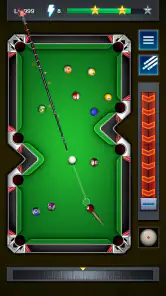

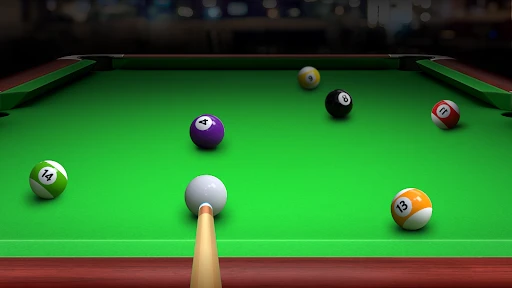
 Analysis by Frivlyz
I like to think of Pool Tour - Pocket Billiards as a game that can fit into the small gaps in a shared household day: a quick turn while someone else is making tea, or a longer session when the living room is quiet. Pool is easy to understand even for someone who has never played a mobile billiards game, but aiming and choosing a shot still give each turn a little room for thought. That makes it more inviting than a game that depends on a long tutorial or a complicated setup.
Why it works for casual shared play
As a sports game from Candy Mobile, it has an immediately recognizable premise: line up a shot, judge the angle, and try to make the next move count. I can see it working well when people in the same home want to take turns without committing to a lengthy session. One person can play for a few minutes, then hand the device over; the basic pool format makes it relatively easy for the next person to understand what is happening.
That said, taking turns on one device is different from playing together in a live match. The game’s multiplayer option is described as a way to challenge friends or other players, but I would not assume that everyone can share one screen in a local pass-and-play format. If your household wants a game specifically designed for couch play, it is worth choosing one that clearly supports that style rather than treating online competition as a substitute.
A sensible routine for a shared device
On a family tablet or a phone that several people use, I would decide in advance who is playing and avoid passing the device around during an online match. That is a simple practical boundary: a match belongs to the person who started it, while casual turns can happen when nobody is in the middle of a game. It also prevents another player from accidentally changing a session or making a shot the original player had been lining up.
For a more deliberate practice session, I would focus on one skill at a time instead of bouncing between every available activity. For example, use a short solo stretch to work on judging angles, then try a challenge when you want a more specific target. The useful trade-off is that structured challenges can give a session direction, while ordinary play leaves you free to experiment. Neither approach guarantees that you will improve quickly; the value is in making your practice less random.
Age, expectations, and trust
The game is rated Everyone, which makes its pool theme broadly suitable for a general audience. I would still set expectations with younger players: the central activity is aiming and taking shots, while the more competitive side may appeal more to someone who enjoys testing their performance against others. An age rating is a helpful starting point, not a replacement for a parent’s judgment about online interaction or a child’s readiness to use a shared device independently.
It is free to play, so the initial decision to try it is straightforward. In a household, though, “free” does not automatically answer every question about spending or account boundaries. I would keep the usual device-level purchase protections in place and make sure children know to ask before approving any payment prompt they might encounter. That is sensible for mobile games generally, without assuming anything specific about this game’s payment setup.
Gaming Stories You May Enjoy

Dancing Road Turns Short Breaks Into a Test of Rhythm and Timing

Super Stylist Makes Every Outfit a Test of Taste and Patience

Dominoes on Your Terms: Who Should Play and Who Should Pass

Pokémon GO Makes the Familiar World Feel New

Chess.com Turns Rematches Into Rivalries, but Community Has Its Costs

Archery Battle 3D Review: Sharp Aiming, Unclear Feedback
Where it fits among pool games
Compared with a simple offline pool game, Pool Tour puts more emphasis on facing opponents and working through competitive play. That can make it more compelling when you want a reason to return, but it may be a less comfortable choice if you only want a quiet table with no pressure to compare results. Against a physical pool table, the obvious benefit is convenience: there is no need to find a venue, gather equipment, or wait for a table. The trade-off is that a touchscreen cannot fully reproduce the feel of holding a cue and judging a real shot.
I would also choose a different kind of sports game if I wanted realistic team tactics, a fast action match, or a physical activity away from the screen. This is specifically for the measured, turn-by-turn pleasure of billiards. Its appeal depends on enjoying the small decisions—where to aim, how much control to use, and whether a safer shot is wiser than an ambitious one—rather than on constant movement or spectacle.
What to expect before you start
The game is free, has an Everyone age rating, and runs on Android 4.0 or later. Its current version is 1.9.8, and it was released on April 13, 2020. Those details make it accessible to a broad range of Android devices, although the experience still depends on how comfortably your particular screen responds to touch. If precise aiming feels awkward at first, slow down and make smaller adjustments rather than dragging quickly; a steady routine is easier to repeat and helps you see whether a miss came from your angle or your timing.
Its 4.7 average from around 108,000 ratings, alongside over 5 million installs, suggests that many players have found something to enjoy here. I treat popularity as useful context rather than a promise that it will suit every person. The game has also received around 10,000 written reviews, which gives prospective players plenty of opinions to explore if they want another perspective before installing.
First Impressions
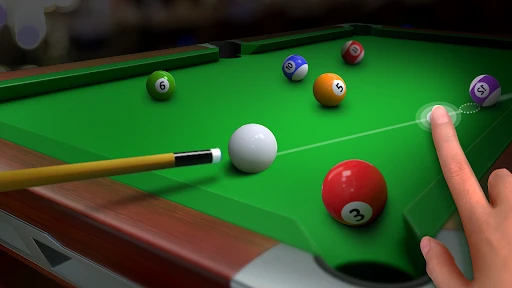
When I first launched Pool Tour - Pocket Billiards, I was greeted with a sleek interface that’s both inviting and easy to navigate. The game doesn’t waste any time, letting you dive straight into the action. What caught my eye immediately was the attention to detail in the graphics. The developers did a fantastic job of making the pool tables and balls look realistic. It almost feels like you’re in an actual pool hall, minus the smell of chalk and the clinking of glasses!
Gameplay and Features
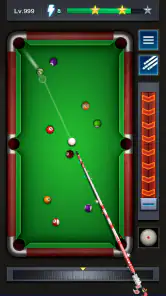
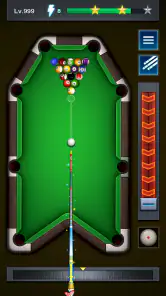
The gameplay is where this app truly shines. It’s incredibly smooth, and the physics engine is top-notch. Every shot you take feels satisfying and precise, which is crucial for a game that’s all about angles and precision. Whether you’re a newbie or a seasoned pro, the game offers different modes to suit your skill level.
One of the standout features is the multiplayer mode. You can challenge your friends or face off against random players worldwide. It’s a great way to test your skills and see how you stack up against other pool enthusiasts. Plus, there’s a ranking system that adds a competitive edge to keep you coming back for more.
Customization and Challenges
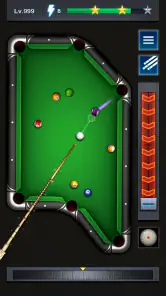
If you’re someone who loves customization, you’re in for a treat. The game lets you customize your cue and table to match your style. It’s a small touch, but it adds a layer of personalization that makes the game feel more engaging.
Additionally, the game features a variety of challenges and tournaments. These are perfect for honing your skills and earning rewards. The challenges range from simple trick shots to complex puzzles that require a bit of strategic thinking. It’s these little extras that keep the game fresh and exciting.
Final Thoughts
All in all, Pool Tour - Pocket Billiards is a fantastic app for anyone who loves billiards or just enjoys a good game. It combines realistic graphics, smooth gameplay, and engaging features to create an experience that’s both fun and addictive. Whether you’re playing solo or competing online, this game has something to offer. So grab your virtual cue and start sinking those balls. You won’t be disappointed!
Sharing the screen without sharing a match
One detail I would keep in mind is the difference between sharing a device and sharing a game session. Passing a phone between household members can be convenient, but it does not necessarily make a competitive match a group activity. If one player is focused on a shot, interruptions can make the experience frustrating. I’d save online play for a time when the device can stay with one person, and use short solo play for casual handoffs.
This also gives the game a useful role as a low-effort break. A parent waiting during an appointment, a student taking a pause between tasks, or someone relaxing after dinner can pick it up without arranging a group or setting aside a whole evening. The strongest fit is for people who enjoy concentration in small doses, rather than those who need every game to create a shared event.
Making practice more useful
Pool games can feel repetitive if every session becomes a string of shots with no particular purpose. I find it more satisfying to choose a simple aim before starting: pay attention to how the cue angle affects the result, or try to think one shot ahead instead of only targeting the easiest ball. That turns even a brief session into a small exercise in decision-making. It also helps separate a genuine aiming mistake from a rushed choice.
Customization is best treated as personal flavor, not a shortcut to better play. Changing a cue or table can make the game feel more like your own, but the practical improvement comes from taking time over the line of the shot and learning from misses. If you are mainly looking for deep equipment progression, a billiards title built around detailed gear systems may be a better match; here, the appeal is the act of playing and the added variety of challenges.
Online play and household expectations
The option to face friends or random opponents gives the game a social side, but it changes the mood compared with solo practice. A player who enjoys rankings may find that extra pressure motivating; someone who dislikes competition may prefer to stay with less demanding play. I would not install it solely because a child wants a social game unless an adult is comfortable with the online element and has talked through sensible behavior with them.
For friends in different places, a direct challenge can be a simple shared activity when everyone has time for a match. For people in the same room, it may be more enjoyable to watch and comment than to assume the app provides a dedicated local multiplayer setup. That distinction matters when choosing a game for a family night: the pool theme is familiar, but the format may not meet the needs of a group that wants everyone playing simultaneously.
Who will enjoy it—and who may not
I’d recommend giving it a try if you like careful shots, quick sessions, and the option to move from practice into competitive play. It can suit a casual player who wants a sports game without the pace of a racing or action title, as well as a pool fan who wants an easy way to enjoy billiards when a real table is not available. Its broad age rating also makes the theme approachable for households, provided online use and device habits are handled thoughtfully.
I’d skip it if you want a strictly offline experience, a guaranteed local turn-taking mode, or a detailed simulation of the physical weight and feel of a cue. It may also be a poor fit for someone who finds rankings discouraging or prefers sports games with teams, seasons, and larger strategic systems. The right choice depends less on whether pool is familiar and more on whether you enjoy aiming patiently on a touchscreen.
A practical household verdict
Pool Tour is easiest to recommend as an accessible pool game that can serve both as a personal pastime and as a conversation starter when someone nearby wants to watch or take a casual turn. The useful household approach is to keep individual online matches with the person who began them, treat solo sessions as the natural option for quick sharing, and set clear expectations around purchases and online interaction for younger players.
My overall view is positive, with one qualification: its competitive and challenge-based appeal will matter more to some people than the shared-device angle. If you want billiards that is easy to start, offers several ways to play, and can fit into spare moments, this is a sensible free option. If your priority is a calm offline table or true group play on one screen, I would look for a game that makes those specific formats its main strength instead.
Pool Tour - Pocket Billiards Pros and Cons
Pros
- Intuitive controls enhance gameplay.
- Realistic physics for authentic experience.
- Multiplayer mode for competitive play.
- Wide range of pool tables and cues.
- Regular updates with new challenges.
Cons
- In-app purchases can be pricey.
- Ads may disrupt gaming experience.
- Requires stable internet for multiplayer.
- Limited offline features available.
- Occasional bugs in older devices.
Frequently Asked Questions
What is Pool Tour - Pocket Billiards?
Pool Tour - Pocket Billiards is a mobile game designed for billiards enthusiasts. It offers players a realistic pool playing experience on their Android or iOS devices. With various game modes, players can enjoy both solo and competitive play, honing their skills through immersive gameplay and realistic physics.
Is Pool Tour - Pocket Billiards free to play?
Yes, Pool Tour - Pocket Billiards is free to download and play. However, it may offer in-app purchases for additional features, such as virtual currency, special cues, or customization options. These purchases can enhance the gaming experience but are not necessary to enjoy the game.
What game modes are available in Pool Tour - Pocket Billiards?
Pool Tour - Pocket Billiards offers several game modes to cater to different player preferences. These typically include classic 8-ball and 9-ball modes, practice sessions, and online multiplayer matches. Each mode provides a unique challenge, allowing players to test and improve their skills in various settings.
Can I play Pool Tour - Pocket Billiards offline?
Yes, Pool Tour - Pocket Billiards can be played offline, allowing users to enjoy practice modes and single-player games without an internet connection. However, to access online features such as multiplayer matches or leaderboards, an internet connection is required.
Does Pool Tour - Pocket Billiards support multiplayer gameplay?
Absolutely, Pool Tour - Pocket Billiards supports multiplayer gameplay, enabling players to compete against friends or other users worldwide. The game features an online matchmaking system, allowing players to participate in competitive matches and climb the global leaderboards.


