

Polysphere: Art Puzzle Game
- Reviews
- 4.3
- Version
- 1.15.44
- Installs
- 50,000,000+

Screenshots
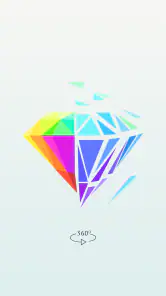



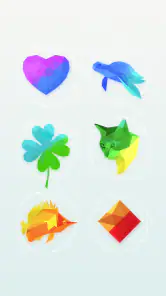



 Analysis by Frivlyz
In our household, Polysphere: Art Puzzle Game works best as a small shared activity rather than a game everyone tries to play at once. One person can rotate the scattered pieces, then pass the device over when someone else thinks they see the image. That turns a quiet puzzle into an easy bit of conversation, without needing anyone to learn complicated rules first. I especially like it for those brief gaps in the day when we want something more engaging than scrolling but don’t have time to start a long game.
A puzzle that suits short shared turns
The central task is easy to explain: move the fragmented artwork until its parts line up into a recognizable picture. What makes it appealing to share is that people can suggest different angles without taking over a complicated strategy. A useful household approach is to agree that one person controls the screen while others call out ideas; swapping turns after a picture appears keeps the session friendly and avoids a tug-of-war over the device.
It also works as a solo pause. I might open it while waiting for food to finish or during a quiet break, solve a puzzle, and put the phone away. The visual reveal gives each attempt a clear endpoint, which makes it easier to stop than an activity built around endless rounds or a competitive match. That said, the “one more” pull is real: if you have a task to get back to, decide on a stopping point before you begin.
Set expectations before handing over the device
For shared-device use, I would treat it as a game that anyone using the phone can open, rather than assume it offers separate household profiles or a child-specific setup. Keep the device’s usual account and purchase protections in place, and make sure the person using it knows to ask before making any purchase. The game is free to start, but in-app purchases are available, with items ranging from $0.99 to $89.99, so that boundary matters more than the gentle puzzle presentation might suggest.
There is no need to turn a casual art puzzle into a complicated family arrangement. A simple agreement about whose turn it is, whether sound is on, and when the device needs to be returned is usually enough. If you share one phone or tablet, remember that a puzzle session belongs to whoever has access to that device; don’t rely on the game itself to keep separate personal progress or preferences unless you have checked how it behaves on your own setup.
Age, trust, and the kind of challenge it offers
The game is rated Everyone, which makes its basic presentation broadly suitable for a household audience. I still think it is worth setting age-appropriate expectations around screen time and spending, as with any app that offers purchases. The challenge here is mainly visual and spatial: players rotate a jumble until an image resolves, rather than competing through fast reactions or elaborate rules. That makes it approachable for people who enjoy pictures and pattern-finding, though younger players may appreciate a little help getting started.
As a puzzle choice, it sits somewhere between a traditional jigsaw and a quick visual brain teaser. Unlike a jigsaw, you are not placing pieces into a fixed board one by one; the key is finding the angle at which the fragments form a coherent picture. Compared with word puzzles or number grids, it asks less of your vocabulary or arithmetic and more of your ability to recognize shapes. If you want careful planning, a long campaign, or a score-based contest, this is probably not the right fit. If you want a short, visual challenge that can be shared casually, it makes more sense.
Gaming Stories You May Enjoy

Dancing Road Turns Short Breaks Into a Test of Rhythm and Timing

Super Stylist Makes Every Outfit a Test of Taste and Patience

Dominoes on Your Terms: Who Should Play and Who Should Pass

Pokémon GO Makes the Familiar World Feel New

Chess.com Turns Rematches Into Rivalries, but Community Has Its Costs

Archery Battle 3D Review: Sharp Aiming, Unclear Feedback
The Allure of Polysphere
From the moment I downloaded Polysphere, I was intrigued. It’s not just any ordinary puzzle game. Imagine this: you're given a fragmented, colorful artwork, and your job is to rotate and align these pieces until the picture emerges in its full glory. Sounds simple, right? Well, let me tell you, it’s delightfully tricky!
Gameplay and Features
What I love about Polysphere is how it combines art with strategy. Each level presents you with a new artistic challenge. As you swipe and rotate, you start to see the image take shape, and there's a real sense of satisfaction when everything clicks into place.
The game features a wide variety of levels, each with its own unique piece of art to be discovered. Whether it’s animals, landscapes, or abstract designs, the game keeps you on your toes with its diverse range of puzzles. Plus, the graphics are simply stunning, making the entire experience visually pleasing.
Why You’ll Get Hooked
Now, let’s talk about the addictive factor. Polysphere has this incredible ability to draw you in. Just when you think you’ve completed your last puzzle for the day, another captivating artwork pops up, urging you to give it just one more go. It’s a fantastic way to relax and unwind while still keeping your brain engaged.
Another thing I appreciate is its intuitive interface. The controls are smooth, and the game hardly ever lags. It’s these little details that make the difference in keeping players engaged and coming back for more.
Who will enjoy it—and who may not
I’d recommend it to people who like a clear visual goal and the small satisfaction of spotting a pattern. It can also be a nice option for someone who finds conventional jigsaws too fiddly or wants a puzzle that doesn’t require setting out pieces on a table. The game is free, developed by CASUAL AZUR GAMES, and has a 4.3 average from around 502,000 ratings, with over 50 million installs. It is rated Everyone and is currently version 1.15.44, with Android 7.0 or later required.
The trade-off is that the core interaction stays focused on rotating and recognizing images. If you want a puzzle that builds a complex solution through many different mechanics, or a game with a strong narrative, I’d choose something else. It may also be less satisfying if you prefer to see progress through a visible board or a detailed score. Polysphere’s reward is the moment the picture snaps into view, not a deep system of mastery.
Small habits that make the puzzles easier to enjoy
When an image looks like a jumble, I find it helpful not to swipe randomly for too long. Pause, rotate in deliberate increments, and watch for a recognizable outline or a color grouping that begins to hold together. Once one part of the picture makes sense, use it as an anchor and adjust from there. This is a simple way to make the puzzle feel less like guesswork, especially when playing with someone else who can watch for a different visual clue.
For a calmer session, lower the stakes: try one puzzle while taking a break rather than treating every level as a test of speed. The art is the point, so taking a moment to look at the completed image can be part of the payoff. If you are sharing a device, agree on whether the person holding it gets to finish the current puzzle before passing it along; that small bit of coordination prevents interruptions just as the pieces are starting to make sense.
How it fits into a real routine
One ordinary use is a short wait in a lobby or at home while dinner is underway. I can open the game, work on a single picture, and either finish it or leave the device when the moment is over. For a parent and child, it can be a low-pressure way to talk about shapes and colors together, provided the adult stays nearby and handles purchase boundaries. For roommates or partners, it is an easy turn-taking activity when neither person wants to commit to a longer game.
It is less suitable when the device needs to remain available for calls, directions, or another person’s work. A shared screen can make turns awkward if someone is interrupted mid-puzzle, and the game’s visual focus means it is not ideal for playing while doing something that needs your eyes. I would keep it as a deliberate short break, not background entertainment during a task that demands attention.
What to expect before downloading
Polysphere was released on December 23, 2018, and its straightforward premise remains its main appeal: rotate the pieces until the artwork becomes legible. The game has 26,000 reviews, and the broad response is reflected in its 4.3 average rating. Those figures can help set expectations, but they do not guarantee that every art style or puzzle will suit your taste. The best test is whether you enjoy visual rotation challenges more than conventional word, number, or placement puzzles.
Because it is free to download, it is easy to try without committing to a purchase. I would still check the in-app purchase prompt carefully if a child is using the device, and avoid assuming that “free” means every optional item costs nothing. If you want a quiet, picture-led activity for a few minutes at a time, it is a reasonable choice; if you need a fully hands-off activity for a young child or a game with extensive household controls, I would look for an option that clearly matches those needs.
Let me tell you about a game that's been puzzling my mind in the best possible way—Polysphere: Art Puzzle Game. If you're into brain teasers and love a good artistic spin, then this app might just be the perfect blend of art and challenge for you.
To sum it all up, Polysphere: Art Puzzle Game is a must-try for anyone who enjoys a good mental workout wrapped in an artistic package. It’s a game that not only challenges your mind but also delights your senses with its vibrant visuals. Whether you're a seasoned puzzle enthusiast or a casual gamer looking for something different, Polysphere is worth downloading. Give it a whirl and see how long it takes for you to get hooked!
Polysphere: Art Puzzle Game Pros and Cons
Pros
- Innovative 3D puzzle concept
- Visually stunning graphics
- Easy to learn
- hard to master
- Relaxing and therapeutic gameplay
- Regular updates with new levels
Cons
- Can become repetitive over time
- Limited free content
- paywall for more
- Occasional glitches in puzzles
- Advertisements can be intrusive
- No multiplayer or social features
Frequently Asked Questions
What is the main objective of Polysphere: Art Puzzle Game?
Polysphere: Art Puzzle Game is a 3D puzzle game where players rotate fragmented pieces to form a complete image. The primary objective is to challenge your spatial awareness and problem-solving skills by reconstructing beautiful artworks. This game offers a relaxing and visually stimulating experience that can help improve mental acuity and creativity.
Is Polysphere: Art Puzzle Game free to play?
Polysphere is free to download and play, but it includes in-app purchases and advertisements. Players can purchase hints or additional puzzle packs to enhance their gameplay experience. While the basic version provides a decent amount of puzzles, spending money can unlock a wider variety of artworks and features.
What are the system requirements for Polysphere: Art Puzzle Game?
Polysphere is compatible with most modern Android and iOS devices. For Android, it typically requires version 4.1 and up, while for iOS, it usually requires iOS 9.0 or later. The game performs best on devices with a good GPU and sufficient RAM to handle the 3D graphics smoothly.
Does Polysphere require an internet connection to play?
No, Polysphere does not require a constant internet connection to be played. Players can enjoy the puzzles offline after downloading the game. However, an internet connection is needed for certain features such as downloading additional puzzle packs, accessing online leaderboards, or making in-app purchases.
What age group is Polysphere suitable for?
Polysphere is suitable for players of all ages due to its simple mechanics and lack of inappropriate content. It's a perfect educational tool for children to develop their cognitive skills and a relaxing pastime for adults. Parents can feel confident in allowing their children to engage with this app without concerns about mature content.


