

Poly Bridge 3
- Reviews
- 4.8
- Version
- 1.1.2
- Installs
- 5,000+

Screenshots


 Analysis by Frivlyz
I like the idea of a puzzle that lets me solve a practical problem with an improvised design, and that is the appeal of Poly Bridge 3. It is a paid simulation game from Dry Cactus Limited, built around planning and testing bridges rather than simply racing across them. The Android version costs $2.99, so this is a purchase rather than a free game with an optional paid upgrade. That makes the main question straightforward: will you enjoy spending time tinkering with a design until it works?
For me, the strongest reason to consider paying is the hands-on problem solving. Each crossing gives you a reason to think about where a structure needs support, then revise it when the test exposes a weak point. The satisfaction comes from understanding why a design failed and making a better one, not just from reaching the other side. If you enjoy that cycle, the cost is easier to justify; if you want a casual game that asks little of you, it may feel like the wrong kind of purchase.
What the purchase means
The game has an average rating of 4.8 from 49 ratings, with 7 written reviews and over 5,000 installs. It is rated Everyone and requires Android 8.0 or later. Those details give a useful sense of its current audience and compatibility, but I would not treat a small number of ratings as a guarantee that its style will suit you. The current version is 1.1.2, and the game was released on August 23, 2024.
There is no free entry point to weigh against the purchase price here: the listed cost is $2.99. I would decide based on whether bridge-design puzzles are something you actively want, rather than expecting a broad collection of unrelated activities. The simple premise has room for thoughtful experimentation, but its appeal depends on enjoying the construction challenge itself.
Building Bridges and Breaking Boundaries
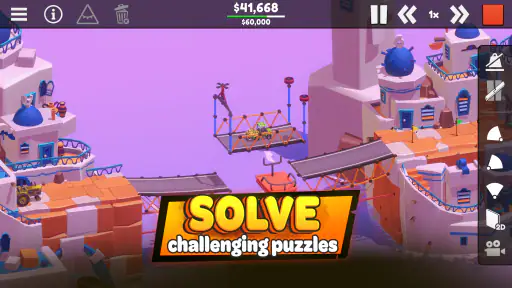
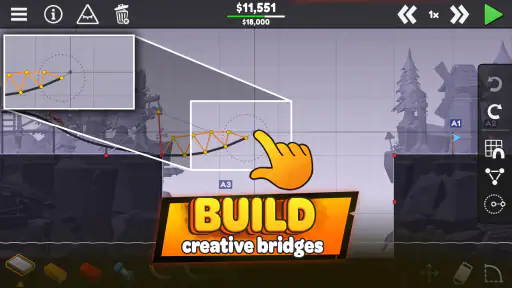
When I first downloaded Poly Bridge 3, I wasn't quite sure what to expect. But let me tell you, from the moment I opened the app, I was hooked. The game challenges you to construct bridges using an assortment of materials, each with its own strengths and weaknesses. Steel beams, wooden planks, and suspension cables are just a few of the tools at your disposal to create a masterpiece that can withstand the test of time—and weight!
Gameplay That Tests Your Skills
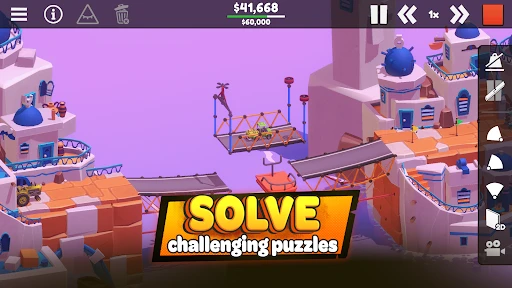
What sets Poly Bridge 3 apart from its predecessors is its improved physics engine. This means that every decision you make has a direct impact on the success or failure of your bridge. It’s a game of trial and error, but that’s where the fun lies. Watching a bridge collapse under the weight of a vehicle might seem frustrating at first, but it’s incredibly rewarding when you finally get that car safely across the river.
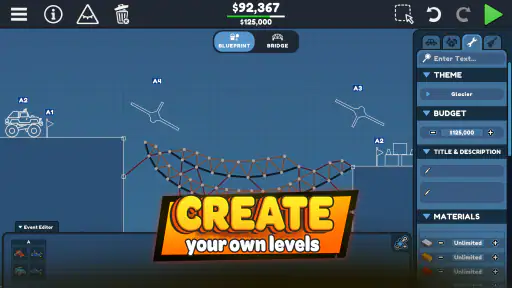
Another fantastic feature is the sandbox mode, where you can let your imagination run wild without any constraints. It’s the perfect place to experiment with outrageous designs and complex structures, whether you're aiming for functionality or just to see how many cars you can catapult into the sky.
Gaming Stories You May Enjoy

Dancing Road Turns Short Breaks Into a Test of Rhythm and Timing

Super Stylist Makes Every Outfit a Test of Taste and Patience

Dominoes on Your Terms: Who Should Play and Who Should Pass

Pokémon GO Makes the Familiar World Feel New

Chess.com Turns Rematches Into Rivalries, but Community Has Its Costs

Archery Battle 3D Review: Sharp Aiming, Unclear Feedback
Visuals and Soundtrack
The graphics in Poly Bridge 3 are colorful and charming, with a simplistic style that doesn’t overwhelm. The visuals keep the focus on the engineering challenges, while the cheerful soundtrack provides a relaxed backdrop to your construction endeavors. It’s a pleasant combination that keeps you engaged without distracting you from the task at hand.
The user interface is intuitive, making it easy to navigate through the game’s various modes and levels. Whether you’re a seasoned bridge builder or a complete novice, you’ll find the controls straightforward and accessible.
Getting more from each attempt
A useful way to approach a difficult crossing is to treat the first build as a test, not a finished answer. I would begin with the simplest structure that seems plausible, run it, and watch where it bends or gives way. Changing one part at a time makes the result easier to interpret than rebuilding everything after every failure. That small habit turns trial and error into a design process instead of a string of guesses.
It also helps to separate the problem into two questions: what must the bridge do, and what is causing the current design to fail? A design can look elegant on screen yet prove unreliable under a vehicle, while a less dramatic arrangement may be enough to get across. I would resist adding extra supports just because a bridge looks fragile; each new piece should have a purpose. This is the kind of game where a modest revision can teach you more than an elaborate redesign.
Sandbox play offers a different kind of value. I would use it when I want to experiment without turning every idea into a pass-or-fail exercise: try an unusual arrangement, see how it behaves, then borrow what I learned for a more practical build. It is also the better place to indulge in silly designs. The trade-off is that open-ended play may not satisfy someone who wants a clear sequence of objectives every time they sit down.
A good fit for a short break or a longer session
One realistic use case is opening the game during a quiet coffee break, choosing a bridge problem, and making a few focused attempts. A failed run can be a natural stopping point; I can come back later with a fresh eye rather than forcing a solution while annoyed. If I have more time, I can stay with a troublesome design and compare several structural ideas. That flexibility makes the game easier to fit around a day than a long, uninterrupted campaign would be.
Still, I would not call every session relaxing. A collapse can be funny, but repeating a failed design can become irritating if I am not in the mood to analyze it. The game suits people who enjoy pausing to inspect a problem and making deliberate changes. If I want instant action, a straightforward driving game is a better choice; if I want a construction puzzle with a more tactile engineering angle, this is the more distinctive option.
Compared with common simulation games that focus on managing a business, building a city, or operating vehicles, this one keeps attention on a single engineered crossing and the consequences of its design. That narrower focus is a strength when I want a compact problem to solve, but it also limits the appeal for anyone expecting broad management systems or a varied set of simulation activities. I would choose it for structural experimentation, not as an all-purpose simulation.
Where the challenge can become friction
The main trade-off is that the same physics-driven experimentation that makes success satisfying also creates the possibility of repeated failure. If I prefer games that explain every decision or let me progress without much adjustment, this may ask for more patience than I want to give. A bridge that collapses is useful feedback only if I am willing to look at the design and try again. For me, that loop is engaging; for a player who sees retries as wasted time, it can be a reason to skip the purchase.
It is also worth being clear about what the price buys in practical terms: access to this particular bridge-building game, not a free trial followed by a decision later. At $2.99, I would see it as a modest one-time game purchase only if the central activity already sounds appealing. I would not buy it just because the rating is high or because simulation is a broad favorite; the construction-and-testing loop is the real test of fit.
Who is likely to get the most value?
I would recommend it to players who like spatial reasoning, incremental problem solving, and the small thrill of seeing a plan survive a real test. It can also suit someone curious about how supports and materials affect a structure, provided they are comfortable learning through experimentation rather than treating the game as a formal engineering lesson. The Everyone age rating makes it broadly approachable, while the need to think through failures means it is not automatically a match for every casual player.
I would skip it if I wanted a story-led experience, fast reflex challenges, or a simulation with lots of different responsibilities to manage. I would also think twice if I rarely enjoy rebuilding something after it fails. Those are not flaws in the bridge-puzzle idea so much as a matter of taste, and knowing that before paying is more useful than relying on a rating alone.
Final Thoughts
In conclusion, Poly Bridge 3 is a delightful addition to the series that will challenge your creativity and problem-solving skills. It's an addictive mix of strategy and fun, offering endless hours of entertainment. Whether you're playing on a quick coffee break or delving into a marathon session, this game is sure to keep you coming back for more. So, why not give it a try and see if you have what it takes to become a master bridge builder? Trust me, it’s a bridge worth crossing!
Poly Bridge 3 Pros and Cons
Pros
- Innovative bridge-building mechanics.
- Challenging levels with creative solutions.
- Vibrant and colorful graphics.
- Engages problem-solving skills.
- Regular updates with new content.
Cons
- Can become repetitive over time.
- Some levels are extremely difficult.
- Limited hints for solving puzzles.
- Occasional bugs affecting gameplay.
- Requires internet for certain features.
Frequently Asked Questions
What is Poly Bridge 3, and how does it differ from its predecessors?
Poly Bridge 3 is the latest installment in the popular bridge-building simulation game series. Building on the success of Poly Bridge and Poly Bridge 2, this version offers enhanced graphics, new levels, and improved physics mechanics. It continues the series' tradition of challenging players to construct bridges that can support various vehicles, but with more complex scenarios and an expanded toolkit for creativity.
Is Poly Bridge 3 available on both Android and iOS platforms?
Yes, Poly Bridge 3 is available for download on both Android and iOS platforms. Users can find it on the Google Play Store for Android devices and the App Store for iOS devices. This ensures that players can enjoy the game regardless of their preferred mobile operating system, making it accessible to a wide audience.
What are the main features of Poly Bridge 3 that make it stand out?
Poly Bridge 3 features a range of new and exciting elements that enhance the gaming experience. This includes a more intuitive interface, advanced physics-based challenges, and a wider variety of construction materials. Additionally, it offers a sandbox mode where players can experiment without constraints, and a community sharing platform for players to share and explore user-created levels, adding to its replayability.
Are there any in-app purchases or microtransactions in Poly Bridge 3?
Poly Bridge 3 does include in-app purchases, which allow players to enhance their gaming experience. These can include additional level packs, unique building materials, or aesthetic upgrades. While the game is fully playable without these purchases, they offer optional enhancements for players looking to expand their gameplay or customize their experience further.
What level of difficulty can players expect in Poly Bridge 3, and is it suitable for beginners?
Poly Bridge 3 caters to both beginners and experienced players, offering a range of difficulty levels. The initial levels are designed to help new players learn the basics of bridge construction and game mechanics. As the game progresses, the challenges become increasingly complex, providing seasoned players with intricate problems to solve. Its adaptable difficulty makes it accessible and enjoyable for all skill levels.


