

Poly Bridge 2
- Reviews
- 4.7
- Version
- 1.71
- Installs
- 500,000+

Screenshots
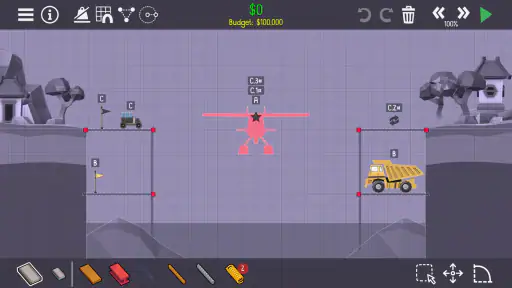
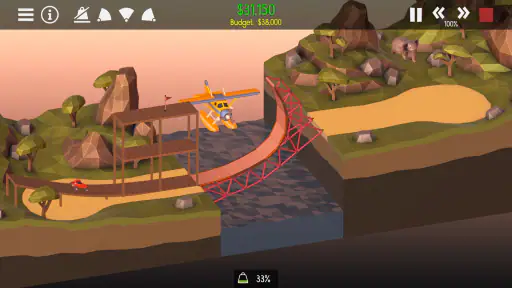
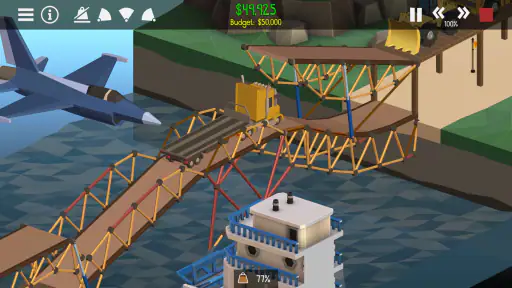
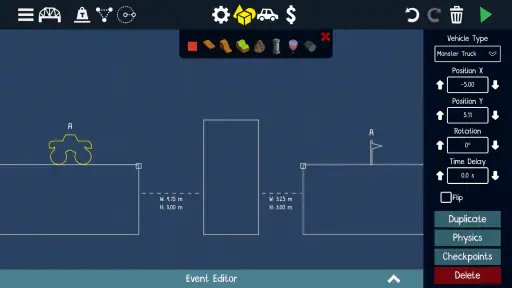
 Analysis by Frivlyz
When I want a game that gives me a small, satisfying problem to solve rather than another long list of tasks, Poly Bridge 2 is an appealing choice. It is a paid bridge-building simulation from Dry Cactus Limited, and its central pleasure is wonderfully direct: work out how to span a gap, test the structure, then figure out what to change when it fails. I like that the fun comes from trying ideas, not from pretending every design will work the first time.
A purchase with a clear purpose
The game costs $1.99, so the decision is straightforward: you pay once for the game rather than being asked to judge it by a free download alone. Its Everyone age rating also makes it an easy game to consider for a broad household, though the appeal is specifically to people who enjoy puzzles and construction. The price is modest, but it is still worth asking whether you like experimenting with designs; someone looking for an action game or a story-led adventure may get little from the core activity.
Dry Cactus Limited released it on Oct 1, 2020, and the current version is 1.71. It is a simulation game, but I would describe the experience less as a technical engineering tool and more as a playful physics puzzle. The store summary calls it an acclaimed indie hit, while my practical reason to consider it is simpler: building, testing, and revising a bridge can make a short break feel rewarding without demanding that I learn a complicated control scheme first.
There is a reassuring amount of interest around it: the average rating is 4.7 from around 12,000 ratings, with about 920 written reviews, and it has over 500,000 installs. Those figures suggest that many players have tried it, but they cannot tell you whether you personally enjoy its trial-and-error rhythm. I would treat them as useful context, not a substitute for knowing whether a bridge puzzle sounds fun to you.
Progress is built on testing, not rushing
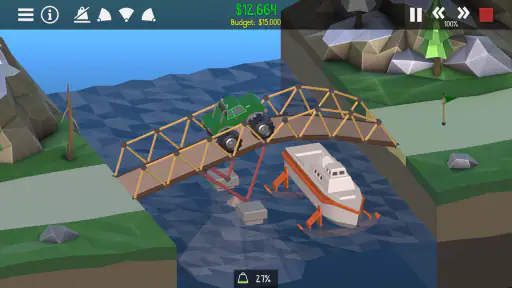
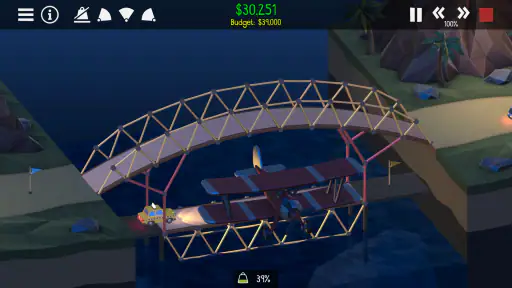
The pressure in a level comes from making a structure that holds up under the vehicles crossing it while working within the materials and budget available. A design that looks neat on screen can behave badly once it is tested, and that is where I find the most useful decision-making: change one part, run the crossing again, and watch for what actually caused the problem. Testing a small revision at a time is more informative than rebuilding everything after every failure.
This also means that progress can feel different from the steady unlock-and-upgrade loop common in many mobile simulations. Here, the satisfying improvement is often in your own understanding: you begin to notice which sections need support and which ambitious shapes are making the structure harder to control. If you like seeing a clear number go up after each session, this may feel less immediately rewarding. If you enjoy learning through experiments, a failed attempt can still move you forward.
A practical way to play is to treat the first design as a sketch rather than a final answer. I would start with a simple layout, test it, and then focus on the point where it bends or breaks. When a solution is close, resist adding extra supports everywhere: a more complicated bridge can make it harder to see which change helped, and it can use resources without solving the real weak spot. That measured approach turns the game from guesswork into a chain of small, understandable choices.
Gaming Stories You May Enjoy

Dancing Road Turns Short Breaks Into a Test of Rhythm and Timing

Super Stylist Makes Every Outfit a Test of Taste and Patience

Dominoes on Your Terms: Who Should Play and Who Should Pass

Pokémon GO Makes the Familiar World Feel New

Chess.com Turns Rematches Into Rivalries, but Community Has Its Costs

Archery Battle 3D Review: Sharp Aiming, Unclear Feedback
For a realistic everyday session, imagine having a few minutes between other tasks. You can open a level, try a straightforward bridge, see how the crossing goes, and leave with one specific idea to test next time. That makes it a better fit for a short puzzle break than for someone who wants constant action or a plot to follow. The main trade-off is that a tricky design can take more patience than the brief session you planned, especially if you keep tweaking without a clear reason.
Fair play, value, and what remains unknown
Because the game is sold for $1.99, I see its value in the puzzle experience itself rather than in any claim about purchases or progression systems beyond that price. I can’t confirm details about additional spending, ads, or policies from the information available here, so I wouldn’t use those as a reason to buy or avoid it. What I can say is that the purchase price is clear, and the game’s core challenge gives you a concrete basis for deciding whether it suits your tastes.
It is also worth separating popularity from competitive fairness. This is a bridge-building puzzle, and the draw is solving the construction challenge; I would not choose it expecting the kind of head-to-head competition found in a versus game. If you mainly want to compare scores or compete directly with friends, a multiplayer-focused alternative would be a better match. If you would rather concentrate on your own designs and learn from each test, the solo puzzle approach is a strength, not a compromise.
Compared with casual games that rely on quick taps, familiar matching rules, or constant rewards, this asks you to pause and reason about a physical structure. Compared with a professional design tool, it is meant to entertain rather than provide real-world engineering guidance. That middle ground is its appeal: the materials and physics make choices feel consequential, but the colorful presentation keeps the activity light. I would not treat a successful in-game bridge as a lesson plan for building one outside the game.
One useful question is whether the game works for a beginner. The basic idea is easy to understand, and the learning curve feels welcoming, but the challenge comes from applying that idea when a level becomes more demanding. You do not need to arrive with engineering knowledge; patience and willingness to test alternatives matter more. On the other hand, a player who dislikes failure as part of learning may find the repeated build-and-test cycle frustrating rather than relaxing.
Another question is how much variety it offers after the early puzzles. The game’s community-driven content is a reason it can stay interesting beyond its built-in challenges, since players can find more levels to try. I would still avoid assuming every community-made level will match your preferred difficulty or style. A sensible approach is to enjoy the core puzzles first and use community content when you want a fresh problem, rather than expecting every new level to be equally polished or approachable.
Compatibility is a practical consideration too: the listed minimum operating system is Android 6.0. That makes it important to check your device’s software before buying, particularly if you use an older phone or tablet. The game is available in a current version, but I would not infer from a version number alone how it performs on every device. For a purchase decision, the safest question is whether your device meets that minimum and whether you are comfortable with a game centered on careful construction.
Building Bridges and Breaking Limits
The first thing that caught my attention about Poly Bridge 2 was its simple yet engaging concept. The game invites you to build bridges over various landscapes, using a limited set of materials. But don’t let the simplicity fool you. As you progress, the levels become increasingly intricate, requiring not only basic engineering knowledge but also a fair amount of creativity.
The game mechanics are straightforward. You start with a budget and a selection of materials like wood, steel, and cables. The challenge lies in constructing a bridge that can withstand the weight of passing vehicles without collapsing. Sounds easy? Trust me, it’s trickier than it seems. The satisfaction you get from seeing your bridge hold up is immensely rewarding.
Aesthetic Appeal and User Interface
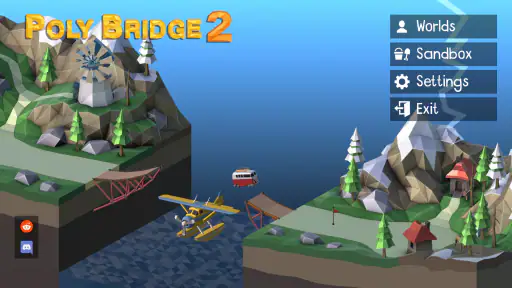
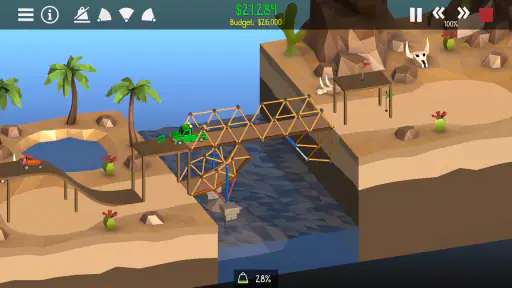
Visually, the game is a treat. The colorful, cartoonish graphics add a layer of fun to the serious task of bridge-building. The interface is intuitive, which makes navigating through the game a breeze. The developers have done a fantastic job of maintaining a balance between simplicity and functionality. You’ll never feel overwhelmed with instructions or options, yet you have everything you need at your fingertips.
Physics Engine and Realism
One of the standout features of Poly Bridge 2 is its highly realistic physics engine. It adds a layer of depth to the game, making each level a unique challenge. The way the materials bend, break, and interact with vehicles feels surprisingly lifelike, which adds to the immersion. I found myself experimenting with different designs just to see how they would react under pressure.
For anyone who enjoys a good puzzle and has a penchant for engineering, this game is a perfect match. The learning curve is gentle, but the challenges are satisfying enough to keep you engaged for hours. Plus, the community-driven content means there are always new levels to try out, keeping the game fresh and exciting.
Final Thoughts
In conclusion, Poly Bridge 2 is not just a game; it's a delightful blend of education and entertainment. Its ability to offer both a relaxing gaming experience and a stimulating mental workout is what sets it apart. Whether you’re a seasoned gamer or a casual player looking for something new, this game is bound to get your creative juices flowing. So grab your virtual hard hat and dive into the world of bridge-building; you won’t regret it!
Poly Bridge 2 Pros and Cons
Pros
- Intuitive and engaging gameplay
- Vast array of levels and challenges
- Realistic physics engine
- Great replay value
- Creative and educational tool
Cons
- High battery consumption
- Occasional glitches
- Steep learning curve for beginners
- In-app purchases can be pricey
- Limited offline functionality
This Game in Other Languages
Frequently Asked Questions
What is Poly Bridge 2, and how does it differ from its predecessor?
Poly Bridge 2 is a bridge-building simulation game that challenges players to construct bridges using various materials to solve physics-based puzzles. Compared to its predecessor, Poly Bridge 2 offers new levels, improved physics, and additional mechanics such as springs. It also includes enhanced graphics and a more comprehensive sandbox mode, allowing players to unleash their creativity. Whether you're a fan of the original or new to the series, Poly Bridge 2 promises engaging gameplay with its unique combination of engineering and puzzle-solving.
What platforms is Poly Bridge 2 available on?
Poly Bridge 2 is available on multiple platforms, including Windows, macOS, Linux, and mobile devices such as Android and iOS. This wide range of availability ensures that players can enjoy the game on their preferred devices, whether they're at home or on the go. The game seamlessly adapts to different screen sizes and control methods, providing a consistent and enjoyable experience across platforms.
Does Poly Bridge 2 offer a multiplayer mode?
Yes, Poly Bridge 2 includes a multiplayer mode where players can challenge each other to build the most efficient and creative bridges. This feature adds a competitive edge to the game, as players can test their engineering skills against others. The multiplayer mode also encourages community interaction, allowing players to share their designs and learn from each other, enhancing the overall gaming experience.
Are there any in-app purchases or ads in Poly Bridge 2?
Poly Bridge 2 offers a premium gaming experience with no in-app purchases or ads, allowing players to enjoy uninterrupted gameplay. Once purchased, players have access to all features and levels without any additional costs. This model contrasts with many mobile games that rely on microtransactions, providing a cleaner and more focused gaming experience that appeals to players who prefer a one-time purchase.
How can players access custom content and community levels in Poly Bridge 2?
Players can access a wealth of custom content and community-created levels through Poly Bridge 2's integrated workshop. This feature allows players to download and share user-generated content, expanding the game's replayability. The workshop encourages creativity and innovation within the community, as players can explore new challenges and bridge designs, keeping the gameplay fresh and engaging long after completing the main levels.


