

Pokémon TCG Live
- Reviews
- 4.5
- Version
- 1.25.0
- Installs
- 5,000,000+

Screenshots

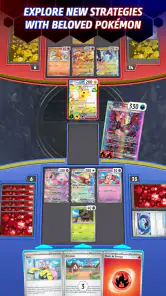




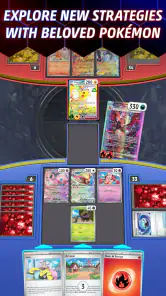

 Analysis by Frivlyz
I like Pokémon TCG Live most as a practical way to learn and play the Pokémon card game when a physical deck is not nearby. It brings the familiar rhythm of building a deck, planning turns, and responding to an opponent to a phone or tablet, while its digital format makes experimenting easier than sorting through a box of cards. It is a free card game from The Pokémon Company International, and its 4.5 average from around 63,000 ratings suggests it has found a large audience. My recommendation is strongest for players who enjoy working on decks and learning through matches; anyone looking for a quick, low-attention game may find the decisions and setup less appealing.
Why the digital format works
The main advantage is not simply that matches can happen on a screen. It is that the game can take care of the fiddly parts that often slow down a paper game: keeping track of the board, following card effects, and moving through a turn. That leaves me more room to think about what an opponent might do next. For a returning player, it is a convenient way to get back into the game; for a newcomer, seeing the cards and turns play out can make the rules feel less abstract than reading them alone.
The tutorial is a helpful starting point, but I would treat it as a first lesson rather than proof that every strategic detail will become obvious at once. Card games reward attention to timing, resource choices, and the way a deck’s pieces support one another. When a match goes badly, I find it more useful to look at which decisions narrowed my options than to blame one unlucky draw. That habit makes the experience more rewarding and helps a new player improve without needing to memorize everything immediately.
Deck building rewards experimentation
The deck builder is one of the most useful parts of the app because it gives me a place to test ideas before committing to them. Instead of treating a deck as a fixed recipe, I can think about its plan: how it starts, what it needs to get going, and what it can do if the first approach is disrupted. A good practical tip is to make one change at a time after a match. If I replace several cards together, it is harder to tell which adjustment actually helped.
Importing a physical deck with a QR code can also make the digital version a handy companion to tabletop play. I would use it to try a list online, notice where it feels slow or short on useful options, and then decide what I want to change when handling the physical cards. The trade-off is that a digital match is not a perfect substitute for sitting across a table: the shared pace and face-to-face conversation are part of the appeal of paper play. For testing choices and getting more practice, though, the app has a clear convenience advantage.
What matches feel like in everyday use
In a normal week, I can imagine opening the game during a quiet break, choosing a deck I already understand, and playing a match rather than spending that time searching for cards or arranging a table. That works best when I have enough attention to follow the board and think through my turn. It is less suited to a moment when I might need to stop abruptly or keep switching between tasks: a strategy match asks me to stay engaged, and rushing decisions can make the game feel more frustrating than relaxing.
For a newer player, I would start with the tutorial and then stick with one deck long enough to understand its basic plan. Switching lists after every loss can make it difficult to separate a deck’s weaknesses from unfamiliarity with its choices. Once the general flow makes sense, trying a different style is a better way to learn what kinds of decisions you enjoy. This simple routine—learn one list, play several matches, then make a small adjustment—turns the deck builder into a learning tool rather than just a collection screen.
Gaming Stories You May Enjoy

Dancing Road Turns Short Breaks Into a Test of Rhythm and Timing

Super Stylist Makes Every Outfit a Test of Taste and Patience

Dominoes on Your Terms: Who Should Play and Who Should Pass

Pokémon GO Makes the Familiar World Feel New

Chess.com Turns Rematches Into Rivalries, but Community Has Its Costs

Archery Battle 3D Review: Sharp Aiming, Unclear Feedback
Where it fits among card-game options
Compared with playing the Pokémon Trading Card Game with physical cards, the digital version is easier to access for a quick practice session and handles the board state for you. Physical play is the better choice if what you value most is trading in person, handling the cards, or sharing a match around a table. I see the two formats as useful for different moods rather than direct replacements: Live suits solo practice and online battles, while a paper deck makes more sense for the social experience of meeting up to play.
It also has a different feel from casual card games that focus on short, simple rounds. Pokémon TCG matches ask you to plan around a deck and make choices whose value may only become clear a few turns later. That strategic texture is a strength if I want to improve or think through a game, but it also means the app is not my first pick when I only want a tiny distraction. Players who prefer a faster, lighter format may be happier with a simpler game; players who enjoy tuning a list and learning matchups have more reason to stay.
Learning curve, pace, and points of friction
The app is approachable, but the card game itself still has a learning curve. A tutorial can explain the basic flow, yet understanding why a particular card belongs in a deck takes practice. New players should not expect every loss to come with an obvious lesson, especially while they are still learning what their own cards can do. I recommend pausing to read unfamiliar effects carefully and focusing on one decision at a time. That is more useful than trying to copy a deck plan without understanding how its pieces fit together.
There is also a difference between seeing a deck list and being comfortable piloting it. A list that looks powerful may demand careful sequencing or a particular opening plan. If I am still learning, I would rather use a deck whose goal I can explain in a sentence than chase a complicated strategy that makes every turn feel uncertain. This is a small but important trade-off: the deck builder encourages experimentation, but experimentation is more informative when I change things gradually and give each version a fair try.
The app is free to download, which makes trying it a low-commitment way to find out whether digital Pokémon matches suit you. It is rated for Everyone, and the current version is 1.25.0; it supports Android 9 and later. Those details make it accessible to a broad range of players, but the age rating should not be confused with the game being equally engaging for every age or attention span. Younger players may appreciate learning through play, while anyone who dislikes reading card text or thinking several moves ahead may prefer a less demanding game.
Who I would recommend it to
I would recommend it first to someone who already likes the Pokémon card game and wants a convenient place to practice. It is also a reasonable starting point for curious newcomers who are willing to learn in stages rather than expecting immediate mastery. The large player base—more than five million installs—makes the digital game feel like an established option, and its 8,300 reviews reflect a substantial range of player experiences. I would not choose it for someone whose main goal is collecting physical cards or enjoying the social ritual of opening and sharing a tabletop game; those pleasures are tied to the real cards, not just the rules.
For a friend who has not played before, I would suggest beginning with the basics and resisting the urge to judge the whole game from one confusing match. If they enjoy spotting patterns and improving a plan, they are likely to find more depth as they go. If they mainly want a relaxed game that can be ignored whenever a notification arrives, I would point them elsewhere. The distinction is not about skill; it is about whether thoughtful turns feel satisfying or like work.
Players who already own physical decks can use the app as a practice partner for their own ideas, while competitive-minded players may value the chance to test decisions against other people rather than only goldfishing a list. For someone who just wants to collect cards as objects, however, the digital collection will not offer the same tactile satisfaction. The best fit is a player who sees cards as tools for a changing strategy, not only as items to own.
Pokémon TCG Live is a focused digital home for a game that rewards patience, planning, and curiosity about how a deck works. I enjoy it most when I use it deliberately: learn a list, play with a clear goal, and make a considered adjustment afterward. Its convenience cannot recreate everything about paper play, and its strategic pace will not suit every casual session, but it makes the core card battles accessible without a physical setup. With more than 8,000 reviews behind its 4.5 average, it is clearly a popular choice; my own advice is simple: try it if the pleasure of improving a deck sounds as good as winning with one.
Getting Started with Pokémon TCG Live
First things first, downloading Pokémon TCG Live is a breeze. Available on both Android and iOS, this app brings the beloved trading card game right to your fingertips. Setting it up is as simple as logging in with your Pokémon Trainer Club account, and boom, you're ready to start your card-slinging adventure.
Gameplay and Features
Now, let's talk gameplay. The app is incredibly intuitive, whether you're a seasoned player or a newbie. It walks you through the basics with a tutorial that’s not too overwhelming. You'll quickly find yourself building decks, battling friends, and rising through the ranks.
One of the coolest features is the deck builder. It's like having a personal assistant that helps you craft the ultimate deck. You can even import your favorite physical decks using a QR code. Pretty neat, right? Plus, the app is regularly updated with new expansions, keeping the game fresh and exciting.
Graphics and User Interface
Visually, Pokémon TCG Live does not disappoint. The graphics are crisp, and the animations during battles add a dynamic edge to the experience. Navigating through the app is smooth, with a user interface that’s both sleek and functional. Everything feels just right, from the sound effects to the vibrant colors that bring each card to life.
Community and Social Features
For those who love a social touch, Pokémon TCG Live has got you covered. You can connect with friends, participate in events, and even join tournaments. The community aspect is robust, making it easy to find fellow Pokémon enthusiasts to challenge and chat with.
The app also supports cross-platform play, so you can battle it out with players across different devices. This feature is a game-changer for those looking to test their skills against a broader audience.
Final Thoughts
In conclusion, Pokémon TCG Live is a must-have for any Pokémon fan. Whether you're looking to casually play or strategically climb the competitive ladder, this app delivers. It's a fantastic blend of nostalgia and modern gaming, offering a compelling experience for all ages. So, why wait? Dive into the world of Pokémon TCG Live and let the card battles begin!
Pokémon TCG Live Pros and Cons
Pros
- User-friendly interface for beginners.
- Regular updates with new content.
- Cross-platform play available.
- Free-to-play with in-game purchases.
- Interactive tutorials enhance learning.
Cons
- Limited card trading options.
- Requires stable internet connection.
- Occasional in-game bugs.
- High storage space needed.
- Some features locked behind paywall.
This Game in Other Languages
Frequently Asked Questions
What is Pokémon TCG Live and how does it differ from previous Pokémon trading card games?
Pokémon TCG Live is the latest digital iteration of the Pokémon Trading Card Game, designed for both new and veteran players. Unlike its predecessors, TCG Live introduces a more streamlined interface, cross-platform play, and a new progression system. Players can build decks, challenge others worldwide, and partake in real-time battles with improved graphics and an intuitive user experience.
Can I transfer my existing Pokémon TCG Online account to Pokémon TCG Live?
Yes, players can transfer their Pokémon TCG Online account to TCG Live, retaining their collection of cards and in-game currencies. However, some items, like unopened packs and certain promo cards, may not transfer. It's essential to check the official resources to understand what will remain after migration to ensure a smooth transition.
What platforms support Pokémon TCG Live?
Pokémon TCG Live is available on multiple platforms, including iOS, Android, Windows, and macOS. This cross-platform availability ensures that players can enjoy the game on their preferred device, whether they are at home or on the go, providing flexibility and convenience for all types of gamers.
Are there any costs associated with playing Pokémon TCG Live?
Pokémon TCG Live is free-to-play, allowing players to access a broad range of features without any initial cost. However, like many free-to-play games, it offers in-app purchases and microtransactions for those who wish to enhance their gameplay experience by acquiring additional cards, cosmetic items, or other in-game benefits.
How does the matchmaking system work in Pokémon TCG Live?
The matchmaking system in Pokémon TCG Live pairs players based on their skill levels and deck strengths to ensure fair and balanced gameplay. By using a sophisticated algorithm, the game provides competitive matches, enhancing the play experience while preventing mismatches that could lead to frustration for less experienced players. This system encourages growth and learning within the community.


