

Pizza Maker Kids Cooking Games
- Reviews
- 4.6
- Version
- 2.2
- Installs
- 1,000,000+

Screenshots





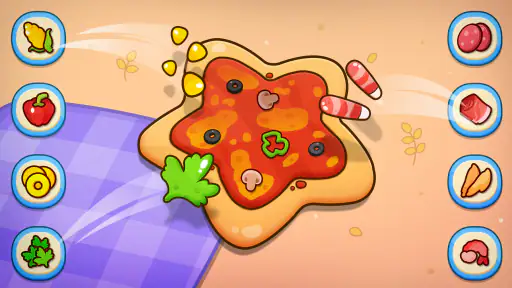
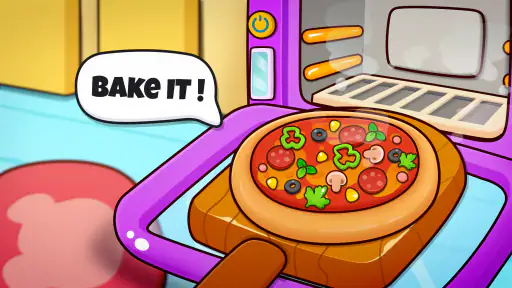
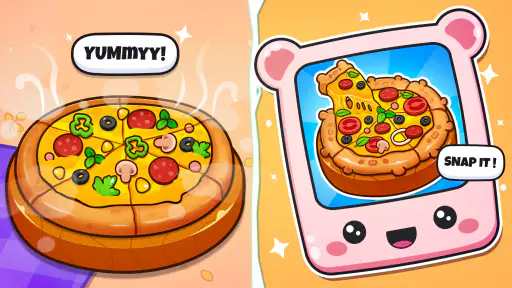
 Analysis by Frivlyz
If there’s one thing kids love, it's pizza. And what could be more fun than making your own pizza from scratch? Enter Pizza Maker Kids Cooking Games, a delightful app that lets your little chefs create their own digital culinary masterpieces. I recently had the chance to explore this charming game, and I'm here to share my experience.
What to know before opening the kitchen
One useful way to approach this game is as a small, low-pressure activity rather than a full cooking simulator. Its appeal is the simple sequence of choosing ingredients and making a pretend pizza, so it suits a short break at home or a quiet moment while an adult is nearby. I would not expect it to teach real kitchen safety or replace hands-on cooking; the value is imaginative play, not practical instruction with food.
That distinction also helps set expectations for children. A child who enjoys choosing colors, combinations, and pretend meals may happily repeat the process, while one looking for a story, a long progression system, or a competitive challenge may lose interest sooner. I’d present it as an easy creative game, not promise a deep role-playing adventure just because it appears in the role-playing category.
The game is free to download, and its age rating is Everyone, which makes it a reasonable option for family consideration. However, the game also offers in-app purchases priced from $1.99 to $59.99 per item. I’d check purchase controls on the device before handing it to a child, and explain that a purchase prompt is not part of making an ordinary pizza. That small bit of preparation can prevent an unexpected interruption or accidental spending.
A smoother first session
If the game does not open or respond as expected, I’d start with ordinary device checks instead of assuming the pizza-making activity itself is broken. Confirm that the device is running a compatible operating system: the minimum listed version is 7.0. Then close and reopen the game, make sure the device has enough available storage for normal app operation, and try again. These are general troubleshooting steps, not special requirements unique to this title.
For a child’s first try, I’d keep the session simple: open the game together, let them explore the ingredient choices, and give them time to learn the touch controls before expecting them to finish a pizza independently. If a tap seems not to register, pausing briefly and trying once more is often more useful than tapping repeatedly. On a shared device, it also helps to make sure the screen is clean and the game is in the foreground rather than covered by another app.
Recovering when play gets interrupted
Children rarely stop at a tidy moment, so I’d treat interruptions as part of the routine. If a notification, incoming call, or accidental app switch pulls the game away, return to it calmly and check what is still on screen before restarting anything. If the current activity has reset, that can be disappointing, but a simple game is easiest to recover from when the child is invited to make a fresh design rather than told they have lost a major achievement.
Gaming Stories You May Enjoy

Dancing Road Turns Short Breaks Into a Test of Rhythm and Timing

Super Stylist Makes Every Outfit a Test of Taste and Patience

Dominoes on Your Terms: Who Should Play and Who Should Pass

Pokémon GO Makes the Familiar World Feel New

Chess.com Turns Rematches Into Rivalries, but Community Has Its Costs

Archery Battle 3D Review: Sharp Aiming, Unclear Feedback
It is also worth keeping expectations modest about saving progress. I would avoid promising that an unfinished pizza or a particular choice will remain exactly where it was after closing the app. For a quick play session, the safer habit is to finish the current creation before switching tasks. This is a practical routine, not a claim about a specific save feature.
When a problem may be elsewhere
Sometimes a slow or unresponsive game reflects the device or its surroundings rather than the app. An older or busy device may struggle when several apps are open, and a child who is tapping rapidly can make a responsive screen look confusing. Closing unused apps, waiting a moment, and asking the child to try one deliberate tap at a time are sensible first checks.
If the game works but a purchase prompt appears, that does not necessarily mean the basic pizza-making activity is unavailable. Since optional in-app purchases are offered, I’d simply back out of the prompt if no purchase is intended and return to the play screen. Parents who want a fully purchase-free experience should use the device’s available purchase restrictions rather than rely on a child to distinguish every prompt.
Unleashing Creativity in the Kitchen
With Pizza Maker Kids Cooking Games, your child is the master of their own pizzeria. From the moment they open the app, they're greeted with a vibrant and inviting interface that sparks their imagination. The game kicks off with selecting the type of dough, sauce, and toppings. Trust me, your kids will have a blast choosing from a variety of ingredients like pepperoni, mushrooms, and even some quirky options like gummy bears and chocolate chips. It's all about creativity, and the sky’s the limit!
That ingredient freedom gives parents a simple way to make the play session feel fresh without inventing a complicated activity. You can ask a child to create a pizza inspired by a favorite color, choose toppings that look unusual together, or make one design for each person at the table. These prompts turn the basic selection process into a small conversation about preferences and imagination. They also give a child who is unsure what to do a starting point without taking over the choices.
For a realistic everyday use, I can imagine opening the game while dinner is being prepared. A child can make a pretend pizza nearby, then describe what they chose when the meal is ready. It is not a substitute for involving them in real cooking, but it can keep them occupied with a related theme while an adult handles hot ovens and sharp tools. If the child wants to help in the actual kitchen afterward, that should be a separate, supervised activity using age-appropriate tasks.
Interactive and Educational
What I found particularly impressive is how the app combines fun with learning. As kids navigate the pizza-making process, they’re not just playing; they’re also learning about the different ingredients and steps involved in cooking. It’s like a mini cooking class wrapped in a game. The app’s interactive nature encourages them to experiment while subtly teaching them about food combinations and cooking techniques.
I would describe that educational value as informal rather than instructional. The game can give a young child a familiar sequence to talk through—choose a base, add ingredients, and make a finished creation—but a digital action cannot show how dough feels or explain why real food needs careful handling. A parent can get more from the experience by asking open questions such as which topping they would really try, or which ingredients they think belong together, instead of treating the game as a lesson with right answers.
One small practical tip is to let the child make a deliberately odd combination first. That takes the pressure off creating a “correct” pizza and makes the activity about experimenting. Afterward, they can design one they would actually want to eat. This works especially well for siblings with different tastes: each can make a personal version without needing to agree on one shared set of toppings.
The game also includes mini-challenges and rewards, which keep the little ones engaged. Successfully completing a pizza earns them points and virtual coins, which they can use to unlock new ingredients and kitchen tools. It’s a clever way to keep them motivated and eager to explore more.
That reward loop may be a plus for a child who likes having a small goal, but it can also change the pace of play. If a child becomes focused on unlocking things rather than enjoying the pizza they are making, I’d steer the session back toward choosing an unusual combination or making a design for someone else. In a short play break, it may be better to celebrate the creation itself than to make the next unlock the whole point.
User-Friendly and Safe for Kids
One of the things I appreciated most about the app is its user-friendly design. It’s incredibly easy for kids to navigate, even without adult supervision. Plus, the game is designed with kids’ safety in mind; there are no in-app purchases or ads, so parents can rest easy knowing their children are playing in a secure environment.
I would be careful about relying on that last point as a blanket guarantee. The game has optional in-app purchases, with individual items priced from $1.99 to $59.99, so it is sensible for a parent to review the device’s purchase settings before a child plays alone. That does not make the basic creative activity unsuitable; it simply means that purchase access deserves the same attention parents give any child-facing game. The Everyone age rating is helpful context, but household rules still matter.
There is also a difference between a child being able to move around a simple interface and being ready to manage every device prompt independently. For younger players, I’d sit with them for the first session, show how to return to the pizza activity if something unexpected appears, and agree that they should ask an adult before accepting a purchase. Older children who already use the device responsibly may need less help, but I still prefer to keep purchase controls in the adult’s hands.
The graphics are colorful and engaging, and the sound effects add an extra layer of fun. Hearing the sizzle of a pizza in the oven or the cheerful “ding” when it’s ready to serve adds to the overall immersive experience.
That presentation is best suited to children who enjoy playful visual feedback. If a child is sensitive to sound or you need a quiet setting, check the device’s audio controls before starting; lowering or muting sound at the device level is a general option when available. The bright, playful style is part of the game’s charm, though it may be less appealing to a child who prefers realistic cooking or calmer, story-led play.
How it fits beside other cooking games
Compared with cooking games built around time pressure, restaurant management, or serving a queue of customers, this one is a better match for relaxed creation. The appeal here is making a pizza from ingredient choices rather than juggling orders or trying to beat a timer. That makes it easier to share with a younger child who wants to explore at their own pace, but it may feel too light for someone seeking strategic decisions, difficult levels, or a detailed simulation.
It is also different from open-ended drawing apps. A drawing app gives a child a blank canvas, while this game frames creativity around a recognizable food-making activity. That structure can help a child who enjoys choices but finds a completely open screen overwhelming. On the other hand, a child who wants to invent anything at all may prefer drawing, and someone eager to learn real recipes would get more from a supervised kitchen activity or a cooking guide designed for actual food preparation.
Piggy Panda Inc is the developer, and the game is free to download. It has a 4.6 average from around 3,200 ratings, with more than 1 million installs. Its current version is 2.2, and it was released on October 25, 2023. Those figures suggest that many players have tried it, but they do not tell me whether a particular child will enjoy repeating its central activity; that depends more on whether they like imaginative ingredient choices than on popularity.
Final Thoughts
Overall, Pizza Maker Kids Cooking Games is a fantastic app that combines fun, creativity, and learning into one delightful package. Whether your child is a budding chef or just loves pizza, this game is sure to provide hours of entertainment. It's a great way to keep them engaged while subtly teaching them valuable skills. So, if you're looking for a safe, educational, and entertaining app for your kids, this is definitely worth a download!
My recommendation is more specific: I’d try it for a child who likes pretend food, colorful choices, and short creative sessions, especially when an adult can help with setup and purchase boundaries. I would skip it for someone expecting a demanding role-playing game, realistic culinary instruction, or lots of varied activities beyond pizza making. The game is available free, but optional purchases mean a parent should check device controls first. If that trade-off suits your household, it is an approachable way to let a young player design a meal without the mess of a real kitchen.
Pizza Maker Kids Cooking Games Pros and Cons
Pros
- Engaging and user-friendly interface.
- Variety of pizza recipes to explore.
- Encourages creativity in kids.
- No in-app purchases required.
- Graphics are vibrant and fun.
Cons
- Contains ads that may interrupt play.
- Limited customization options.
- Might not hold interest for older kids.
- Requires internet for some features.
- Can be repetitive over time.
Frequently Asked Questions
What is the main objective of Pizza Maker Kids Cooking Games?
Pizza Maker Kids Cooking Games is designed to engage children in a fun and educational cooking simulation. The main objective is to allow kids to explore their creativity by designing and baking various types of pizzas using different ingredients and cooking techniques. It's a delightful way to introduce children to basic culinary skills and the joy of cooking.
Is Pizza Maker Kids Cooking Games suitable for all age groups?
While Pizza Maker Kids Cooking Games is primarily aimed at children, it can be enjoyed by users of all ages. The game features simple controls and colorful graphics that appeal to young players, but older users can also find it entertaining as a casual game. Parents can participate with their kids, making it a fun family activity.
Are there any in-app purchases in Pizza Maker Kids Cooking Games?
Yes, Pizza Maker Kids Cooking Games may include in-app purchases. These purchases typically offer additional ingredients, customization options, or special features that enhance gameplay. Parents should be aware of these options and manage settings appropriately to prevent unauthorized purchases by children.
Does Pizza Maker Kids Cooking Games require an internet connection?
Pizza Maker Kids Cooking Games does not necessarily require an internet connection for basic gameplay. However, certain features, such as downloading new content or accessing ads, might need an active connection. It is advisable to check the app's settings and permissions to ensure optimal performance and control over data usage.
How can I ensure a safe and secure experience for my child while using Pizza Maker Kids Cooking Games?
To ensure a safe and secure experience for your child, it's important to adjust parental controls and monitor the app's settings. Disable in-app purchases if necessary, and supervise gameplay to ensure content is appropriate. Regularly update the app to benefit from the latest security features and improvements, ensuring a worry-free gaming experience for your child.


