

Pizza Boy C Pro
- Reviews
- 4.5
- Version
- 6.4.0
- Installs
- 10,000+

Screenshots

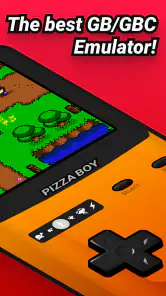

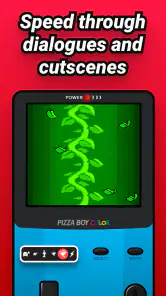
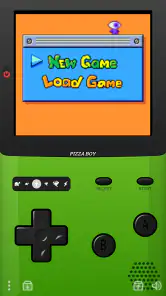
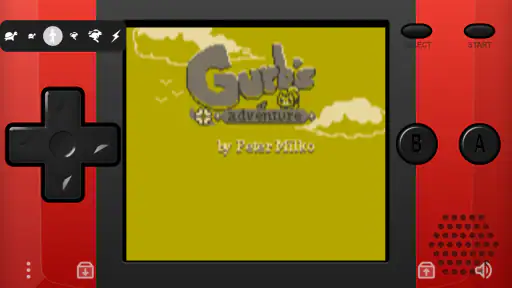
 Analysis by Frivlyz
I judge a paid emulator differently from a free arcade game: the key question is whether it earns a place in my routine, not whether it can promise a long list of extras. Pizza Boy C Pro is an arcade game from Pizza Emulators, built around playing Game Boy Color titles on a phone. It costs $5.49, so I’d think of it as a considered purchase rather than something to install casually and forget. Its Everyone age rating makes the content broadly suitable, while the 4.5 average from around a thousand ratings suggests many players have found it worthwhile.
What the purchase is really for
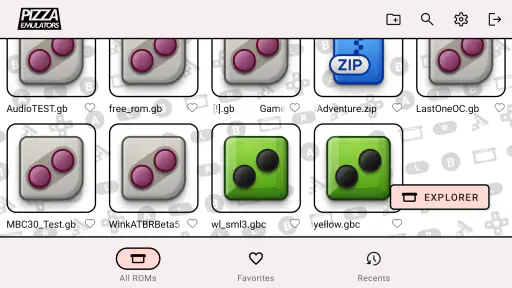
The value here depends on what you want to play. If you already have a personal collection of compatible game files and want a convenient way to revisit them, a dedicated emulator can be more useful than a general-purpose retro collection. You choose what to play instead of being limited to a bundled selection. That flexibility is a real strength, but it also means the app is not a ready-made library: getting a game collection together is a separate step, and new users should understand that before paying.
I’d also separate the purchase from the games themselves. Paying for this app does not mean a particular game is included, and I would only use game files I’m entitled to use. That distinction matters more than it may seem: if you expect to tap once and immediately browse a catalogue of classics, this is probably not the experience you’re looking for. The price makes most sense to someone who knows what they want to play and expects to return to it.
A good fit for short sessions, with a little setup
On an ordinary day, I can picture using it during a quiet commute or while waiting for an appointment: open a familiar adventure, make a little progress, then stop without needing to plan a long gaming session. Save states are especially handy for that pattern. They let me treat a game as something I can pick up between other tasks, rather than having to reach a formal save point before putting the phone away.
There is a trade-off, though. Touch controls can’t reproduce the feel of a handheld’s physical buttons, and screen size is always a compromise when a game was designed for a small dedicated device. Adjusting the layout may help, but it takes a little experimentation to find a comfortable arrangement. If precise button timing is central to the games you play, or if you strongly prefer physical controls, a compatible external controller or original hardware may suit you better.
Progress without turning every session into a grind
Fast forward is useful for a different reason than simply making play feel quicker. In a role-playing game, repeated battles or familiar stretches of travel can interrupt the pace of the story. Used selectively, speeding through those parts can leave more time for exploration and decisions. I would not keep it on all the time: faster play can make it easier to miss dialogue or lose track of what is happening, and some moments are better experienced at the intended pace.
Save states also deserve a bit of restraint. They are excellent as a practical pause button, especially when life interrupts unexpectedly, but relying on them for every small risk can change the feel of a game. For a first playthrough, I’d use them mainly to protect a session from interruptions and let the game’s ordinary checkpoints do their job otherwise. That keeps the convenience without removing every consequence from the original design.
Gaming Stories You May Enjoy

Dancing Road Turns Short Breaks Into a Test of Rhythm and Timing

Super Stylist Makes Every Outfit a Test of Taste and Patience

Dominoes on Your Terms: Who Should Play and Who Should Pass

Pokémon GO Makes the Familiar World Feel New

Chess.com Turns Rematches Into Rivalries, but Community Has Its Costs

Archery Battle 3D Review: Sharp Aiming, Unclear Feedback
Bringing Back the Classics
First off, let's talk about what makes Pizza Boy C Pro stand out. This isn't your average emulator. What caught my attention right away was its seamless performance. Seriously, I threw everything at it, from "Pokémon Crystal" to "The Legend of Zelda: Oracle of Ages," and it handled them like a champ. No lag, no glitches, just smooth gameplay. It felt like I was back in the '90s, sitting on my bedroom floor, Game Boy in hand.
User-Friendly Interface
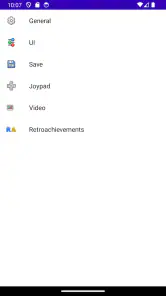
Now, I know what you're thinking: "Emulators can be a pain to set up." But fear not! The developers have crafted an intuitive interface that even the least tech-savvy among us can navigate with ease. Installing games is as simple as one, two, three. Just download your favorite ROMs, and the app does the rest. Plus, the customization options are a nice touch. You can tweak the controls, adjust the screen size, and even apply shaders to give your games a fresh look.
Performance and Features
One of the things I genuinely appreciate about this app is the attention to detail in replicating the original Game Boy Color experience. The sound emulation is spot on, and the visuals? Crisp as a freshly baked pizza! And speaking of pizzas, the app doesn’t just stop at playing games. It offers save states, allowing you to pause your adventure and pick up right where you left off. No more worrying about losing progress because your phone decided to die on you.
Oh, and did I mention the fast forward feature? It's perfect for those moments when you're grinding through repetitive battles or waiting for that one elusive Pokémon to appear. Trust me, once you've tried it, you'll wonder how you ever lived without it.
Setting up a collection that works for you
For a smoother start, I’d decide on a small set of games before importing a large collection. That makes it easier to check that each file is recognized and that the on-screen layout feels right for the way you play. If a title behaves unexpectedly, test it on its own rather than changing several settings at once; that way, you can tell whether the issue comes from the game file, the control setup, or a display adjustment. It’s a more useful troubleshooting habit than assuming every problem has the same fix.
Customizing the screen is not only about appearance. A larger image can make details easier to see, while a tighter layout may leave more room for touch controls. Shaders can add a different visual character, but they are a preference rather than a requirement. I’d start with the clearest presentation, then experiment only if the default look feels uncomfortable. Keeping a familiar setup across games also saves time when you switch titles during a short session.
How it compares with other ways to revisit handheld games
Compared with a broad retro-game collection, this emulator gives more control over the titles you bring to it, but less instant convenience if you do not already have game files. A general collection may be easier for someone who wants a ready-to-play selection; this is more appealing if you value choosing your own library. Compared with playing on original handheld hardware, it is easier to carry alongside a phone and offers practical tools such as save states and fast forward, but it cannot fully recreate physical buttons or the feel of a dedicated device.
It also sits apart from simply watching playthroughs or revisiting a game on another platform: the point is to interact with the original handheld experience, not just remember its story. That makes it most rewarding for people who enjoy the rhythm of these games themselves. If your main goal is a modern remake, online competition, or a large built-in catalogue, I’d look elsewhere rather than buying this in the hope that it will provide those things.
Who should skip it, and what to check first
I’d recommend it most to players who already have a few Game Boy Color games in mind, enjoy solo retro play, and are comfortable spending a little time arranging controls and screen settings. The current version is 6.4.0, and the app has been available since February 27, 2017; it has reached over 10,000 installs. Those details provide useful context for an established paid app, but they don’t replace checking that the emulator fits your own device and expectations.
On Android, the minimum supported operating system is 6.0. Before buying, I’d check the Android version on the phone or tablet I plan to use, then think about whether touch controls are acceptable for my favorite games. The purchase is less compelling if I have no compatible game files, rarely play older handheld titles, or expect a full game catalogue to be included. It is also not the right pick for someone who wants a console-style setup without any configuration.
Where trust comes from—and where it stops
The app’s 4.5 average from around a thousand ratings and its 227 written reviews offer a useful sign that people are actively using it, but I would not treat popularity as proof that every game or phone combination will behave identically. The developer is Pizza Emulators, and the current version is 6.4.0. For a paid tool, I’d still make my decision around the practical basics: whether I can supply legitimate game files, whether the controls suit me, and whether I want a dedicated Game Boy Color experience often enough to justify the one-time cost.
Some purchase questions are best answered by checking the current app page and the device itself before committing. I’d verify that the app is available for the Android device I intend to use, make sure the operating system meets the minimum, and confirm the current price at checkout. I would not assume that buying it includes games, removes every setup step, or guarantees the same performance across all titles. Those are sensible checks for any emulator, and they help avoid paying for a style of play that isn’t a good match.
Final Thoughts
In a world filled with countless emulators, Pizza Boy C Pro rises above the rest with its reliability and user-centric design. It's a must-have for any retro gaming enthusiast. Whether you're looking to relive childhood memories or discover classic games for the first time, this app has got you covered. So, go ahead and give it a whirl. Your inner child will thank you!
And there you have it, folks. My take on Pizza Boy C Pro. Now, if you'll excuse me, I've got some more Game Boy adventures to embark on. Happy gaming!
Pizza Boy C Pro Pros and Cons
Pros
- Highly accurate game emulation.
- User-friendly interface design.
- Supports various ROM formats.
- Regular updates and improvements.
- Customizable on-screen controls.
Cons
- No free version available.
- Occasional minor bugs.
- Limited advanced features.
- High battery consumption.
- Requires external ROMs.
Frequently Asked Questions
What is Pizza Boy C Pro and what platforms is it available on?
Pizza Boy C Pro is a highly acclaimed emulator app that allows users to play classic Game Boy and Game Boy Color games on modern devices. It offers a smooth and reliable gaming experience with enhanced features. The app is available for Android devices, and users can download it from the Google Play Store.
What are the key features of Pizza Boy C Pro?
Pizza Boy C Pro offers several standout features, including high compatibility with Game Boy and Game Boy Color games, fast emulation speed, and customizable controls. Additionally, it supports save states, allowing users to save their progress at any time, and includes advanced settings for video filters and shaders to enhance the gaming experience.
Is Pizza Boy C Pro user-friendly for beginners?
Yes, Pizza Boy C Pro is designed with user-friendliness in mind, making it accessible for both beginners and seasoned gamers. The interface is intuitive, and the app provides easy-to-navigate settings and options. Even users new to emulators will find it straightforward to set up and start playing their favorite classic games.
Does Pizza Boy C Pro support multiplayer gaming?
Currently, Pizza Boy C Pro is primarily focused on single-player gaming experiences. While it does not natively support multiplayer gaming through the app, users looking to play with friends might explore other apps or methods for achieving multiplayer functionality, but this would be outside the standard use of Pizza Boy C Pro.
Are there any in-app purchases or ads in Pizza Boy C Pro?
Pizza Boy C Pro is a premium app, meaning users need to purchase it upfront to download and use. One of its advantages is that it is ad-free, providing an uninterrupted gaming experience. There are no in-app purchases, ensuring that users have access to all features and functionalities once they acquire the app.


