

Pixel Art - Color by Number
- Reviews
- 4.5
- Version
- 9.11.0
- Installs
- 100,000,000+

Screenshots

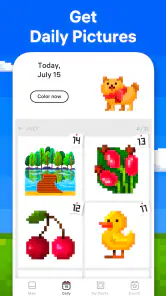
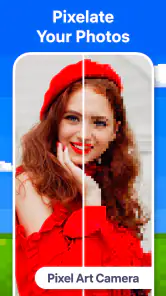

 Analysis by Frivlyz
Pixel Art - Color by Number makes more sense to me as a small, structured break than as a serious art tool. I can open it, choose a picture, and start filling in numbered squares without needing to plan a design or know how to draw. That low-pressure setup is its main appeal: it gives my hands something simple to do while my attention gets a rest.
What the purchase details tell me
This is a free puzzle game from Easybrain, with optional in-app purchases listed from $5.49 to $46.99 per item. That gives me a useful boundary: I can try the basic experience without paying upfront, but purchases are part of how the game is offered. I would decide whether to spend only after seeing how often I actually return to it, rather than treating the price range as a reason to buy anything immediately.
The game is rated Everyone, and its reach is substantial: it has over 100 million installs and a 4.5 average from around 2.4 million ratings. Those figures suggest that the simple format has broad appeal, but they do not tell me whether the purchase options will suit my habits. I’d still approach it as a free-to-start pastime and make any spending decision deliberately.
Our Stories on Pixel Art - Color by Number
Mafia City: Strategy and Power in the Digital Underworld
NewsWhy Block Blast! Is the Puzzle Game Everyone's Talking About
NewsWhy Bingo Blitz™️ - Bingo Games is Your New Mobile Obsession
NewsRoyal Match: A Puzzle Game Fit for a King
NewsTie Dye: Mastering the Art of Digital Fabric Design
NewsDancing Road Turns Short Breaks Into a Test of Rhythm and Timing
NewsSmall choices that make sessions smoother
Because the pictures are divided into numbered pixels, I find it helps to choose a design to match the time and attention I have. A smaller, simpler picture is a better fit for a short pause; an intricate one asks me to settle in and keep track of tiny spaces. The practical trade-off is that detailed art can feel rewarding when I’m focused, but fiddly when I’m tired or trying to do something else at the same time.
Zooming in is more than a way to rescue a mistake. I use it as a pacing tool: I can work through a dense patch carefully, then zoom back out to see how the whole image is coming together. If I start tapping randomly, I lose track of the color I’m working on and the picture becomes less relaxing. Taking a moment to locate the relevant numbered areas before tapping makes the task feel calmer and more deliberate.
Who will enjoy it, and who may not
I’d recommend this to someone who likes puzzles with clear rules and a visible finish. It also suits people who want a quiet activity for a waiting room, a commute where using a phone is practical, or a few minutes at home between chores. In an everyday evening, I might pick a manageable picture while the kettle boils, make a little progress, and stop when I’m ready; there’s no need to turn a casual session into a long project.
It is less suitable if you want to draw your own composition, choose every color freely, or learn techniques used in digital illustration. The numbered grid guides the decisions, so the satisfaction comes from completing the image rather than inventing one. If creative control is the point for you, a sketching or open-ended coloring app is likely a better match. If you mainly want a defined task with a colorful result, this format is much more appealing.
Gaming Stories You May Enjoy

Super Stylist Makes Every Outfit a Test of Taste and Patience

Dominoes on Your Terms: Who Should Play and Who Should Pass

Pokémon GO Makes the Familiar World Feel New

Chess.com Turns Rematches Into Rivalries, but Community Has Its Costs

Archery Battle 3D Review: Sharp Aiming, Unclear Feedback

Should You Switch to Geometry Dash Meltdown? A Test of Timing and Patience
Compared with a conventional jigsaw puzzle, the work here is less about rearranging pieces and more about spotting and filling matching numbered cells. Compared with a freehand coloring book, it removes the pressure of deciding where each shade belongs. That makes it easier to pick up casually, though it also means less room for personal interpretation. I see that as a clear design choice rather than a flaw: the game favors guided completion over artistic freedom.
Getting Started
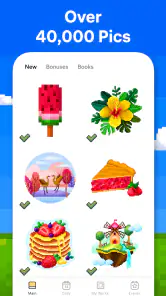
Jumping into Pixel Art - Color by Number is a breeze. The app welcomes you with a simple, user-friendly interface that makes navigation a walk in the park. I found myself quickly scrolling through an extensive gallery of images waiting to be brought to life with color. From cute animals to intricate mandalas, there's something for everyone. To start, you simply pick an image, and you're off to the races!
Coloring Experience
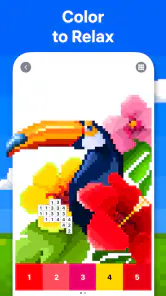
Now, let's talk about the actual coloring process. The app breaks down each image into tiny, numbered pixels, guiding you on which color goes where. It’s like a digital paint-by-numbers, but with a modern twist. I loved how each tap filled in the pixel with a satisfying pop of color. If you mess up, no worries! The app lets you zoom in and erase mistakes with ease. Plus, the color palette is rich and varied, allowing for a vibrant final product.
Features That Stand Out
One of the standout features of Pixel Art - Color by Number is its daily updates. Each day, new images are added, so there's always fresh content to explore. I also appreciated the "My Gallery" section, which keeps a neat collection of all your completed artworks. It's like having a personal art exhibit at your fingertips. For those who love a challenge, try the advanced images; they're intricate and require a keen eye for detail, but the results are oh-so-satisfying.
That steady stream of pictures is useful if I finish one and want another without having to search elsewhere, while the completed gallery gives me a simple way to revisit what I’ve done. I wouldn’t treat the collection as a substitute for a personal art portfolio, though: the pleasure is in finishing guided designs, not building original work. When I have only a short break, choosing a familiar, easier image can be more satisfying than starting a demanding one that I may not finish.
Chill Vibes and Zen Mode
What really sets this app apart is the chill vibes it brings. The background music is soothing, almost meditative, making it perfect for unwinding after a long day. If you prefer silence, you can easily turn off the music and get lost in the rhythmic tapping of coloring. There's also a "Zen Mode" which removes the numbers, letting you color freely and intuitively. It's a great way to challenge your creativity and test your memory!
The no-numbers option changes the nature of the task: it asks me to rely on familiarity with the picture rather than simply follow visible labels. I’d use it only when I want a change of pace, not when I’m trying to finish quickly or find the activity soothing. For a straightforward session, keeping the guidance visible is the more comfortable choice. Switching between guided coloring and a less directed approach can help the routine feel less repetitive without turning the game into a drawing tool.
Progress without pressure
I like that the basic loop has a natural stopping point: a picture is either still in progress or complete, so I can pause when real life interrupts and return when I feel like it. That makes it easier to fit around small gaps in the day than a game that expects a long uninterrupted session. I wouldn’t use it while I need to watch a screen or conversation closely, however; locating tiny numbered cells takes enough attention that it works best when I can give it a little focus.
The most helpful way to avoid turning a relaxing activity into a chore is to choose an image for my mood, not just the most intricate one in the gallery. If I’m restless, a detailed picture can give me something absorbing to concentrate on. If I’m worn out, the same detail can become tedious, and a simpler design is the kinder choice. I also try not to judge a session by whether I finish: filling a few areas can be a perfectly good break on its own.
Spending, fairness, and what remains uncertain
The free entry point makes it reasonable to test whether the coloring loop suits me before considering an in-app purchase. The listed purchase range is broad, so I would check the actual option and its terms in the app before confirming anything; the range alone doesn’t tell me what a particular purchase includes. I also wouldn’t assume that spending is necessary to enjoy the core activity. My approach would be to play first, notice whether I’m running into a real limitation, and only then decide if a purchase is worthwhile to me.
For a puzzle game, fairness is less about competition and more about whether the activity stays enjoyable without pressure to pay. This is a solo coloring experience as I use it, so I’m not measuring my progress against other players or treating purchases as a way to gain an advantage over them. Still, the existence of optional purchases means I’d keep an eye on confirmation screens, especially if a child is using the device. The Everyone rating describes the age category, but it doesn’t replace a family’s own rules about spending.
The game was released on October 16, 2017, and its current version is 9.11.0; it requires Android 7.0 or later. I’d check compatibility before installing on an older device, and I’d keep the game updated if I want the current version. Its long presence and large audience are reassuring context, but they are not a promise that every device or every player will have the same experience.
There are a few practical questions I’d answer by trying it rather than guessing: whether the available pictures match my taste, whether the detail level feels calming or tiring on my screen, and whether I’m comfortable with the purchase choices I encounter. Those are personal fit questions, not reasons to expect a particular outcome. A short trial session with a simple picture is a sensible way to judge the controls and the pace before committing more time.
My trust verdict
Overall, Pixel Art - Color by Number is more than just a coloring app; it's a gateway to relaxation and creativity. Whether you're a seasoned artist or just looking to kill some time, this app has something to offer. So, grab your virtual paintbrush and dive into a world of color. Trust me, it's a colorful escape you won't want to miss!
My recommendation is narrower and more practical: I’d choose it when I want a guided, low-stakes puzzle and don’t mind working within someone else’s design. I’d skip it when I want freehand expression, more complex puzzle-solving, or a session that demands no visual attention. The free starting point gives curious players a way to see whether the rhythm suits them, while the optional purchases are a reason to make spending decisions carefully. For the right kind of quiet break, that balance makes it an easy game to try without expecting it to be something it isn’t.
Pixel Art - Color by Number Pros and Cons
Pros
- Intuitive interface for all ages
- Vast library of pixel images
- Daily updates with new designs
- Offline mode available
- Enhances creativity and patience
Cons
- Ads can be intrusive
- Limited features in free version
- Occasional glitches with saving progress
- Requires in-app purchases for premium content
- Not suitable for advanced artists
This Game in Other Languages
Frequently Asked Questions
What is Pixel Art - Color by Number and how does it work?
Pixel Art - Color by Number is a digital coloring book where users fill in numbered areas with corresponding colors to create intricate pixelated artwork. It's an engaging and relaxing activity, perfect for users who enjoy art and creativity. The app provides a wide range of images to color, catering to different tastes and skill levels.
Do I need to have artistic skills to use Pixel Art - Color by Number?
No, you don’t need any prior artistic skills to use Pixel Art - Color by Number. The app is designed for everyone, from beginners to experienced artists. The number-based system makes it easy for anyone to create beautiful pixel art by simply following the guided color numbers, ensuring a fun and stress-free experience.
Is Pixel Art - Color by Number free to download and use?
Pixel Art - Color by Number is free to download, offering a variety of basic features at no cost. However, it may include in-app purchases for premium features, such as a wider selection of images and additional coloring tools. Users can enjoy the basic version without any financial commitment, with the option to upgrade if desired.
What devices are compatible with Pixel Art - Color by Number?
Pixel Art - Color by Number is compatible with both Android and iOS devices. It supports a wide range of smartphones and tablets, ensuring that users can enjoy the app on their preferred device. It's advisable to check the app store for specific device compatibility and app version requirements before downloading.
How does Pixel Art - Color by Number help with relaxation and stress relief?
Pixel Art - Color by Number is designed to promote relaxation and stress relief through its calming and focused activity. By engaging in the methodical process of coloring, users can unwind and shift their focus away from daily stressors. The app’s soothing color palette and creative outlet contribute to a peaceful and enjoyable experience.


