

Pinkfong Tracing World : ABC
- Reviews
- 3.9
- Version
- 33.24
- Installs
- 1,000,000+

Screenshots



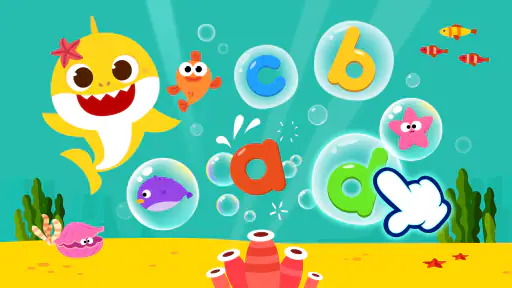

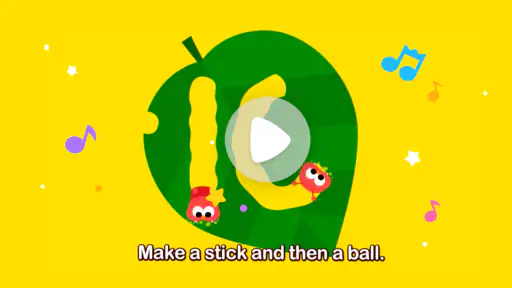

 Analysis by Frivlyz
When I first opened Pinkfong Tracing World: ABC, I understood its appeal almost immediately: it turns early writing practice into a short, playful activity instead of presenting letters and numbers as a worksheet. This is an educational game from The Pinkfong Company for children who are beginning to recognize and trace basic characters. The central idea is simple, but the way it is presented makes a difference for a child who loses interest quickly when practice feels repetitive.
The game is free to install and is suitable for Everyone, although optional in-app purchases range from $2.99 to $109.99 per item. That combination is worth keeping in mind before handing a device to a child. You can start without paying, but an adult should still look at the purchase options and decide how the game will be used. In my experience, it works best as a guided introduction to tracing rather than as a complete replacement for drawing with paper, pencils, or other learning activities.
What to expect from the tracing activities
The main experience focuses on practicing ABCs and numbers through tracing. A child follows the path of a character on the screen, building familiarity with its shape and direction. That makes the game especially suitable for preschoolers and early learners who need repeated exposure before writing feels natural. It is not designed to teach long explanations or advanced language lessons; its strength is the small, immediate action of following a letter or number.
The presentation is clearly aimed at keeping young players comfortable. The Pinkfong identity gives the game a bright, character-led feel, while the tracing task remains easy to understand. A child does not need to read complicated instructions to begin. That matters in a first learning game because too much text can become a barrier before the actual practice has started.
I would describe the experience as structured practice with game-like encouragement, not as a deep arcade game. Children who enjoy quick activities can move through several short attempts without feeling that they are sitting down for a formal lesson. Parents should also set realistic expectations: tracing on a touchscreen helps with recognition and hand movement, but it does not provide the same resistance or grip practice as a pencil on paper.
The app has been available since Nov 25, 2015, and its current version is 33.24. It supports devices running Android 5.0 or later. Those details make it accessible on many older compatible Android devices, though the experience will still depend on the particular screen and how comfortably a child can touch it. A small phone may make tracing harder than a larger tablet, especially for children who are still developing fine motor control.
Its popularity also gives some useful context. The game has passed 1 million installs and holds a 3.9 average from around 4.4 thousand ratings. I would not treat that score as a guarantee that every family will enjoy it, but it suggests a substantial audience has tried the approach. The more important question is whether your child benefits from guided repetition and bright visual feedback.
Gaming Stories You May Enjoy

Dancing Road Turns Short Breaks Into a Test of Rhythm and Timing

Super Stylist Makes Every Outfit a Test of Taste and Patience

Dominoes on Your Terms: Who Should Play and Who Should Pass

Pokémon GO Makes the Familiar World Feel New

Chess.com Turns Rematches Into Rivalries, but Community Has Its Costs

Archery Battle 3D Review: Sharp Aiming, Unclear Feedback
Who is likely to enjoy it
This is a good match for a child who already likes touching and following objects on a screen, but needs a gentle reason to practice letters and numbers. It can also help during short waiting periods, such as before an appointment or while traveling, when a parent wants something more purposeful than a random video. I would use it for brief sessions rather than leaving it open indefinitely.
It is less suitable for children who are already writing confidently and need spelling, reading comprehension, or more demanding number work. It is also not the best first choice for a child who becomes frustrated by tracing paths or who needs a physical demonstration from an adult. In that situation, a paper activity may be more reassuring because the parent can guide the child’s hand and adjust the difficulty immediately.
Why the first session should be supervised
Even though the age rating is Everyone, a young child may not understand the difference between the free starting experience and optional purchases. I recommend that an adult open the game first, check how the available activities are presented, and make sure purchase controls are protected on the device. This is not a criticism of the tracing idea; it is simply sensible preparation for any children’s app that includes paid items.
Supervision also improves the learning value. Instead of saying only “trace this,” I would ask the child what character is on the screen, where the line begins, and whether the shape looks familiar. Those questions turn a finger movement into a small recognition exercise. The game supplies the activity, but a parent or teacher supplies the conversation that connects it to everyday learning.
Getting started without making the setup stressful
After installing it, I would begin with the device held in a comfortable position and the screen cleaned so that a small finger movement registers reliably. A tablet is usually easier for a young child to use than a compact phone because there is more room to follow a path. If a phone is the only option, I would keep the first attempt simple and stay close enough to help without taking control.
The first useful goal is not to complete a large amount of content. It is to help the child understand the basic rhythm: look at the character, find the starting point, follow the guide, and notice what happens after the attempt. Keeping that sequence consistent reduces confusion. Young users often tap everywhere when they are unsure, so a calm demonstration can be more effective than repeated corrections.
I also recommend choosing a time when the child is alert but not already frustrated. A tracing game cannot compensate for tiredness or hunger. A short session after breakfast, before a quiet activity, or during a planned travel break is more likely to end positively than an attempt made when the child wants to run around. The aim is to associate the game with manageable success.
Because the game mixes letters and numbers, parents can choose a starting point based on the child’s current interest. If the child is learning the alphabet at preschool, begin with letters and say their names aloud. If counting is the current focus, numbers may create a more familiar entry point. I would avoid turning the first session into a test. Recognition can come before perfect tracing, and praise for careful effort is more useful than demanding flawless lines.
One practical tip is to keep the device steady on a table rather than asking a child to hold it in the air. Stability makes it easier to concentrate on the tracing motion. Another is to let the child use one finger consistently at first. Switching fingers, tapping with the whole hand, or dragging too quickly can make the activity feel unpredictable, especially on a smaller screen.
The first meaningful success
The first successful action is straightforward: the child follows one complete letter or number path from its beginning to its end. I would demonstrate one example slowly, then give the device back and allow the child to try. If the child misses part of the path, I would avoid grabbing the hand immediately. Instead, I would point to the next section and say something like, “Start here and follow the line.” That keeps the child involved in the correction.
Once the child completes a character, pause for a moment. Ask what was traced and invite the child to find the same letter or number somewhere else in the room, in a book, or on a sign. This is one of the most useful ways to extend the app beyond the screen. The game becomes a starting point for recognition, while the surrounding world supplies real examples.
I found that repeating one character can be more productive than rushing ahead. A child may complete a trace successfully but still not remember its name. Revisit it verbally, connect it to a familiar word, and then move to another character only when the child remains comfortable. The app is better used as a flexible prompt than as a race through every available activity.
For a realistic everyday routine, imagine a child waiting at a café while an adult finishes a conversation. Instead of offering an open-ended game, the adult can choose a small tracing goal, sit nearby, and ask the child to identify the character afterward. When the activity ends, the adult can put the device away and continue the conversation. That gives the game a clear beginning and end, which is healthier than using it as background entertainment.
Common points of confusion
The biggest early confusion is usually the difference between touching a character and tracing it. A child may expect a tap to be enough, then become annoyed when the game expects a finger to travel along a path. I would explain that the finger is pretending to draw. Showing the movement once, with a steady pace, is clearer than giving a long verbal explanation.
Another issue is speed. Young players often drag quickly because they are excited, but fast movement can make it harder to stay on the intended route. Encourage a slow “follow the road” motion. If the child repeatedly fails, do not assume the child is not ready. The screen size, hand position, or device responsiveness may be contributing to the problem. Moving the device onto a flat surface can solve more than additional instruction.
Some children may also think that completing a trace means they have mastered the character. I would gently separate the two ideas: finishing the activity is a success, while remembering the shape and recognizing it later takes repetition. This distinction prevents the game from becoming a performance test. It also helps parents use the app for practice rather than judging progress from a single attempt.
Parents may wonder whether the game alone is enough to prepare a child for handwriting. In my view, it is not. Touch tracing can support visual familiarity and directional awareness, but it should sit beside physical drawing, coloring, and pencil practice when the child is ready. The screen is convenient and motivating; paper provides a different kind of control and resistance. Choosing one instead of the other would miss what each medium does well.
There is also a practical question about paying. Since the game is free to start but includes individual purchases from $2.99 to $109.99, I would not let a child explore purchase screens alone. An adult should decide whether the free experience already meets the family’s needs before considering anything extra. For a child who only needs occasional letter and number practice, the free starting point may be enough. For a family seeking a broader set of activities, it is sensible to review the cost carefully rather than buying impulsively during a play session.
How it compares with paper and other learning choices
Compared with printable worksheets, this game is more inviting for children who resist sitting down with a pencil. It gives immediate visual involvement and makes a short practice session feel less formal. Worksheets, however, are easier for an adult to customize and can show how a child handles a real writing tool. I would use the game to introduce or reinforce a character, then move to paper when the child is ready to attempt it independently.
Compared with ordinary drawing apps, the tracing focus is more purposeful. A blank canvas encourages creativity but may not show a beginner where to start or how a character is formed. Pinkfong Tracing World gives the child a defined path, which is useful when the goal is letter and number familiarity rather than free drawing. The trade-off is that it offers less open-ended expression during the tracing task.
Compared with broader educational platforms, this game is narrower and easier to explain. A child can concentrate on a small set of foundational actions instead of moving among reading, puzzles, stories, and mathematics. That simplicity can be a strength for a first-time learner. It can also become a limitation for families wanting one app to cover several school-readiness skills in depth.
Building a better next step
After a child is comfortable completing a trace, I would reduce my help rather than increasing the amount of screen time. Let the child identify the character before touching it, then ask for a matching example outside the app. If the child is learning a letter, say its sound or name together. If the child is practicing a number, count a few nearby objects. These small extensions make the activity meaningful without pretending that the game replaces a lesson.
A useful routine is to choose one short goal, complete it carefully, talk about it, and stop while the child is still engaged. Ending on a positive attempt makes it easier to return another day. Long sessions can turn repetition into frustration, particularly for children whose fingers tire or whose attention moves quickly. The game’s short, focused nature is most valuable when the adult respects that limit.
I would also watch for signs that the child needs a different tool. If tracing remains uncomfortable after adjusting the device position and slowing down, try paper with thicker crayons or a larger writing surface. If the child already knows the characters, move toward activities that build sounds, words, counting, or independent writing. The right next step is not always more content inside the same game; sometimes it is transferring the skill to a new setting.
For families using older Android hardware, the minimum operating system is Android 5.0, which makes the technical entry point relatively broad. Still, I would test the game myself before a planned trip or classroom activity. A child’s experience depends on practical details such as screen size, touch accuracy, and whether the device is comfortable to hold. A quick adult check can prevent a technical problem from being mistaken for a learning problem.
My final impression is that this is a friendly starting tool for early tracing, especially when a child needs encouragement to approach ABCs and numbers. It is free to begin, familiar in style, and simple enough for a first supervised session. I would recommend it to parents who want a focused digital activity and are prepared to connect it with conversation and hands-on practice.
I would skip it if you are looking for advanced literacy instruction, detailed handwriting coaching, or a complete educational curriculum. I would also avoid treating it as an unattended babysitter, particularly because optional purchases are present. Used in short sessions, with an adult nearby and a clear follow-up away from the screen, it can turn one successful traced character into a useful learning habit. The best result comes from using the game as a bridge to real-world recognition and writing, not as the whole journey.
Pinkfong Tracing World : ABC Pros and Cons
Pros
- Bright animations and friendly characters keep tracing practice engaging.
- Covers uppercase and lowercase letters with guided stroke directions.
- Simple controls are suitable for preschoolers learning independently.
- Includes varied tracing activities beyond basic alphabet practice.
- Works well as a short
- focused learning activity for young children.
Cons
- Some lessons or features may require an in-app purchase to unlock.
- Repeated animations can feel repetitive after extended play sessions.
- The app is mainly aimed at beginners and offers limited advanced practice.
- Young children may need supervision to avoid accidental taps or purchases.
- Device storage and performance requirements may vary across older phones.
Frequently Asked Questions
What is Pinkfong Tracing World: ABC?
Pinkfong Tracing World: ABC is an educational tracing app designed to help young children practice the English alphabet, numbers, shapes, and early writing movements. It combines guided tracing activities with colorful Pinkfong characters, animations, sounds, and simple interactive exercises. The app is aimed mainly at preschool and kindergarten-age children who are beginning to recognize letters and develop hand control.
Is Pinkfong Tracing World: ABC suitable for preschool children?
Yes, the app is primarily designed for preschoolers and early learners. Its activities use large visual prompts, cheerful audio instructions, and simple touch gestures that are generally easy for young children to understand. Parents should still consider their child’s age, attention span, and familiarity with English, since some children may need help following the tracing paths or understanding the instructions during their first sessions.
What can children learn with Pinkfong Tracing World: ABC?
Children can practice recognizing and tracing uppercase and lowercase English letters, while also exploring basic numbers, shapes, and other early-learning concepts depending on the available activities and app version. The guided exercises encourage children to follow lines in the correct direction, which can support pencil-control skills and letter formation. It is best used as a playful supplement to hands-on writing practice.
Does Pinkfong Tracing World: ABC require an internet connection?
The app may allow some downloaded activities to work offline, but internet access can be required for the initial download, updates, account-related features, advertisements, or additional content. Availability may also differ between Android and iOS versions. Before giving the device to a child, parents should open the app once, download any necessary resources, and test whether the desired lessons remain accessible without Wi-Fi or mobile data.
Is Pinkfong Tracing World: ABC free to download, and does it include purchases?
Pinkfong Tracing World: ABC may be free to install while offering selected activities at no cost and reserving additional lessons or features for in-app purchase, depending on the platform and region. Pricing and included content can change over time. Parents should review the store listing carefully, check whether subscriptions or one-time purchases are offered, and enable parental controls to prevent accidental purchases.


