

Piano Tiles 2™ - Piano Game
- Reviews
- 4.6
- Version
- 1.6.1
- Installs
- 5,000,000+

Screenshots


 Analysis by Frivlyz
The first appeal of Piano Tiles 2™ - Piano Game is how quickly it turns a spare moment into a focused little challenge. I only need a screen and a few seconds to understand the basic idea: follow the moving piano tiles with accurate taps, keep pace as the rhythm tightens, and try not to lose concentration. That immediate clarity is a real strength. There is no long explanation to get through before playing, so it suits a short break when I want something more engaging than scrolling but don’t have time to settle into a larger game.
That simplicity also explains why the first few sessions can feel so absorbing. My attention narrows to the next tile, and even a brief run asks for timing rather than passive watching. It gives the game an easy-to-grasp music rhythm identity without requiring music theory or piano experience. I would recommend trying it with the sound on when practical, since the musical framing is part of the appeal, but the central test is still visual timing and finger control. It is a rhythm game, not a piano lesson, and that distinction matters if you are choosing it to learn an instrument.
Why the first week feels lively
At first, the loop has a satisfying rhythm: I start a run, make a mistake, and immediately want to see whether I can last longer next time. The black-tile premise is simple enough to grasp at a glance, while increasing speed and trickier patterns give each attempt a clear pressure point. A quick retry feels less like a commitment than restarting a long level, which is exactly why the game can slip naturally into a commute break, a wait in a queue, or a pause between other tasks.
There is a useful little discipline in playing with a relaxed hand rather than jabbing at the screen. When I tense up, my taps become less controlled; when I watch a small area just ahead of my fingers and let the pattern enter that focus, I make fewer panicked corrections. That is not a shortcut around the challenge, but it helps turn a frustrating miss into something I can learn from. The game is best enjoyed in a setting where I can give the screen my attention, not while crossing a street or trying to follow a conversation.
What gives it a chance to last
The game comes from Kooapps Games | Fun Arcade and Casual Action Games, and it has the compact, pick-up-and-play shape I expect from a casual mobile rhythm title. Its audience is broad: the age rating is Everyone, and the game is free to start. The version available is 1.6.1, with Android support from version 5.0. The game has a 4.6 average from around 55,000 ratings and over 5 million installs, which suggests that its simple tapping format has found a substantial audience, though popularity alone cannot tell me whether it will suit my habits.
For me, the more meaningful question is whether the loop keeps earning a place after the novelty settles. Piano Tiles 2 has a good chance if I like chasing a cleaner run, improving timing, and fitting short attempts into otherwise empty moments. It is less compelling if I need a story, a steady sense of progression outside my own performance, or a deep music-making tool. In-app purchases range from $0.99 to $49.99 per item, so I would treat the free entry point as a way to judge the core experience and decide for myself whether anything beyond it feels worthwhile. I would not spend simply because a retry has made me impatient; a break can be the smarter move.
When the rhythm starts to wear
The same narrow focus that makes the game easy to pick up can also make it tiring. Faster patterns reward concentration, but repeated attempts can blur together, especially if I keep playing after my attention has slipped. This is not a game I would choose for a relaxed, hands-off listening session: it asks me to watch and react, and a missed tile can break the flow. Nor is it the best fit for someone who wants to practice reading notation or develop piano technique, since tapping moving tiles is a different skill.
Gaming Stories You May Enjoy

Dancing Road Turns Short Breaks Into a Test of Rhythm and Timing

Super Stylist Makes Every Outfit a Test of Taste and Patience

Dominoes on Your Terms: Who Should Play and Who Should Pass

Pokémon GO Makes the Familiar World Feel New

Chess.com Turns Rematches Into Rivalries, but Community Has Its Costs

Archery Battle 3D Review: Sharp Aiming, Unclear Feedback
Gameplay: Tap, Tap, and Tap Again
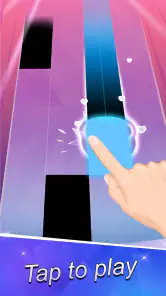
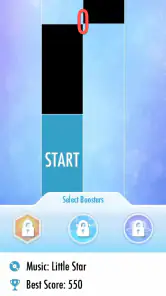
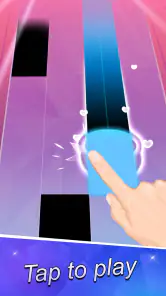
The core gameplay of Piano Tiles 2™ is beautifully simple. All you have to do is tap on the black tiles as they scroll down your screen. Sounds easy, right? But here's the twist – as you progress, the speed increases, and the patterns get trickier. It's a game of speed and precision, where missing a tile means you’ll have to start over. And trust me, as someone who’s spent countless hours trying to perfect every song, the urge to hit that retry button is irresistible.
Music Selection: A Symphony of Choices
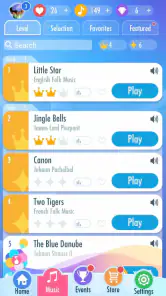
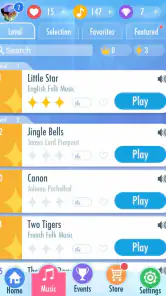
One of the standout features of this game is its diverse range of music. From classical masterpieces by Beethoven and Mozart to contemporary hits, there’s something for everyone. The game constantly updates its library, so you never run out of new tunes to tap along to. I personally love how it introduces you to pieces you might not have heard before, broadening your musical horizons while having fun.
Visuals and Interface: Sleek and User-Friendly
The interface of Piano Tiles 2 is as smooth as the music it offers. The tiles are responsive, and the graphics are simple yet elegant. It’s designed to keep you focused on the game without unnecessary distractions. The app also provides a seamless experience across different devices, which is a big win in my book. I’ve played it on both my tablet and smartphone, and the transition is flawless.
Challenges and Competitions: Keep the Adrenaline Going
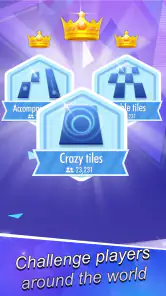
If you're the competitive type, you’ll love the various challenges and tournaments. Compete against friends or players worldwide to top the leaderboard. It adds a thrilling layer to the game, pushing you to hone your skills and achieve higher scores. Personally, I find the competitive aspect exhilarating and a great way to bond with friends over shared victories and near misses.
Keeping the habit healthy
My practical advice is to make each session intentional: decide whether I am playing for a quick distraction or trying to beat a personal performance target, then stop when that goal is met. Without that small boundary, the fast retry loop can turn a five-minute break into a longer stretch than I planned. The game is particularly convenient when I am waiting for food or sitting through a delayed appointment, because I can put it down as soon as my name is called. I would avoid starting a run when I need to leave immediately; the urge to try again can make a simple interruption feel annoying.
For families, the Everyone rating makes the game broadly accessible, but I would still consider the child’s patience and the context of play. The tapping is straightforward, yet the faster pace can make a young player feel rushed. I would frame it as a short reaction game rather than a music-learning activity, and I would keep an eye on in-app spending if a child is using the device. The free starting point is useful for deciding whether the style suits them before any purchase is considered.
How it compares with other music games
Compared with music games built around instruments, song creation, or lessons, this one asks for much less setup and offers a more immediate test of reflexes. That makes it easier to pick up, but it also gives it less depth for someone who wants to shape a melody or build a lasting musical skill. Against other quick-tap rhythm games, its familiar piano-tile presentation is approachable; the real question is whether its pace and song selection keep you interested after the first burst of discovery. I would choose it for brief, score-focused play, and choose a dedicated instrument or rhythm-learning app when practice, arrangement, or musical feedback is the goal.
One useful trade-off is that the simplest play setting is also the easiest to fit around daily life: a short run needs little planning, but the game’s strongest moments come when I can focus on the timing. Playing one-handed may be convenient, though I find a stable grip and a clear view of the lower screen more reliable when the pace rises. If taps seem inconsistent, I first check my posture and whether my finger is covering the next tile rather than assuming the game itself is at fault. Small adjustments to how I hold the phone can make a run feel more controlled.
What to expect before installing
On Android, the minimum operating system is version 5.0, so the game is compatible with a wide range of devices that meet that requirement. It is free to download, but optional in-app purchases are available. I would not treat those purchases as necessary to find out whether the core tapping loop works for me; the best test is simply whether I enjoy repeating attempts without needing a larger reward structure. The game is rated for Everyone, but that does not mean every player will enjoy its pressure or the temptation to keep retrying.
A common practical question is whether this can replace a piano app. In my view, no: it can make music feel playful and test reactions, but it does not teach fingering, notation, or how to play a keyboard. Another is whether it works as background entertainment. I would say only partly; the music gives each run character, yet the visual stream demands attention, so I would not choose it while reading, talking, or doing anything that needs steady focus. For a short, active pause, that demand is the point.
What keeps me coming back—and what does not
The competitive angle can give a session a purpose when I want to compare results with friends or see how I fare against other players. That can add energy, but it is not the only reason to play, and I would avoid letting rankings decide whether a session was worthwhile. A cleaner run or better control can be a satisfying personal benchmark even when I am not chasing a leaderboard. On the other hand, players who dislike score pressure may find that this emphasis makes the experience feel more like repeated testing than relaxed music play.
There is also a difference between enjoying a tune and enjoying the game’s demands. A familiar or appealing piece may encourage me to begin, but the repeated need to watch, time, and tap can eventually outweigh the pleasure of hearing it. When that happens, switching to a music player is a better choice than forcing another attempt. That is a useful way to judge the game’s recurring value: it should earn another session because I want the challenge, not merely because the restart is immediate.
Who should make room for it
I would recommend it to someone who likes quick reflex tests, enjoys music as a backdrop to active play, and is happy to improve through repeated short attempts. It is also a reasonable option for a casual group moment: passing the phone around for brief turns can make near misses and personal bests part of the fun, as long as everyone is comfortable with the pace. The uncomplicated premise is easy to explain without a tutorial, which helps when introducing it to someone who rarely plays games.
I would skip it if my main goal were to learn piano, relax with music without watching a screen, or make progress through a story and a varied set of activities. I would also be cautious if I know that rapid retries tend to keep me playing longer than intended. In those cases, a music-learning tool, a calmer listening app, or a game with more varied goals would be a better match. That is not a flaw in the tile-tapping idea so much as a reminder that this particular kind of fun depends on enjoying repetition and pressure.
Long-term verdict: a small game, not a daily obligation
In conclusion, Piano Tiles 2™ is more than just a game; it's an addictive musical journey that sharpens your reflexes and introduces you to a world of music. Whether you’re in it for the competition, the music, or just to kill some time, it delivers on all fronts. So, if you haven’t tried it yet, what are you waiting for? Dive into the music and let your fingers dance on the tiles!
My more measured recommendation is to install it as a compact option for spare moments, then let your own routine decide whether it deserves regular space. Its appeal is immediate, its musical framing makes the tapping less abstract, and the competitive layer can give experienced players another reason to return. But the long-term case rests on a narrow loop: watch, tap, miss, retry, and gradually improve. If that cycle feels satisfying rather than monotonous, the game can remain a handy casual diversion. If it starts to feel like work, I would put it down without guilt and come back only when the urge to test my timing returns.
Piano Tiles 2™ - Piano Game Pros and Cons
Pros
- Engaging gameplay with intuitive controls
- Wide variety of songs to choose from
- Regular updates with new content
- Challenges increase replayability
- Can be played offline
Cons
- Contains ads that can be intrusive
- In-app purchases can be expensive
- Might drain battery quickly
- Requires precise timing
- Limited free content
This Game in Other Languages
Frequently Asked Questions
What is Piano Tiles 2™ and how does it work?
Piano Tiles 2™ is a rhythm-based mobile game that challenges players to tap on black piano keys that scroll down the screen while avoiding the white tiles. The game tests your speed and accuracy as you play along to classical and modern piano songs. As you progress, the speed increases, making the game more challenging and engaging. It's available on both Android and iOS, offering a fun way to improve your hand-eye coordination and enjoy music on the go.
Is Piano Tiles 2™ free to play, or does it have in-app purchases?
Piano Tiles 2™ is free to download and play, but it does offer in-app purchases. These purchases can enhance your gaming experience by unlocking additional songs, removing ads, or acquiring other premium features. While the game can be enjoyed without spending money, some players opt to purchase items to progress faster or enjoy a more seamless experience.
Can I play Piano Tiles 2™ offline?
Yes, you can play Piano Tiles 2™ offline. However, some features such as updates, leaderboards, and certain in-game events may require an internet connection. Playing offline is perfect for practicing and improving your skills without interruptions, but connecting to the internet occasionally can enhance your overall experience with additional content and competitive aspects.
What types of music can I expect in Piano Tiles 2™?
Piano Tiles 2™ features a diverse range of music genres, primarily focusing on classical piano pieces, but it also includes pop, electronic, and original compositions. The game regularly updates its song library, offering players new and exciting pieces to master. This variety helps keep the game fresh and appealing to a wide range of musical tastes.
How does Piano Tiles 2™ compare to similar rhythm games?
Piano Tiles 2™ stands out due to its simplicity and addictive gameplay. Unlike other rhythm games that may require complex controls or peripherals, Piano Tiles 2™ only requires tapping, making it accessible to players of all ages. Its extensive song library and frequent updates ensure that players always have new content to enjoy, setting it apart from other games in the genre. Its combination of challenge and simplicity makes it a favorite among rhythm game enthusiasts.


