

Piano Magic Star 4: Music Game
- Reviews
- 3.9
- Version
- 2.15.1
- Installs
- 10,000,000+

Screenshots



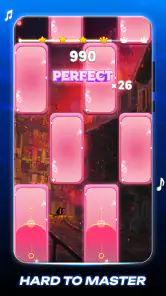

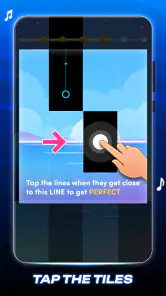

 Analysis by Frivlyz
I judge a rhythm game less by how quickly it gets me tapping and more by whether I can settle into its timing without fighting the screen. Piano Magic Star 4: Music Game is built around a simple premise: follow the falling piano tiles and keep pace with the music. That makes it easy to understand at a glance, but the experience depends on details a short description cannot tell you, such as whether you are in the right frame of mind for quick reactions or whether a song’s pace suits a brief break.
Where the first session can feel tricky
The basic interaction is straightforward, but “easy to start” does not mean every run feels effortless. When several tiles arrive close together, it is tempting to tap faster than the rhythm and lose your sense of timing. I get better results by watching the pattern a little ahead of the next tap rather than staring at the tile directly under my finger. That small change makes a run feel more controlled, especially when I am still learning a track.
A missed tile can break a combo, so a distracted session may feel harsher than expected. I would not treat an early stumble as proof that the game is too difficult; first check whether you are tapping to the beat or reacting late to what has already reached the bottom of the screen. The game is most satisfying when I give it a few minutes of attention rather than trying to play while switching constantly between other tasks.
Simple checks before blaming the game
If the timing seems off, I start with ordinary checks instead of assuming the game is malfunctioning. I make sure the sound is at a comfortable level, close anything competing for my attention, and try another run while holding the phone steadily. A noisy room or music played too quietly can make it harder to follow the beat, even when the taps themselves are registering normally.
I also pay attention to whether the problem happens on every song or only on one attempt. A single rough run can come from losing concentration; a repeated issue is a reason to pause, reopen the game, and see whether the same pattern persists. These are basic troubleshooting steps, not special hidden settings, but they help separate a momentary lapse from a more persistent interruption without wasting time changing things at random.
The Gameplay Experience
Jumping straight into Piano Magic Star 4: Music Game, the first thing you’ll notice is its intuitive interface. Even if you’re not a seasoned gamer, the game welcomes you with open arms. The mechanics are simple: tap the black tiles as they slide down your screen to the rhythm of the music. Miss a tile, and your combo breaks, but hit them all, and you’ll be jamming to the beat in no time!
What makes this game stand out is its dynamic difficulty setting. As you improve, the game ramps up the challenge, ensuring that you’re always pushed to your limits. It’s a bit like having a personal piano instructor who knows exactly when to turn up the heat!
Gaming Stories You May Enjoy

Dancing Road Turns Short Breaks Into a Test of Rhythm and Timing

Super Stylist Makes Every Outfit a Test of Taste and Patience

Dominoes on Your Terms: Who Should Play and Who Should Pass

Pokémon GO Makes the Familiar World Feel New

Chess.com Turns Rematches Into Rivalries, but Community Has Its Costs

Archery Battle 3D Review: Sharp Aiming, Unclear Feedback
Song Selection and Variety
The song library in this game is nothing short of impressive. Whether you’re into classical, pop, or even rock, there’s something here for you. The best part? New songs are added regularly, so you’re never stuck playing the same old tracks. I found myself humming along to some of the tunes even after putting my phone down.
Each song is meticulously crafted to provide a seamless playing experience. The transitions are smooth, and the sound quality is top-notch, making you feel like you’re at a live concert.
Choosing the right moment to play
This works best for me as a compact attention exercise rather than a substitute for a full music-learning routine. A realistic use is opening it during a short wait, choosing a track, and focusing on one clean attempt instead of trying to set a personal record while hurried. If I have only a little time, I can still get the satisfying loop of hearing a beat, anticipating a tile, and checking whether my hands stay in sync.
It also suits someone who enjoys music games but does not want to learn complicated controls before playing. The visual cues give the session a clear focus, and the basic tapping idea is easy to explain to a friend. On the other hand, a player looking for instrument lessons, notation, or practice that transfers directly to playing a real piano should choose a dedicated learning app. This is a rhythm game, not a piano course.
Compared with music games that ask players to manage lanes, gestures, or a more elaborate interface, the tile-tapping approach is easier to pick up. That simplicity is a strength on a phone, though it also means the enjoyment rests heavily on the song and the timing challenge. I would choose a more involved rhythm game if I wanted deeper control or a more demanding mix of mechanics; I would choose this one when I want a quick, direct test of timing.
Graphics and Visuals
Now, I know what you might be thinking: "It’s just a music game, how good can the graphics be?" Well, let me tell you, the visuals in Piano Magic Star 4 are stunning. The vibrant colors and fluid animations make each session a treat for the eyes. It’s clear that the developers put a lot of thought into making the game visually appealing without distracting you from the gameplay.
Recovering a run and knowing when to pause
When I lose a combo, restarting immediately can turn a small mistake into a string of rushed attempts. I prefer to take a breath, reset my grip, and begin the next run with my eyes following the incoming pattern instead of dwelling on the missed tile. If I keep missing the same kind of moment, slowing down mentally and listening for the beat is more useful than tapping harder or faster.
There is a limit to what that approach can fix. If the sound is interrupted, the phone is busy, or I am playing in a setting where I cannot concentrate, the game may simply be a poor fit for that moment. I would pause and come back when I can hear and watch clearly rather than deciding that the song or controls are at fault. A rhythm game is unusually sensitive to divided attention, so the environment can matter as much as practice.
For anyone wondering whether a missed note means a broken touch screen, I would first compare several attempts and notice whether taps register consistently across the play area. If the issue appears only when I am moving quickly, timing and finger placement are more likely explanations than a general failure. If other apps also respond unreliably, that points to a broader device issue; the game alone cannot diagnose it.
Who will enjoy it, and what it costs
Pem studio’s music game is free to download and rated for Everyone, which makes it approachable for casual players and families seeking a simple, music-led activity. It has a 3.9 average from around 19,000 ratings, while more than 10 million installs show that plenty of players have tried it. Those figures are useful context, but they do not tell me whether its song choices match your taste or whether its pace will suit your reflexes.
The game was released on August 17, 2023, and its current version is 2.15.1. It requires Android 7.0 or later, and in-app purchases range from $1.99 to $8.99 per item. I would begin with the free experience and decide whether I enjoy the core tapping loop before spending anything. Purchases are a trade-off to consider if you prefer games with no optional spending at all, particularly if you are choosing an app for a child.
I would skip it if I want a carefully structured music curriculum, a realistic piano simulator, or a rhythm game built around extensive control options. I would also be cautious if rapid visual movement is uncomfortable for me. For someone who mainly wants a quick musical challenge and can enjoy repeating a track to improve timing, its focused design makes more sense than a larger game with systems they may never use.
Final Thoughts
Overall, Piano Magic Star 4: Music Game hits all the right notes. It’s a fantastic way to pass the time while honing your rhythm skills. Whether you’re a music lover or just looking for a new game to play, this app is worth checking out. The combination of challenging gameplay, a diverse song selection, and eye-catching visuals makes it a standout in the mobile gaming world.
My practical recommendation is to try it when you can give the beat your attention, rather than judging it during a noisy or interrupted moment. If the tapping feels rewarding and you like returning to a song to improve, it can make a satisfying short-session game. If you want instruction, deeper musical control, or a calmer pace, another kind of music app will serve you better. For a free-to-start tile rhythm game, I find it easy to understand and enjoyable when its quick reactions are what I am looking for.
Piano Magic Star 4: Music Game Pros and Cons
Pros
- Engaging rhythm challenges.
- Wide variety of songs available.
- User-friendly interface.
- Regular updates with new songs.
- Offline mode available.
Cons
- Ads can be intrusive.
- Limited free song choices.
- In-app purchases required.
- Occasional lag issues.
- No multiplayer option.
Frequently Asked Questions
What is Piano Magic Star 4: Music Game?
Piano Magic Star 4: Music Game is an engaging mobile application designed for music enthusiasts who enjoy playing the piano. The game allows users to tap on tiles that correspond to notes of popular songs, enhancing their musical skills and rhythm. With a wide variety of songs and difficulty levels, it offers both entertainment and a challenge for players of all ages.
Is Piano Magic Star 4: Music Game free to play?
Yes, Piano Magic Star 4: Music Game is free to download and play. However, it offers in-app purchases for users who want to unlock additional songs, features, or remove ads. These purchases are optional, and players can still enjoy the core game experience without spending money.
What features does Piano Magic Star 4: Music Game offer?
Piano Magic Star 4: Music Game offers a range of features, including a vast library of songs across different genres, various difficulty levels, and an online leaderboard to compete with friends. The game also provides a practice mode for beginners to improve their skills and a challenge mode for advanced players looking to test their abilities.
Can I play Piano Magic Star 4: Music Game offline?
Yes, you can play Piano Magic Star 4: Music Game offline. Once the game and songs are downloaded, you can enjoy playing without an internet connection. This feature makes it convenient for users to play on the go, without worrying about data usage or connectivity issues.
Does Piano Magic Star 4: Music Game support different languages?
Piano Magic Star 4: Music Game supports multiple languages, making it accessible to a broader audience. Players can choose their preferred language from the settings menu, ensuring a more personalized and comfortable gaming experience for users from different linguistic backgrounds.


