

Piano Fire: Edm Music & Piano
- Reviews
- 4.5
- Version
- 1.0.208
- Installs
- 100,000,000+

Screenshots
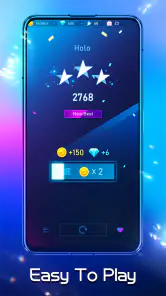



 Analysis by Frivlyz
My first useful expectation for Piano Fire: Edm Music & Piano is simple: this is a quick rhythm game, not a piano lesson. I would install it for short bursts of tapping to music, rather than to learn keys, read notation, or practise an instrument. That distinction makes the first session much less confusing. The game comes from Adaric Music, is free to start, and is rated for Everyone; optional in-app purchases are listed from $0.99 to $9.99 per item.
What to expect from a music game
The basic appeal is the link between what you hear and what you do. Tiles move in time with the track, and tapping them gives the music a playable, hands-on feel. You are responding to a rhythm and trying to keep a run going, not choosing piano notes or building a song of your own. If you enjoy timing challenges, that immediate feedback is the reason to try it; if you want an instrument simulator, it is better to look elsewhere.
The distinction matters when comparing it with familiar alternatives. A conventional piano-tile game often emphasizes quick reactions to a sequence of notes, while a rhythm game built around a track asks you to follow its pulse. Piano Fire sits in that music-game space: the song is part of the challenge, not just background sound. It will suit someone who wants a musical arcade break more than someone seeking the open-ended practice tools of a keyboard-learning app.
Our Stories on Piano Fire: Edm Music & Piano
Piano Fire: EDM Music & Piano—Igniting Your Rhythm Game Passion
NewsHow Android and iOS Updates Enhance Plants vs. Zombies™ Heroes
NewsHow My Talking Angela Thrives with New Android and iOS Updates
NewsDancing Road Turns Short Breaks Into a Test of Rhythm and Timing
NewsSuper Stylist Makes Every Outfit a Test of Taste and Patience
NewsDominoes on Your Terms: Who Should Play and Who Should Pass
NewsGetting started without overthinking it
When you first open the game, I’d keep the goal modest: choose a track that sounds appealing, begin at a comfortable pace, and focus on staying with the beat instead of chasing a perfect result. The controls are designed to be approachable, so there is no need to know piano technique before playing. Treat the opening run as a chance to get used to the visual rhythm and how your taps line up with the music.
A practical first-session tip is to play somewhere you can hear the track clearly and hold the phone steadily. If the screen feels crowded or your timing seems off, slow down mentally: watch the tiles approaching the point where you need to act, rather than trying to track every visual effect at once. That small change helps separate the musical cue from the neon presentation and makes it easier to see whether you are reacting early or late.
For a first meaningful success, pick a short play window and aim to finish a run cleanly rather than immediately replaying the hardest song you can find. A completed attempt gives you a better sense of the game’s rhythm and your own comfort with the controls. If you miss, treat it as information: notice whether fast passages, distractions, or looking away from the screen caused the break. That is more useful than tapping randomly and hoping to improve.
How to make a session fit real life
This is the sort of game I’d use while waiting for a ride, taking a quick break between tasks, or relaxing for a few minutes after dinner. Those moments favor a clear, self-contained challenge over a game that needs a long setup or a quiet hour. For example, if I had a short wait before meeting a friend, I’d play one familiar-feeling track, put the phone away when they arrived, and save attempts at tougher songs for a time when I could pay attention.
Gaming Stories You May Enjoy

Pokémon GO Makes the Familiar World Feel New

Chess.com Turns Rematches Into Rivalries, but Community Has Its Costs

Archery Battle 3D Review: Sharp Aiming, Unclear Feedback

Should You Switch to Geometry Dash Meltdown? A Test of Timing and Patience

Fidget Toys Trading・Pop It 3D: What Happens When the Game Stumbles

NBA LIVE Mobile Makes the Season the Main Event
That approach also makes the game easier to enjoy without turning every session into a score chase. A rhythm game rewards concentration, and trying to play while walking, talking, or watching something else can make missed taps feel arbitrary. I’d keep it for a stationary break, especially if the music is what drew me in. It is a less suitable choice when I need a calm background activity, because the visual timing asks for attention.
Where the challenge comes from
The satisfying part is the moment when listening and tapping begin to feel connected. Early on, I would concentrate on the broad pulse instead of attempting to anticipate every tile. Once a track feels familiar, I’d use another run to notice where its rhythm changes and where my attention tends to slip. This is a more reliable way to build consistency than rushing through retries without identifying what went wrong.
There is a trade-off, though: a colorful screen can make the experience lively, but visual effects may compete with the cues you need to follow. If that happens, focus your gaze near the action point and let the rest of the screen sit in your peripheral vision. I also wouldn’t assume that enjoying one song means every track will feel equally natural; different rhythms can expose different timing habits, so changing songs can be a useful test rather than a sign that you have suddenly become worse.
Feel the Beat, Tap the Tiles
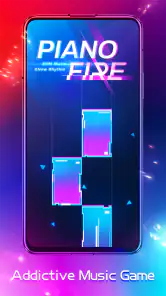
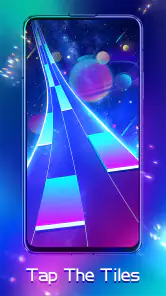
Once you dive into Piano Fire: Edm Music & Piano, the first thing you'll notice is how effortlessly it pulls you into the rhythm. The app is super intuitive, allowing you to jump straight into the action. As the vibrant tiles cascade down your screen, all you have to do is tap along to the beat. Miss a tile, and you might just find yourself wanting to start over to get that perfect score!
Music Selection That Keeps You Hooked
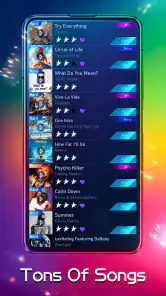
One of the standout features is its diverse music library. Whether you're a fan of chart-topping EDM hits or prefer something more niche, there's something here for everyone. The app frequently updates its playlist, so there's always a new tune to master. And trust me, nothing feels better than nailing those fast-paced songs and seeing your scores climb!
For a first-time player, I’d treat song choice as part of the learning curve rather than just a matter of taste. Starting with music whose pulse is easy for you to follow can help you learn how the tiles relate to the beat. After that, trying a less familiar track is a good way to check whether you are reacting to the rhythm or simply remembering a sequence. If a song feels frustrating, switch tracks and return later; persistence is useful, but repeating the same difficult passage while annoyed usually is not.
One thing I would keep in mind is that a music game’s library is not the same as a personal playlist. The fun comes from playing the tracks the game offers, and listeners who want to select any song from their own collection may prefer a different kind of music app. If your main reason for installing is to tap along with an existing favorite, check that the available selection appeals to you before making the game part of your routine.
Sleek Design with a User-Friendly Interface
Visually, the app is a treat. It’s designed with neon lights and futuristic themes that complement the energetic music perfectly. The interface is clean, ensuring that even beginners can navigate without a hitch. It’s as if the developers knew exactly what users needed—a seamless experience that focuses on the fun!
The presentation is part of the mood, but I would not let the bright styling distract from the basic task. A useful habit is to settle your hands and position the phone before starting, so you are not adjusting your grip during a run. If you play on a small screen, a steady hold can make the action easier to follow; if you prefer a larger display, make sure you can tap comfortably without stretching. The best setup is the one that lets you react naturally.
For someone wondering whether this is a good first rhythm game, I’d say yes if the appeal is immediate music-and-timing play. The simple premise keeps the barrier low, while tougher runs can still demand attention. But “easy to start” does not mean every song will be easy to complete. Players who dislike restarting after a mistake, or who find fast visual movement tiring, may prefer a slower music game or a learning app with a less score-focused pace.
Challenge Your Friends
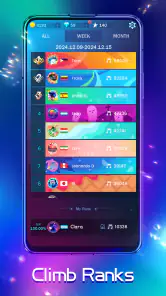
If you’re the competitive type, you’ll love the multiplayer mode. Challenge your friends and see who can keep up with the beats. It’s a great way to add a social element to your gaming and makes those victories even sweeter. Plus, you can boast about your high scores on social media directly from the app!
I’d use competition as a reason to compare improvement, not just as pressure to win. A friendly challenge works best when everyone is playing for fun and understands that familiarity with a track can affect a score. If you are new, try a song on your own first so the controls do not feel unfamiliar when someone else is watching. If the social side is not your thing, the core rhythm challenge still makes sense as a solo time-killer.
What to know before making it a regular habit
The game is free to download, with optional purchases priced from $0.99 to $9.99 per item. I’d treat those purchases as optional rather than necessary for deciding whether the basic experience suits me: first try the game, see whether its music and tapping feel enjoyable, and only then consider spending. The install itself is not a commitment to buy anything, but it is worth being mindful of in-app purchases if children use the device.
Piano Fire has a 4.5 average from around 664,000 ratings, and it has passed 100 million installs. Those figures suggest that it has found a broad audience, but they do not tell me whether its particular rhythm style will fit your taste. The game was released on September 18, 2020, and its current version is 1.0.208; it requires Android 5.0 or later. I’d still judge it by how the first few tracks feel on your own device and whether you enjoy replaying a song to improve.
Age-wise, it is rated for Everyone, which makes the basic content broadly accessible, though I’d still keep an eye on optional purchases when a child is playing. For a newcomer, the reassuring part is that the game’s central action is easy to understand: follow the moving tiles and tap in time. The more personal question is whether you enjoy repeating a musical challenge enough to improve. If you do, the game can turn a few spare minutes into a focused little session.
In conclusion, if you’re looking for an app that combines the thrill of EDM with the skillfulness of piano playing, Piano Fire: Edm Music & Piano is a must-try. Whether you’re a seasoned player or just looking for something to pass the time, this app has something for everyone. It’s more than just a game; it’s a full-fledged musical experience that you can carry wherever you go. So, what are you waiting for? Get ready to tap along to your favorite beats and set those high scores!
My honest recommendation is narrower than “for everyone”: try it if tapping along to energetic music sounds satisfying, and skip it if you want actual piano instruction, unrestricted song choice, or a low-attention background game. I’d give it a few relaxed attempts before deciding, because the first run is mainly about learning the visual timing. When the beat and taps click together, the game delivers the quick musical payoff it promises; when they do not, choosing another track or another kind of music app is a sensible call.
Piano Fire: Edm Music & Piano Pros and Cons
Pros
- Engaging gameplay with dynamic music tracks.
- Simple controls
- easy for all skill levels.
- Regular updates with new songs added.
- Visually appealing with vibrant graphics.
- Offline mode available for uninterrupted play.
Cons
- Limited song selection without premium.
- Occasional ads disrupt gameplay flow.
- In-app purchases can be costly.
- Some users report lag on older devices.
- Requires internet for accessing leaderboards.
This Game in Other Languages
Frequently Asked Questions
What is Piano Fire: Edm Music & Piano app about?
Piano Fire: Edm Music & Piano is an engaging rhythm-based music game that combines the elegance of piano melodies with the energetic beats of EDM. Players can tap on the black tiles that appear in rhythm with the music to score points. With a vast library of songs, it offers both casual and competitive gaming experiences for music lovers.
Is Piano Fire free to play, and are there any in-app purchases?
Yes, Piano Fire: Edm Music & Piano is free to download and play. However, it offers in-app purchases that allow users to unlock premium features, remove ads, or acquire additional songs and game resources. While it's possible to enjoy the game without spending money, these purchases enhance the overall experience.
What are the system requirements for installing Piano Fire on my device?
Piano Fire: Edm Music & Piano is compatible with most modern Android and iOS devices. It requires Android 4.4 and up or iOS 9.0 and later to run smoothly. Ensure your device has sufficient storage space and a stable internet connection for downloading additional songs and updates.
Can I play Piano Fire: Edm Music & Piano offline?
Piano Fire: Edm Music & Piano does allow for offline play, which means you can enjoy your favorite songs even without an internet connection. However, certain features like song downloads, updates, and online leaderboard competitions will require internet access. It's a great option for playing on the go.
How does Piano Fire ensure a fair and competitive gaming experience?
Piano Fire incorporates a well-balanced scoring system and regular updates to ensure fairness. It features real-time competitive modes and global leaderboards, allowing players to compete fairly. Additionally, the game is designed to challenge both beginners and experienced players, with varying difficulty levels to suit everyone's skill set.


