

Piano Dance: beat music game
- Reviews
- 3.5
- Version
- 1.2.4
- Installs
- 1,000,000+

Screenshots

 Analysis by Frivlyz
What makes a music game satisfying is not just the song playing in the background; it is the small challenge of responding at the right moment. Piano Dance: beat music game is built around that simple appeal, using falling tiles to turn listening into a quick test of attention and timing. I see it as a casual rhythm game first and a piano-themed experience second: you do not need musical training to start, but you do need to stay focused once the pace picks up.
A tile-based take on music play
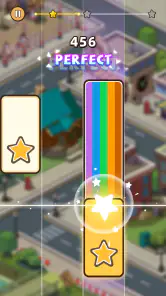
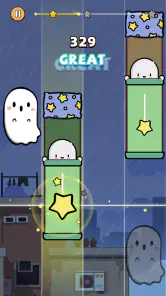
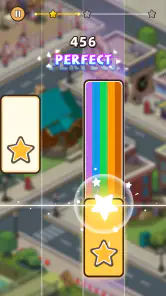
The central idea is easy to understand. Notes appear as tiles moving down the screen, and you tap in time with the track. That keeps the barrier to entry low: there is no instrument to learn and no complicated setup before you can try a song. The piano framing gives the familiar tap-to-the-beat format a musical look, while the changing tracks provide a reason to keep testing your timing.
That simplicity is useful when I want a short activity rather than a long session. I can concentrate on following the visual cues and listening for the beat, then stop when I have had enough. At the same time, the format asks for more than random tapping. Looking ahead at the incoming tiles while keeping pace with the music is the main skill to build, and a track that feels comfortable at first can become demanding when I try to stay accurate throughout.
How the rhythm challenge feels in practice
Because the tiles provide a visible guide, the game can work for someone who does not confidently recognize musical beats by ear. My practical tip is to use both cues rather than staring only at the tiles: listen for the pulse, then let the screen help you anticipate when to tap. That can make the sequence feel less like a reflex test and more like following a rhythm.
It also changes how I approach a new track. I would begin by focusing on a clean, steady run instead of trying to tap as fast as possible. If I lose the rhythm, pausing mentally for a moment and rejoining on the next clear cue is more useful than rushing to catch every missed tile. The appeal is in gradually getting comfortable with the pattern, not pretending that every attempt will be perfect.
For an everyday example, this is the sort of game I would open during a short break when I want something more active than scrolling but do not have time to settle into a larger game. A few focused attempts can give me a compact listening-and-timing challenge. It is less suitable for a moment when I need to keep my attention on another task, since the moving tiles reward concentration rather than casual background play.
Choosing it over other music games
Compared with music apps meant for making or learning music, this one is about responding to prepared tracks, not composing a tune or practicing an instrument. That distinction matters: I would choose a piano-learning app if my goal were to build keyboard technique, and a music-creation tool if I wanted to arrange sounds. I would choose this game when I want a straightforward rhythm challenge with a piano-style presentation.
Gaming Stories You May Enjoy

Dancing Road Turns Short Breaks Into a Test of Rhythm and Timing

Super Stylist Makes Every Outfit a Test of Taste and Patience

Dominoes on Your Terms: Who Should Play and Who Should Pass

Pokémon GO Makes the Familiar World Feel New

Chess.com Turns Rematches Into Rivalries, but Community Has Its Costs

Archery Battle 3D Review: Sharp Aiming, Unclear Feedback
It also sits in a different lane from rhythm games whose appeal depends on elaborate controls or extended progression. Here, the basic interaction is quick to grasp, which helps when I want to start playing without first learning a complex system. The trade-off is that players who want deep musical instruction or a highly detailed control scheme may find the tile-tapping approach too limited. Its strength is accessibility, not replacing a lesson or a full-featured music studio.
Small habits that make sessions better
A useful way to keep the experience enjoyable is to treat accuracy as the goal for a session, rather than chasing a personal best every time. When I focus on a manageable rhythm, I can notice where my timing slips and adjust how I watch and listen. That is a more rewarding approach than tapping harder or faster, neither of which solves a timing mistake.
I would also choose a track according to the kind of attention I have available. When I am tired or distracted, an unfamiliar pattern may feel frustrating; when I can give the screen my full attention, learning that pattern is part of the fun. This is a small but meaningful trade-off of tile-based play: the visual prompts are helpful, yet following them still takes concentration, especially if I am trying to listen closely at the same time.
Who will enjoy it, and who may prefer something else
This is a natural fit for casual players who like tapping games, enjoy having music shape the pace, or want an easy-to-start challenge during spare moments. It can also suit friends who want to compare how they handle the same kind of rhythm task, provided they are interested in competition rather than collaborative music-making. The game is aimed at Everyone, so its basic audience is broad, although the fast attention demands may not appeal to every player.
I would skip it if I mainly wanted to learn piano, create original music, or relax with a game that asks almost nothing of me. It is also not the best choice when a phone session needs to stay in the background: the tile stream is the point, so looking away means losing the flow. Those limits are not flaws for the right audience, but they help set a fair expectation before installing.
What to know before you install
Developed by XGAME STUDIO, the game is free to install and has in-app purchases ranging from $0.99 to $99.99 per item. I would treat the free starting point as a way to see whether the tap-and-rhythm loop suits me, then make any purchase decisions only after I know what I actually want from the game. The range is broad enough that it is worth checking each purchase carefully rather than assuming every optional item costs about the same.
The game has an average rating of 3.5 from 352 ratings and has passed 1 million installs. Those figures suggest it has found an audience while leaving room for mixed reactions, so I would not take popularity as a guarantee that its particular rhythm style will click for me. It was released on June 2, 2024, and version 1.2.4 supports Android 6.0 and later. If you are choosing between this and another music game, the most useful question is not which one sounds more impressive, but whether you want to tap along to tracks or pursue a different kind of musical activity.
Getting into the Groove
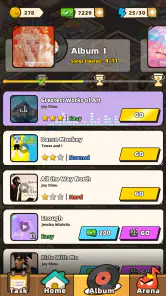
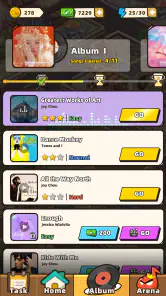
So, what’s the deal with Piano Dance: beat music game? Imagine combining your favorite rhythm games with the elegance of piano tiles. As you dive into the game, you'll be greeted with a vibrant interface, which is both inviting and easy to navigate. The game offers a plethora of songs across various genres, ensuring that there’s something for everyone.
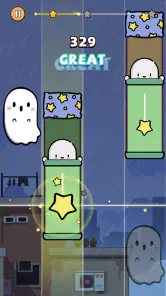
The gameplay is pretty straightforward. You tap on tiles as they cascade down your screen, matching the rhythm of the song playing in the background. It’s a test of your reflexes and timing, and trust me, it gets addictive! Whether you’re a seasoned gamer or a casual player, you’ll find yourself tapping along to hits across pop, classical, and even indie tracks. The best part? You don’t need to be a piano prodigy to ace this game!
Features that Hit the Right Notes
One of the standout features of this app is its vast library of songs. New tracks are added regularly, keeping the content fresh and exciting. Plus, the game’s developers have done a stellar job of ensuring that the songs are of high quality, which really enhances the overall experience.
Another cool feature is the competitive edge. You can challenge your friends or take on players from around the world in head-to-head matches. This adds a fun layer of competition, making each session more thrilling than the last. Not to mention, the leaderboard system keeps you motivated to climb up the ranks.
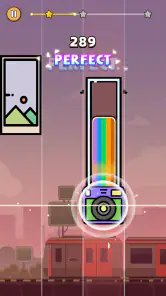
Visually, the game is a treat. The graphics are smooth, and the animations are crisp, which makes for an immersive experience. The color schemes and effects are pleasing to the eye, and they sync well with the beats, enhancing the overall rhythm game vibe.
My Two Cents
Having spent a good amount of time with Piano Dance: beat music game, I can say it’s a must-try for anyone who enjoys music-based games. It’s engaging, challenging, and most importantly, fun! The app does a fantastic job of blending music and gameplay, creating an experience that’s both entertaining and rewarding.
Whether you’re looking to kill time, improve your rhythm skills, or compete against friends, this game has got you covered. So why not give it a shot? You might just find yourself hooked on the rhythm!
Piano Dance: beat music game Pros and Cons
Pros
- Engaging rhythm-based gameplay.
- Wide variety of songs available.
- User-friendly interface.
- Suitable for all ages.
- Offline play supported.
Cons
- Contains ads that can be intrusive.
- In-app purchases can be expensive.
- Limited free song selection.
- Graphics are simple
- not advanced.
- Requires good reflexes for success.
Frequently Asked Questions
What is Piano Dance: Beat Music Game?
Piano Dance: Beat Music Game is a mobile application available on both Android and iOS platforms. It combines the thrill of dancing with the challenge of a rhythm game. Players tap on the screen following the beat of popular songs while maintaining the rhythm and timing to score high points. The app features various levels and genres, providing an engaging musical experience.
Is Piano Dance: Beat Music Game free to download and play?
Yes, Piano Dance: Beat Music Game is free to download and play. However, it may offer in-app purchases to enhance the gaming experience, such as unlocking additional songs, removing ads, or accessing special features. Users should be aware of these optional purchases when playing the game.
What are the main features of Piano Dance: Beat Music Game?
Piano Dance: Beat Music Game offers a variety of features, including a wide selection of songs from different genres, multiple difficulty levels, and vibrant graphics. It also includes a competitive mode where players can challenge friends or other users worldwide. The game is designed to improve hand-eye coordination and rhythm skills while providing an entertaining musical experience.
Can I play Piano Dance: Beat Music Game offline?
Piano Dance: Beat Music Game primarily requires an internet connection to download songs, updates, and participate in competitive modes. However, once the songs are downloaded, some features may be accessible offline. Users should ensure they have a stable internet connection for the best experience and to fully enjoy all aspects of the game.
How does Piano Dance: Beat Music Game compare to other rhythm games?
Piano Dance: Beat Music Game stands out with its combination of dance and rhythm elements, offering a unique twist compared to traditional rhythm games. Its extensive song library and competitive features provide a comprehensive experience for music game enthusiasts. The intuitive controls and engaging gameplay make it accessible for both beginners and seasoned players, setting it apart from other rhythm-based apps.


