

Pepi Super Stores: Fun & Games
- Reviews
- 4.1
- Version
- 1.13.1
- Installs
- 50,000,000+

Screenshots

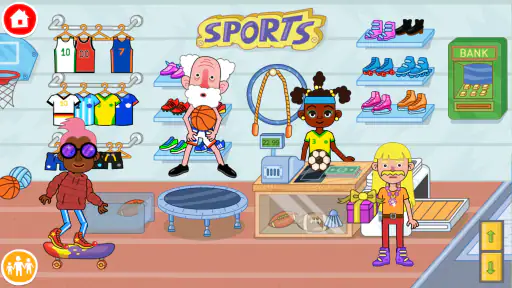
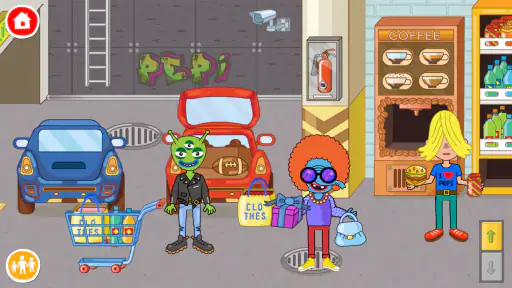
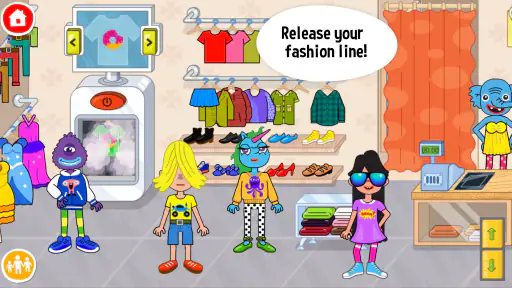
 Analysis by Frivlyz
When I want a child to have room for make-believe without handing them a complicated game, a virtual shopping mall can be a useful place to start. Pepi Super Stores: Fun & Games turns that familiar setting into a playful space to explore, and its appeal is less about winning than about deciding what happens next. I find that distinction important: children who enjoy inventing characters and little everyday stories may get much more from it than children who expect clear missions, scores, or a finish line.
It is an educational game from Pepi Play, but I would describe its learning as informal rather than lesson-based. The game is free to download, is rated Everyone, and has in-app purchases ranging from $0.99 to $4.49 per item. Its average rating is 4.1, with over 232,000 ratings, and it has more than 50 million installs. Those figures suggest that many families have tried it, but they do not tell me whether it suits a particular child; the best guide is whether that child likes open-ended pretend play.
What kind of play fits the mall
The setting gives a child familiar prompts: browse a shop, visit the food court, or look around the supermarket. Rather than treating those places as a checklist, I think of them as props for stories. A child might decide that one character is buying lunch, another is choosing an outfit, and someone else is helping at a counter. That freedom is the main reason I would choose this over a game built around repeated levels. There is no need to explain a complicated objective before play can begin.
Our Stories on Pepi Super Stores: Fun & Games
Sonic Forces: PvP Battle Race - Speed and Strategy Combined
NewsZombie Tsunami: A Reflection of Our Mobile Culture
NewsDancing Road Turns Short Breaks Into a Test of Rhythm and Timing
NewsSuper Stylist Makes Every Outfit a Test of Taste and Patience
NewsDominoes on Your Terms: Who Should Play and Who Should Pass
NewsPokémon GO Makes the Familiar World Feel New
NewsA practical way to introduce it is to suggest one small scenario, then let the child take over. For example, while waiting at home before dinner, I might ask them to imagine what a character should eat or wear for a special outing. The prompt creates a starting point without turning the session into a lesson. If the child would rather move between areas and make up a different story, that is part of the point; the experience works best when an adult does not insist on a single correct way to play.
Quick sessions and performance expectations
For a casual play session, I would expect the experience to feel approachable rather than demanding: the basic appeal is exploring a cartoon mall and interacting with its contents. The game’s current version is 1.13.1 and its minimum operating system requirement is Android 6.0. Those details help with a first compatibility check, but device fit still depends on the phone or tablet in hand. I would install it before relying on it for a particular outing, then let the child try moving around and interacting while I can help if the controls feel unfamiliar.
Open-ended play can become a heavier test of attention than it first appears. A child who is moving among shops, changing characters, and building a long story may stay engaged for longer than one who only wants a quick distraction. That is not necessarily a technical problem; it is a reason to decide in advance whether the game is for a short wait or a longer, supervised play period. I find it useful to offer a natural stopping point, such as finishing the pretend shopping trip, rather than expecting the game itself to signal when play is over.
Stability is also something I judge in context. Children can tap quickly, switch their attention, and hand a device back and forth, so I would test those ordinary habits before treating the game as a dependable travel activity. If a scene seems unresponsive, waiting a moment and trying one deliberate tap is a better first move than repeatedly pressing the screen. If the app closes or the device struggles, reopening it and checking that other demanding apps are not running may help; I would not promise that this resolves every device-specific issue.
Gaming Stories You May Enjoy

Chess.com Turns Rematches Into Rivalries, but Community Has Its Costs

Archery Battle 3D Review: Sharp Aiming, Unclear Feedback

Should You Switch to Geometry Dash Meltdown? A Test of Timing and Patience

Fidget Toys Trading・Pop It 3D: What Happens When the Game Stumbles

NBA LIVE Mobile Makes the Season the Main Event

Unlocking the Secrets of Piano Game: Classic Music Song
The Colorful World of Pepi Super Stores
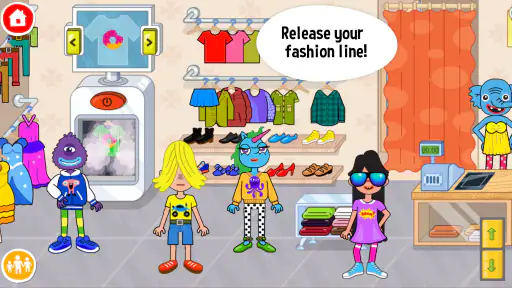
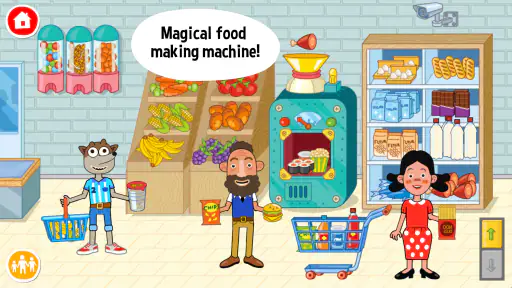
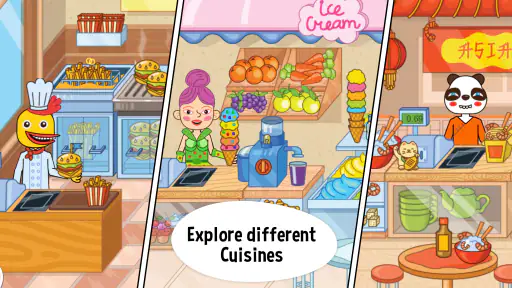
From the moment you open Pepi Super Stores: Fun & Games, you're greeted with a burst of colors and a lively soundtrack that sets the stage for an exciting adventure. The app is designed to mimic a bustling shopping mall, complete with various shops, food courts, and even a supermarket. Each area is packed with interactive elements that encourage exploration and creativity.
Interactive Gameplay
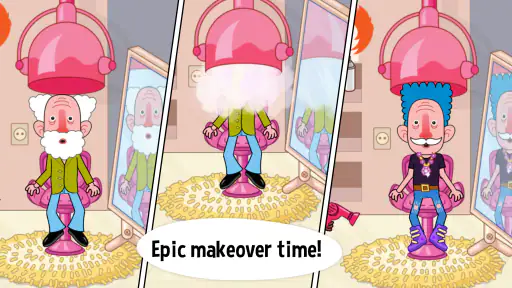
The gameplay in Pepi Super Stores is intuitive and easy to navigate, making it accessible for young children. Players can move around the mall, interact with different characters, and engage with various objects. Whether it's trying on clothes in the fashion boutique, preparing a meal in the food court, or shopping for groceries, there's always something to do. The app promotes imaginative play, allowing kids to create their own stories and scenarios.
One useful way to get more from that freedom is to give the child a role rather than a sequence of instructions. They could decide who is shopping, who is helping, and what the characters need. This encourages turn-taking if siblings or an adult share the device, and it can make the same familiar areas feel different on another day. I would avoid doing every action for a younger player: a little time to explore and make mistakes is more valuable here than moving quickly through the mall.
That same openness is a trade-off. Children who like visible goals, puzzles with definite answers, or a clear reward for completing each task may find the mall less focused than they want. In that case, a level-based educational game may be a better match, especially when the aim is practicing one specific skill. Pepi’s strength is that it lets children decide what counts as play; its limitation is that adults may need to offer a starting idea when a child is unsure what to do.
Educational Value
While the app is primarily designed for fun, it also offers educational benefits. Kids can learn about different roles and responsibilities within a shopping mall, such as being a cashier or a chef. The app subtly introduces basic math skills through activities like counting money or measuring ingredients. It's a great way for children to develop problem-solving skills and enhance their creativity while having a blast.
I would treat those learning moments as conversation starters, not as proof that the game replaces teaching or practice. An adult can ask what a character needs, how many items might be needed, or what should happen next, then follow the child’s answer. The benefit is the chance to connect play with familiar routines; the trade-off is that a child who wants direct instruction in reading or arithmetic will need a more structured resource alongside it. This distinction helps set realistic expectations for an educational game built around pretend play.
It can also be a gentle way to rehearse everyday social situations. A child might imagine asking for help, taking turns, or deciding how a meal is prepared, then talk through those choices with a parent. I would not assume every child will learn the same thing from a scene, since their own stories shape what they notice. The adult’s role is less like a teacher delivering a lesson and more like a companion who can extend a good question when the child is interested.
The characters in the app are diverse and inclusive, reflecting a wide range of backgrounds and personalities. This not only enriches the gameplay experience but also teaches kids about diversity and acceptance. Each character has unique interactions and responses, adding depth to the game and keeping it fresh and engaging.
For shared play, I find it useful to let children choose characters for different roles and explain their choices. That can open a conversation about how people with different appearances or personalities can take part in the same story. It should remain a natural part of play, rather than turning every character selection into a test or a lecture. Families looking for a carefully sequenced social-emotional curriculum should still use a purpose-built resource; the mall is better viewed as a flexible setting for conversation and imaginative play.
Who is likely to enjoy it
I would recommend trying it with a child who likes role-play, browsing, and making up dialogue for characters. It is particularly convenient when an adult wants a low-pressure activity that can begin without explaining a long rule set. A short session can be as simple as choosing a shop and inventing a reason to visit it. For siblings, taking turns deciding what happens next can help make the open format feel cooperative, though a shared screen can also lead to disagreements over who gets to control the action.
It is less suitable for a child who becomes frustrated without explicit goals, or for a parent who wants a tightly controlled lesson with a measurable endpoint. I would also avoid presenting it as an unsupervised substitute for family boundaries around device use. The game’s Everyone age rating is useful context, but families still need to decide what content and screen habits work for their own child. A brief first session together is a sensible way to see whether the style feels comfortable.
Compared with a typical worksheet-style learning app, this game gives up a clear progression in exchange for more room to invent. Compared with a simple digital toy, it offers a recognizable collection of places and roles that can support a longer story. Neither approach is automatically better: if a child needs practice with a particular skill, a focused activity is easier to choose; if they are seeking imaginative play, a mall setting gives them more prompts than a blank screen or a single toy interaction.
Purchases, supervision, and practical setup
The free price makes it possible to try the game before deciding whether it belongs in a child’s routine, while the in-app purchases mean I would check the purchase settings on the device before handing it over. A child may tap with curiosity, so it is prudent for an adult to manage purchases and explain that digital items are not part of every play session. That small preparation is more useful than assuming a young player will distinguish an in-game offer from ordinary play.
The app is developed by Pepi Play and has been available since March 22, 2017. I mention that history only as context: the practical choice still comes down to how it behaves on a particular device and whether its style suits the child. The current version is 1.13.1, and the Android minimum is 6.0, so checking compatibility before planning a long trip or relying on it away from home can prevent an avoidable disappointment.
I would also test the sound and controls in the environment where the child will use it. A lively soundtrack may be enjoyable at home but less welcome in a quiet waiting room, so lowering the device volume is an easy adjustment if needed. If the child is likely to play on a shared phone, agree on how long they can use it and what happens when the device is needed back. Those simple habits make the game easier to fit into family life without expecting the app to manage screen time for you.
Parental Controls and Safety
As a parent, one of the biggest concerns with apps is ensuring a safe environment for kids. Pepi Super Stores: Fun & Games addresses this by offering comprehensive parental controls. Parents can adjust settings to limit screen time and control access to certain features, ensuring that kids have a balanced and safe play experience.
Moreover, the app is free from third-party advertisements, providing a seamless and uninterrupted experience for young users. This thoughtful design choice ensures that kids can focus on playing and learning without distractions.
For me, the most sensible routine is to explore the game together once, decide what purchase and play boundaries apply, and then let the child lead within those limits. That gives an adult a chance to see how the child navigates the mall and whether they need help getting started. It also answers a practical question that a rating alone cannot: does this particular child settle into creative play, or do they quickly want a more directed activity?
In conclusion, Pepi Super Stores: Fun & Games is a charming and educational app that offers endless hours of entertainment for children. With its vibrant graphics, interactive gameplay, and educational elements, it's a fantastic tool for nurturing creativity and learning in a fun and engaging way. Whether your child is exploring the mall or learning new skills, this app provides a safe and delightful digital playground.
My performance verdict
Overall, I see this as a relaxed, imaginative game rather than a demanding test of speed or a structured school tool. Its mall setting offers plenty of prompts for pretend stories, and the open format is a real advantage for children who enjoy choosing their own activities. The same openness can feel aimless to players who need goals, and the purchase options make a little adult setup worthwhile. I would try it on the device the child will actually use, check that the controls suit them, and decide on play boundaries before a longer session. For families seeking creative play with everyday themes, that is a reasonable balance; for a focused lesson or a game with firm stages, I would choose something more directed.
Pepi Super Stores: Fun & Games Pros and Cons
Pros
- Engaging and educational gameplay.
- Colorful and vibrant graphics.
- Wide variety of interactive stores.
- Encourages imaginative play.
- User-friendly interface for all ages.
Cons
- Limited free content available.
- No multiplayer option.
- In-app purchases can add up.
- Some items are locked behind paywall.
- Requires internet for full features.
Frequently Asked Questions
What age group is Pepi Super Stores suitable for?
Pepi Super Stores is designed for children aged 3-8 years old. The game is crafted to be both educational and entertaining, providing a safe and creative environment for young kids to explore and learn. It features interactive elements that help enhance motor skills, creativity, and basic understanding of daily routines in a fun way.
Is Pepi Super Stores available on both Android and iOS platforms?
Yes, Pepi Super Stores is available for download on both Android and iOS platforms. Users can easily find it on Google Play Store for Android devices and the Apple App Store for iOS devices. It is important to ensure that your device meets the necessary system requirements for a smooth gaming experience.
Does Pepi Super Stores require an internet connection to play?
No, Pepi Super Stores does not require an internet connection to play. It is designed to be fully functional offline, allowing kids to enjoy the game without needing Wi-Fi or mobile data. This makes it a great option for long car rides or areas with limited internet access.
Are there any in-app purchases in Pepi Super Stores?
Yes, Pepi Super Stores does include some optional in-app purchases. While the game offers a variety of free content, additional features, characters, and items can be unlocked through purchases. Parents should be aware and manage these settings to prevent unauthorized purchases by children.
Is Pepi Super Stores educational and safe for kids?
Pepi Super Stores is both educational and safe for kids. It encourages creative play and learning through various interactive scenarios and characters. The app is designed with children’s safety in mind, ensuring a secure environment free from inappropriate content. Parents can trust it as a tool to aid in their child's development.


