

PBA® Bowling Challenge
- Reviews
- 4.5
- Version
- 3.18.3
- Installs
- 10,000,000+

Screenshots

 Analysis by Frivlyz
If you’re a fan of bowling and looking for a mobile game that brings the authentic experience right to your fingertips, look no further than PBA® Bowling Challenge. This game offers a realistic and immersive bowling experience that you can enjoy anytime, anywhere. Whether you’re a seasoned pro or just a casual player, there’s something here for everyone.
That quick appeal is worth balancing with a practical question: how comfortable is it to play on a small screen, and does it suit the way you want to bowl? I find it best to think of this as a bowling game built around short sessions and finger controls, rather than a full substitute for time at a physical lane. Its sports focus is clear, while the experience still depends on whether swiping and watching a simulated roll work well for you.
The Thrill of the Game
First off, let’s talk about the gameplay. PBA® Bowling Challenge does an incredible job of simulating the physics of real bowling. You can feel the weight of the ball, the tension of the lane, and the satisfaction of a perfect strike. The controls are intuitive; you swipe to roll the ball and can adjust the spin with a flick of your finger. It’s as close as you’ll get to the real thing without having to rent those funky shoes.
That swipe-based approach makes it easy to understand what the game is asking you to do, but it still calls for controlled movement. If your finger tends to drift or you find repeated gestures uncomfortable, a session may be less relaxing than the simple premise suggests. I’d start with a short play, use a comfortable grip, and pay attention to whether you can make the same motion consistently before settling in for a longer run.
For anyone deciding whether to install it, the basics are straightforward: Concrete Software, Inc. developed this free sports game, and it is rated Everyone. It has a 4.5 average from around 306,000 ratings, with over 10 million installs. The current version is 3.18.3, and it runs on OS 7.1 or later. Optional in-app purchases range from $0.99 to $99.99 per item, so I’d treat spending as a choice rather than something needed to find out whether the bowling itself suits you.
Features Galore
One of the things that stands out about this game is the plethora of features. You can choose from a wide variety of balls, each with unique stats, to suit your playing style. Want more of a challenge? Try the different modes, including Quickplay, Career, and Multiplayer. I personally enjoyed the Career mode, as it allows you to advance through the ranks of professional bowling, taking on the best of the best.
The ball choices give you a reason to pause before every roll rather than treating equipment as decoration. A useful habit is to test a ball across several attempts and judge it by the results you can reproduce, not one lucky strike. That makes equipment selection feel more deliberate, though players who simply want an unchanging, no-progression bowling toy may find the broader feature set unnecessary.
Gaming Stories You May Enjoy

Dancing Road Turns Short Breaks Into a Test of Rhythm and Timing

Super Stylist Makes Every Outfit a Test of Taste and Patience

Dominoes on Your Terms: Who Should Play and Who Should Pass

Pokémon GO Makes the Familiar World Feel New

Chess.com Turns Rematches Into Rivalries, but Community Has Its Costs

Archery Battle 3D Review: Sharp Aiming, Unclear Feedback
Quickplay is the natural choice when you have a few spare minutes and don’t want to commit to a longer progression. Career mode makes more sense when you enjoy having a continuing goal to return to. Multiplayer adds another kind of motivation, but it is not the best fit if you only want a quiet solo activity or dislike comparing your performance with other people. These modes serve different moods, which is more useful than expecting every session to feel the same.
There’s also a multiplayer option, which lets you compete against your friends or other players around the world. It’s a great way to test your skills and see how you stack up against other bowlers. Trust me, there’s nothing like the thrill of a close match!
In everyday use, I can imagine opening Quickplay during a short break, then returning to Career when I have a little longer and want the session to contribute to a larger goal. A friend who enjoys bowling but cannot easily get to a lane could also use it as a casual shared challenge. It remains a screen-based game, though: it won’t reproduce the physical movement, social atmosphere, or hands-on practice of bowling together in person.
Readability, Controls, and Different Play Settings
The game’s familiar bowling layout makes the basic action easy to follow: line up, swipe, and watch the ball travel. That clarity is helpful if you are new to mobile sports games, and the distinction between choosing a ball and making a shot gives each turn a readable rhythm. Still, visual effects and lane presentation are part of the experience, so anyone sensitive to animated motion or busy screens may prefer brief sessions and a comfortable viewing distance.
There is a meaningful difference between understanding the controls and finding them accessible for your own hands. A flick to add spin may feel natural to one player and fiddly to another, especially if precise finger movement is difficult. I would try the basic roll before investing time in advanced play, and avoid assuming that a touchscreen gesture will be comfortable just because it is simple to describe.
Sound adds atmosphere, but it is not essential to the basic idea of aiming and rolling. That can make the game more suitable for a quiet setting if you choose to play without relying on audio; the visual action still carries the central result of a shot. Conversely, players who depend on sound cues may want to check whether the on-screen presentation gives them enough information. I would not choose this game on the assumption that it offers specialized accessibility options.
Eye-Catching Graphics
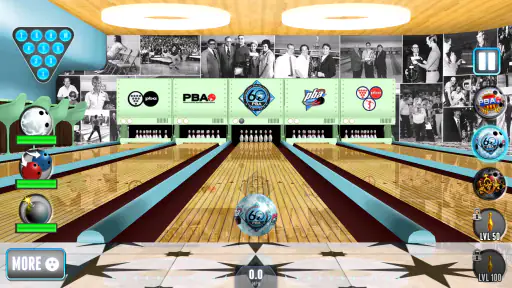
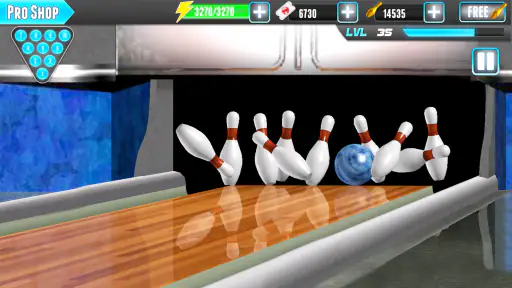
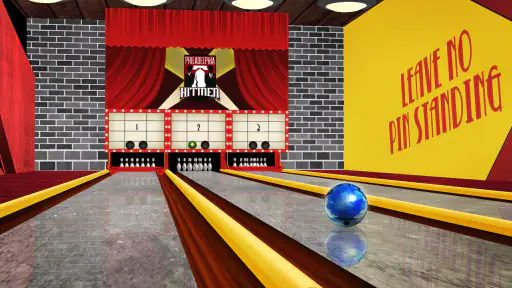
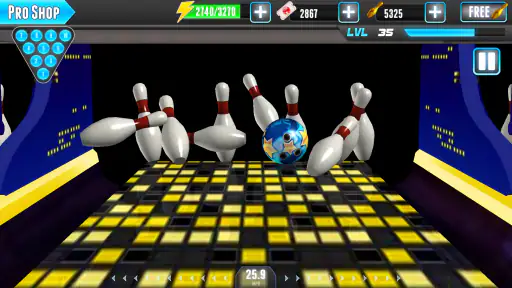
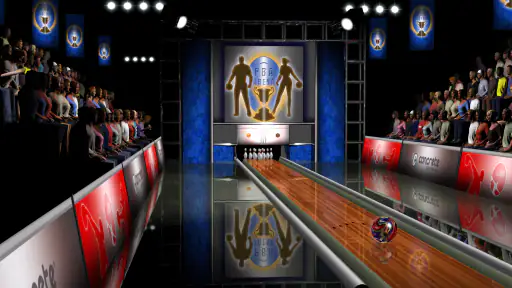
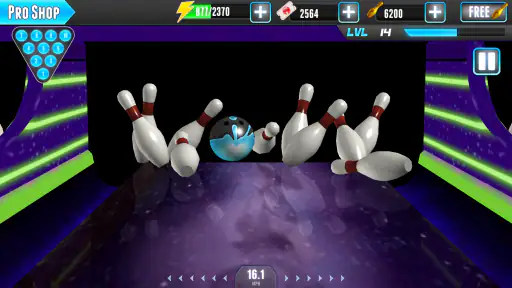
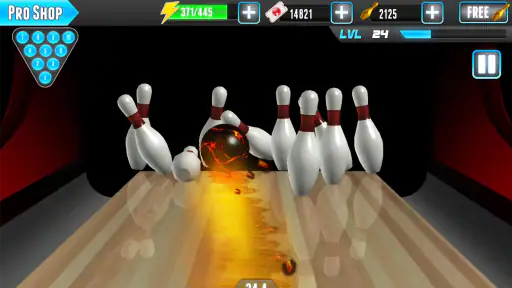
Let’s not forget the visuals. The graphics in PBA® Bowling Challenge are top-notch. The lanes are beautifully rendered, and the animations are smooth and lifelike. It’s easy to get lost in the game’s immersive environments, each with its own unique vibe. From the classic wood-paneled lanes to the flashy neon alleys, the attention to detail is impressive.
The polished presentation helps make each roll satisfying to watch, but it also means this is not simply a score sheet with a ball attached. If you prefer a minimalist bowling game with little animation, a stripped-down alternative may be a better match. I see the visuals here as part of the fun, not a practical advantage for every player or every setting.
Moreover, the sound effects add an extra layer of realism. The crash of the pins, the roll of the ball, and the murmur of the crowd make you feel like you’re really there. It’s the little things that make all the difference, and this game nails it.
Where you play matters too. A phone is handy for a quick solo round while waiting or winding down, but a crowded commute or a one-handed situation is not ideal for a gesture-based game that asks for a deliberate swipe. At home, a steadier grip and a few uninterrupted minutes make it easier to enjoy the lane presentation and refine your timing. If you need a game that works comfortably without attention to the screen, this is not the one I’d reach for.
Who Will Enjoy the Lanes—and Who May Prefer Another Game
I’d recommend it most to bowling fans who want a convenient, replayable version of the sport, and to casual players who like improving through repeated attempts. The PBA identity gives the game a more competition-minded feel than a purely casual arcade diversion, while the different modes give you options for a quick shot or a longer progression. Its release dates back to January 15, 2013, so it is an established mobile game rather than a brand-new take on the genre.
Compared with a basic bowling app that focuses only on taking a shot and seeing a score, this one offers more to work toward through its ball selection, Career progression, and multiplayer play. That extra structure is a strength if you like goals and variety. It can be a drawback if menus, equipment choices, and progression feel like interruptions between rolls. Players seeking physical bowling practice, a calm minimalist pastime, or controls that do not rely on touch gestures should consider a different option.
One practical trade-off is the purchase range. The game is free to start, but optional items can cost from $0.99 to $99.99 each. I would play first and decide whether the core bowling loop holds my attention before spending anything; the existence of purchases alone is not a reason to buy, and it is sensible to keep any spending within a limit that feels comfortable. This matters especially if the game is being used by a younger player, even though its age rating is Everyone.
Final Thoughts
In conclusion, PBA® Bowling Challenge is a must-have for any bowling enthusiast. It combines realistic gameplay, stunning graphics, and a wealth of features to create a truly engaging experience. Whether you’re a competitive player or just looking for some fun, this game has it all. So grab your virtual ball, hit the lanes, and see if you have what it takes to become a bowling legend. Happy gaming!
My recommendation is a little more specific: try it if you want bowling-themed play in brief, convenient sessions and enjoy learning a gesture-based control through repetition. Give it a pass if your priority is accessible controls tailored to a particular motor or sensory need, a bare-bones interface, or the physical social experience of a real bowling alley. For me, its best quality is the way a quick roll can sit alongside longer-term play; its main limitation is that the same touch interaction and visual activity that create the appeal may not work for everyone.
PBA® Bowling Challenge Pros and Cons
Pros
- Realistic bowling physics
- Wide variety of bowling balls
- Multiplayer mode available
- Challenging tournaments
- Frequent game updates
Cons
- Contains ads
- In-app purchases required
- Some bugs reported
- Occasional crashes
- Limited offline play
Frequently Asked Questions
What is PBA® Bowling Challenge and how do I play?
PBA® Bowling Challenge is a popular bowling game that brings the excitement of the Professional Bowlers Association right to your mobile device. Players can experience realistic bowling physics, compete in various tournaments, and challenge themselves with different modes and levels. The game is designed for both casual players and bowling enthusiasts. Players use swipe gestures to control the ball's direction and spin, aiming for strikes and spares in an immersive bowling alley setting.
Is PBA® Bowling Challenge free to download and play?
Yes, PBA® Bowling Challenge is free to download and play on both Android and iOS platforms. However, like many free-to-play games, it offers in-app purchases. These purchases can enhance the gaming experience by allowing players to unlock new balls, alleys, and other premium features more quickly. While in-app purchases can provide advantages, they are not necessary to enjoy the game fully.
What types of game modes are available in PBA® Bowling Challenge?
PBA® Bowling Challenge offers a variety of game modes to keep players engaged. These include single-player tournaments, multiplayer mode, and quick play options. Players can participate in official PBA tournaments, challenge friends in head-to-head matches, or practice their skills in solo games. Each mode offers unique challenges and rewards, catering to different play styles and preferences.
Are there any special features or updates in PBA® Bowling Challenge?
The game frequently updates with new content and features to enhance player experience. Special features include a wide range of PBA licensed balls, unique bowling alleys, and challenging oil patterns that replicate real-life bowling conditions. Regular updates often introduce new tournaments, balls, and events, keeping the gameplay fresh and exciting for both new and returning players.
How can I improve my skills in PBA® Bowling Challenge?
Improving skills in PBA® Bowling Challenge involves practicing regularly and understanding the game mechanics. Players should focus on controlling the ball's spin and direction with precision. Watching tutorials and learning from experienced players can also be beneficial. Participating in various tournaments and challenges helps players gain experience and improve their techniques. Consistent practice and smart gameplay are key to mastering the game.


