

One Line: Drawing Puzzle Game
- Reviews
- 4.7
- Version
- 1.1.2
- Installs
- 10,000,000+

Screenshots






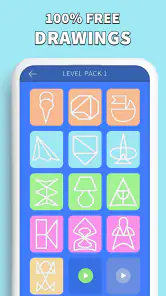
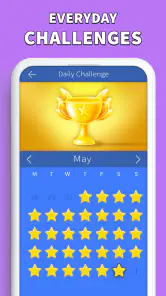
 Analysis by Frivlyz
When I’m deciding whether a small puzzle game deserves a place on my phone, I look for more than a clever premise: I want to know whether its early goals are clear, whether progress feels satisfying, and whether the challenge stays fair once the easy wins are over. One Line: Drawing Puzzle Game makes a strong first impression with a simple rule: trace a shape in one continuous stroke without going back over a line. That gives each level an immediate objective, while still leaving room to pause, inspect the drawing, and work out a route before committing.
That clarity is useful in ordinary moments when I don’t want to learn a complicated control scheme. I can open the game, understand what the puzzle asks, and decide whether I have time for one more attempt. It is a free puzzle game from Kidding Box Studio, with a 4.7 average from around 118,000 ratings and over 10 million installs. Those figures suggest it has found a broad audience, but the more relevant point for me is that the central idea is easy to explain and quick to try.
Small goals that are clear from the first move
The opening appeal is the directness of the task. There is no elaborate setup to remember: look at the connected points, consider the route, and try to complete the drawing in one stroke. That makes the game approachable for someone who rarely plays puzzles, as well as for a regular player who wants a compact logic challenge rather than a long story or a large set of rules.
I find it especially well suited to short breaks with a natural stopping point. A level gives me a specific problem to solve, so I can play while waiting for a kettle, taking a quiet moment between chores, or sitting on a commute where I don’t want to follow a plot. If I am interrupted, the puzzle’s visual layout makes it relatively easy to return to the question: which connections remain, and where should the line begin or turn?
There is also a useful distinction between moving quickly and solving thoughtfully. The drawing gesture itself is simple, but the planning is the real activity. Before tracing, I try to identify branches or awkward endpoints that could make a route impossible if I leave them until last. That habit turns a casual swipe into a small exercise in sequencing, and it is more satisfying than simply dragging a finger around until the shape happens to work.
How the challenge and pacing hold up
What sets One Line: Drawing Puzzle Game apart is its simplicity combined with complexity. Sounds contradictory, right? Let me explain. The game’s premise is straightforward: you need to connect all the dots with a single continuous line without retracing your steps. However, as you progress, the shapes become increasingly intricate and the paths more convoluted, turning the game into a real brain workout.
Easy to pick up, but not always easy to plan
The intuitive interface makes it easy for anyone to jump right in. You won’t be overwhelmed by tutorials or unnecessary instructions. It’s all about diving straight into the action. But don't be fooled by the initial levels. They might seem like a walk in the park, but soon you'll find yourself scratching your head and pondering over the next move. Each level is a new puzzle, a new challenge to conquer. And believe me, the satisfaction of solving a particularly tough puzzle is unmatched!
Gaming Stories You May Enjoy

Dancing Road Turns Short Breaks Into a Test of Rhythm and Timing

Super Stylist Makes Every Outfit a Test of Taste and Patience

Dominoes on Your Terms: Who Should Play and Who Should Pass

Pokémon GO Makes the Familiar World Feel New

Chess.com Turns Rematches Into Rivalries, but Community Has Its Costs

Archery Battle 3D Review: Sharp Aiming, Unclear Feedback
The increasing intricacy gives the game its main sense of progress. Instead of relying on a complex character system or a story to show that I have advanced, it asks me to handle less obvious routes. I can feel my own progress when I start checking the shape before drawing rather than reacting one connection at a time. That is a modest but meaningful signal: the game is training a way of looking, not just asking for faster taps.
One practical approach is to treat a failed attempt as information. If a route leaves a point or branch stranded, I can reconsider the order of connections rather than repeating the same gesture with more speed. On a difficult shape, I make a quick mental map of possible endpoints first, then trace only when the route looks coherent. This is a small change in how I play, but it reduces aimless retries and makes the puzzle feel more like reasoning than trial and error.
The touch control also means that a correct idea still has to be carried out cleanly. On a small screen, my finger can cover a junction or make it harder to see where two lines meet. I get better results by slowing down at crowded turns and keeping the device steady, rather than attempting a fast sweep. That trade-off is worth knowing: the game’s rule is easy to understand, but precision can matter when the diagram gets busy.
Minimal presentation keeps the puzzle in focus
The graphics are sleek and minimalistic, which is exactly what you need for a game like this. The calm and soothing background music complements the gameplay perfectly, creating a relaxing environment that allows you to focus solely on solving the puzzles. It’s as if the app developers knew exactly how to create an ambiance where your brain can operate at full capacity.
That restrained presentation suits the one-line mechanic because the drawing remains the center of attention. I would not choose it for elaborate animation, a strong visual world, or a narrative to follow; its appeal is the small moment of concentration around a route. The quiet style can make it a comfortable option when I want something less hectic than an action game, though anyone who prefers energetic feedback may find the presentation understated.
And hey, if you ever find yourself stuck, the game offers hints to nudge you in the right direction. But use them wisely, as they're limited, and sometimes part of the fun is figuring out the solution on your own.
Because hints are limited, I treat them as a way to get past a genuine block, not as a routine shortcut. Before spending one, I look again at the points where the path branches and ask which connections would be hardest to leave for last. If I still cannot see a workable order, a hint can keep one stubborn level from ending the session. If I use help whenever I hesitate, though, I lose the chance to build the planning skill that makes later puzzles more rewarding.
Where this fits among puzzle games
Compared with common match-three games, word puzzles, or larger logic games, this one asks for less context and gives a more concrete spatial problem. I don’t need to remember a board state across a long session or search for a word; I need to reason about a single stroke. That makes it a good fit for brief, focused play. On the other hand, someone who wants variety from several puzzle mechanics in one app may prefer a collection of different challenges rather than a game built around one central rule.
It is also a different kind of relaxation from a no-pressure coloring or tile game. Here, the calm mood does not remove the possibility of getting stuck: the satisfaction comes from finding a route that works. If I want to switch my brain off completely, I would choose something more automatic. If I want a compact problem that feels manageable but still asks me to pay attention, this is the better match.
A realistic use case is a short wait when I have my phone out but do not want to start a conversation-heavy game or watch a video. I can try a puzzle, stop after solving it, and return to whatever I was doing without needing to remember a plot. The same quality makes it convenient at home between tasks. It is less suited to moments when I am walking, handling something with both hands, or likely to be interrupted every few seconds, since careful tracing and visual attention work best when I can focus.
Progress without turning every session into a commitment
For me, the pacing works best when I approach it as a series of small goals instead of an obligation to clear a long run. A puzzle offers its own immediate finish line, and the rising complexity provides a reason to try another. Still, a single mechanic can eventually feel repetitive if I play for too long in one sitting. I prefer a few levels at a time, especially when the shapes demand more thought, rather than pushing through just to keep a streak of progress going.
The game is free to start, with in-app purchases priced from $1.99 to $7.99 per item. That is worth bearing in mind if you are deciding how to manage spending on a casual game. I would begin with the free experience and see whether the one-line puzzles hold my attention before considering any purchase. The presence of optional purchases does not change what makes the core idea appealing, but it may matter to anyone who prefers games with no in-app spending at all.
It is rated Everyone, which makes the straightforward premise easy to share across ages, though younger players may still need patience when a later shape is hard to reason through. The game’s current version is 1.1.2, and it runs on Android 7.0 or later. I would check that operating-system requirement before installing it on an older device. The uncomplicated objective also makes it easy to explain to someone else: show them a shape, describe the no-retracing rule, and let them work out a route.
My main reservation is not that the game is difficult, but that its core loop stays deliberately narrow. Players who expect a campaign, a changing set of puzzle types, or a deep progression system may find that the satisfaction depends on enjoying the act of tracing and planning itself. Likewise, if a puzzle’s difficulty makes you impatient, limited hints may not feel generous enough to remove that friction. I would skip it if I mainly want a fast game that rewards reflexes or a broad collection of activities.
A good choice when you want one focused puzzle
One thing I really appreciate about this app is its accessibility. Whether you're on a quick break, commuting, or just lounging at home, One Line: Drawing Puzzle Game is the perfect companion to keep your mind engaged. Plus, it doesn't require an internet connection, so you can play it anytime, anywhere.
That offline convenience is particularly useful for travel or places where a connection is unreliable, and the short, self-contained puzzles suit brief sessions better than games that expect continuous attention. I would still save the more intricate levels for a moment when I can look closely at the screen; being offline makes it available, but it does not make every puzzle ideal for distracted play.
If you are wondering whether it is appropriate for a child or for someone new to puzzle games, I think the simple drawing rule is a friendly starting point, while the later increase in complexity gives more experienced players something to think about. If you are wondering whether it replaces a broader puzzle app, I would say no: its strength is commitment to one spatial challenge, not variety. And if you want to know whether to use hints, my advice is to attempt a deliberate route first, then use one when you have genuinely run out of ideas rather than merely wanting to finish faster.
In conclusion, One Line: Drawing Puzzle Game is a delightful mix of simplicity and complexity that offers endless fun and a great way to enhance your problem-solving skills. So, if you're up for a challenge, give it a go. Who knows, you might just find your new favorite pastime!
One Line: Drawing Puzzle Game Pros and Cons
Pros
- Easy to learn
- hard to master
- Visually appealing minimalist design
- Wide variety of challenging levels
- Offline play available
- Frequent updates with new puzzles
Cons
- Some levels feel repetitive
- Ads can be intrusive
- In-app purchases can be pricey
- Limited hints available
- No multiplayer mode
Frequently Asked Questions
What is One Line: Drawing Puzzle Game about?
One Line: Drawing Puzzle Game is a captivating and brain-challenging mobile game where players must connect all the dots in a single continuous line without retracing the same line. It offers a stimulating mental exercise with varying levels of difficulty, designed to enhance problem-solving skills and keep players entertained for hours.
Is One Line: Drawing Puzzle Game free to play?
Yes, One Line: Drawing Puzzle Game is free to download and play on both Android and iOS platforms. However, it does offer in-app purchases for players who wish to enhance their gaming experience with additional features or to remove ads. These purchases are optional and not required to enjoy the game.
What are the system requirements for One Line: Drawing Puzzle Game?
To run One Line: Drawing Puzzle Game smoothly, Android users need a device with Android OS version 4.1 or higher, while iOS users require iOS 9.0 or later. The game is optimized for both phones and tablets, ensuring a great experience regardless of the device size. Adequate storage space is also necessary to accommodate game updates.
Does One Line: Drawing Puzzle Game require an internet connection?
One Line: Drawing Puzzle Game can be played offline, making it a perfect companion for users on the go or without a stable internet connection. However, an internet connection may be needed for certain features, such as downloading updates or making in-app purchases. Playing offline will not affect the core gameplay experience.
Can I sync my progress in One Line: Drawing Puzzle Game across multiple devices?
Yes, One Line: Drawing Puzzle Game supports progress synchronization across multiple devices. Players can log in using their Google Play or Apple Game Center accounts to save and sync their progress. This feature ensures seamless gameplay whether you switch devices or wish to continue playing on a new device without losing progress.


