

Note Rush: Learn to Read Music
- Reviews
- 4.2
- Version
- 2.01.2
- Installs
- 10,000+

Screenshots
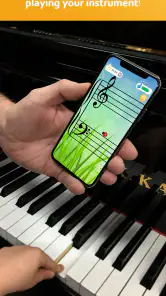
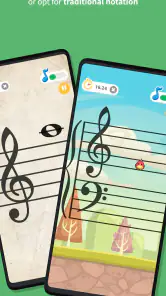
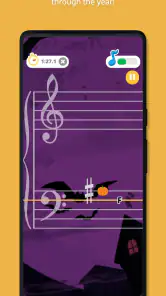
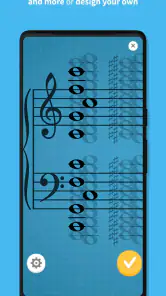
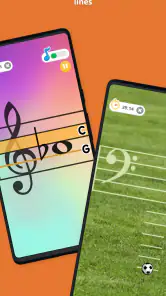
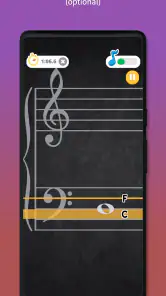
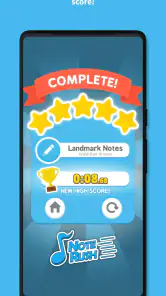
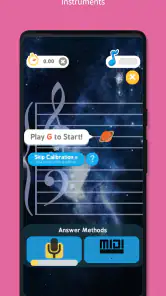
 Analysis by Frivlyz
I find Note Rush: Learn to Read Music most useful when I treat it as a focused practice aid, not a complete music course. It is a music game from Thomas Grayston Software, built around recognizing written notes and responding by playing them. That narrow purpose is also its strength: a learner can spend a short session on note reading without needing to plan a full lesson. The game is rated for Everyone, and its appeal to both children and adult beginners comes through in the playful approach.
Getting Started with Note Rush
When you first open Note Rush, you're greeted with a simple and intuitive interface. The app immediately gives off a friendly vibe, making it accessible even for children. The setup is straightforward, and it guides you through the steps to get started. You can choose your instrument, be it piano, guitar, or any other, and the app tailors its exercises accordingly. This personalization is a great feature, ensuring that you're working on skills relevant to your instrument.
Readability and navigation
For note-reading practice, clear presentation matters as much as the exercise itself. I appreciate that the basic task is easy to grasp: look at a note, identify it, and play the corresponding pitch. That direct loop is less intimidating than opening a broad theory course with many menus and topics. It also makes the game approachable for a child sitting down with a parent or teacher nearby, because the adult can explain the musical idea without first teaching a complicated interface.
Note reading is not the same as learning all of music theory, though. A learner who wants explanations of rhythm, key signatures, intervals, or how notes relate across an entire piece will need instruction beyond this sort of drill. I would use it alongside a lesson book, teacher, or instrument method rather than expecting it to replace one. The best results are likely when the learner already has a basic idea of how to find notes on their instrument and can connect the on-screen prompt to a real key or string.
The store describes Note Rush as a favorite among music teachers, and I can see why a teacher might find a short, repeatable drill convenient between lessons. Its average rating is 4.2 from around 380 ratings, with about 96 written reviews and over 10,000 installs. Those figures offer context, but they do not tell me whether the exercise style will suit a particular student; the practical test is whether the learner can read the prompt and respond comfortably on their own instrument.
Features That Stand Out
One of the standout features of Note Rush is its use of your device's microphone to listen to you play. This real-time feedback helps you correct mistakes on the spot, which is incredibly helpful for learning. The app offers several levels of difficulty, accommodating complete beginners to more advanced musicians. Each level is designed to gradually increase the complexity, building confidence as you progress.
Additionally, the app offers a variety of themes, such as "Space," "Jungle," and "Underwater," which can be particularly appealing to younger users. These themes add a layer of fun and motivation, encouraging users to earn stars and unlock new challenges. It's these little touches that make Note Rush more than just a learning tool; it becomes a game that you look forward to playing.
Gaming Stories You May Enjoy

Dancing Road Turns Short Breaks Into a Test of Rhythm and Timing

Super Stylist Makes Every Outfit a Test of Taste and Patience

Dominoes on Your Terms: Who Should Play and Who Should Pass

Pokémon GO Makes the Familiar World Feel New

Chess.com Turns Rematches Into Rivalries, but Community Has Its Costs

Archery Battle 3D Review: Sharp Aiming, Unclear Feedback
The microphone-based approach is a useful distinction from flashcards or a quiz where you only tap an answer. It asks the learner to make a sound on an instrument, so recognition and physical response are joined together. That is valuable practice, but it also means the room and setup matter: a quiet space and a clear instrument sound make the feedback easier to trust. If the device cannot hear the played note reliably, repeating the same prompt may become frustrating rather than educational.
A practical way to use the game is to keep sessions brief and purposeful. For example, a student could play a few rounds before a piano lesson, then ask the teacher about any notes that caused hesitation. Another option is to focus on one comfortable register first, resisting the temptation to rush into harder material simply to earn rewards. The game element can encourage repetition, but accuracy is more useful than speed when a learner is still building the habit of reading rather than guessing.
Motor and sensory considerations
Because the central action involves playing an instrument and having a microphone hear it, Note Rush may suit learners who benefit from active, sound-based practice better than those who prefer silent, visual drills. At the same time, this interaction creates a real constraint. A learner who has limited access to an instrument during the day, finds playing physically tiring, or needs to practice in a shared quiet room may not be able to use it as freely as a paper worksheet or a phone-based note quiz.
I would also consider how a learner handles game feedback. Themes and rewards can help keep a child interested, but some people prefer a calm, uncluttered routine and may find game elements distracting. A parent or teacher can help by framing the activity as a short exercise rather than a competition. For learners who need larger visual elements, reduced motion, specific contrast settings, or alternative input methods, it is sensible to try the actual interface before relying on it as a regular practice tool; I would not assume that a playful design automatically meets every access need.
One useful trade-off is that playing the note can reveal a gap that a multiple-choice answer hides: a learner may recognize a note name but still struggle to locate it on an instrument. That makes the exercise more connected to musicianship, yet it can also blur the source of a mistake. If a response is marked wrong, the learner may need to work out whether they misread the staff, chose the wrong key or string, or whether the sound was not picked up clearly. A teacher or parent can help separate those possibilities, especially early on.
Situational access and everyday use
Imagine a student who has ten minutes before leaving for a lesson. They can use that window for a compact note-reading warm-up, then spend the lesson on pieces and technique instead of beginning with basic recognition. At home, a parent could take turns with a child, while the app’s multiple-user support lets family members keep their own progress separate. That is more practical than sharing one paper tally, provided each person can comfortably use the same device and instrument setup.
For a teacher, the game can be a change of pace after a longer written exercise. A student who loses focus while naming notes from a page may respond better to the immediate play-and-listen cycle. Conversely, a learner who is already comfortable reading notes but needs help with rhythm, phrasing, or sight-reading complete passages will probably get more value from playing real music or using a broader lesson resource. Note Rush is best as a targeted supplement, not a substitute for varied practice.
Compared with traditional flashcards, it offers a more hands-on response and an entertaining presentation, but flashcards are easier to use away from an instrument and do not depend on microphone feedback. Compared with general music-learning apps, its narrower focus can be a benefit when note recognition is the specific weakness; broader apps may cover more topics but divide attention across them. Choosing between these options depends on the learner’s immediate goal, not on which format sounds more modern.
Note Rush costs $8.99, so I would decide whether its instrument-based practice will become part of a routine before buying. It has been available since August 5, 2016, and the current version is 2.01.2; it requires Android 7.0 or later. Those details matter if you are checking an older device or deciding whether the price makes sense for occasional use. I would expect the best value for a learner who will return to short drills regularly, rather than someone who only wants to try a music game once.
Remaining barriers and who should choose it
There are a few questions worth answering before making it part of a routine. Is it suitable for a complete beginner? It can help with note recognition, but a beginner will still need to learn how the staff maps to their instrument and what the note names mean. Does it replace lessons? No: I see it as practice for one skill, while a teacher or a structured course can explain errors and connect reading to musical expression. Can it work without an instrument? Its defining feedback depends on playing and microphone listening, so it is not the strongest choice for instrument-free study.
It is a good fit for a child who enjoys short challenges, a beginner who needs repeated note-reading practice, or a family looking for a small activity to support lessons. I would be more cautious about recommending it to someone whose main goal is composing, learning songs, understanding theory in depth, or practicing silently in a place where playing is inconvenient. A learner who gets discouraged by incorrect feedback should also try it with an adult or teacher at first, so a sound-detection issue is not mistaken for a lack of musical ability.
One tip I would use is to make practice deliberately observable: after a round, ask the learner to name one note that felt easy and one that took longer, then locate those notes again on the instrument outside the game. This turns the session into a bridge to real playing rather than an isolated score chase. Another is to stop when attention fades instead of extending the session just to unlock something; brief, accurate repetition is more likely to build a useful reading habit than tired guessing.
Why You'll Love It
What really sets Note Rush apart is its ability to make learning music enjoyable. The gamified approach means that you’re not just staring at sheet music and trying to memorize notes; you’re actively participating in a game that rewards progress and improvement. This approach is not only more effective but also helps maintain your interest over time.
The app also supports multiple users, allowing different family members to track their progress separately. This is a big plus for households where more than one person is learning an instrument. Everyone can have their own profile, and the app keeps track of each individual's achievements and areas for improvement.
For me, the strongest recommendation is for someone who already has regular access to an instrument and wants note reading to feel less like a worksheet. The main limitation is equally specific: it cannot make every practice setting suitable, and learners needing a broader or more adaptable teaching format may be better served elsewhere. I would judge progress not just by game rewards but by whether the learner begins to recognize notes more readily when they return to printed music.
Final Thoughts
In conclusion, Note Rush is an invaluable tool for anyone looking to improve their music reading skills. Its engaging and interactive design makes it appealing to both kids and adults. Whether you’re just starting your musical journey or looking to polish your skills, this app provides a comprehensive, fun, and effective way to learn. So, if you’re ready to take your note reading to the next level, give Note Rush a try. You might just find yourself looking forward to practice sessions!
My inclusive verdict is positive, with a clear condition: the learner should be able to see the prompts comfortably, play the instrument in their setting, and benefit from a game-like routine. For that person, it offers an approachable way to turn note recognition into an active habit. If those conditions do not fit, a quiet paper exercise, teacher-led practice, or a broader music-learning option may be a better starting point.
Note Rush: Learn to Read Music Pros and Cons
Pros
- Engaging interface for quick learning
- Customizable note settings
- Supports multiple instruments
- Fun for all ages
- Encourages regular practice
Cons
- Limited free content
- Requires device microphone
- Ads can be intrusive
- No advanced music theory
- May not suit professional musicians
Frequently Asked Questions
What is Note Rush: Learn to Read Music?
Note Rush is an educational app designed to help users, especially music students, improve their music reading skills. It uses an interactive game-like interface to make learning notes fun and engaging. The app offers various levels and challenges that adapt to the user's progress, making it suitable for all ages and skill levels.
How does Note Rush help with learning music?
Note Rush helps users learn music by providing a series of timed challenges that require identifying notes on a staff and matching them to the correct keys on a piano or other instrument. It uses audio and visual feedback to reinforce learning, making the process interactive and effective. The app is designed to improve speed and accuracy in reading music notes.
Is Note Rush suitable for beginners or only advanced musicians?
Note Rush is suitable for both beginners and advanced musicians. It offers multiple difficulty levels, allowing users to start at a basic level and gradually increase the complexity as they improve. This makes it an ideal tool for beginners who are just starting to learn music as well as for more experienced musicians looking to sharpen their skills.
What devices is Note Rush compatible with?
Note Rush is compatible with both Android and iOS devices, making it accessible to a wide range of users. The app can be downloaded from the Google Play Store for Android users and the Apple App Store for iOS users. It is optimized for smartphones and tablets, offering a seamless user experience across different devices.
Does Note Rush require any additional equipment to use?
Note Rush does not require any additional equipment, but having a musical instrument like a piano or keyboard can enhance the learning experience. The app can detect notes played on a real instrument, providing an interactive learning session. However, users can still benefit from the app's features without any instruments by using the on-screen keyboard.


