

Nostalgia Color by number game
- Reviews
- 4.6
- Version
- 1.1.9
- Installs
- 500,000+

Screenshots

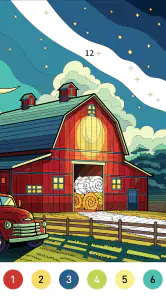
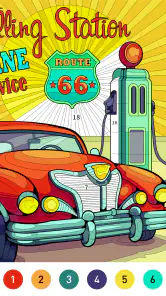
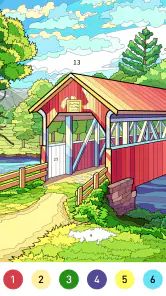
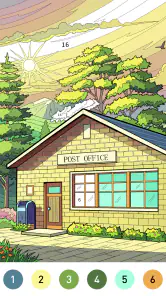
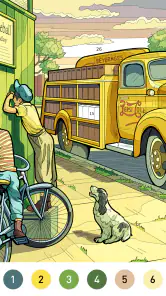
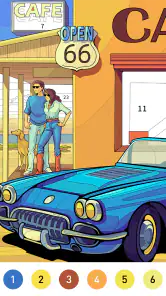

 Analysis by Frivlyz
When I want a quiet break that gives my hands something to do without asking me to learn a complicated game, number coloring is an easy choice. Nostalgia Color by Number makes that familiar activity digital: choose a picture, follow its numbered sections, and watch the image take shape. Its appeal is less about chasing a score than about setting a small goal and seeing it through at a comfortable pace.
A small goal that is easy to begin
The first useful decision is simply choosing a picture. Once I start, the numbered areas provide a clear next step, so I don’t need to plan a design or decide which colors belong where. That makes the game approachable when I have only a few minutes and don’t want another demanding task competing for my attention.
This structure also answers a practical question: is it suitable for someone who isn’t confident at drawing? Yes. The activity is guided by the numbers rather than freehand skill, so I can focus on finding the matching sections. The trade-off is that this is guided coloring, not a drawing tool; anyone hoping to sketch original art or freely choose every color will probably prefer a different kind of creative app.
I find it works best when I treat a picture as a series of small goals rather than a project I have to finish in one sitting. Filling a few sections during a quiet moment can feel complete in itself. If I have more time, I can continue working toward the satisfying point when the whole image comes together.
How the coloring loop holds up
Nostalgia Color by Number is a coloring app that does exactly what it says on the tin, but with a delightful splash of nostalgia. You’ll find yourself diving into a vast collection of images ranging from intricate mandalas to adorable animals, all waiting for your artistic touch. The app’s design is reminiscent of the classic coloring books we all grew up with, yet it’s packed with modern features that make the experience seamless and ultra-engaging.
Simplicity at Its Best
One of the first things I noticed about this app is how straightforward it is. No complicated menus or overwhelming features—just good old coloring. You pick an image, and the app guides you with numbered sections, making it a breeze to fill in each segment with the appropriate color. It’s perfect for those moments when you just want to unwind and shut out the world.
The color palette is vibrant and diverse, offering a wide range of hues to bring your chosen image to life. And let me tell you, there's something incredibly satisfying about watching a black and white sketch transform into a colorful masterpiece, one number at a time.
Gaming Stories You May Enjoy

Dancing Road Turns Short Breaks Into a Test of Rhythm and Timing

Super Stylist Makes Every Outfit a Test of Taste and Patience

Dominoes on Your Terms: Who Should Play and Who Should Pass

Pokémon GO Makes the Familiar World Feel New

Chess.com Turns Rematches Into Rivalries, but Community Has Its Costs

Archery Battle 3D Review: Sharp Aiming, Unclear Feedback
Progress without a scoreboard
For me, the clearest progress signal is visual: blank numbered spaces gradually become a finished picture. That is a different kind of reward from a board game with turns, tactical decisions, or a win-or-lose result. This is listed as a board game, but its moment-to-moment activity is closer to digital coloring than to a competitive match. If you’re looking for opponents, strategy, or a challenge that tests planning, you may be better served by a traditional board-game app.
The gentle structure has a useful consequence: I can stop and return without having to remember a complicated sequence of moves. The original app description presents saving progress as a way to pick up where you left off, which suits interrupted sessions. In practice, I’d still choose a picture with my available time in mind. A more detailed image can make a short break feel unfinished, while a simpler-looking choice is easier to approach as a quick, self-contained activity.
Features That Stand Out
While the app’s primary function is to provide a calming coloring experience, it doesn’t skimp on features. There’s an option to share your finished artwork directly on social media, which is a neat touch if you’re the kind who likes to showcase your creative prowess. Additionally, the app frequently updates its library, so there’s always something new to color. Talk about keeping things fresh!
Another feature worth mentioning is the ability to save your progress. You can easily pick up where you left off, which is perfect for those who like to color in short, satisfying bursts. Plus, the app is designed to work offline, so you can enjoy your coloring sessions even when you’re off the grid.
Choosing a pace that suits you
There is no need to turn every session into a completion race. I’d use a short pause in the day to fill a few areas, then leave a picture for a longer evening session if I want the stronger sense of finishing something. That approach is especially helpful if a detailed image begins to feel like a chore: switching to another picture can restore the relaxed feeling, rather than pushing through simply to clear a task.
One small technique is to pay attention to how much of the image remains before starting when I know I have limited time. A nearly complete picture can be a satisfying choice for a brief session; a largely untouched one is better when I’m happy to make gradual progress. This is not a special unlock strategy, but it makes the game’s visual progress more rewarding without inventing a target or system the app doesn’t need.
Compared with paper coloring books, the numbered digital format removes the need to carry pencils or decide on every shade, and it makes it easy to pause a picture. Paper is still the better choice if I want the feel of physical materials, a fully self-directed palette, or something away from a screen. Compared with puzzle and board-game alternatives, this asks less of my attention and offers a softer, more meditative rhythm, but also less strategic depth.
Who will enjoy the slower rhythm?
I’d recommend it to people who like coloring, nostalgic imagery, and low-pressure activities they can dip into between other plans. It can fit a quiet commute or a few minutes at home, provided the device is available; the offline option is useful when a connection isn’t convenient. A realistic routine might be to open a picture while waiting for dinner, fill a few numbered sections, and return later rather than trying to make the whole session an event.
It’s also a reasonable choice for someone who wants a simple creative pastime but doesn’t want to learn drawing techniques. The game is rated for Everyone, though that rating alone doesn’t tell me whether every individual will enjoy the pace. A person who likes fast feedback, competition, elaborate puzzles, or total artistic control may find the loop too guided and repetitive. In those cases, a strategy board game or an open-ended art app is a better match.
As a free game from Art Coloring Group, it is easy to try without paying upfront. It has a 4.6 average from around 4,000 ratings and has been installed over 500,000 times, which gives a useful sense of its audience without telling me whether its particular style will suit you. Optional in-app purchases range from $0.99 to $59.99 per item, so I’d treat the free experience as the sensible starting point and consider any purchase carefully rather than assuming it is needed to enjoy coloring.
A gentle loop, with limits
In this fast-paced world, finding a moment of tranquility can be challenging. That’s where Nostalgia Color by Number steps in. It’s not just a coloring app; it’s a great tool for stress relief. The repetitive motion of coloring and the focus required to match the numbers to colors can be meditative, making it a perfect companion for anyone looking to unwind after a long day.
I’d describe that benefit as a possibility, not a promise: the steady task may help me settle, but it won’t suit everyone, and a busy or highly detailed picture can become fiddly rather than calming. The main limitation is also part of the appeal. The number-to-color structure keeps the activity approachable, but it leaves less room for personal expression than blank-page drawing or physical coloring with a palette of my own choosing.
The progression feels sustainable when I enjoy the act of filling sections, not only the finished artwork. Fresh pictures and saved progress can encourage me to return, but the experience is gentle rather than built around a demanding challenge. Nostalgia Color is currently at version 1.1.9 and was released on February 5, 2024; it requires Android 7.1 or later. Those details make it easier to judge compatibility, while the core decision is simpler: do you want guided, unhurried coloring, or a game with more pressure and strategic choices?
So, if you’re in the mood for a trip down memory lane or simply want to engage in a relaxing activity, give Nostalgia Color by Number a whirl. It’s a delightful blend of old-school charm and modern convenience, and trust me, it’ll keep you coming back for more!
Nostalgia Color by number game Pros and Cons
Pros
- Engaging and relaxing gameplay.
- Wide variety of images to color.
- Easy-to-use interface.
- Offline mode available.
- Regular updates with new content.
Cons
- Ads can be intrusive.
- Limited free content.
- In-app purchases can be costly.
- Some images lack detail.
- Occasional app crashes.
Frequently Asked Questions
What is Nostalgia Color by Number and how does it work?
Nostalgia Color by Number is a relaxing and entertaining game app where users color pixelated images based on a number system. Each number corresponds to a color, and players simply fill in the colors to complete vibrant, retro-style artwork. The app offers a wide variety of images, from simple to complex designs, catering to all age groups and skill levels. It's a great way to unwind, enhance creativity, and enjoy the nostalgia of pixel art.
Is Nostalgia Color by Number free to download and play?
Yes, Nostalgia Color by Number is free to download and play on both Android and iOS platforms. However, the app includes in-app purchases and ads. Users can choose to buy premium features or remove ads for a more seamless experience. Free users still have access to a substantial collection of images and features, but premium options offer additional content and benefits.
Does Nostalgia Color by Number require an internet connection?
Nostalgia Color by Number can be enjoyed offline, allowing users to color images without an active internet connection. However, an internet connection is required to download new images, updates, and access certain features that are online-exclusive, such as community galleries or sharing completed artwork with friends on social media platforms.
Are there any age restrictions for playing Nostalgia Color by Number?
Nostalgia Color by Number is suitable for all ages, making it a family-friendly app. The simple mechanics of coloring by numbers are easy for children to understand, while adults can appreciate the intricate designs and the therapeutic effects of coloring. The app does not contain any explicit content, ensuring a safe environment for users of all ages.
What accessibility features does Nostalgia Color by Number offer?
Nostalgia Color by Number includes several accessibility features to ensure a broad range of users can enjoy the game. The app supports zooming in on images for more precise coloring, offers colorblind-friendly palettes, and has adjustable difficulty levels to cater to both beginners and experienced users. These features ensure that everyone can have a comfortable and enjoyable coloring experience.


