

NES.emu (NES Emulator)
- Reviews
- 4.3
- Version
- Varies with device
- Installs
- 100,000+

Screenshots
 Analysis by Frivlyz
When I want a quick session with an old NES game, I prefer a setup that gets out of the way: choose a game, settle the controls, and keep a familiar routine. NES.emu is built for that kind of retro play on Android, and its appeal is less about recreating a living-room console perfectly than about making a personal game library usable on a phone. It is an arcade game from Robert Broglia, released in 2011, and it remains a paid option at $3.99. Its 4.3 average from around 2.8 thousand ratings and more than 100 thousand installs suggest that plenty of players find a dedicated emulator worth choosing over a casual free alternative.
Start with a dependable routine
The first useful step is not to adjust every option. I would begin by opening one game I know well, checking whether the on-screen buttons feel comfortable, and playing for a few minutes before changing anything else. That makes it easier to tell whether a problem comes from the layout, the phone’s orientation, or simply a game that expects precise timing. Once the controls feel familiar, I can use the same setup for short sessions instead of rebuilding my preferences every time.
That routine suits a realistic everyday use case: I might have a little time during a break, open a familiar platform game, play one section, and put the phone away. A touchscreen can work well enough for slower exploration or a turn-based moment in an adventure, but rapid jumps and directional changes expose its limits. A Bluetooth controller is the more comfortable choice when I expect to play for longer or want physical buttons. I would test the exact controller and layout before relying on them for a serious run, rather than assuming that a setup that feels good in one game will suit every title.
Check the details that affect comfort
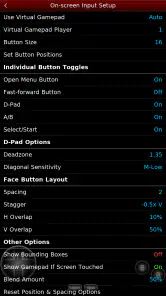
Control customization is most useful when treated as a practical adjustment, not a project. I would move frequently used buttons within easy reach, avoid crowding them together, and make sure the directional controls do not interfere with the action buttons. A layout that looks tidy can still be awkward when I hold the phone one-handed, so a short test in a game with frequent movement is more informative than judging the screen while idle.
Screen layout and filters also deserve a little restraint. A display treatment can change the look of the image, but it is personal preference rather than an automatic improvement; I would compare it with the unfiltered picture and keep whichever remains readable during movement. The useful trade-off is between a more stylized presentation and a clean view of small, fast-moving details. I would also settle on one orientation and control arrangement for a while before making further changes, because repeated tweaking can make it hard to know which adjustment actually helped.
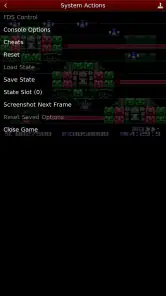
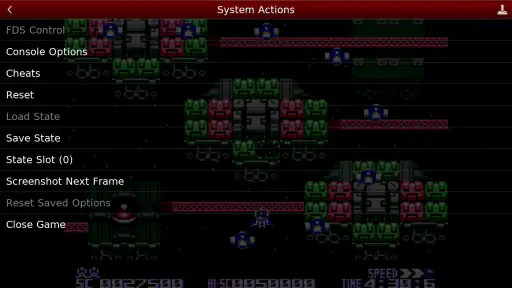
Save states and cheat codes give players more ways to manage a session, but they change the feel of a game. I find a save state most helpful as a practical stopping point when I need to interrupt a longer play session, rather than as a replacement for every in-game challenge. Cheats can make a difficult section less demanding, yet using them freely may remove the satisfaction of learning a tricky sequence. For a first playthrough, I would keep them as an option for a genuine sticking point, not the default way to progress.
Know what this emulator is—and is not
Compared with a general mobile game, an emulator asks me to bring more of the experience myself: I need to choose the games I want to play and decide how I want to control them. That extra responsibility is part of the appeal for someone who already has a collection and enjoys fine-tuning a familiar setup. It is also a reason to skip this kind of app if I want a ready-made game catalog, straightforward touch play, or an experience that requires no configuration. I would not buy an emulator expecting it to supply the games; the practical value is in playing compatible games I already have access to.
Gaming Stories You May Enjoy

Dancing Road Turns Short Breaks Into a Test of Rhythm and Timing

Super Stylist Makes Every Outfit a Test of Taste and Patience

Dominoes on Your Terms: Who Should Play and Who Should Pass

Pokémon GO Makes the Familiar World Feel New

Chess.com Turns Rematches Into Rivalries, but Community Has Its Costs

Archery Battle 3D Review: Sharp Aiming, Unclear Feedback
It is also worth separating the emulator from the games themselves. The app provides the playing environment, while the feel of a session still depends on the particular game, its control demands, and the device in hand. A puzzle or exploration-focused game can be forgiving on a touchscreen; a fast action game makes button placement and input comfort much more noticeable. If I am choosing between this and a modern mobile game, I would pick NES.emu for the appeal of a specific NES library and choose the mobile game for convenience, built-in content, and controls designed around a phone.
Who will get the most from it
This is a better fit for someone who already knows what they want to play and is happy to spend a little time arranging controls. It can also suit a curious newcomer who wants to explore older games, provided they understand that the emulator is only one part of the setup. The Everyone age rating makes the app broadly suitable from a content-rating standpoint, though individual games may have their own tone and difficulty. For a family device, I would choose games deliberately and test the controls before handing the phone over.
By contrast, I would steer away from it if the main goal is instant entertainment with no setup, if touch controls are uncomfortable for the games you like, or if you expect a subscription-style library included with the purchase. The $3.99 price is a straightforward upfront commitment, so I would weigh it against how often I expect to use an emulator and whether I already have a controller that makes phone play enjoyable. Its 630 reviews offer additional reader opinions to consider, but no rating can tell you whether your favorite game feels good on your particular screen.
Reviving the Classics
First things first, let's talk about what makes NES.emu stand out in the crowded world of emulators. This app is designed to bring your favorite NES games to life with impressive accuracy. It supports a wide range of ROM formats and offers a seamless gaming experience, complete with customizable controls. Whether you're using a touchscreen or a Bluetooth controller, this app has got you covered!
Getting Started
Setting up NES.emu is a breeze. Once you've downloaded the app, you just need to load your favorite ROMs and you're ready to go. The interface is straightforward and user-friendly, making it easy to navigate even if you're not a tech whiz. Plus, the app provides helpful tips and tricks to ensure you get the most out of your gaming session.
In day-to-day use, I would keep the first session deliberately simple: load one game, confirm that it appears and starts as expected, then play long enough to judge the controls. If I am moving games between folders or organizing a larger collection, I would do that separately from a short play session so setup work does not become a barrier every time I want to play. A compact, familiar selection is often more useful on a phone than a huge library that takes longer to browse than to enjoy.
A common question is whether the emulator itself settles every compatibility question. I would treat the broad ROM support as helpful flexibility, not a promise that every file or every game will behave identically. If something does not load or feels wrong, I would first check that I have selected a compatible game file and then try a known title before changing several settings at once. That one-variable-at-a-time approach makes troubleshooting less frustrating and keeps a working setup intact.
Performance and Features
One of the standout features of this emulator is its excellent performance. It runs smoothly on most devices, and the graphics are pixel-perfect, just as you remember them. The sound emulation is top-notch too, so you won't miss a single nostalgic tune. Additionally, NES.emu offers features like save states and cheat codes, allowing you to enhance your gaming experience. Want to skip a tough level? No problem, just use a cheat code and breeze through it!
My practical advice is to decide in advance what a save state is for. Used as a convenient bookmark, it can make an interrupted evening session easier to resume. Used constantly to retry every small mistake, it can make progress feel less earned and leave me unsure which in-game saves or checkpoints I actually reached. Likewise, a cheat code can be a reasonable way to get past a frustrating obstacle, but I would keep a separate, unassisted run if learning the original challenge is part of the fun.
For experienced players, a repeatable setup matters more than a long list of tweaks. I would settle on a comfortable button arrangement, keep the same screen presentation across sessions, and change one setting only when I can name the problem it is meant to solve. If a game demands quick reactions, I would choose a controller before spending time trying to make tiny touchscreen buttons behave like physical ones. If it is slower and forgiving, the phone’s built-in controls may be perfectly adequate. That distinction saves time and avoids treating every game as though it needs the same configuration.
There is a trade-off between portability and precision. A phone means the games are close at hand, but a touchscreen covers part of the image and offers no physical feedback. A controller can improve button feel, though it adds another item to carry and connect. For a commute or a brief wait, touch controls may be the sensible compromise; for a longer session at home, a controller is more likely to feel natural. I would decide based on the game and the setting, rather than assuming one control method is best everywhere.
Personal Touch
What I love most about NES.emu is the ability to customize the gaming experience. You can adjust the screen layout, change the control scheme, and even apply filters to give your games a fresh look. It's like having your very own retro gaming console in your pocket, and you get to tweak it to your liking.
That flexibility is most valuable when I stop tweaking once the experience is comfortable. A useful personal setup is not necessarily the most elaborate one: it is the arrangement I can pick up again without remembering a complicated series of changes. I would keep visual adjustments subtle if they make game details harder to read, and I would revisit button placement only after a real session reveals a problem. That approach makes customization serve the game rather than becoming the activity itself.
NES.emu is an arcade-focused emulator, not a collection of current phone games, and that distinction shapes who should choose it. Its developer, Robert Broglia, has made a dedicated option for players who want to run NES games through an emulator rather than browse a ready-to-play catalog. It was released on February 9, 2011, and its long-standing presence may appeal to people who already know the emulation workflow. Newcomers should be comfortable managing their own game files and checking control feel before deciding that the format suits them.
If your preference is a broad, instantly playable selection, a conventional mobile game or a licensed retro collection may be less work. Those alternatives can offer curated content and phone-friendly controls, while an emulator gives more direct control over how you arrange and play your own compatible library. Neither approach is automatically better: the choice depends on whether you value convenience or the flexibility of an emulator enough to accept the setup involved.
A measured verdict for repeat play
My overall recommendation is conditional but positive. I would choose this app if I wanted a dedicated NES emulator, already had games I could use, and cared about arranging controls and screen presentation to suit my habits. I would skip it if I expected a built-in library, disliked configuration, or mainly played games that demand precise physical inputs but had no controller available. Those are not minor distinctions; they decide whether the emulator feels convenient or like extra work.
Before settling in, I would test a familiar game, check touch-button spacing, try any controller I plan to use, and make a deliberate choice about filters and save states. That short routine answers the questions that matter most in practice: can I comfortably control the games I want, does the display remain easy to read, and do the session tools match how I like to play? If the answers are yes, the app can make a phone a handy way to return to NES favorites. If not, a more curated alternative or a larger-screen setup may be the better fit.
Overall, if you're a fan of classic NES games and want to carry them around wherever you go, NES.emu is a must-have app. It's reliable, feature-rich, and brings back the joy of retro gaming in the palm of your hand. So, dust off those virtual cartridges and dive into the world of 8-bit nostalgia. Trust me, you won't regret it!
NES.emu (NES Emulator) Pros and Cons
Pros
- Supports NES and Famicom formats.
- Customizable on-screen controls.
- Smooth and lag-free performance.
- Save and load game states easily.
- Open-source and regularly updated.
Cons
- Requires ROMs to play games.
- Limited to NES games only.
- No multiplayer support.
- Some features are device-dependent.
- Interface feels outdated.
Frequently Asked Questions
What is NES.emu and what platforms does it support?
NES.emu is a high-quality emulator specifically designed to bring the classic Nintendo Entertainment System (NES) gaming experience to modern devices. It is compatible with both Android and iOS, allowing users to enjoy their favorite retro games on smartphones and tablets. The emulator includes features such as customizable controls, save states, and support for various file formats, making it a versatile choice for NES enthusiasts.
Is NES.emu easy to use for beginners?
Yes, NES.emu is designed with user-friendliness in mind, making it accessible even for beginners. The interface is intuitive, and the setup process is straightforward, allowing users to quickly load their favorite NES games. Additionally, the emulator provides comprehensive documentation and support, ensuring that users can easily navigate any issues they may encounter while gaming.
Does NES.emu support multiplayer gaming?
NES.emu does indeed support multiplayer gaming through its Bluetooth and Wi-Fi connectivity features. This allows users to connect with friends and enjoy classic NES multiplayer games together, provided each player has the emulator installed on their device. This feature brings a social element to retro gaming, enhancing the overall experience.
What file formats does NES.emu support for game ROMs?
NES.emu is versatile in terms of the file formats it supports for game ROMs. It can handle .nes, .unf, .unif, and .zip file formats, offering flexibility to users who might have their game libraries in different formats. This ensures that users can easily load and play their preferred games without the hassle of converting files.
Are there any additional features that enhance the gaming experience on NES.emu?
Yes, NES.emu comes packed with additional features to enhance the gaming experience. These include customizable on-screen controls, support for external controllers, cheat code compatibility, and save/load states. These features allow users to tailor their gaming experience to their preferences, offering conveniences such as resuming play from any point and using cheats to modify gameplay.


