

My Home Design: Makeover Games
- Reviews
- 4.7
- Version
- 2.3.1
- Installs
- 1,000,000+

Screenshots


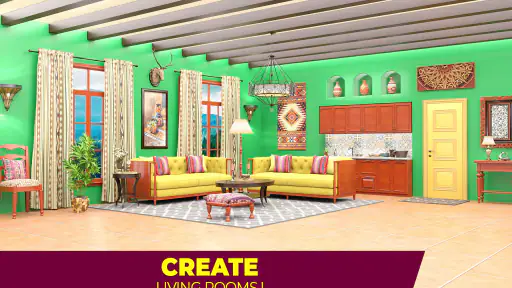
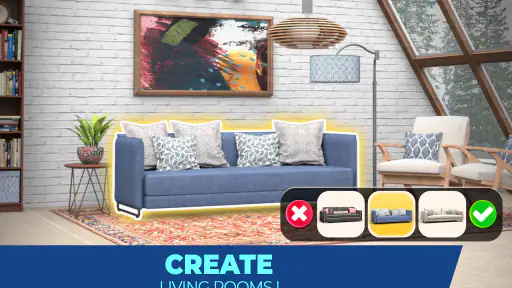
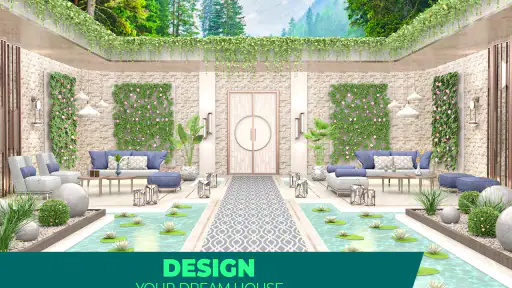
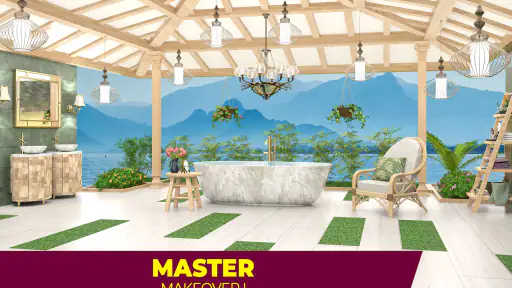
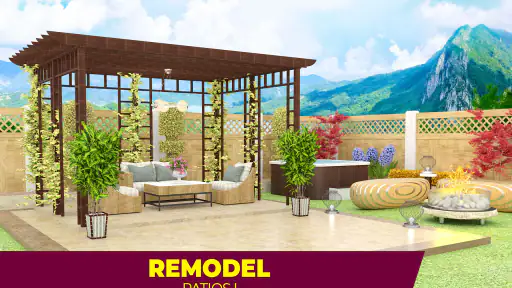

 Analysis by Frivlyz
If you enjoy choosing how a room should look but want more to do than browse furniture, My Home Design: Makeover Games combines decorating decisions with match-3 puzzles. I like that its main loop gives each activity a purpose: solving a board helps move a makeover forward, and the room choices give the puzzle wins a visible result. It is a light, colorful way to fill a short break, though the puzzle side means this is not a pure interior-design sandbox.
What to expect from the mix of puzzles and decorating
The game is a free word-category? No: it is a home-design and match-3 game from Holy Cow Studio, rated for Everyone. Its appeal is the back-and-forth between clearing a puzzle and making a room feel more personal. You are not simply placing objects wherever you like; progress is tied to completing challenges, so anyone expecting an open-ended floor-planning tool should set their expectations accordingly.
The design choices are the part I find easiest to enjoy casually. A room makeover gives you a reason to compare colors and furniture rather than tapping through a puzzle with no broader context. My practical tip is to pause briefly before choosing a new item and look at the room as a whole: a striking piece can be fun, but a consistent palette often makes the finished space feel more intentional. The game’s visual presentation helps here because the décor is easy to inspect on screen.
A reassuring route from install to first progress
When I start a game like this, I want to understand the basic loop before worrying about perfect design choices. Here, the clearest first step is to follow the opening room task, try the match-3 board, and then use the reward to continue the makeover. That first completed change is a more useful test than judging the game from its opening screens: it shows whether you enjoy both the puzzle and the decorating payoff.
You do not need to arrive with a design plan or knowledge of interior styles. I would treat the early choices as a low-pressure experiment, not as a permanent portfolio piece. If you are unsure between options, choose the one that makes the room look coherent to you and keep moving. The point is to learn how the game’s puzzle-to-room rhythm feels, rather than spending your first session trying to make every detail perfect.
How it fits into an ordinary day
For me, the best use case is a short pause when I want something more absorbing than scrolling but do not have the time or energy to start a long game. A commute, a quiet break, or a few minutes at home can be enough to tackle a board and see a makeover advance. Since the activities connect, even a small session can feel like progress instead of an isolated round.
That rhythm also makes it easy to stop and return later, but it may not suit every mood. If a puzzle level is difficult, you might spend your available break retrying it rather than choosing décor. I would avoid starting a session when you only want uninterrupted creative freedom; the match-3 requirement is part of the experience, not an optional side activity.
Gaming Stories You May Enjoy

Dancing Road Turns Short Breaks Into a Test of Rhythm and Timing

Super Stylist Makes Every Outfit a Test of Taste and Patience

Dominoes on Your Terms: Who Should Play and Who Should Pass

Pokémon GO Makes the Familiar World Feel New

Chess.com Turns Rematches Into Rivalries, but Community Has Its Costs

Archery Battle 3D Review: Sharp Aiming, Unclear Feedback
Unleashing Your Inner Designer
The moment I launched My Home Design: Makeover Games, I was greeted by a vibrant interface that promised hours of design fun. The app's primary allure lies in its vast array of design options, enabling you to customize everything from the color palette to the furniture layout in various virtual rooms. What I found particularly engaging was the app's ability to cater to different design preferences, whether you're a fan of modern minimalism or rustic charm. The game seamlessly integrates a puzzle-solving element, where completing match-3 challenges unlocks new furniture and décor items, keeping the gameplay both rewarding and refreshing.
Immersive Gameplay Experience
One of the standout features of this game is its immersive storytelling. You are not just designing rooms; you are interacting with clients, each with their own backstory and unique tastes. This adds a layer of depth and personalization to the game that I genuinely enjoyed. It felt like I was part of a home makeover TV show, with the added pressure of meeting my client’s expectations. The dialogue and interactions with the characters are charmingly realistic, making the design process feel authentic and engaging.
Moreover, the graphics are absolutely stunning. The attention to detail in the furniture pieces and room decor is remarkable, and I often found myself zooming in just to admire the intricate designs. The game runs smoothly, with no noticeable lag, which is a huge plus for maintaining the flow of creativity.
Challenges and Progression
As you progress, the challenges naturally ramp up, demanding more strategic thinking to complete the puzzles. This clever integration of design and strategy keeps the game from becoming repetitive. I must admit, there were moments when I felt a tad stuck on a particularly tricky level, but the satisfaction of finally overcoming it and unlocking a new piece of chic furniture made it worthwhile.
The game also encourages a sense of community. You can visit friends’ homes, share design tips, and even engage in friendly competitions. It’s a great way to draw inspiration from others and showcase your own design prowess.
Making a choice that suits your play style
That balance between creation and challenge is also the main trade-off. If you want to sketch room layouts, freely move objects, or use a catalog like a real decorating planner, a dedicated design tool will be a better fit. If you prefer a clear goal and a reward for solving a board, this game’s structure is more appealing than a conventional match-3 game with no room makeover attached. I would recommend it to casual players who enjoy both, rather than to someone who only wants one half of the combination.
There is a useful way to approach the choice-driven decorating: think of each option as a chance to explore a style, not as a test with one correct answer. Try a bolder selection once in a while, then compare its effect with the rest of the room. That small habit makes the design portion feel more engaging, even when the puzzle dictates how quickly you can move on. It also helps if you are playing mainly for visual inspiration rather than for a highly realistic design simulation.
Progress without turning every session into a grind
When I hit a level that takes more than one attempt, I find it helps to treat the board as the immediate task and the room as the longer-term reward. A failed attempt does not have to ruin the session: I can take a short break, return with a fresh look, and focus on the puzzle instead of repeatedly changing my decorating plan. This is a small but practical distinction, because the game’s two activities ask for different kinds of attention.
For a first-time player, I would also avoid making assumptions about how quickly a full makeover will unfold. The pace depends on puzzle progress, and a challenging board can slow the creative part down. If you are looking for a game that lets you produce a complete room in one sitting, this may feel less direct than a simple decorating app. If you enjoy gradual progress, though, the unlocks give each successful board a tangible purpose.
Free to start, with spending worth keeping in mind
The game is free to download, with optional in-app purchases priced from $0.99 to $99.99 per item. That range is worth noticing before you begin, especially if you are setting it up for a child or prefer to keep mobile spending controlled. I would start by playing without buying anything and see whether the normal puzzle-and-decorating cycle feels satisfying. The presence of purchases does not mean you need to spend, but it is sensible to check purchase settings on a shared device.
It has reached over a million installs and holds a 4.7 average from around 8,700 ratings, which suggests it has found a sizable audience among players who like this blend. Those figures are a useful signal of broad interest, not a guarantee that its pacing or puzzle difficulty will suit you personally. The current version is 2.3.1, and it runs on Android 5.0 or later; the age rating is Everyone. I would check your device’s store page for compatibility before installing, particularly if you use an older phone.
Questions I would settle before committing
Is it suitable for a younger player? Its Everyone rating makes it broadly accessible, but I would still keep the optional purchase range in mind when a child uses a phone. Is it really a design game? Yes, but decorating is linked to match-3 progress, so someone seeking an unrestricted room editor should choose a different kind of app. Can it work in short sessions? That is how I find the loop most comfortable, although a tough board can make a brief break feel less productive.
Would I pick it over a standard match-3 title? If I wanted puzzle rounds alone, probably not; the room makeovers are what give this one its distinctive draw. Would I choose it over a dedicated interior-design simulator? Only if I wanted puzzles alongside the visual choices. Knowing which side matters more to you is the quickest way to decide whether the game will feel relaxing or like an interruption.
Final Thoughts
All in all, My Home Design: Makeover Games is a delightful blend of creativity, strategy, and storytelling. It’s perfect for anyone looking to indulge their interior design fantasies without the mess of real-life renovation. Whether you’re a seasoned design aficionado or a curious beginner, this app offers a fun and fulfilling experience. So, if you’re ready to unleash your inner designer, give this game a whirl. You might just find it as addictively entertaining as I did!
My Home Design: Makeover Games Pros and Cons
Pros
- Engaging interior design challenges.
- Variety of decorations to choose from.
- User-friendly and intuitive interface.
- Regular updates with new content.
- Offline mode available.
Cons
- In-app purchases can be pricey.
- Some ads interrupt gameplay.
- Limited lives slow progress.
- Repetitive level designs.
- Occasional bugs affect performance.
Frequently Asked Questions
What is the main objective of My Home Design: Makeover Games?
My Home Design: Makeover Games is an interactive design simulation game where players are tasked with renovating and decorating various rooms to meet clients' specifications. The main objective is to complete design challenges, using creativity and strategic planning to earn rewards and advance to higher levels, unlocking new design options and tools.
Is My Home Design: Makeover Games free to play?
Yes, My Home Design: Makeover Games is free to download and play. However, it offers in-app purchases for players who wish to enhance their gaming experience. These purchases can include additional design elements, energy boosts, or premium currency that can accelerate progress in the game.
Can I play My Home Design: Makeover Games offline?
No, My Home Design: Makeover Games requires an internet connection to play. This is because the game frequently updates with new design challenges and content, and also to ensure that progress is saved to the server, allowing players to access their game data from different devices seamlessly.
What devices are compatible with My Home Design: Makeover Games?
My Home Design: Makeover Games is compatible with both Android and iOS devices. Players should ensure their devices meet the minimum operating system requirements, which are typically Android 5.0 (Lollipop) or higher, and iOS 10.0 or later, to enjoy smooth gameplay and access all features of the app.
Are there any tips for beginners in My Home Design: Makeover Games?
Beginners in My Home Design: Makeover Games should focus on completing the tutorial to understand the game mechanics and design tools. It's beneficial to prioritize tasks that yield high rewards and to save premium currency for challenging levels. Engaging in daily challenges and connecting with friends for extra lives can also enhance the gaming experience.


