

My Boy! - GBA Emulator
- Reviews
- 3.6
- Version
- 2.0.7
- Installs
- 1,000,000+

Screenshots
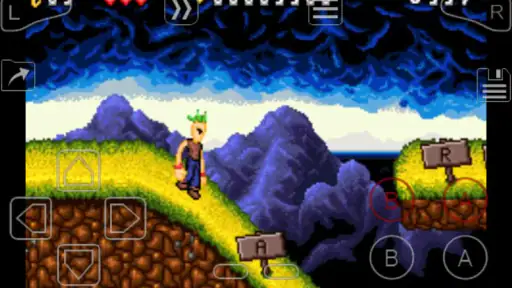
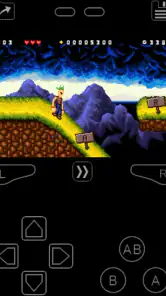
 Analysis by Frivlyz
My first impression of My Boy! - GBA Emulator is that it puts the feel of a handheld gaming session on a phone without asking you to learn a complicated interface first. That matters when I want a quick return to a familiar game rather than a project in setup and settings. It is an arcade game from Pixel Respawn LLC, and its appeal is less about presenting a new world of its own than making old GBA adventures playable in a more convenient place.
A pocket-sized way back to familiar games
The biggest practical question for a newcomer is what the app actually provides. It emulates the GBA; it does not arrive with games ready to play, so you need game files you are entitled to use. That distinction is worth understanding before paying: the $4.99 purchase is for the emulator, not a bundle of titles. If you already have a collection and a clear idea of what you want to revisit, the app makes more sense than it does for someone expecting a ready-made library.
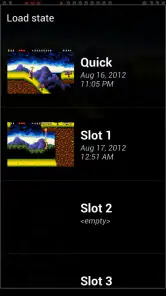
I’d describe its mood as a bridge between old-school handheld play and the interruptions of a modern phone. The small-screen format suits short sessions, while the option to save a state gives me a way to pause at an inconvenient moment. That is useful on a commute or while waiting for an appointment, but it also changes the rhythm of a game: I can stop mid-stage instead of planning around a traditional checkpoint. I prefer to use that convenience thoughtfully, since saving constantly can flatten the tension that made a difficult section satisfying in the first place.
How the world and its presentation come through
An emulator does not supply a single art direction or setting; those belong to whichever GBA game I load. That makes the experience unusually personal. Bright, compact sprites can make a familiar adventure feel readable on a phone, while detailed scenes and small text may demand more attention than they did on a dedicated handheld. I find that the right game matters as much as the emulator: titles built around clear shapes and simple menus tend to translate more comfortably than ones that rely on tiny interface elements.
Sound follows the same logic. What I hear comes from the game itself, so a lively soundtrack can quickly restore its character, while a quiet puzzle or a menu-heavy game creates a very different atmosphere. On a phone, I also have to account for where I am playing: using headphones can make music easier to follow, but a quick session in a shared space may call for lower volume or silence. The emulator’s value is that it lets those older soundtracks travel with me; it cannot make every game’s mix equally pleasant through every device speaker.
Controls, pace, and the trade-offs of a phone
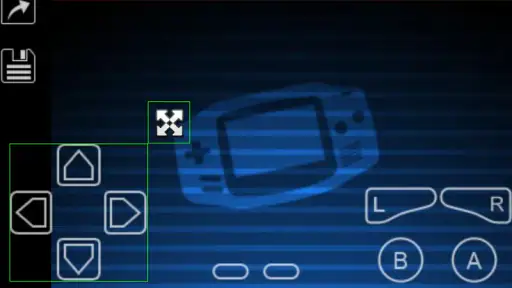
The touchscreen layout is adjustable, which helps because a virtual directional pad never feels exactly like a physical handheld’s controls. I would spend a minute moving buttons before beginning a long session, especially in a game that asks for precise timing. A layout that feels fine during menu navigation can become awkward when I need to jump, steer, and press an action button together. If your preferred games depend on quick inputs, try the controls in a low-pressure section first rather than discovering their weak spots during a boss fight.
Fast forward is another tool that changes pacing in a useful but selective way. It can help move through a slow stretch, yet speeding through dialogue, timing-based challenges, or a first playthrough can make a game feel less coherent. I use it more readily when replaying a section I know than when discovering a story for the first time. The best fit is someone who wants control over the tempo, not someone who expects every old game to feel perfectly natural on a touchscreen.
Gaming Stories You May Enjoy

Dancing Road Turns Short Breaks Into a Test of Rhythm and Timing

Super Stylist Makes Every Outfit a Test of Taste and Patience

Dominoes on Your Terms: Who Should Play and Who Should Pass

Pokémon GO Makes the Familiar World Feel New

Chess.com Turns Rematches Into Rivalries, but Community Has Its Costs

Archery Battle 3D Review: Sharp Aiming, Unclear Feedback
Bringing the Classics to Your Fingertips
One of the first things you'll notice about My Boy! - GBA Emulator is how it perfectly replicates the classic gaming experience on your smartphone or tablet. The app is designed for both Android and iOS, meaning you can enjoy your favorite GBA games no matter what device you're using. It’s like having a pocket-sized time machine, taking you back to those carefree days of gaming on the go.
Seamless Gameplay Experience
The developers have done a stellar job ensuring that the gameplay is smooth and responsive. The emulator supports fast forward, so you can breeze through those long, tedious parts of games. Plus, you can save and load your game states at any time, which is a lifesaver if you’ve ever had to put down a game unexpectedly.
Another feature that caught my attention is the ability to link up with other devices for multiplayer action. Yes, you heard that right! You can connect with friends and relive those competitive battles or co-op missions, just like the good old days.
User-Friendly Interface
Now, let’s talk about the interface. It’s simple, intuitive, and doesn’t bombard you with unnecessary options. Whether you’re a tech-savvy user or not, navigating through the app is a breeze. The layout is clean and thoughtful, allowing you to focus on what truly matters—the games!
For those who love customization, the emulator offers various settings to adjust graphics and controls to your liking. You can even customize the control layout, which is perfect for tailoring the gaming experience to fit your style.
Getting set up and choosing a routine
For a realistic first session, I’d start at home with one game file, a charged phone, and a few minutes to test the screen controls. That small trial answers practical questions faster than changing several settings at once: can I see the action comfortably, do the buttons land under my thumbs, and does the game feel responsive enough for the way I play? Once those basics feel right, I’d keep a simple routine: use a named save state before putting the phone away, then resume from that point rather than relying on memory about where I stopped.
Save states are particularly handy when a game has long stretches between its built-in saves, but they are not a replacement for understanding the game’s own save system. I’d use both when possible: the game’s regular save for progress that should persist naturally, and a state for a temporary interruption. That gives me a fallback if I want to experiment or step away, while reducing the chance that one accidental overwrite becomes my only record of a long playthrough. It is a small habit, but it makes portable play feel much less fragile.
Where link play fits—and where it may not
The link-cable emulation is the feature that separates this from a basic solo-only setup, especially for games designed around trading or multiplayer sessions. It is most compelling when a friend is already interested and both of you can arrange a relaxed time to test it. I would not buy the app solely on the assumption that every game or every device pairing will make multiplayer effortless; the game itself must support the kind of play you want, and arranging a connection is less spontaneous than passing a physical handheld across a table.
For a planned session, it helps to decide in advance which game you want to use and what you hope to do together. That avoids spending the whole meetup browsing files and menus. Link play is a meaningful extra for people revisiting compatible games with a friend, but if you mainly play alone, it should be treated as a bonus rather than the reason the emulator earns its place on your phone.
How it compares with other ways to play
Compared with playing on original GBA hardware, a phone is easier to carry alongside the device you already use, and save states can make brief sessions more forgiving. The trade-off is tactile: a touchscreen cannot reproduce the feel or certainty of physical buttons. If precise controls are central to your enjoyment, original hardware or a suitable controller-based setup may be a better fit. For someone who values convenience and already enjoys phone gaming, the emulator’s adjustable layout and quick access are the stronger arguments.
Compared with other emulators, the useful distinction here is the combination of an approachable interface, fast-forward, flexible save states, control adjustment, and link-cable emulation. I would choose based on the games and features I actually plan to use rather than assuming that every emulator handles every title identically. Someone looking for a broad collection of current games, online matchmaking, or a curated way to discover new releases should look elsewhere; this is for bringing GBA games you already have into a portable routine.
Who should make room for it
I can see it working especially well for someone who owns or can lawfully access GBA game files, likes replaying older adventures, and wants the option to continue in short bursts. It also suits players who appreciate the freedom to adjust controls and occasionally speed up familiar sections. A student waiting between classes, for example, could play a few minutes, save before heading into the next class, and pick up later without carrying another device.
I’d be more cautious if you are new to emulation and expect the app to provide games, or if you dislike touchscreen controls enough that even a customizable layout will not help. It is also not the best choice for a player whose main goal is discovering a large, ready-to-play library. The app’s Everyone age rating indicates broad suitability, but the content and themes still depend on the particular game you choose to load.
A few tips for new users
If you’re new to using emulators, don’t worry. Getting started with My Boy! - GBA Emulator is straightforward. Here’s a quick tip: make sure you have your game ROMs ready, as the emulator doesn’t come with games pre-loaded. A quick search online should help you find the games you want to play.
Also, remember to tweak the settings according to your device’s capabilities to get the best performance. It's amazing how such a small app can handle the graphics and sound so well without any lag.
What the price and version mean for a buyer
At $4.99, this is a paid app rather than a free trial-style starting point, so I would decide whether its particular conveniences matter to me before purchasing. The current version is 2.0.7, and it runs on Android 5.0 or later. Its average rating is 3.6 from around 57,000 ratings, with about 7,200 written reviews and over one million installs. Those figures suggest a sizeable user base, but they do not guarantee that every game, phone, or control setup will suit an individual player.
My practical advice is to check your device’s operating system first, then think about your library and playing style. If you mainly want to test one game and are unsure whether emulation or virtual controls appeal to you, a paid purchase may feel like a bigger commitment than you want. If you already know you enjoy GBA games and expect to use fast-forward, save states, or link play, the price is easier to justify as a focused tool rather than a source of new games.
The atmosphere verdict
What I like most is how the mood comes from the game I choose and the way I fit it into the day. A familiar soundtrack during a quiet break can make a short session feel transporting; fast-forward and save states can make a longer adventure practical around ordinary interruptions. The emulator is at its best when those conveniences support the game instead of replacing the rhythm it was designed to have.
There are real compromises: touch controls may take adjustment, game files are the player’s responsibility, and the experience depends heavily on the title being played. I would not call it a substitute for every aspect of original hardware, but it offers a useful portable alternative for the right person. If you have GBA games you want to revisit and value flexibility more than physical buttons, I think it is worth considering; if you want a ready-made library or the most tactile way to play, another option will suit you better.
In conclusion, if you’re on the lookout for an emulator that delivers on performance and nostalgia, My Boy! - GBA Emulator is definitely worth checking out. It's a fantastic way to revisit those beloved classics and discover new favorites. So, grab your device, load up your favorite ROMs, and get ready for a trip down memory lane!
My Boy! - GBA Emulator Pros and Cons
Pros
- High compatibility with GBA games.
- Fast forward feature saves time.
- Customizable on-screen controls.
- Supports external controllers.
- Battery-saving features.
Cons
- Free version has ads.
- Limited save slots in free version.
- Some graphical glitches.
- Occasional sound issues.
- No multiplayer feature.
This Game in Other Languages
Frequently Asked Questions
What is My Boy! - GBA Emulator and what does it do?
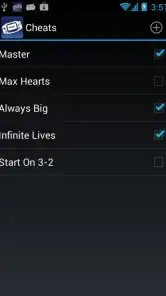
My Boy! - GBA Emulator is a fast, full-featured emulator for running Game Boy Advance games on Android devices. It allows users to play their favorite GBA titles with high compatibility and performance, offering a seamless gaming experience. This emulator includes features like fast forward, save/load states, and cheat codes support, making it a comprehensive tool for GBA game enthusiasts.
Is My Boy! - GBA Emulator compatible with all Android devices?
My Boy! - GBA Emulator is designed to work with a wide range of Android devices, offering robust performance even on older hardware. However, for optimal performance and smoother gameplay, it is recommended to use a device with a decent processor and sufficient RAM. Users should check the app's compatibility on their specific device through the Google Play Store before downloading.
Does My Boy! - GBA Emulator support multiplayer gaming?
Yes, My Boy! - GBA Emulator supports multiplayer gaming through link cable emulation. This feature allows users to connect with others and enjoy multiplayer games, just like on the original Game Boy Advance. To utilize this feature, users will need to have Bluetooth or Wi-Fi capabilities, as the emulator leverages these technologies to enable multiplayer connections.
Are there any legal concerns with using My Boy! - GBA Emulator?
While using an emulator like My Boy! - GBA Emulator itself is legal, users must be cautious about the legality of the game ROMs they are playing. Downloading ROMs of games you do not own is illegal and can result in legal consequences. It is recommended to only use ROMs from games you own physically to stay within legal boundaries.
What features does My Boy! - GBA Emulator offer to enhance gameplay?
My Boy! - GBA Emulator provides a range of features to enhance the gaming experience. These include fast forward and slow motion options, multiple save and load states, customizable virtual control layouts, and support for cheat codes. Additionally, it offers OpenGL rendering for improved graphics and BIOS emulation, eliminating the need for external BIOS files, thereby simplifying the setup process.


