

Monster DIY: Mix Beats
- Reviews
- 4.7
- Version
- 0.0.7
- Installs
- 5,000,000+

Screenshots
 Analysis by Frivlyz
I like the idea behind Monster DIY: Mix Beats: it brings playful character-making together with music, so I can spend a few minutes shaping a silly creature or stay longer experimenting with sounds. It is a casual music game from HIGAME GLOBAL, and its appeal is less about serious composition than about making something amusing and personal. If you enjoy creative games that invite you to play around without needing musical experience, this one is easy to understand at a glance.
What free access means here
The game is free to download, which makes trying it a low-commitment choice. I would treat that as free access, not as a promise that every possible item or option is available without conditions; I wouldn’t plan around purchases or assume anything about them. The sensible approach is to install it only if the creative loop sounds appealing, then decide from your own session whether it earns a place on your device.
Its audience is broad enough for casual play, but the content rating is Teen, so it is worth checking that rating before handing the game to a younger player. The game was released on December 19, 2024, and the current version is 0.0.7. It has a 4.7 average from around 29,000 ratings and over 5 million installs, which suggests that the concept has found a sizeable audience. Those figures are useful context, but they cannot tell you whether its particular mix of customization and music will suit your taste.
Why the creative loop works
What I find appealing is the quick switch between visual and musical choices. Instead of treating a character editor and a music activity as unrelated tasks, the game gives them a shared purpose: build a creature, then make the moment feel lively with sound. That makes it a good fit for short breaks, especially when I want something more hands-on than watching a video but less demanding than learning an instrument or opening a full music-production app.
There is a useful way to approach the creation process: decide on a mood before choosing parts or sounds. A goofy-looking monster paired with a contrasting beat can be funnier than trying to make every choice match, while a consistent look and sound can make the result feel more deliberate. I’d try both approaches rather than spending too long searching for a perfect combination. The point is to explore, and an unexpected pairing can be more entertaining than a polished one.
Making a monster and finding a rhythm
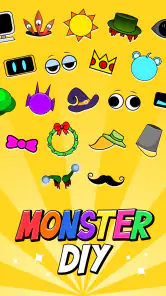
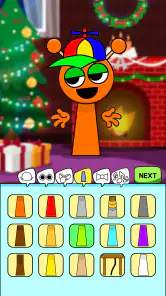
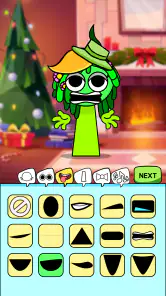
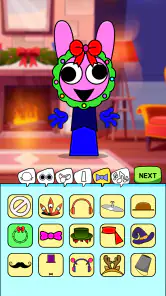
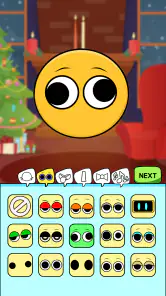
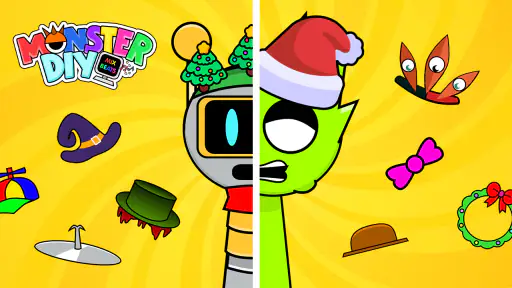
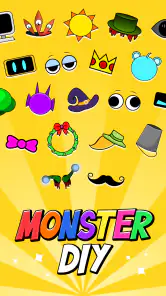
The first thing that grabbed my attention was the monster creation feature. You start by selecting various parts to assemble your monster. From quirky eyes to funky legs, the options are plenty and super fun! It's like having a mini Frankenstein lab at your fingertips, but with a much cuter outcome. The interface is intuitive, allowing you to drag and drop parts seamlessly. I spent a good chunk of time just mixing and matching parts to see what wacky combinations I could come up with.
The Beat-Making Experience
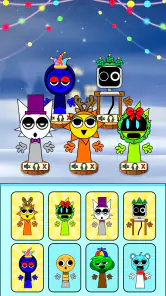
Once you're satisfied with your monster's look, it's time to move on to the beat-making section. This is where the app really shines for music lovers. You can layer different sounds and instruments to create a unique track that your monster can groove to. I was pleasantly surprised by the variety of sounds available. From electronic beats to jazzy riffs, there's something for everyone. The app even lets you record your creations and share them with friends, which I found to be a neat way to show off my musical prowess.
Gaming Stories You May Enjoy

Dancing Road Turns Short Breaks Into a Test of Rhythm and Timing

Super Stylist Makes Every Outfit a Test of Taste and Patience

Dominoes on Your Terms: Who Should Play and Who Should Pass

Pokémon GO Makes the Familiar World Feel New

Chess.com Turns Rematches Into Rivalries, but Community Has Its Costs

Archery Battle 3D Review: Sharp Aiming, Unclear Feedback
For a more satisfying first session, I’d keep the experiment small: make one character, test a few sound combinations, and save or share only the version that still feels fun after replaying it. That helps avoid a common creative-game trap—changing so many things at once that it becomes hard to tell which choice made the result better. If you’re sharing a creation, it can also help to show it to a friend in person and ask which pairing they find most amusing. The activity works nicely as a light conversation starter, even if neither of you thinks of yourselves as musicians.
Where the game may feel limited
This is not the option I’d choose for building a serious song, learning music theory, or fine-tuning a track with the control expected from a dedicated music-making tool. Its appeal is playful experimentation, not a substitute for a proper recording or composition workflow. Likewise, if you prefer games with a clear story, tactical depth, or a long sequence of goals, the character-and-beat concept may feel too loose. The freedom to make odd combinations is part of the charm, but it may not provide the structure every player wants.
I’d also separate the different activities in my mind rather than expecting every part to be equally compelling. Someone who mainly wants to customize characters may spend most of their time on the visual side, while a player who comes for sound experiments may care less about collecting new looks. The best fit is for someone who enjoys switching between the two. If one half of that pairing does nothing for you, the game’s central idea has less room to work.
How it fits among music games
Compared with rhythm games that ask you to hit prompts in time, this is a more open-ended kind of music play: the fun comes from making a creature and choosing sounds rather than proving timing accuracy. Compared with music-production apps, it is approachable and less focused on technical control. That middle ground is useful for casual players, but it is also the trade-off. I wouldn’t pick it to practise an instrument or produce a finished track; I would pick it when I want a playful result without turning a break into a lesson.
A realistic use case is a short wait before an appointment or a relaxed moment at home. I can make a quick monster, try a few combinations, and show someone the result without needing to set aside time for a full game session. For a longer stretch, I’d give myself a simple prompt—such as making the strangest-looking character I can, then finding a sound pairing that makes it seem cheerful or dramatic. A small self-imposed goal gives the open-ended play a little direction without changing what the game is.
Engaging Gameplay
Beyond just making monsters and beats, Monster DIY: Mix Beats offers engaging gameplay that keeps you coming back for more. There are challenges and competitions where you can pit your creations against others. It's a competitive world out there, and seeing how your monster stacks up in the community adds an extra layer of excitement. Plus, the rewards from these challenges can be used to unlock more parts and sounds, which kept me motivated to keep playing.
That progression can give a player a reason to return, though I’d treat the competition as an optional extra rather than the main attraction. If comparing creations motivates you, it adds a social goal to the creative process; if you would rather make things privately, the monster-and-music activity still makes sense on its own. When a challenge catches your attention, I’d first make a version that feels like yours, then adjust it to fit the task. That keeps the process enjoyable instead of making every choice feel like a chase for a reward.
Another aspect I appreciated was the app's vibrant graphics. The colors are bright and cheerful, perfectly complementing the playful nature of the app. The animations are smooth, and the sound quality is top-notch, making the entire experience immersive and enjoyable.
Who is likely to enjoy it
I’d recommend it to people who like light creative play, enjoy customizing characters, or want a simple way to experiment with musical combinations. It may also suit friends or family members who like taking turns making silly creations and comparing which one gets the biggest laugh. You don’t need to approach it as a musician; curiosity and a willingness to try unusual choices are enough to get something out of it.
I’d suggest skipping it if your priority is a full-featured music studio, a conventional rhythm challenge, or a tightly plotted game. It is also not an ideal choice if you dislike open-ended experimentation and want the game to provide a clear, step-by-step objective at all times. Those preferences are not flaws in the game; they simply point toward a different kind of app. The minimum operating-system requirement is 7.1, so checking compatibility before downloading is a practical first step.
Final Thoughts
All in all, Monster DIY: Mix Beats is a delightful app that beautifully combines creativity with music. It's perfect for anyone looking to unleash their inner artist while having fun with beats. Whether you're a seasoned musician or just someone who loves a good creative outlet, this app has something to offer. So, if you're in the mood for some monster-making and beat-mixing madness, give it a go! You'll be in for a monstrously good time!
My verdict is to try it if the free, casual concept is what you’re after, while keeping expectations focused on playful creation rather than professional music tools. The strongest value is the pairing of a visual character project with a sound experiment, especially for short sessions or sharing a laugh with someone nearby. If that combination sounds more appealing than a standard rhythm game or a serious audio editor, it is an easy one to consider; if not, another music app will probably suit you better.
Monster DIY: Mix Beats Pros and Cons
Pros
- User-friendly interface for quick navigation
- Wide variety of beats and sounds available
- Customizable beat mixing options
- Regular updates with new features
- Supports offline usage for creativity on-the-go
Cons
- Limited free version features
- Occasional app crashes reported
- High battery consumption during use
- In-app purchases can be costly
- Requires a stable internet connection for updates
Frequently Asked Questions
What is Monster DIY: Mix Beats and how does it work?
Monster DIY: Mix Beats is an engaging music creation app that allows users to explore their creativity by mixing beats and creating unique soundtracks. With an intuitive interface and a wide range of sound samples, users can easily drag and drop loops, adjust tempos, and apply effects to produce professional-quality music tracks. Whether you're a seasoned DJ or a music enthusiast, this app offers a fun and interactive way to experiment with music production.
Is Monster DIY: Mix Beats suitable for beginners?
Yes, Monster DIY: Mix Beats is designed to be user-friendly and accessible for beginners. The app features a straightforward interface with tutorials and guides that help new users understand the basics of beat mixing and music production. Even if you have no prior experience, you can start creating your own tracks quickly and easily. The app also offers advanced features for more experienced users, making it suitable for all skill levels.
What devices are compatible with Monster DIY: Mix Beats?
Monster DIY: Mix Beats is available for both Android and iOS devices. It supports a wide range of smartphones and tablets running on these operating systems. Users should ensure their devices are updated to the latest version to enjoy optimal performance. Check the app's listing on the Google Play Store or Apple App Store for specific compatibility details and system requirements before downloading.
Does Monster DIY: Mix Beats offer in-app purchases?
Yes, Monster DIY: Mix Beats includes optional in-app purchases that enhance the user experience. While the app provides a wide variety of free features and samples, users can purchase additional sound packs, advanced tools, and effects to expand their creative possibilities. These purchases are entirely optional, and users can still enjoy a robust music creation experience without them.
Can I share the music I create on Monster DIY: Mix Beats with others?
Absolutely! Monster DIY: Mix Beats allows users to export their music creations in high-quality audio formats that can be shared easily. You can upload your tracks to social media, share them with friends via messaging apps, or even use them in your projects. The app offers seamless integration with various platforms, making it easy to showcase your musical talents to a wider audience.


