

Mindblow: Guess the Word!
- Reviews
- 4.4
- Version
- 2.4.1
- Installs
- 1,000,000+

Screenshots
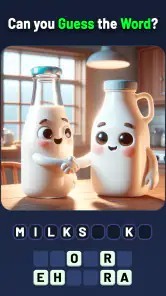
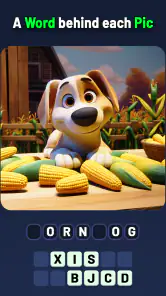
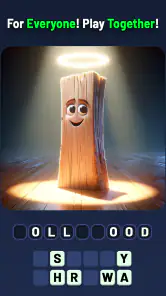
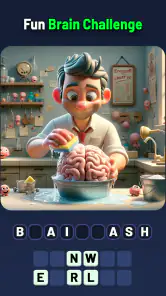
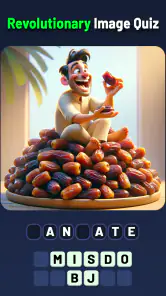
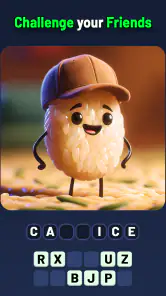
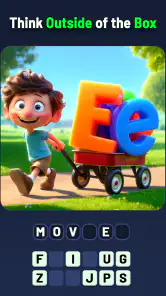

 Analysis by Frivlyz
I like the idea of a picture clue turning a spare moment into a small puzzle, and Mindblow: Guess the Word! is built around that simple appeal. It is a trivia game from Kidding Box Studio, with word answers to work out from images or hints. If you are opening it for the first time, expect an easy-to-grasp premise rather than a long tutorial: look at the clue, consider what it might suggest, and try to connect the image with a word.
What to expect from the first puzzles
The first useful success is likely to come from slowing down and looking at the whole picture instead of naming the most obvious object in it. In this kind of puzzle, an image can point to an idea or association as well as to a literal thing. I find that shift is the key to enjoying the game: when a guess does not fit, I ask what else the image could mean rather than repeating the same answer.
That makes the game a better fit for people who enjoy lateral thinking than for anyone who wants a conventional quiz with factual questions and fixed answers recalled from memory. It can be played in short bursts, so I would try a few puzzles while waiting for a ride or taking a break, then stop when I feel myself guessing randomly. A brief pause often helps more than forcing an answer.
A low-pressure way to get started
Mindblow is free to download and rated for Everyone, so it is easy to consider for a casual household puzzle session. It has a 4.4 average from around 18,000 ratings and has passed one million installs. Those figures suggest a broad audience, but they do not tell me whether every puzzle will match your taste; the appeal depends on enjoying image-based wordplay.
Before spending anything, I would simply try the basic puzzle loop and see whether the clues feel fair to you. The game includes in-app purchases, with items ranging from $1.99 to $99.99, so it is worth being deliberate if an optional purchase appears while you play. I would treat hints as a way to get unstuck, not as a reason to spend automatically: first inspect the image again, say a few possible associations aloud, and only then decide whether a nudge is worthwhile.
Unpacking the Gameplay
So, what’s the deal with Mindblow: Guess the Word!? Basically, it's a word puzzle game that challenges you to guess words based on pictures or hints. Sounds simple, right? Well, hold on to your hats because it gets tricky! The game is designed to test your vocabulary and lateral thinking skills, and trust me, it does just that. I found myself scratching my head more than a few times.
Each level presents a unique challenge that encourages you to think outside the box. Some puzzles are straightforward, while others require a bit more creativity. But that’s the beauty of it—the variety keeps you on your toes and makes for an engaging gameplay experience.
Gaming Stories You May Enjoy

Dancing Road Turns Short Breaks Into a Test of Rhythm and Timing

Super Stylist Makes Every Outfit a Test of Taste and Patience

Dominoes on Your Terms: Who Should Play and Who Should Pass

Pokémon GO Makes the Familiar World Feel New

Chess.com Turns Rematches Into Rivalries, but Community Has Its Costs

Archery Battle 3D Review: Sharp Aiming, Unclear Feedback
Features That Shine
One of the standout features of this game is its user-friendly interface. It's super easy to navigate, even if you’re a newbie to mobile gaming. The graphics are crisp and vibrant, which adds a nice touch to the overall experience. Plus, the sound effects are perfectly synced with the gameplay, making each guess feel rewarding.
Another cool feature is the hint system. If you’re ever stuck, you can use hints to nudge you in the right direction. Just remember, they're limited, so use them wisely! The game also offers daily challenges and rewards, which are a great incentive to keep coming back.
Getting more out of a clue
One practical habit I would use is to separate observation from interpretation. First, name what is plainly visible; next, list a couple of related words or phrases; then consider whether the picture is combining ideas or suggesting a familiar expression. That little routine keeps me from burning through guesses on the first object that catches my eye. If a clue still feels opaque, I would move on for a while rather than let one stubborn answer sour the session.
The hint system is useful precisely because it can interrupt that loop, but using help too early can take away the satisfying moment of making the connection yourself. I would save a hint for a puzzle where I have tried more than one interpretation and still cannot see a sensible path. On the other hand, if you are playing with a child or a friend, a hint can be a conversation starter: ask what they notice before revealing anything, and compare interpretations.
Where it fits among word games
Compared with a crossword, this is less about filling a grid from intersecting clues and more about making a quick visual association. Compared with a standard trivia quiz, it asks less for stored facts and more for flexible thinking. That makes it a handy change of pace if you like word games but do not want a timed knowledge test or a lengthy puzzle to manage.
The trade-off is that picture clues can feel subjective. A crossword usually gives you crossing letters to narrow down an answer, while an image puzzle may leave you deciding which detail matters most. If you prefer explicit clues, a traditional quiz or word-search game may feel more dependable. I would choose Mindblow when I want a compact “what am I looking at?” challenge, not when I am in the mood for a deep campaign or a carefully structured story.
My Personal Take
Playing Mindblow: Guess the Word! is like going on a mental workout. It’s not just about having a large vocabulary; it’s about how well you can connect the dots and think creatively. I found it incredibly satisfying to solve the tougher puzzles, and I might have even done a little victory dance on occasion.
What I love most about the game is its accessibility. Whether you have a few minutes to kill or want to spend a longer session diving into puzzles, it caters to both playstyles. It’s the perfect blend of challenging and entertaining without being overwhelming.
A realistic moment to play
Picture a short wait before an appointment: I would open the game, try a few images, and treat each answer as a standalone mini-puzzle rather than expecting a long, uninterrupted session. If I get stuck, I can take a breath, revisit the details, or leave the clue for later. That makes it a reasonable choice for small gaps in the day, though I would not rely on it as a distraction-free activity if I need to stay focused on something else.
It can also work as a casual shared activity. Two people can look at the same picture and suggest different answers, which is more fun than silently tapping guesses when the clue is ambiguous. For a group that wants competitive scoring, detailed rules, or a substantial multiplayer mode, I would pick a game designed around those features instead; the appeal here is the quick act of interpreting an image.
What to keep in mind as you continue
The game was released on December 30, 2023, and version 2.4.1 is listed for devices running Android 5.1 or later. If you are deciding whether an older device can run it, check that your operating system meets that minimum before installing. The current build and the game’s broad audience make it approachable, but neither removes the personal question that matters most: do you enjoy this particular style of visual wordplay?
It is also worth setting your own stopping point. Daily challenges and rewards can give you a reason to return, but a routine should feel enjoyable rather than like an obligation. I would use them as an occasional prompt to play, not as a checklist. And if you find yourself relying on hints for every difficult image, that may be a sign to take a break or switch to a more direct puzzle format, rather than keep pushing through frustration.
Who should try it—and who may prefer another game
I would recommend it to casual players who like short word puzzles, visual clues, and the small satisfaction of spotting an unexpected connection. It is especially suited to someone who wants to dip in and out without learning complicated controls. People who dislike ambiguity, want a substantial narrative, or prefer puzzles with clearly constrained answers may be happier with crosswords, word searches, or a fact-based quiz.
My overall impression is positive, with one clear caveat: the fun depends on whether the image clues feel clever rather than arbitrary to you. Try a handful before deciding whether to make it part of your regular routine, and be patient with the puzzles that do not click immediately. If the act of looking twice and finding a new meaning appeals to you, this is an easy game to keep nearby for a spare moment.
In conclusion, if you’re a fan of word games and enjoy testing your mental prowess, give Mindblow: Guess the Word! a shot. It’s a delightful way to pass the time and sharpen your mind. Happy guessing!
Mindblow: Guess the Word! Pros and Cons
Pros
- Engaging and challenging word puzzles.
- Intuitive and user-friendly interface.
- Regular updates with new levels.
- Offline mode available.
- Suitable for all age groups.
Cons
- Ads can be intrusive at times.
- Limited hints without purchase.
- Occasional app crashes reported.
- Requires frequent internet for updates.
- Some levels may be too difficult.
Frequently Asked Questions
What is Mindblow: Guess the Word! and how does it work?
Mindblow: Guess the Word! is an engaging word puzzle game designed to enhance your vocabulary and lateral thinking skills. Players are presented with a series of scrambled letters and must guess the correct word. The game offers various levels of difficulty, ensuring that both beginners and seasoned wordsmiths are challenged. With hints and power-ups available, players can enjoy a balanced gameplay experience while improving their language skills.
Is Mindblow: Guess the Word! available for both Android and iOS devices?
Yes, Mindblow: Guess the Word! is available for download on both Android and iOS platforms. You can find it on the Google Play Store for Android devices and the Apple App Store for iOS devices. The game is optimized for a wide range of devices, ensuring smooth performance and an enjoyable user experience across different operating systems.
Are there any in-app purchases in Mindblow: Guess the Word!?
Mindblow: Guess the Word! offers optional in-app purchases that enhance the gaming experience. While the game is free to download and play, players can purchase additional hints, power-ups, or ad-free experiences. These purchases are not necessary to complete the game but can provide extra convenience and enjoyment for those who choose to invest in them.
Can I play Mindblow: Guess the Word! offline?
Yes, you can play Mindblow: Guess the Word! offline. The game is designed to be accessible without an internet connection, allowing players to enjoy word puzzles anytime and anywhere. However, certain features, such as purchasing in-app items or accessing updated content, will require an internet connection. Offline mode ensures uninterrupted play even when you're on the go.
Does Mindblow: Guess the Word! cater to different skill levels?
Certainly, Mindblow: Guess the Word! is designed to cater to players of all skill levels. The game includes multiple difficulty settings, from easy levels suitable for beginners to more challenging ones for advanced players. This ensures that everyone, regardless of their word puzzle proficiency, can enjoy and progress through the game at their own pace, making it an inclusive experience for all.


