

Meme Color Pro:Color by Number
- Reviews
- 4.8
- Version
- 1.0.75
- Installs
- 500,000+

Screenshots
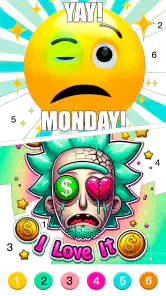

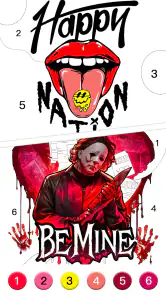
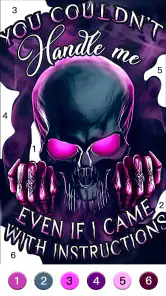
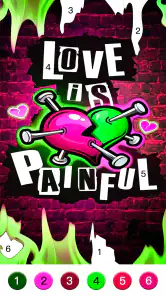
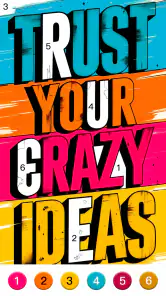
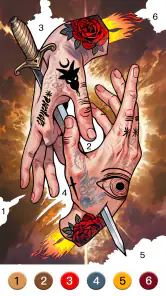
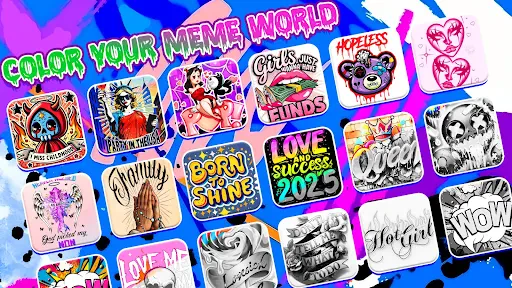
 Analysis by Frivlyz
When I want a small distraction rather than a game that demands a long commitment, a color-by-number puzzle built around meme art is an appealing place to start. Meme Color Pro:Color by Number turns that idea into a simple routine: choose an image, tap the numbered areas, watch it take shape, and decide whether to start another. I find the appeal less about artistic skill and more about the steady, low-pressure feeling of making visible progress.
One image, one clear first move
The first useful choice is the picture itself. Rather than facing a blank page and having to invent something, I can begin with a meme illustration and let its numbered sections guide me. That makes the game approachable when I have only a little attention to spare: I do not need drawing experience, a plan for a composition, or a particular mood before I start.
This is also where the format differs from open-ended digital coloring. In a freeform coloring app, choosing colors and deciding where they go are part of the activity; here, the number-to-color system narrows those decisions so I can focus on filling the image. If I want creative control over every shade, that trade-off may feel restrictive. If I want an easy entry point and a defined task, it is the reason to play.
A relaxed routine for short breaks
I can picture using it during an ordinary lull: I have a few minutes before heading out, or I am winding down at home and do not want to open a demanding game. I pick an illustration, work through its numbered spaces, and get a small, concrete result from a short session. It suits that moment better than a board game that needs several players or a puzzle that expects uninterrupted concentration.
For a more comfortable session, I would treat the zoom control as a practical tool, not just a detail. On a crowded section, zooming in before tapping can make the small spaces easier to distinguish; zooming back out helps me check the overall picture and see which parts still need attention. That simple rhythm—work close, review the whole image—keeps the task from becoming a sequence of hurried taps.
It is worth approaching the game as a casual coloring activity rather than a test of artistic freedom. The numbered guidance makes the process easier to pick up, but also means the pleasure comes from completion and the image’s reveal, not from choosing a personal palette. I would recommend it to someone who enjoys recognizable meme-inspired art and orderly, bite-sized tasks. Someone who wants to sketch from scratch, paint freely, or solve a strategic board puzzle should look elsewhere.
A Splash of Color to Brighten Your Day
The premise of Meme Color Pro:Color by Number is simple yet captivating. It's all about coloring your favorite memes using a color-by-number system. Now, I know what you might be thinking—coloring is for kids, right? But let me tell you, this app is a delightful escape for all ages. The joy of seeing a meme come to life with vibrant colors is oddly satisfying, and it’s a perfect way to de-stress.
Gaming Stories You May Enjoy

Dancing Road Turns Short Breaks Into a Test of Rhythm and Timing

Super Stylist Makes Every Outfit a Test of Taste and Patience

Dominoes on Your Terms: Who Should Play and Who Should Pass

Pokémon GO Makes the Familiar World Feel New

Chess.com Turns Rematches Into Rivalries, but Community Has Its Costs

Archery Battle 3D Review: Sharp Aiming, Unclear Feedback
Getting Started
Downloading the app is a breeze, and once you open it up, you’re greeted with a user-friendly interface. The app organizes its memes into various categories, so whether you’re a fan of classic memes or the latest viral trends, there’s something for everyone. The best part? You don’t need to be an artist to create something beautiful because the app guides you every step of the way.
It is a board game, although its play does not resemble the usual turn-taking match around a table. Developed by Excellent Coloring Pages, it gives me a quieter, individual alternative to competitive board games. I can pick it up without arranging a group or learning a long ruleset, which is useful when I want a brief activity rather than a social game. Its all-ages content rating also makes the basic concept approachable across age groups, though a parent may still want to check whether optional purchases suit their household.
The Coloring Experience
As you dive into coloring, you’ll notice how intuitive the process is. Simply tap on a number, and the app automatically selects the corresponding color for you. It’s almost therapeutic, watching the colors fill in the blank spaces. Plus, with a wide range of colors available, your creativity is the only limit. The app even includes a handy zoom feature, ensuring you don’t miss any tiny details.
The satisfying feedback is immediate: a tap fills part of the drawing, and repeated taps gradually turn an unfinished outline into a recognizable image. That makes progress easy to feel even when I only complete a portion in one sitting. The number labels reduce guesswork, while zooming helps with small areas. The trade-off is that the same structure can become repetitive if I am looking for changing challenges or a more active game loop.
- Easy-to-use interface
- Wide selection of memes
- Relaxing and stress-free experience
One small habit improves the flow: I work through a color wherever it appears instead of treating the image as a strict left-to-right task. That lets me see a color’s contribution across the whole picture and makes it easier to notice what remains. If tapping starts to feel mechanical, I pause and inspect the artwork at full view before continuing; the visual change is the reward, so taking a moment to see it is part of the fun.
Why I Love It
What truly sets Meme Color Pro:Color by Number apart is the sense of accomplishment and relaxation it provides. Each meme you complete feels like a mini masterpiece, ready to be shared with friends or simply admired in your gallery. It’s a wonderful way to express your creativity without any pressure.
The reward is modest but clear: I finish an image and get the satisfaction of seeing the completed design. That can be enough after a busy day, especially if I want a playful subject without the pressure to be good at drawing. The game’s store presence suggests that many people have found the concept appealing too, with an average rating of 4.8 from around 8,800 ratings and over 500,000 installs. Those numbers are encouraging, but they do not change the basic question: does this particular loop suit the kind of break I want?
The reset is part of the appeal. Once one picture is done, I can stop with a finished result or choose another image and begin again with a fresh set of numbered spaces. That makes the game easy to put down, but also gives it a natural reason to invite another short session. It is not the best fit for someone who needs a deeper progression system or a changing strategic puzzle to stay interested; its repeat play comes from new artwork and the simple pleasure of completing it.
For a parent choosing a quiet activity, or a meme fan who likes coloring more than competing, that focused loop may be a good match. I would still keep an eye on spending options: the game is free to download, with in-app purchases ranging from $0.99 to $59.99 per item. I would treat optional purchases as a separate decision rather than a requirement for enjoying the basic idea, and check the purchase controls before handing a device to a child. The game is rated for Everyone, but that does not itself answer whether spending settings are right for a family.
There is also a practical question about staying power. The current version is 1.0.75, and the game was released on May 27, 2022; it runs on Android 7.0 or later. Its stated meme-library updates offer a reason to revisit, though the experience will still depend on whether the available art keeps appealing to you. I would choose it over a standard coloring book app when I want the numbered, meme-centered task; I would choose a free-painting app when making my own color decisions matters more, or a conventional board game when playing with other people is the point.
Moreover, the app is constantly updating its meme library, so you’ll never run out of options. Whether I’m on a long commute or just lounging at home, this app is always ready to provide a burst of color and laughter.
In practice, I would save it for a break where tapping and looking closely are comfortable, rather than expecting it to replace every kind of game. If I am tired of coloring, switching to a strategy game or a social board game is a better reset than forcing another picture. But when I want a calm, self-contained task, the sequence still works: choose an image, fill it in, enjoy the reveal, then stop or start over.
So, if you’re looking for a fun and creative way to unwind, give Meme Color Pro:Color by Number a try. It might just become your new favorite pastime, as it has for me!
Meme Color Pro:Color by Number Pros and Cons
Pros
- Wide variety of coloring pages.
- User-friendly interface.
- Regular updates with new content.
- Offline mode available.
- Supports custom images for coloring.
Cons
- Contains in-app purchases.
- Ads can be intrusive.
- Limited free content.
- Some images are too complex.
- Occasional performance issues.
Frequently Asked Questions
What is Meme Color Pro: Color by Number?
Meme Color Pro: Color by Number is a coloring app that combines the fun of coloring with the humor of memes. It offers a wide range of meme templates that users can color by numbers, providing a relaxing and entertaining experience. This app is perfect for meme enthusiasts who enjoy a creative outlet and want to unwind by coloring their favorite internet memes.
How does the coloring process work in Meme Color Pro?
In Meme Color Pro, the coloring process is straightforward and user-friendly. Each meme template is divided into numbered sections, and each number corresponds to a specific color. Users simply select the correct color and fill in the corresponding numbered areas. This guided process ensures that even beginners can create vibrant and humorous meme artworks with ease.
Is Meme Color Pro suitable for kids?
Yes, Meme Color Pro is suitable for kids, as it features a simple and intuitive interface that is easy for children to navigate. The app's content is family-friendly, focusing on popular and funny memes without inappropriate material. It provides a safe and enjoyable environment for kids to explore their creativity and improve their number recognition skills through coloring.
Does Meme Color Pro offer in-app purchases?
Meme Color Pro does offer in-app purchases. While the app provides a variety of free meme templates, users have the option to purchase additional premium templates and features. These purchases enhance the coloring experience by offering more diverse and exclusive meme content, allowing users to enjoy a broader range of creative possibilities.
Can I share my completed meme artworks on social media?
Yes, Meme Color Pro allows users to easily share their completed meme artworks on social media platforms. Once you've finished coloring a meme, the app provides options to share directly to popular social networks such as Instagram, Facebook, and Twitter. This feature makes it simple for users to showcase their creativity and humor with friends and followers.


