

Mahjong Solitaire Classic Game
- Reviews
- 4.9
- Version
- 1.2.8
- Installs
- 500,000+

Screenshots
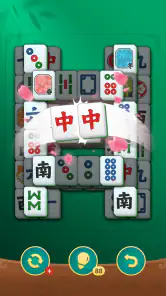
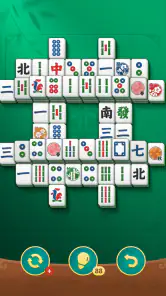
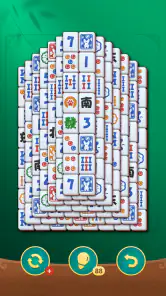
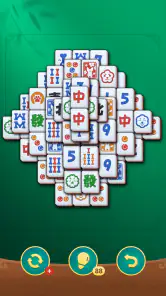
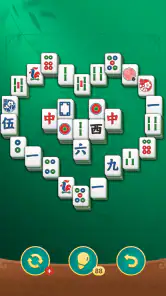
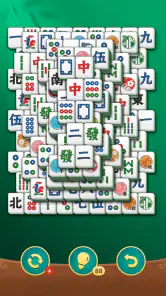
 Analysis by Frivlyz
When a round of mahjong solitaire goes wrong, it is easy to blame the board—or your tapping. I find that a better first move is to pause and check what the game is actually asking: only exposed tiles can be paired, and a pair that looks similar is not necessarily identical. That small distinction is where many early mistakes happen. Mahjong Solitaire Classic Game is a board game from Brainteaser Puzzle Game Studio, built around this solo tile-matching routine rather than the four-player game some people expect from the word “Mahjong.”
Why a board can feel stuck
The central puzzle is not simply to spot matching symbols; it is to choose a pair that opens useful tiles underneath or beside it. Removing an obvious pair can sometimes leave a more awkward layout, while a less tempting match may expose options that keep the board moving. I recommend scanning the full board before making the first move, then checking the newly opened area after each match. It is a practical habit, not a guarantee: some layouts still demand patience, and a move that seems sensible can narrow your choices.
That makes the game a better fit for people who enjoy visual search and planning than for anyone looking for a fast reflex challenge. If you want a quiet puzzle to return to between tasks, the format works well. If you expect competitive matches, a story campaign, or a social table, this is the wrong kind of Mahjong; look for a multiplayer game or a different board-game app instead.
Before settling in to play
The game is free, rated for Everyone, and its current version is 1.2.8. It requires Android 6.0 or later, so I would check that requirement before trying to install it on an older device. In-app purchases are listed at $7.99 per item, which is worth knowing if you share a phone or tablet with a child, even though the age rating is Everyone. I would also check the purchase confirmation settings on a shared device rather than assuming that “free” means every part of the experience has no cost.
There is a reassuring amount of player interest: it has a 4.9 average from around 35,000 ratings, with over 500,000 installs. Those figures can help set expectations about its audience, but they do not tell me whether every screen or puzzle will suit your tastes. I would treat them as context, then decide based on whether you like this particular kind of solo matching.
Getting unstuck without making it a chore
If a board stops feeling clear, I step back and look for pairs that affect the most covered tiles, rather than tapping the first match I notice. I also avoid treating a quick round as a test of speed: a short pause to compare symbols can prevent a careless move. If you have to leave in the middle of a session, the original experience describes progress as saved, so returning later is part of its appeal; before relying on that in an important moment, I would make sure the game has had a chance to settle after a move rather than closing it abruptly.
When the app seems unresponsive, I would first check the basics: whether the device is still responding, whether the game is in the foreground, and whether a tap landed on the tile you intended. Close and reopen the game only if it is safe to do so, since interrupting any app during a transition can risk losing the very state you hoped to keep. If the trouble repeats, restarting the device and checking that the operating system meets the minimum requirement are reasonable general steps. I would avoid reinstalling as an early fix if I cared about an unfinished board.
Gaming Stories You May Enjoy

Dancing Road Turns Short Breaks Into a Test of Rhythm and Timing

Super Stylist Makes Every Outfit a Test of Taste and Patience

Dominoes on Your Terms: Who Should Play and Who Should Pass

Pokémon GO Makes the Familiar World Feel New

Chess.com Turns Rematches Into Rivalries, but Community Has Its Costs

Archery Battle 3D Review: Sharp Aiming, Unclear Feedback
Rediscovering the Classic Game
Now, here's the thing—I thought I knew Mahjong, but Mahjong Solitaire Classic brings a unique twist to the table. Instead of the traditional four-player setup, this version is a solo adventure. Your mission, should you choose to accept it, is to match open pairs of identical tiles and remove them from the board. Sounds simple? Trust me, it’s anything but. The game's rich graphics and intuitive interface make it a breeze to get started, but mastering it? Well, that’s a different story.
A Feast for the Eyes
One of the first things that struck me about this app is how visually stunning it is. The tiles are designed with vibrant colors and intricate patterns that pop right off the screen. You can almost feel the texture under your fingers. And let’s not forget the backgrounds—each one is a beautiful landscape that adds to the overall zen vibe of the game. If you’re someone who appreciates good design, you’ll find yourself getting lost in the aesthetics as much as the gameplay.
Gameplay that Keeps You Hooked
Okay, let’s talk about the gameplay itself. With hundreds of puzzles to solve, each one more challenging than the last, you’ll never run out of opportunities to test your skills. What I love is how the game manages to balance being relaxing yet challenging at the same time—no easy feat! You can spend hours trying to clear a tricky board, and just when you think you’ve cracked it, the game throws a curveball that has you scratching your head.
Perfect for Quick Breaks
One of the best parts about Mahjong Solitaire Classic is how perfectly it fits into those little breaks throughout the day. Whether you’re waiting for your coffee to brew or need a breather between meetings, it’s the ideal companion. The app loads quickly, and you can dive right into a game without any fuss. Plus, it saves your progress, so you can pick up right where you left off at any time. It's like having a pocket-sized puzzle master at your fingertips!
Where it fits—and where it doesn’t
For me, its strongest everyday use is a brief reset that still gives my attention something concrete to do. On a coffee break, I can make a few deliberate matches, leave the board, and come back later without needing to remember a plot or a long chain of instructions. That is different from using a word puzzle for vocabulary practice or a match-three game for quick effects and cascading rewards: this one asks me to read a layered board and think about which pair preserves options. If I want a calmer, more spatial kind of focus, I reach for this; if I want a brisk score chase or a game with other people, I choose something else.
There is also a useful trade-off in the familiar rules. Because the basic action is easy to understand, a newcomer can begin without learning a complicated control scheme. Yet the apparent simplicity can hide the planning challenge: matching a pair immediately is not always the best choice. I get more from a session when I scan the edges and overlaps first, then make a move with a reason. That approach makes the puzzle feel less like random tapping and more like a small sequence of decisions, even when I only have a few minutes.
A sensible routine for short sessions
Imagine you have a few minutes before an appointment and want something more absorbing than scrolling, but not a game that punishes you for stopping. I would open a board, take a moment to locate several available pairs, and make only the first few matches if time is tight. When I return, I can reassess the arrangement rather than trying to recreate a long plan from memory. This is a better use of the game than starting a session when I know I will be interrupted every few seconds; frequent distractions make it harder to compare tiles and can turn a relaxing puzzle into a string of rushed decisions.
For a longer break, I would slow down instead of treating the number of cleared tiles as the goal. A useful personal check is to ask, “What will this pair uncover?” before committing. If the answer is nothing helpful, I look for another open match. It is not a hidden setting or a guaranteed solving trick, just a way to make each move more deliberate. The game’s appeal comes from that small moment of choice, so tapping quickly through the board can remove much of what makes it satisfying.
What to expect from the free-to-play setup
The game is free to install, but in-app purchases are available at $7.99 per item. I would keep that distinction in mind if I am installing it for someone else or using a shared device: the listed price does not mean purchases are impossible. On a device used by a child, checking purchase-confirmation controls is a sensible precaution. I would not assume that buying anything is necessary to enjoy the basic tile-matching premise, but anyone who wants to avoid accidental spending should make the device’s safeguards part of setup.
It is also worth separating popularity from personal fit. A 4.9 average across around 35,000 ratings and over 500,000 installs suggests that many players have tried it, but the number cannot tell you whether its visual style is comfortable on your screen or whether its pace suits your habits. I would give the first session a fair try, particularly if you already enjoy solitaire puzzles, and judge it by whether you like examining the board—not by how quickly you clear it.
When a problem may be outside the game
If tiles are difficult to distinguish, I would first consider the device’s display brightness, glare, and viewing angle. A screen that is hard to read can make similar symbols seem less clear, and that is frustrating in a game built around matching. Adjusting the viewing conditions is a low-risk first step. If taps seem to miss across other apps too, the issue may be with the device’s touch response rather than this puzzle specifically; testing ordinary screen interaction can help separate those possibilities.
Likewise, if installation is blocked, I would compare the device’s Android version with the game’s Android 6.0 minimum before troubleshooting more aggressively. A device that does not meet that requirement is not a good candidate for repeated reinstall attempts. If the game closes unexpectedly, I would note whether the device is also struggling elsewhere and try ordinary steps such as closing unused apps or restarting it. These checks do not promise a fix, but they help avoid blaming the puzzle for a wider device issue.
Who I would recommend it to
I would recommend this board game to someone who enjoys patient pattern recognition, wants a solo activity, and likes a puzzle that can be approached in short bursts. The Everyone rating also makes it broadly suitable as a family-friendly style of game, though I would still handle purchase safeguards on shared devices. The developer, Brainteaser Puzzle Game Studio, has kept the core idea easy to grasp, while the layered layout gives experienced tile-matchers room to plan rather than simply react.
I would skip it if I needed reliable head-to-head play, a broad collection of different game modes, or a high-energy challenge with constant action. It is also a poor match for someone who dislikes visually scanning a busy arrangement or who wants every move to be obvious. In those cases, a simpler matching game may feel less demanding, while a traditional multiplayer Mahjong title would better serve anyone seeking the social, turn-based game rather than solitaire.
My practical verdict
I’ve got to say, this app has quickly become one of my go-to solutions for boredom. If you’re a fan of puzzles or just need something to unwind with, give Mahjong Solitaire Classic a whirl. It’s a refreshing twist on a beloved classic that’s bound to keep you entertained for hours. So go ahead, download it, and prepare to become a tile-matching pro!
My recommendation comes with one qualification: I enjoy it most when I treat each board as a calm reasoning exercise, not as a test I have to finish at speed. The familiar pair-matching makes it approachable, and the need to think ahead gives it more substance than casual tapping. With a free entry point, an Everyone rating, and a clear Android minimum to check before installation, it is easy to decide whether it fits your device and routine. If you want a quiet solo board puzzle, I think it is worth trying; if you want competition or variety beyond tile layouts, I would choose a different game.
Mahjong Solitaire Classic Game Pros and Cons
Pros
- Classic gameplay experience.
- Easy to learn and play.
- Beautiful tile designs.
- Relaxing music and sound effects.
- No time limit for levels.
Cons
- Limited customization options.
- Ads can be intrusive.
- Some levels are too easy.
- Requires internet for some features.
- No multiplayer mode available.
This Game in Other Languages
Frequently Asked Questions
What is Mahjong Solitaire Classic Game?
Mahjong Solitaire Classic Game is a traditional tile-matching game that challenges players to remove all tiles from the board by pairing them with matching tiles. This game is popular for its simplicity and relaxing gameplay, offering users a perfect blend of fun and mental exercise. With various themes and layouts, it caters to both beginners and seasoned players.
How do I play Mahjong Solitaire Classic Game?
To play Mahjong Solitaire Classic Game, you must match open pairs of identical tiles and remove them from the board. A tile is 'open' if it can be moved either left or right without disturbing other tiles. The goal is to clear the board by matching all tiles. The game often includes hints and shuffle options to assist players when they are stuck.
What are some features of Mahjong Solitaire Classic Game?
Mahjong Solitaire Classic Game offers a variety of features including multiple tile sets, board layouts, and background themes. It also provides options like hint and shuffle to aid players when they are stuck. The game tracks your progress, allowing you to improve over time with a scoring system and timer to add an extra layer of challenge.
Can I play Mahjong Solitaire Classic Game offline?
Yes, Mahjong Solitaire Classic Game can typically be played offline, making it a great option for those who want to enjoy the game without an internet connection. This feature makes it convenient for users to play anywhere and anytime without worrying about data usage or connectivity issues.
Is Mahjong Solitaire Classic Game free to download and play?
Mahjong Solitaire Classic Game is generally free to download and play, although it might include in-app purchases or ads to support development. These purchases usually offer additional features or remove ads, providing an enhanced gaming experience. Always check the app store description for specific details regarding cost and in-app purchase options.


