

LEGO® Bluey
- Reviews
- 4.4
- Version
- 3.1.0
- Installs
- 1,000,000+

Screenshots



 Analysis by Frivlyz
I find LEGO® Bluey works best when a child wants to make something, change it, and then turn that creation into a little story. It is an educational game from StoryToys, built around familiar characters and the playful look of LEGO. Rather than asking children to master a complicated set of rules, it gives them a friendly place to explore and build. That makes it an appealing option for families who want screen time to involve imagination, though it is not the right fit for every child or every kind of play.
What gives a first play session direction
A young player often needs a reason to begin before open-ended creativity feels inviting. Bluey and her friends provide a recognizable starting point, while the building and activities give children something concrete to do. I like that combination: the familiar world can help a hesitant player get started, and the building element leaves room to make choices rather than simply watch a story unfold.
For a first session, I would sit beside a child and invite them to choose one small idea: make a place for a character, arrange a scene, or decide what should happen next. Keeping the prompt simple helps avoid turning play into a parent-led task. After the child has the hang of moving around and interacting, I would step back and let them take the story in their own direction.
Progress that comes from making choices
The appealing kind of progress here is creative, not a race to beat a score. A child can see a scene take shape and can revise it when a new idea occurs. That visible change is a useful reward in its own right: the result is something they helped make, not just a completed screen to move past.
One practical tip is to ask a child to explain what they have built before suggesting what to do next. It gives them a chance to practise describing choices and linking ideas, while keeping the game in their hands. I would not treat every play session as a lesson, though. The strongest use is relaxed play where any learning happens naturally through making, trying, and imagining.
How the challenge feels for different ages
The approachable presentation should suit children who are still learning how to navigate a game, and the LEGO-style building offers a gentle creative challenge. It is a different kind of difficulty from a platform game, where timing and quick reactions often decide whether a player succeeds. Here, the more relevant question is whether a child enjoys experimenting and inventing scenes.
That also means the game may not hold the attention of a child looking for demanding competition, elaborate strategy, or a tightly guided story. Older players who want complex construction tools may also find the experience too simplified. I see that simplicity as a sensible choice for a family-oriented game, but it narrows the audience: the most suitable player is one who enjoys imaginative play more than mastering difficult mechanics.
Gaming Stories You May Enjoy

Dancing Road Turns Short Breaks Into a Test of Rhythm and Timing

Super Stylist Makes Every Outfit a Test of Taste and Patience

Dominoes on Your Terms: Who Should Play and Who Should Pass

Pokémon GO Makes the Familiar World Feel New

Chess.com Turns Rematches Into Rivalries, but Community Has Its Costs

Archery Battle 3D Review: Sharp Aiming, Unclear Feedback
Keeping play engaging without making it a chore
For families, a useful way to approach the game is as a short shared activity rather than something that must occupy a whole afternoon. A parent can join in for a few minutes, let the child choose the direction, and then agree on a natural stopping point once the scene or play idea feels complete. That gives the child a satisfying ending without needing to chase an arbitrary target.
It is free to start, but in-app purchases range from $4.99 to $39.99 per item. I would check the purchase settings on the device before handing it to a child, and make clear that paid content is not part of the basic invitation to play. This is especially worth doing when a child is used to asking for every visible add-on. The game is rated Everyone, but that rating does not replace a parent’s judgment about spending or screen-time routines.
In its category, it sits closer to a character-led creative toy than to a conventional educational app built around quizzes, drills, or lessons. Compared with those alternatives, it offers more room for make-believe and less obvious practice structure. Compared with a general-purpose digital building game, Bluey’s familiar cast gives younger fans an easier story hook, while a broader construction sandbox may suit children who want more open-ended tools. The best choice depends on whether a child wants recognizable characters, structured learning, or deeper building freedom.
A realistic place in a family routine
Picture a rainy afternoon when dinner is still being prepared and a child wants something to do nearby. I would open the game, let them pick a character or scene to focus on, and ask them to make up what happens next. If I have time, I might join for a few minutes; if not, the child can still use the familiar world as a prompt for independent pretend play. It is a better fit for that calm, creative window than for a car ride where a parent needs an activity that works entirely offline or without supervision.
Another useful approach is to let a child build first and tell the story afterward. This can be easier than asking them to invent a plot from a blank slate: the objects and arrangement give them something to talk about. If they lose interest once the building is done, there is no need to push them toward a longer session. The value is in the act of creating, not in keeping the app open for as long as possible.
Who is likely to enjoy it, and who may prefer something else
I would recommend it most to younger Bluey fans who enjoy arranging things, making up scenes, and playing alongside a parent or sibling. It can also work for a child who is curious about digital building but finds more complicated games intimidating. The game’s recognizable world can lower the barrier to starting, while the creative angle leaves room for a child to supply their own ideas.
I would look elsewhere for a child who wants a curriculum-like experience with clearly stated learning goals, a competitive game with measurable mastery, or a construction app with extensive technical options. It may also be less satisfying for someone who does not know or care about Bluey, since the characters and setting are a major part of its appeal. A different educational game may be a better match when the adult’s priority is practising a specific academic skill rather than imaginative play.
Practical details before you install
The game is free, has an Everyone age rating, and requires Android 9 or later. Its current version is 3.1.0. The average rating is 4.4 from around 7,500 ratings, with about 99 written reviews and over one million installs. Those figures suggest it has found a substantial audience, but they cannot tell you whether its particular style of creative play suits your child; a short supervised first session is a better test.
Before starting, I would also decide whether the child can make purchases on the device and whether the game belongs in a shared play routine or is meant for independent use. If a child expects every game to have a clear level structure, explain that this one is more about building and imagining. That small expectation-setting step can prevent the first session from feeling aimless.
A Dash of Creativity Meets Playtime
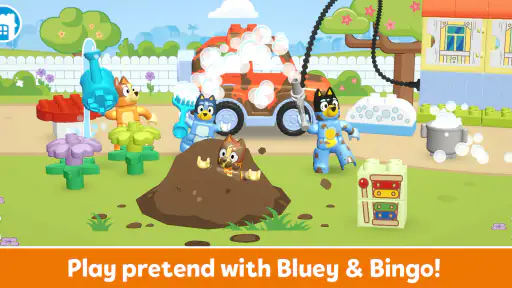
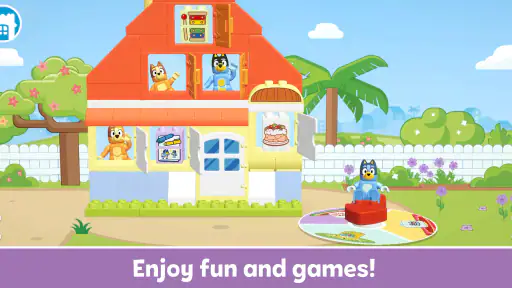
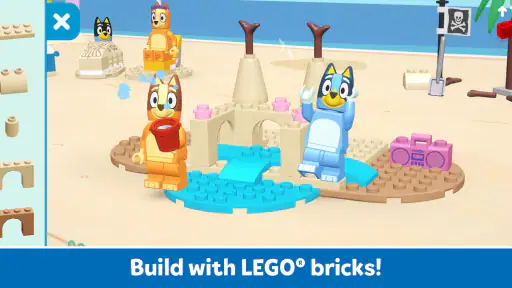
From the moment I launched LEGO® Bluey, I was greeted with a vibrant splash of colors and a catchy tune that set the mood for some serious fun. The app invites users to dive into an interactive world where creativity knows no bounds. You can build, explore, and engage with your favorite characters from the Bluey universe, all in the playful form of LEGO bricks.
Building Your World
One of the standout features is the building aspect. Imagine having a digital bucket of LEGO bricks to create your own Bluey-inspired scenes. The app provides a user-friendly interface that makes building intuitive, even for younger players. You can choose from a variety of bricks and decorations to bring your ideas to life. It’s like having a limitless LEGO set right at your fingertips!
Adventures Await
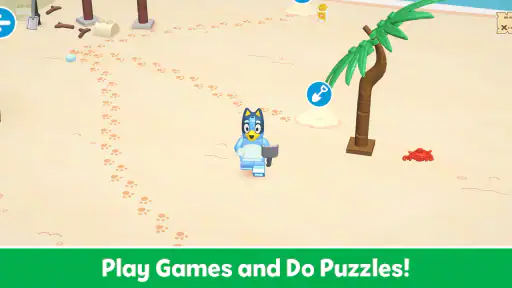
But wait, there’s more than just building. The app offers a series of adventures and challenges that players can embark on with Bluey and her family. These adventures are not only entertaining but also educational, promoting problem-solving and creativity. Whether it's helping Bluey find her favorite toy or going on a treasure hunt, each challenge is engaging and full of surprises.
Family-Friendly Fun
What really struck me about LEGO® Bluey is how it caters to both kids and adults. The app fosters a shared experience where parents and children can play together, building and exploring as a team. It’s a fantastic way to spend quality time and enjoy some screen time that’s actually beneficial.
Easy to Navigate
Worried about complicated controls? Fear not! The app is designed with simplicity in mind. The navigation is straightforward, allowing players to jump right into the action without any hassle. Even if you’re new to the digital LEGO world, you’ll find it easy to get the hang of things.
Graphics and Sound
Visually, the game is a treat. The graphics are crisp and colorful, capturing the essence of the Bluey show perfectly. Coupled with the cheerful background music and sound effects, it creates an immersive experience that keeps players engaged for hours.
Room for Improvement?
While LEGO® Bluey is a fantastic app, there’s always room for growth. It would be great to see more frequent updates with new building challenges and adventures to keep the content fresh. Additionally, expanding the customization options for characters could enhance the creative experience even further.
All in all, LEGO® Bluey is a delightful app that brings joy and creativity to the forefront. It’s perfect for fans of the show and LEGO enthusiasts looking for a new way to explore their creativity. So, grab your virtual bricks and get ready for a playful adventure with Bluey and her friends. Happy building!
LEGO® Bluey Pros and Cons
Pros
- Engaging and educational gameplay.
- Vibrant graphics capture Bluey's world.
- Intuitive controls for young users.
- Regular updates with new content.
- Encourages creativity and exploration.
Cons
- Requires in-app purchases for full access.
- May consume significant device storage.
- Occasional lags on older devices.
- Limited offline functionality.
- Some features require account setup.
This Game in Other Languages
Frequently Asked Questions
What is LEGO® Bluey and how does it work?
LEGO® Bluey is a mobile application that combines the beloved Bluey animated series with interactive LEGO building experiences. Users can embark on creative adventures by building and interacting with their favorite characters and scenes from the show. The app provides step-by-step instructions and encourages imaginative play by allowing users to explore various storylines.
Is LEGO® Bluey suitable for all age groups?
LEGO® Bluey is designed primarily for children aged 4 to 8. However, its engaging content and intuitive design can appeal to a wider audience, including parents and older siblings who enjoy building with LEGO or are fans of the Bluey series. It’s always a good idea for parents to review the app’s content to ensure it aligns with their child’s interests and maturity level.
Does LEGO® Bluey require an internet connection to play?
While LEGO® Bluey can be enjoyed offline, some features may require an internet connection. For instance, downloading new content updates or accessing community features might need connectivity. It’s recommended to have a stable internet connection for the initial download and setup, but basic gameplay and story modes are accessible offline.
Are there any in-app purchases or advertisements in LEGO® Bluey?
LEGO® Bluey is designed to provide a child-friendly experience, minimizing in-app purchases and ads. However, there might be optional content packs or cosmetic items available for purchase to enhance the gameplay experience. Parents can manage these purchases through app permissions and ensure a safe environment for their children.
What devices are compatible with LEGO® Bluey?
LEGO® Bluey is available for both Android and iOS devices. It supports a range of smartphones and tablets, but it’s important to check the app’s store page for specific operating system requirements. Ensuring your device is updated to the latest version of its OS will help in achieving the best performance and compatibility with the app.


