

John GBC
- Reviews
- 3.9
- Version
- v4.11
- Installs
- 100,000+

Screenshots
 Analysis by Frivlyz
When I want an old handheld game to fit into an ordinary day, I care less about a long feature list than about whether I can get from opening an emulator to playing without turning the setup into a project. John GBC is an Android arcade game emulator from John emulators, designed for Game Boy and Game Boy Color titles. Its appeal is straightforward: it brings those compact, pixel-based games to a phone, where their short stages and simple controls can suit a spare moment just as well as a longer session.
That simplicity also sets the right expectations. This is a way to play games you already have access to, not a collection of games bundled into an arcade library. You will need to bring compatible game files yourself, and that step can be less familiar than tapping a title in a regular game store. For someone who likes revisiting handheld favorites and is comfortable organizing their own files, that trade-off can be worthwhile. If you want a ready-made catalogue with no setup, a conventional mobile game or a subscription library is likely a better fit.
Where the old handheld mood comes from
The distinctive atmosphere of Game Boy Color games comes from their limitations as much as their art: small screens, compact sprites, restrained color palettes, and clear visual signals. Playing them on a phone changes the scale, but not the underlying design. I find that the best sessions happen when I treat the display as a window onto a small, deliberate world rather than expecting modern visual polish. The focused framing lets a familiar character or setting read quickly, which is part of why these games still work well in brief bursts.
That mood depends on the game being played, not on the emulator creating a new story or atmosphere of its own. John GBC is the container for the experience; the title supplies its world, art, and pacing. This distinction matters if you are choosing it for a particular kind of nostalgia. A familiar game can feel immediately inviting, while an unfamiliar one may take time to reveal why its simple visuals and repeated routes are compelling.
Sound and pacing on a phone
Classic handheld soundtracks and effects are often built from short, recognizable patterns, so they can lend a session a strong sense of place without demanding full attention. I particularly like that kind of music for a quiet break: a few minutes of play can feel complete even if I stop before finishing a stage or reaching a major point in the game. The phone makes the experience easy to carry, though the surrounding environment still affects how much I enjoy it. On a noisy commute, visual cues may do more work than the soundtrack; at home, listening can make the game feel more absorbing.
There is also a practical pacing trade-off. A phone is convenient for picking up a game, but touch controls occupy part of the screen and do not feel identical to physical buttons. I would choose a game with forgiving timing for short touchscreen sessions, and save precision-heavy play for a setup where the controls feel comfortable. That small bit of self-selection can make the difference between a relaxing nostalgic break and a frustrating attempt to repeat a difficult section.
What the emulator suits—and what it asks of you
The most useful way to think about John GBC is as a focused emulator rather than a general-purpose modern game. Its support for both Game Boy and Game Boy Color gives it a clear place among retro-play options, while its accessible approach is aimed at people who want to load a game and get on with playing. Compared with a mobile game that supplies its own catalogue, it asks more of you before the first session; compared with using original handheld hardware, it offers the convenience of playing on a device you already carry. Neither comparison makes it universally better: your preference depends on whether convenience, physical controls, or a ready-to-play library matters most.
Gaming Stories You May Enjoy

Dancing Road Turns Short Breaks Into a Test of Rhythm and Timing

Super Stylist Makes Every Outfit a Test of Taste and Patience

Dominoes on Your Terms: Who Should Play and Who Should Pass

Pokémon GO Makes the Familiar World Feel New

Chess.com Turns Rematches Into Rivalries, but Community Has Its Costs

Archery Battle 3D Review: Sharp Aiming, Unclear Feedback
Before settling in, I would make a small amount of preparation part of the routine. Keep your game files in an easy-to-find place, give them recognizable names, and check that the title you want is actually available to you. This is more useful than downloading the emulator and then searching through unrelated folders while a spare ten-minute break slips away. It also avoids confusing the emulator itself with the legal or practical question of where a game file comes from; I would use files I am entitled to use rather than treating the app as a source of games.
John GBC is best for someone who already knows which Game Boy or Game Boy Color game they want to revisit, or who enjoys exploring that era and is willing to handle the file step. It is less suitable for a player who expects an included library, modern online features, or a fully tactile handheld experience. If your main goal is to discover new games with no preparation, ordinary arcade titles made for phones are simpler. If the feel of real buttons is central to your enjoyment, original hardware or a compatible physical controller may suit you better than relying on a touchscreen.
Bringing Back Nostalgia
First off, let me just say how perfectly John GBC captures the essence of retro gaming. As someone who spent countless hours on a Game Boy Color as a kid, I was immediately hit with a wave of nostalgia. The app flawlessly emulates the original console, allowing you to play all your favorite titles from the past. From the moment I loaded up my first game, it felt like I was transported back to the 90s, sitting cross-legged on the living room floor, completely absorbed in my gaming universe.
Setting Up is a Breeze
One of the things I absolutely love about John GBC is how easy it is to get started. The interface is user-friendly, making it accessible to everyone, even if you're not particularly tech-savvy. Simply download the ROMs you want to play, load them into the app, and voila! You're ready to dive into your retro gaming journey. I appreciate how the developers have streamlined the process, eliminating any unnecessary complications.
Performance and Features
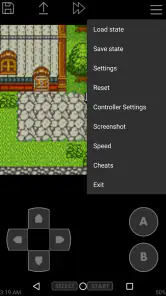
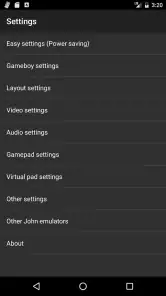
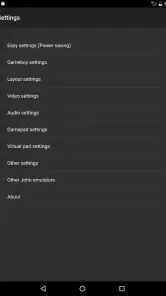
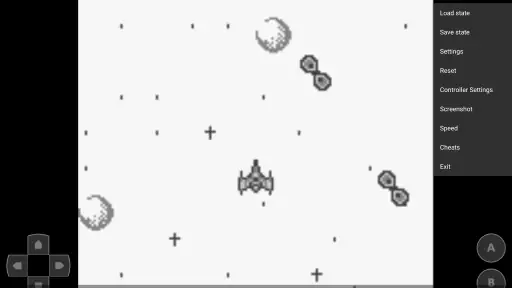
Now, let's talk about performance. The app runs smoothly, with no noticeable lag or glitches, which is crucial for an enjoyable gaming experience. I was impressed by how well it handled even the most graphically intensive games from the Game Boy Color library. What really sets John GBC apart is its array of features that enhance the gaming experience. You have the ability to save and load game states, which is a lifesaver for tackling those tricky levels. Additionally, the customizable on-screen controls are a nice touch, allowing you to tailor the layout to your preference.
Those tools are most valuable when they support your routine instead of becoming another menu to manage. A quick save can help when a game reaches a natural pause just as you need to put your phone away; a load state can let you resume near a challenging section rather than replaying a long stretch. I would still use a game's own save system where it makes sense, because a state snapshot is best treated as a convenient extra, not as the only record of progress. If you experiment with different control layouts, change one thing at a time and test it in a safe area before taking it into a demanding part of a game.
A small routine for better sessions
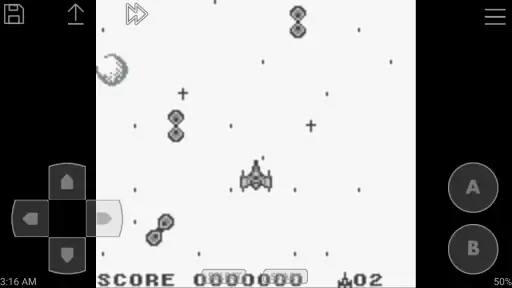
For an everyday example, imagine opening the emulator during a lunch break. If the game file is already organized and the buttons are placed where your thumbs naturally rest, you can spend the break playing rather than troubleshooting. Before a longer session, I would check that the controls do not cover an important part of the action and that the phone is comfortable to hold. This is a modest adjustment, but it matters more in games that ask for repeated directional inputs or quick reactions than in slower, menu-driven play.
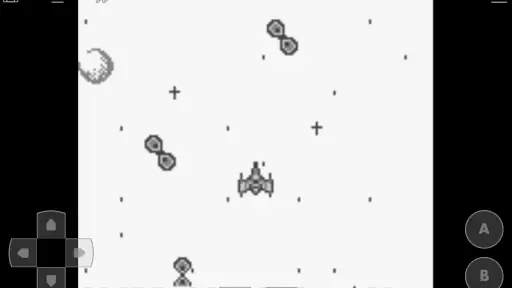
Touchscreen comfort is personal, and the ideal arrangement is not necessarily the one that looks neat on screen. A layout that works while holding the phone in both hands may feel awkward when playing one-handed, and a control position that suits one game may be inconvenient in another. I would avoid changing controls in the middle of a difficult passage; settle on a layout during an easy section, then leave it alone long enough to judge it fairly. That is a more reliable way to tell whether the emulator suits your hands than making several adjustments at once.
As an emulator, it also cannot make every older game feel equally natural on a modern phone. Games designed around physical buttons may expose the limits of touch input, and the small original screen can look different when expanded on a larger display. I see that as a trade-off of mobile convenience rather than a reason to dismiss the app outright. If a title depends on precise timing, try a short session first; if the controls keep interrupting the fun, a physical controller or original handheld is the more sensible choice.
Who will get the most from it
The strongest audience is a player who already has a specific memory attached to a handheld game, or someone curious about the compact design of that era and willing to find game files separately. It can also suit a person who prefers a focused single-player diversion to a mobile game built around frequent prompts and ongoing tasks. The format rewards patience with repeated routes and familiar patterns; it is less compelling if you need constant novelty or a game that explains itself through modern tutorials.
I would steer away from it if the file-management step sounds like work rather than part of the hobby. It is also not the right answer for someone who wants a catalogue included at install, local multiplayer as a central feature, or the tactile response of buttons built into a handheld. Those are reasonable preferences, not shortcomings to overlook. A standard mobile arcade game is easier for immediate play, while original hardware can preserve the physical feel that an emulator on a touchscreen cannot reproduce.
Cost, age suitability, and what to expect
John GBC costs $2.99, so I would decide based on whether I expect to use an emulator regularly rather than treating it as a way to get games at no cost. The app is rated for Everyone, which makes its stated age classification broad, though the content and themes still depend on the individual game you choose to load. Its average rating is 3.9 from around 4,300 ratings, and it has more than 100,000 installs. Those figures suggest an established audience, but they cannot tell you whether its control feel will suit your particular phone or favorite game.
The app has been available since June 2, 2011, and its current version is v4.11, with Android 6.0 as the minimum operating system requirement. John emulators develops it. For a practical compatibility check, I would confirm that your Android device meets the system requirement and that you have access to a suitable game file before paying. That order helps avoid mistaking a missing game file or an unsuitable control preference for a problem with the emulator itself.
Why You Should Try It
If you're a fan of retro games, I highly recommend giving John GBC a try. It's a fantastic way to revisit cherished games from your childhood, and the convenience of having it on your mobile device means you can play anytime, anywhere. Whether you're on a long commute or just relaxing at home, this app provides endless entertainment. Plus, there's something incredibly satisfying about seeing those pixelated graphics come to life on a modern screen.
My recommendation comes with one condition: go in knowing that the emulator and the games are separate parts of the experience. The app can make a familiar handheld title convenient to play, but it cannot supply the memories, the game files, or the exact feel of old hardware by itself. If you are ready for that distinction, a quick test with a game you already know is the clearest way to judge whether its screen and touch controls work for you.
In conclusion, John GBC is a must-have app for any retro gaming enthusiast. Its ease of use, excellent performance, and rich feature set make it a standout choice in the world of emulators. So, dust off those old ROMs, fire up the app, and get ready for a trip down memory lane. Trust me, you won't be disappointed!
For me, the lasting appeal is the way this emulator makes a small, self-contained style of play easy to carry into ordinary life. It is not the best choice for everyone, and the need to bring your own games and adapt to touchscreen controls is real. But if the trade-offs fit your habits, it offers a direct route back to Game Boy and Game Boy Color play without asking you to turn each session into a major commitment.
John GBC Pros and Cons
Pros
- Smooth gameplay experience
- Supports multiple ROM formats
- Customizable control settings
- Save and load game states easily
- Compatible with external controllers
Cons
- Limited free version features
- Occasional sound glitches
- Ads in free version
- Requires BIOS file setup
- No support for multiplayer mode
Frequently Asked Questions
What is John GBC and what platforms is it available on?
John GBC is a popular Game Boy and Game Boy Color emulator that allows users to play classic games on their Android devices. It replicates the original hardware, providing a nostalgic gaming experience. Currently, John GBC is only available for Android devices, and there is no iOS version. Users can download it from the Google Play Store.
Does John GBC support save states and other advanced features?
Yes, John GBC supports save states, allowing you to save your game progress at any point and resume from the same spot later. This feature is particularly useful for longer games or when you need to pause your gaming session. Additionally, the emulator offers fast forward, customizable controls, and even supports external controllers for a more authentic experience.
Is there a cost associated with downloading and using John GBC?
John GBC is available as a paid app on the Google Play Store. While it is not free, the nominal price provides users with a robust set of features without the interruption of ads. This makes it a worthwhile investment for those who are serious about retro gaming on their Android devices.
Can I play multiplayer games on John GBC?
John GBC supports local multiplayer gaming through Bluetooth or Wi-Fi, allowing you to connect with friends and enjoy multiplayer classics. However, it does not support online multiplayer gaming, so both players need to be in close proximity to each other for this feature to work.
Is John GBC user-friendly for beginners?
John GBC is designed with user-friendliness in mind, offering an intuitive interface that's easy for beginners to navigate. The emulator includes detailed settings and options that can be easily adjusted, even if you are new to emulation. Additionally, there are online resources and communities where new users can find support and tips.


