

iDaft Jamming-Daft Punk Sounds
- Reviews
- 3.3
- Version
- 1.7.5
- Installs
- 1,000,000+

Screenshots
 Analysis by Frivlyz
The first time I tried iDaft Jamming-Daft Punk Sounds, its appeal was immediate: tap a sound, hear a familiar electronic phrase, and start building a playful rhythm from the pieces. It asks for curiosity, not musical training, so I could get a little burst of hands-on fun without setting up a full music-making workflow. The novelty is real, but the more useful question is whether those quick sessions keep feeling worthwhile after the first few days.
A quick spark, not a full music studio
This is a music game from Drohm, centered on soundboard-style interaction with Daft Punk material. Its appeal is different from a conventional rhythm game, where I would expect timed notes and a score, or a production app, where I would expect a broader toolset for building and saving tracks. Here, the pleasure is in triggering recognizable sounds and experimenting in the moment. That makes it approachable, but also sets a clear ceiling: I would not choose it when I want a structured challenge or a polished track to develop over time.
The first week is likely its strongest stretch. Familiar sounds give each tap an instant payoff, and the low-pressure format makes it easy to try combinations without worrying about getting a sequence exactly right. I found it best to approach it as a small musical toy: spend a few minutes testing what sounds work together, then stop while it is still amusing. Treating every session as a chance to create a finished remix would put expectations on it that this kind of soundboard is not built to meet.
Where it fits into an ordinary day
It makes more sense in short, casual moments than as the centerpiece of an evening. On a commute, I might use headphones and tap out a few combinations while waiting, keeping the volume modest and not expecting a hands-free listening experience. At home, it can be a quick distraction between tasks. If I wanted to share the sounds with friends, I would try it in a relaxed setting where everyone can hear the phone or speaker clearly, rather than relying on it to run a party soundtrack from start to finish.
That distinction matters because a soundboard and a music player solve different problems. A streaming service is the better choice when I want complete songs, dependable background listening, or a playlist that keeps going without attention. A beat-making app is better when I want more control over arrangement and a result I can polish. This game sits between those uses only in the loose sense that it lets me play with music; its particular draw is the quick, tactile pleasure of triggering Daft Punk-inspired sounds.
Unleashing Your Inner DJ
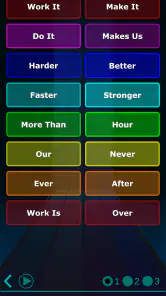
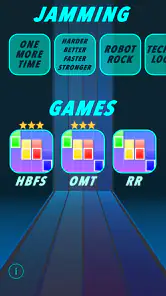
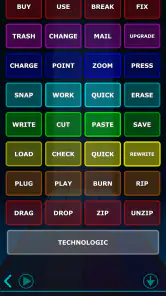
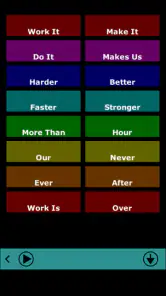
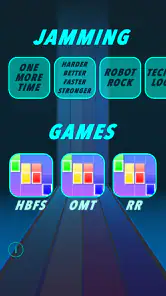
Let's cut to the chase: this app is a blast. From the moment you fire it up, you're greeted with a slick interface that feels like it was crafted by the robots themselves. The app offers a variety of soundboards featuring iconic tracks like "Harder, Better, Faster, Stronger" and "Technologic." It's like having a slice of Daft Punk history at your fingertips. You can mix and match sounds to your heart's content, creating your own unique mashups and remixes. It's not just a soundboard; it's a playground for creativity.
Easy Peasy, Lemon Squeezy
What I really appreciate about iDaft Jamming-Daft Punk Sounds is its simplicity. You don't need to be a music production wizard to have fun with it. The app is intuitive and user-friendly, making sure you spend more time jamming and less time figuring out how everything works. Just tap, mix, and enjoy – it's that easy!
Gaming Stories You May Enjoy

Dancing Road Turns Short Breaks Into a Test of Rhythm and Timing

Super Stylist Makes Every Outfit a Test of Taste and Patience

Dominoes on Your Terms: Who Should Play and Who Should Pass

Pokémon GO Makes the Familiar World Feel New

Chess.com Turns Rematches Into Rivalries, but Community Has Its Costs

Archery Battle 3D Review: Sharp Aiming, Unclear Feedback
A practical tip is to start by listening to individual sounds before layering several together. That gives me a better feel for which combinations are clear and which become crowded. I also find that a deliberately simple pattern can be more satisfying than filling every moment with taps: leave a little space, repeat a small phrase, and change one element at a time. This is not a hidden feature or a technical trick; it is a way to make a limited set of interactive sounds feel less random and more intentional.
Perfect for Parties and More
Picture this: you're at a party, the vibe is great, but the music could use a little kick. That's where this app comes in. Just connect your phone to a speaker, and suddenly, you're the life of the party. Everyone will be grooving to the beats you create, and who knows, you might even inspire a dance-off or two. Plus, it's not just for parties; whether you're commuting, chilling at home, or just need a quick pick-me-up, this app is there to lift your spirits.
For a more realistic party use, I would treat it as a brief bit of crowd participation rather than the main music source. Let friends take turns trying a few taps, then hand the music back to a player designed for continuous listening. That keeps the novelty from becoming a chore for the person holding the phone, and avoids the awkward expectation that a small soundboard should replace a complete set of songs. It can be a fun icebreaker for Daft Punk fans, but it will not suit a gathering where people want a steady, hands-off playlist.
What keeps it fresh—and what wears thin
The recurring value depends mostly on how much I enjoy experimenting with familiar sounds. Someone who likes trying slightly different combinations, sharing a quick joke, or introducing a friend to a playful musical interaction may return to it now and then. Someone looking for new content, progression, or a reason to practice every day may run out of motivation sooner. I would not build a daily music habit around it; I would keep it as an occasional diversion and let its simplicity be the point.
There is also a practical trade-off in the format: the same immediacy that makes the game easy to pick up can make it feel repetitive. Once I have explored the combinations that interest me, the experience may not offer enough depth to sustain longer sessions. That is not a flaw for a quick sound toy, but it is a real limitation if I want evolving challenges or a more flexible way to compose. If the first few experiments leave me wanting a sequencer, a recording workflow, or full-length tracks, I would switch to a tool made for that purpose rather than expect this one to grow into it.
Cost, compatibility, and who should try it
The game is free to download and is rated Everyone, which makes it easy to try casually. Optional in-app purchases range from $0.99 to $9.49 per item, so I would check the purchase details in the app before spending and decide whether the free experience already gives me the kind of quick interaction I wanted. Its current version is 1.7.5 and it requires Android 6.0 or later. The 3.3 average from around 6,000 ratings suggests reactions are mixed rather than universally enthusiastic; I would read that as a reminder that a niche soundboard will appeal strongly to some listeners and feel too limited to others. It has passed one million installs, but popularity alone does not tell me whether its particular style will suit my taste.
I would recommend giving it a try if Daft Punk’s sound is already meaningful to you, or if you enjoy tapping together short musical phrases without needing to produce a finished song. I would skip it if I want a traditional rhythm game, a complete music library, serious composition tools, or a reliable replacement for a party playlist. Before installing, I would also ask myself whether I enjoy repeating and rearranging familiar material; that is the core reason to return, not a promise of endless new things to unlock.
And let's not forget the nostalgia factor. For those of us who grew up listening to Daft Punk, this app is like a trip down memory lane. It brings back all those good vibes and memories associated with their music, making it even more special.
Does it earn a lasting place?
For me, the answer is yes, but only as a lightweight, occasional amusement—not as an app I need to open every day. The maintenance burden is low in the everyday sense: I can dip in for a short session and leave without learning a complicated system or planning a long project. The harder part is keeping the experience fresh once the first burst of recognition fades. That depends on whether I enjoy inventing small variations for their own sake.
In conclusion, iDaft Jamming-Daft Punk Sounds is a must-have app for any Daft Punk fan or anyone who loves to have fun with music. It's simple, entertaining, and a great way to express your creativity. Whether you're a seasoned DJ or just someone who loves to jam, this app has something for everyone. So, what are you waiting for? Go ahead and give it a whirl – your inner robot will thank you!
iDaft Jamming-Daft Punk Sounds Pros and Cons
Pros
- Authentic Daft Punk sound effects.
- Easy-to-use interface.
- Free to download and use.
- No in-app purchases necessary.
- Works offline.
Cons
- Limited sound options.
- No recording feature.
- Ads can be intrusive.
- Not updated frequently.
- Basic graphics.
Frequently Asked Questions
What is iDaft Jamming-Daft Punk Sounds?
iDaft Jamming-Daft Punk Sounds is a mobile application that allows users to engage with Daft Punk's iconic music in an interactive way. The app provides a platform for fans to create their own beats and sounds using samples from Daft Punk's discography. It's designed for both casual listeners and music enthusiasts who want to explore and remix Daft Punk's electronic music.
How user-friendly is the iDaft Jamming app for beginners?
The iDaft Jamming app is designed to be intuitive and user-friendly, making it accessible even for beginners with no prior experience in music production. The interface is straightforward, with easy-to-navigate controls and interactive tutorials that guide users through the basics of creating their own Daft Punk-inspired tracks. This ensures a smooth experience for all users, regardless of their skill level.
What features does iDaft Jamming offer to enhance the user experience?
iDaft Jamming offers a variety of features to enhance the user experience, including a wide range of soundboards with authentic Daft Punk samples, customizable beat and loop options, and the ability to save and share your creations with friends. The app also updates regularly with new content, ensuring that users always have fresh material to experiment with.
Is iDaft Jamming-Daft Punk Sounds free to download and use?
iDaft Jamming-Daft Punk Sounds is free to download and provides a substantial amount of content at no cost. However, there are in-app purchases available for users who wish to unlock additional features and sound packs. These purchases are optional and are designed to enhance the overall experience for those who want to delve deeper into music creation.
Can I use iDaft Jamming offline, or is an internet connection required?
iDaft Jamming can be used offline, allowing users to jam and create music without the need for an internet connection. This makes it a convenient app for use on the go, whether you're traveling or in an area with limited connectivity. However, an internet connection is required for downloading new sound packs and sharing your creations online.


