

House Flipper: Home Design
- Reviews
- 4.6
- Version
- 1.502
- Installs
- 50,000,000+

Screenshots


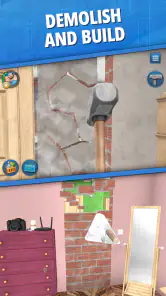
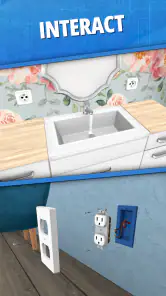
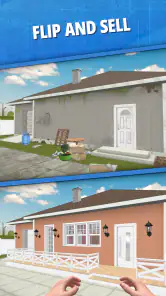


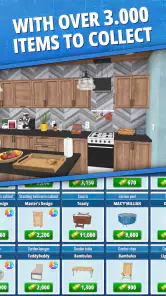
 Analysis by Frivlyz
When I want a calm game that gives me something to arrange and improve, House Flipper: Home Design is an easy one to pick up. Its appeal is straightforward: I work on neglected homes, make practical choices about their condition and appearance, then enjoy seeing a space take shape. That hands-on loop makes it feel more personal than a simple room-decorating app, though it is still a mobile game rather than a full renovation simulator.
Readability and finding your way around
The first impression is approachable. The game presents a clear home-improvement goal, and the basic rhythm of cleaning, repairing and decorating is easy to grasp without knowing anything about renovation. I found it welcoming for short sessions because I could focus on the task in front of me instead of learning a complicated simulation system. Its menus and visual choices are built around familiar things such as walls, furniture and rooms, which helps make the idea legible even if you are new to this kind of game.
That simplicity has a trade-off: a screen full of objects and choices can still take concentration, especially when I am deciding how several pieces should work together. I recommend approaching a room with one small plan—choose its purpose, settle on a general look, and then pick the large items before fussing over details. That keeps the decorating process manageable and helps prevent a room from becoming a collection of unrelated purchases.
Motor and sensory considerations
This is a visually led game, so much of the enjoyment comes from noticing how colors, furniture and layout change a room. I like that the subject matter is gentle and familiar, with no need to keep up with a fast action sequence. That can make it a comfortable choice when I want a low-pressure game and would rather think through a design than react quickly to an opponent.
Still, “relaxing” does not mean effortless for every player. Moving through a mobile interface and making precise selections can be tiring for someone who finds touch controls uncomfortable, while visual detail may be less convenient for someone who struggles to distinguish items or colors on a small screen. I would try a brief session first and see whether the interface feels comfortable on your device. The game’s appeal depends on being able to inspect a space and make choices, so it may not suit someone looking for audio-led play or minimal visual interaction.
When it fits into a day
I can imagine opening it during a quiet break, finishing one manageable bit of a renovation, and leaving the bigger design decisions for later. That makes it a better fit for relaxed, self-directed play than for someone who wants a tightly structured story or a quick competitive match. It can also be useful as a casual source of room-layout inspiration: I might try a different mood or furniture arrangement in a virtual home before thinking about how I want a real room to feel.
For that kind of experimentation, I find it helpful to decide what a room needs before decorating it. A living room meant to feel uncluttered calls for different choices from one designed to feel warm and lived-in. Working from that goal makes the choices more coherent and gives the finished room a stronger identity. The game is entertainment, not a substitute for measuring real furniture or planning an actual renovation, but it can still be a pleasant way to explore broad visual ideas.
Gaming Stories You May Enjoy

Dancing Road Turns Short Breaks Into a Test of Rhythm and Timing

Super Stylist Makes Every Outfit a Test of Taste and Patience

Dominoes on Your Terms: Who Should Play and Who Should Pass

Pokémon GO Makes the Familiar World Feel New

Chess.com Turns Rematches Into Rivalries, but Community Has Its Costs

Archery Battle 3D Review: Sharp Aiming, Unclear Feedback
Where the trade-offs show
Compared with a basic decorating app, House Flipper has more of a renovation-and-progress loop: I am not only arranging a room, but also working through the idea of improving a property. Compared with deeper building or interior-design simulations, it is easier to approach and less demanding, but that also means it should not be treated as a detailed professional planning tool. I would choose it for a friendly, game-like makeover experience, not for precise architectural control.
There is also a balance between creativity and progression. The game encourages me to make a home look better, but tasks and resources give that creativity a framework rather than leaving every decision completely open. That structure is useful when I want a prompt or a reason to keep moving; it can feel restrictive if I only want an unrestricted digital mood board. I would also keep in mind that optional in-app purchases are available, so anyone who prefers to avoid spending should be comfortable with the game’s free experience and make purchase decisions deliberately.
Jumping into the Flipping World
As soon as you fire up House Flipper: Home Design, you’re thrust into a world full of potential. The game kicks off pretty simply; you start with a rundown property that’s practically begging for a makeover. And here’s where the fun begins! You’ve got to clean, repair, and eventually upgrade your humble abode to turn it into a real estate gem. It’s like being on one of those home renovation shows, but the best part is, you’re the star!
Design and Customize to Your Heart’s Content
What really stands out in this game is the sheer amount of customization available. Whether it’s picking out the perfect shade of paint for your walls or selecting the comfiest couch for your living room, the choices are vast. I spent hours agonizing over whether my virtual living room should have a modern or rustic vibe. Spoiler alert: I went with rustic, and it looks amazing!
Moreover, the game’s user interface is super intuitive. Even if you’re not a tech whiz, you’ll find navigating through the options a breeze. The controls are smooth, and the graphics are impressive for a mobile game. It really feels like you’re immersed in your little renovation world.
Challenges and Rewards
Now, no game is complete without its set of challenges, right? House Flipper: Home Design doesn’t disappoint in this regard. You’ll face various challenges, from managing your budget to dealing with unexpected repairs. But don’t fret! Successfully overcoming these hurdles is incredibly satisfying and rewarding. Plus, the in-game currency you earn can be used for purchasing better materials and furniture, giving you even more creative freedom.
One of my favorite parts? Selling your revamped property. There’s nothing quite like the feeling of satisfaction when you see the value of your hard work reflected in the sale price. It’s like a pat on the back for a job well done!
The Social Aspect
What’s a game without a little social interaction? House Flipper: Home Design allows you to share your designs with friends and even visit their creations. It’s a great way to get inspiration and maybe a little friendly competition going. I’ve spent a fair amount of time just visiting my friends' homes and picking up a few design tips along the way.
If you’re a fan of creativity and strategy, this game is definitely worth a download. It’s relaxing yet challenging, and the sense of accomplishment when you turn a drab space into something fab is genuinely unmatched. So grab your virtual paintbrush and get ready to flip some houses! You won’t regret it.
Who I’d recommend it to
I’d point this game toward people who enjoy making visual choices, like the satisfaction of gradual improvement, and are happy to play at their own pace. It suits a casual player who wants a home-makeover theme with more direction than a blank canvas. It may be a poor match if you want a realistic construction simulator, competitive play, or complete freedom to build from scratch; in those cases, a dedicated building game or an open-ended design tool is likely a better fit.
House Flipper is a free simulation game from PlayWay SA. It has a 4.6 average from around 2.7 million ratings, and more than 50 million installs. The game is rated Everyone, with a current version of 1.502 and Android support from version 7.0. It first arrived on October 28, 2020, and optional purchases range from $0.99 to $29.99 per item. I would treat those purchases as optional extras, not a reason to rush through the game: the more enjoyable part for me is making thoughtful choices and seeing a space come together.
A measured recommendation
My inclusive verdict is positive, with a few sensible limits. The familiar subject and unhurried renovation theme make it inviting, and there is room to enjoy it in short visits or longer decorating sessions. At the same time, it relies on visual attention and touch interaction, and its structured game progression will not satisfy everyone who wants a completely freeform design experience. If those trade-offs sound acceptable, I think it is worth trying as a low-pressure way to play with home styles. If they do not, a less visually busy or more open-ended alternative may be kinder to your needs.
House Flipper: Home Design Pros and Cons
Pros
- Engaging and realistic home renovation gameplay.
- Wide variety of design options available.
- Regular updates with new content.
- Intuitive and user-friendly interface.
- Offline play available.
Cons
- In-app purchases can be expensive.
- Occasional bugs and glitches.
- Requires a lot of storage space.
- Loading times can be long.
- Limited customization for some items.
Frequently Asked Questions
What is the main objective of House Flipper: Home Design?
House Flipper: Home Design is a simulation game where you take on the role of a renovator and decorator. The main objective is to buy, renovate, and sell houses for profit. Players can unleash their creativity by designing interiors, choosing furnishings, and applying various design elements to transform rundown properties into dream homes.
How does the gameplay work in House Flipper: Home Design?
In House Flipper: Home Design, players start by purchasing a neglected property. The gameplay involves cleaning, repairing, and decorating the house to increase its market value. Players can use a variety of tools and materials to complete tasks, and once the renovation is done, the house can be sold to earn profits, which can be used for future projects.
Is House Flipper: Home Design suitable for all ages?
House Flipper: Home Design is suitable for players of all ages, although it is particularly popular among teens and adults who enjoy simulation and design games. The game provides a creative outlet and can be both educational and entertaining. However, younger children may need assistance with understanding the game mechanics and controls.
Does House Flipper: Home Design require an internet connection to play?
House Flipper: Home Design can be played offline, which is great for users who may not always have access to an internet connection. However, some features such as updates, additional content, and social sharing may require an internet connection to fully enjoy all aspects of the game.
What devices and platforms is House Flipper: Home Design available on?
House Flipper: Home Design is available on multiple platforms including Android and iOS devices. The game is optimized for both smartphones and tablets, ensuring a smooth gaming experience across different screen sizes. Players can download the game from the Google Play Store or the Apple App Store.


