

Happy Color®: Coloring Book
- Reviews
- 4.6
- Version
- 2.19.0
- Installs
- 100,000,000+

Screenshots
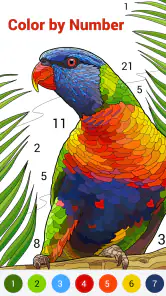
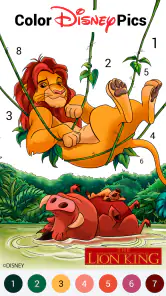
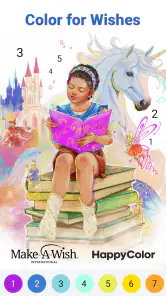
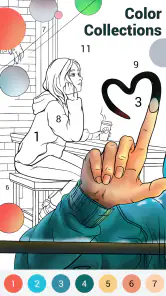

 Analysis by Frivlyz
When I want a quiet activity that doesn’t ask me to plan a project or learn a complicated set of rules, I reach for Happy Color®: Coloring Book. The appeal is immediate: choose a picture, follow its numbered areas, and watch the image fill in. It suits the small gaps in a day especially well, though the simple routine won’t satisfy everyone. I see it as a calming digital pastime rather than a substitute for freehand drawing or a traditional coloring book.
What the pace feels like
The basic interaction is quick to understand, so there’s little setup between opening the game and starting a picture. That makes it easy to pick up for a brief break. The pace of coloring itself depends on the image: broad, easy-to-find sections can feel brisk, while a more detailed page asks for patience and careful taps. I like that I can decide how much attention to give it instead of having to commit to a long session.
The numbered approach also changes what “making art” means here. I’m not choosing every color or deciding how to shade a scene; the structure guides me through a preset design. That removes the pressure of getting the colors right, which is part of the relaxation, but it also limits creative control. If I’m in the mood to invent a palette or sketch something from scratch, a drawing app or physical pencils are a better fit.
Our Stories on Happy Color®: Coloring Book
How Happy Color®: Coloring Book Crafts a Habit-Forming Mobile Experience
NewsWhy School Party Craft Stands Out in Mobile Gaming
NewsHow Vita Mahjong Blends Tradition with Modern Gaming
NewsDigital Identity and Culture in Vlogger Go Viral: Tuber Life
NewsDancing Road Turns Short Breaks Into a Test of Rhythm and Timing
NewsSuper Stylist Makes Every Outfit a Test of Taste and Patience
NewsWhere it fits into an ordinary day
A useful way to enjoy it is to keep a picture in progress for short sessions rather than treating completion as a task. I might open a page while waiting for an appointment, color a few sections during a quiet break, and return to it later. That stop-and-start rhythm is a natural match for numbered coloring. It gives my hands something simple to do without requiring me to remember a story, manage a team, or keep up with a fast-moving game.
For a less obvious approach, I choose a page based on the attention I have available, not just the subject. A busy design is more satisfying when I can settle in; a simpler-looking image is a better choice when I’m tired or have only a few minutes. If the small sections start to feel fiddly, I switch to another page instead of forcing myself to finish. The point is to relax, not to turn a hobby into a checklist.
How it compares with other ways to color
Compared with a paper coloring book, this is tidier and easier to carry around: there are no pencils to gather or pages to store. The trade-off is that I’m tapping a screen and following assigned numbers instead of choosing tools and colors myself. Compared with open-ended drawing apps, the game is much more guided and approachable, but offers less room to express an original idea. Those differences make it useful to know what you want before you start: convenience and direction, or hands-on materials and creative freedom.
It can also work as a shared low-pressure activity. Two people can pick images and compare their finished results, or a parent can sit with a child and talk about the picture while coloring. I wouldn’t expect it to replace a craft activity that involves cutting, mixing colors, or practicing drawing skills. Its strength is the easy, self-contained routine, not teaching traditional art techniques.
Gaming Stories You May Enjoy

Dominoes on Your Terms: Who Should Play and Who Should Pass

Pokémon GO Makes the Familiar World Feel New

Chess.com Turns Rematches Into Rivalries, but Community Has Its Costs

Archery Battle 3D Review: Sharp Aiming, Unclear Feedback

Should You Switch to Geometry Dash Meltdown? A Test of Timing and Patience

Fidget Toys Trading・Pop It 3D: What Happens When the Game Stumbles
What to expect from a longer session
When I spend more time on one picture, the repetition can become the main limitation. Filling one section after another is satisfying at first, but if I’m looking for changing challenges or strategic decisions, this isn’t the kind of board game I’d choose. I also don’t treat every unfinished picture as something I have to complete; leaving one and returning later keeps the activity from feeling like work.
A practical tip is to pause when I notice myself tapping automatically without enjoying the image. I can switch subjects, stop for the day, or come back when I want a quieter activity. The app is at its best when the coloring itself feels pleasant. If I need stronger variety in moment-to-moment play, a puzzle game with more active choices will probably hold my attention better.
Getting Started with Happy Color®
First things first, getting started with Happy Color®: Coloring Book is a breeze. Just a quick download, and you’re set to dive into a world of color. The app is available on both Android and iOS, which means you can enjoy it on whatever device you prefer. Once inside, you’re greeted with a sleek interface that’s easy to navigate. You don’t need to be tech-savvy to find your way around, which is a huge plus in my book!
A Vibrant Array of Choices
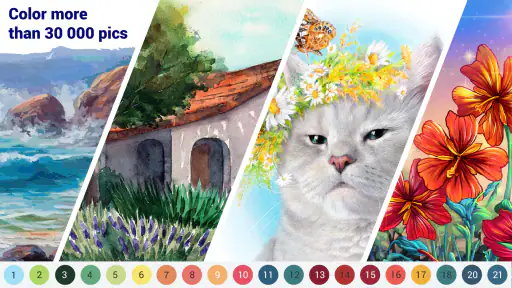
Now, let’s talk about what you’re really here for—the coloring pages. The app boasts an extensive library of images ranging from intricate mandalas to delightful animals and everything in between. There’s something for every mood and occasion. Feeling a little whimsical? Go for a fantasy-themed image. Want something soothing? Opt for a tranquil landscape. The choices are endless, and they keep updating the library with fresh content, so you’re never left wanting.
Simple Yet Satisfying
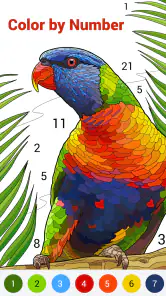
What I absolutely love about Happy Color® is how intuitive it is. You simply tap on the number, and the app automatically fills in the corresponding section with the designated color. It’s incredibly satisfying to watch your masterpiece come to life with just a few taps. Plus, the colors are vibrant and true-to-life, adding to the overall experience.
One small workflow change makes the numbered system less distracting: I look for a patch of neighboring areas tied to the same color and finish those before moving on. It gives me a clear little goal and means less bouncing between colors. On detailed images, I slow down and check the boundaries before tapping; a quick, careless rhythm is less enjoyable when the areas are tiny. The guided fill is forgiving in concept, but it still rewards a little patience.
Great for All Ages
One of the things that makes this app stand out is its universal appeal. It doesn’t matter if you’re a kid looking for some fun or an adult seeking a relaxing pastime; Happy Color® has something for everyone. It’s a fantastic way to bond with your kids or even have a coloring competition with friends. Who knew coloring could be so versatile?
For adults, I think its best role is a quick mental reset between tasks, especially when the alternative is opening a feed and losing track of time. For children, an adult can turn a page into a shared conversation about shapes and colors rather than handing over a device as a long, unsupervised activity. Its Everyone age classification reflects broad suitability, but I’d still choose the session length and device use with the child in mind. Anyone seeking lessons in drawing, fine motor practice with real materials, or a more challenging strategy game should look elsewhere.
Device demands and reliability
I wouldn’t expect a coloring game built around tapping numbered areas to feel as demanding as a graphically intense action game, but I also wouldn’t promise identical performance on every phone. Screen size matters more to comfort than raw power: on a compact display, small regions may take more careful tapping, while a larger screen can make detailed pages easier to inspect. If navigation or coloring feels awkward, trying a less intricate image is a sensible first adjustment.
For an older device, the minimum operating system requirement is Android 5.1, and the current release is version 2.19.0. Those details help establish compatibility, but they don’t guarantee that every device will feel equally responsive. If the game ever seems slow, I’d first close other demanding apps and reopen it, then check that the device has room to operate comfortably. I would avoid assuming that a pause means progress is lost; for any game, it’s wise to leave a moment for the app to settle before force-closing it.
The developer is X-FLOW, and the game is free to download. Optional in-app purchases are listed at prices from $1.99 to $7.99 per item, so I’d check what an item offers before buying and decide whether the free experience already suits my habits. Its popularity is substantial, with an average rating of 4.6 from around 3.6 million ratings and over 100 million installs. That’s reassuring as a sign that many people enjoy the format, though it doesn’t guarantee that its repetitive rhythm will suit me or you.
When I’d choose it—and when I wouldn’t
The game is a good match for someone who wants a guided, low-pressure coloring routine, a broad choice of pictures, and an activity that can be picked up in spare moments. I’d recommend trying it if you like the small satisfaction of completing a design one color at a time. I’d skip it if tapping prescribed sections feels restrictive, if screen time is exactly what you’re trying to reduce, or if you want a game built around changing objectives and meaningful decisions.
My overall performance expectation is modest in a good way: quick to understand, suited to short visits, and focused on a simple task rather than complex gameplay. Its strongest quality is that it lowers the barrier to starting; its main limitation is that the same guided simplicity can become repetitive. I’d keep it as an easy option for calm breaks, while reaching for paper, a drawing tool, or a more involved puzzle when I want a different kind of engagement.
Why It’s Worth Your Time
In a world that’s constantly on the go, finding moments to unwind is crucial. Happy Color®: Coloring Book offers a perfect escape from the hustle and bustle of daily life. It’s not just about coloring; it’s about taking a moment for yourself, indulging in creativity, and finding peace in simplicity. It’s an app that delivers on its promise to provide relaxation and joy.
If you’re looking for a simple yet fulfilling way to spend your free time, I highly recommend giving Happy Color® a try. It’s a small investment of time that can yield significant returns in terms of relaxation and happiness. So go ahead, download it, and let your creativity flow! You won’t regret it.
Happy Color®: Coloring Book Pros and Cons
Pros
- Extensive color palette enhances creativity.
- User-friendly interface
- easy for all ages.
- Regular updates with new pictures.
- Offline mode available for on-the-go coloring.
- Supports saving and sharing artwork.
Cons
- In-app ads can be intrusive.
- Some features require payment.
- Large app size may affect storage.
- Occasional performance lags.
- Limited free content availability.
This Game in Other Languages
Frequently Asked Questions
What is Happy Color®: Coloring Book and how does it work?
Happy Color®: Coloring Book is a digital coloring application available on Android and iOS devices. It offers a vast array of black-and-white images that users can color using a palette of colors. The app is designed to be an engaging and relaxing activity, allowing users to tap on sections of an image to fill them with color. It’s suitable for all ages, promoting creativity and stress relief.
Is Happy Color®: Coloring Book free to download and use?
Happy Color®: Coloring Book is free to download and use, providing users with a selection of free images to color. However, the app also offers in-app purchases and subscriptions that provide access to premium content, including exclusive images and additional colors. Users can choose to enjoy the free content or enhance their experience with these optional purchases.
Does Happy Color®: Coloring Book require an internet connection?
While Happy Color®: Coloring Book can be used offline for coloring previously downloaded images, an internet connection is required to download new images and access the latest updates. Additionally, an internet connection is necessary for in-app purchases and accessing any cloud-based features or content the app may offer.
What age group is Happy Color®: Coloring Book suitable for?
Happy Color®: Coloring Book is designed to be suitable for all age groups. The app's straightforward interface and range of images make it an enjoyable experience for children, teens, and adults alike. It’s a perfect tool for anyone looking to relax, de-stress, and unleash their creativity, making it family-friendly and accessible to users of all ages.
How can I manage or cancel my subscription to Happy Color®: Coloring Book's premium features?
To manage or cancel your subscription to Happy Color®: Coloring Book's premium features, you can do so through your device's app store. For Android users, this involves going to the Google Play Store, selecting 'Subscriptions', and then choosing Happy Color® to manage your subscription. For iOS users, the process is similar but is done through the Apple App Store under 'Manage Subscriptions'. This allows you to easily cancel or change your subscription preferences.


