

Hangman
- Reviews
- 4.6
- Version
- 5.5.68
- Installs
- 50,000,000+

Screenshots


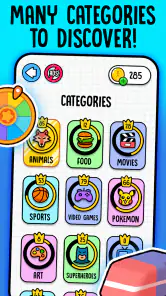
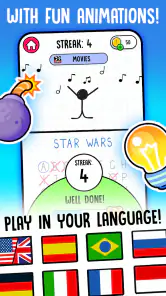
 Analysis by Frivlyz
I find a mobile hangman game easiest to enjoy when I know what it asks of me: choose letters, build a word from the clues, and avoid running out of guesses. That familiar loop makes Hangman approachable even if you have not played this kind of word game in years. It is a straightforward pick for a short break, though its appeal depends on whether you enjoy solving one word at a time rather than chasing a long story or a complex puzzle.
What to expect from this word game
Made by Senior Games, this free word game has a 4.6 average from around 600,000 ratings and more than 50 million installs. Those figures suggest it has found a broad audience, but the practical appeal is simpler: the rules are familiar, and a round gives you a clear goal without asking you to learn a complicated system. It is rated for Everyone, so it can suit a family game break, provided younger players are comfortable with spelling and taking turns.
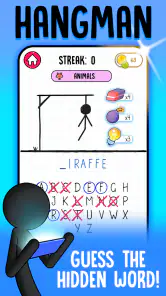
The basic rhythm is easy to settle into. You see a word represented by blanks, select letters, and use each result to narrow down the possibilities. A correct choice helps reveal the answer; a wrong one uses up part of your allowance. That creates a small but satisfying decision: do you try a common letter, or take a chance on a guess that might complete the word?
Our Stories on Hangman
Hangman: Nostalgia Meets Modern Mobile Gaming
NewsWhy Word Cookies! ® Is the Ultimate Quick Brain Workout
NewsWhy Word Cookies! ® Continues to Captivate Puzzle Fans
NewsDancing Road Turns Short Breaks Into a Test of Rhythm and Timing
NewsSuper Stylist Makes Every Outfit a Test of Taste and Patience
NewsDominoes on Your Terms: Who Should Play and Who Should Pass
NewsFor me, the best use is a spare moment when I want something more engaging than scrolling but less demanding than a long game. I can play while waiting for a drink or during a quiet pause, then put the phone away when I am called. It is also a reasonable choice for sharing a word puzzle with a child or another person nearby: take turns suggesting letters, and the discussion becomes part of the fun.
Getting started and reaching your first win
On first opening the game, I would keep the setup simple: choose a category or difficulty if those options are presented, then start a round rather than spending time searching through menus. The interface is described as clean and easy to navigate, so a first-time player should be able to focus on the puzzle. The current version is 5.5.68, and the minimum OS listed is 7.1; if you are choosing a device for a family member, it is worth checking that its operating system meets that requirement before trying to install.
For a first successful round, resist the urge to guess a whole word after seeing only one or two blanks. Start with letters that often appear in the language you are playing, then use the revealed positions to revise your idea. If a category is available, use it as a real clue rather than decoration: a short blank pattern in an animal category points you toward a very different set of possibilities than the same pattern in a place-name category. This is a useful habit whether you are new to hangman or simply rusty.
Making guesses count
One practical way to avoid wasting turns is to think in stages. First try a common vowel if the puzzle gives you little context; then look at the shape of the word and any repeated letters. Once the category and pattern narrow the field, switch to consonants that can distinguish between your strongest candidates. This is more reliable than tapping letters at random, and it makes each round feel like a small reasoning exercise rather than a lottery.
Gaming Stories You May Enjoy

Pokémon GO Makes the Familiar World Feel New

Chess.com Turns Rematches Into Rivalries, but Community Has Its Costs

Archery Battle 3D Review: Sharp Aiming, Unclear Feedback

Should You Switch to Geometry Dash Meltdown? A Test of Timing and Patience

Fidget Toys Trading・Pop It 3D: What Happens When the Game Stumbles

NBA LIVE Mobile Makes the Season the Main Event
Hints can help when a puzzle stops moving, but I would save them for a genuinely difficult point instead of using one as soon as I feel uncertain. A hint is most valuable when it gives you a fresh angle on a word you have partly uncovered. If you are playing with someone else, agree before starting whether hints are allowed; otherwise one person may feel that the other has skipped the fun part of solving.
Gameplay Experience
The moment you open Hangman, you’re greeted with a simple and clean interface that screams simplicity. It’s perfect for a quick game when you’re on the go or waiting for your coffee. The game stays true to its roots, offering players a word to guess with a limited number of guesses before the stick figure meets its untimely end. The tension as you edge closer to that last incorrect guess is real and keeps you on your toes!
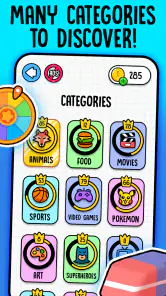
What I particularly loved is the variety of categories you can choose from. Whether it’s animals, movies, or geography, there’s something for everyone. This makes the game not just a test of your vocabulary but also your general knowledge. Plus, with varying difficulty levels, it's suitable for players of all ages. You can start off easy and work your way up to the more challenging words.
Visuals and Sound
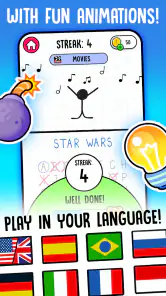
Visually, the app doesn’t try to do too much, which is a good thing. The minimalistic design ensures that you’re not distracted by unnecessary elements, allowing you to focus purely on the game. The animations are smooth, and the graphics do a fantastic job of bringing the classic game to life without being overwhelming.
The sound effects are subtle but effective. A little ding for a correct guess and a disappointing buzz for a wrong one. It’s these simple audio cues that add to the overall immersive experience of the game.
User Interface
Navigation is a breeze, thanks to the intuitive user interface. Everything is where you’d expect it to be, and I didn’t find myself fumbling around looking for options or settings. The game runs smoothly, and I didn’t encounter any lags or crashes during my playtime. It’s clear the developers put thought into creating a seamless user experience.
I also appreciated the hints feature, which can be a lifesaver when you’re stuck. However, they’re limited, so use them wisely! This adds a strategic element to the game, making it not just about guessing but also about smart usage of available resources.
Playing with someone else—and knowing when to stop
A useful way to make a solo puzzle feel social is to pass the phone after each guess. One person can watch the pattern while another proposes a letter, then swap roles for the next turn. This keeps the game cooperative without needing a separate multiplayer mode. It works especially well with a child who is learning to spell: ask them to explain why a letter might fit, rather than simply handing them the answer. The category can offer a gentle prompt while leaving the actual deduction to the player.
There is a trade-off in that shared play: the person holding the phone controls the pace, and a confident solver can take over. I would set a simple rule—one guess per person, or let the younger player choose first—to keep it enjoyable. If the group wants a lively party game with simultaneous participation, a spoken version of hangman or a word game designed around teams is probably a better fit.
For a quiet solo session, the app is best treated as a collection of brief puzzles rather than an endless challenge. If you notice yourself tapping letters without thinking, pause and look again at the pattern; if no sensible clue emerges, a hint may be preferable to a string of random guesses. The point is to keep the puzzle satisfying, not to protect a perfect run at all costs.
How it compares with other word games
Compared with a crossword, this version of hangman asks for less patience and less reading. You do not have to work through a large grid or keep track of clues across several entries; each round is self-contained. That makes it easier to pick up for a minute, but it also means there is less room for layered deduction. If you want a long-form puzzle with interconnected clues, a crossword or a word-search game may hold your attention longer.
Compared with word-building games, the emphasis is different. You are not arranging a rack of letters to make several words or competing over a score; you are narrowing down one hidden answer under pressure from limited guesses. I like that focused format when I want a quick mental reset. Players who prefer a persistent progression system, a narrative, or regular head-to-head competition may find the traditional hangman loop too repetitive.
The categories and difficulty choices described in the game can help vary the challenge, but they do not change the core routine. A practical way to keep it fresh is to switch the kind of knowledge you rely on: choose a familiar subject when you want a gentle round, then try a less familiar one when you have more time. If the words begin to feel predictable, that is a sign to take a break or move to a different kind of puzzle, not necessarily to push through more rounds.
Small points that affect the experience
Hangman is free to play, with in-app purchases ranging from $0.49 to $30.99 per item. That range is worth keeping in mind if you are handing the device to a child: make sure the device’s purchase controls are set the way you want before play. The game’s age rating is Everyone, but an age rating does not replace a family’s own rules about spending or screen time.
The familiar format is also its main limitation. A round can be satisfying, but players looking for elaborate word puzzles, a broad learning course, or a reason to return for a continuing story should choose something built around those goals. I would also skip it if guessing under a limited number of mistakes feels stressful rather than playful. In that case, a word-search or an untimed crossword offers a calmer way to work with vocabulary.
One small tip for reducing frustration is to read the revealed pattern aloud or trace the blank positions with your eyes before choosing again. It helps catch repeated-letter possibilities that are easy to overlook when tapping quickly. When playing with a beginner, avoid supplying a letter immediately; ask what the category and visible pattern suggest first. That turns a quick round into a useful spelling exercise without making it feel like a lesson.
Who will enjoy it, and what to try next
I would recommend this game to someone who likes classic word puzzles, wants an uncomplicated phone game, or needs a short activity to share with family. It is especially appealing if the familiar rules are part of the draw and you enjoy making a few careful choices rather than managing many systems. The developer, Senior Games, has kept the central idea accessible, and the game’s broad reach is reflected in around 11,000 written reviews alongside its large rating count.
If you are new to it, a good first session is simply to choose an approachable puzzle, use the category as a clue, and aim to solve one word without spending a hint. After that, try a harder setting only if the first round felt easy; there is no need to turn a casual game into a test. The release date was April 26, 2018, and its current version is 5.5.68, but the main reason to try it is still the immediate, familiar puzzle rather than a long list of extras.
So, is it worth installing? For me, yes, if you want a free, easy-to-understand hangman game for spare moments and occasional shared play. I would choose a crossword for deeper clue-solving, a word-search for a more relaxed pace, or a competitive word game for social scoring. But when all I want is one clear puzzle and a few thoughtful guesses, this is a friendly place to start.
Final Thoughts
In conclusion, Hangman is a delightful blend of nostalgia and modern-day gaming. It’s perfect for anyone looking to enjoy a quick, fun, and challenging word game. The app does a stellar job of capturing the essence of the traditional game while adding features that enhance the overall experience.
Whether you’re a wordsmith or just someone looking to kill some time, this app is worth a download. It’s free to play, though there are ads, but they’re not intrusive enough to ruin the experience. So, go ahead and give it a try – you might just find yourself hooked!
Hangman Pros and Cons
Pros
- Simple and easy to play interface.
- Great for enhancing vocabulary skills.
- Available offline for anytime fun.
- Suitable for all age groups.
- Multiple difficulty levels to choose from.
Cons
- Limited word database may repeat.
- Ads can be intrusive at times.
- No multiplayer mode available.
- Graphics are quite basic.
- Lacks sound effects for immersion.
Frequently Asked Questions
What is Hangman and how do you play it?
Hangman is a classic word puzzle game where the player must guess a hidden word by suggesting letters within a limited number of tries. Each incorrect guess results in a part of a stick figure being drawn, and the game ends when the figure is complete (traditionally resembling a hanged man). The aim is to guess the word before the drawing is completed.
Is Hangman suitable for all ages?
Yes, Hangman is suitable for players of all ages. It is a simple and fun way to improve vocabulary and spelling skills. The app often includes varying difficulty levels to cater to different age groups and skill levels, making it an educational and entertaining tool for both children and adults.
Does Hangman require an internet connection to play?
Most Hangman apps do not require an internet connection to play, allowing users to enjoy the game offline. However, some versions might offer online features such as leaderboards or multiplayer options, which would require a connection. It's always a good idea to check the app details for specific requirements.
What are the benefits of playing Hangman?
Playing Hangman offers several benefits, including enhancing vocabulary, improving spelling, and providing cognitive stimulation. It encourages players to think critically and strategically as they try to deduce the correct word with limited information. Additionally, it's a great way to relax and have fun, either solo or with friends.
Are there any in-app purchases or ads in Hangman?
Many Hangman apps are free to download but may include ads or offer in-app purchases to enhance the gaming experience. These purchases might include additional word packs, themes, or ad-free experiences. It's advisable to review the app's description and user reviews to understand any potential costs before downloading.


